


Before explaining what ambiguous ampersands are, let’s talk about character references.
There are different kinds of character references. The HTML 4.01 spec divides them in two groups, but really there are three:
©©©Character references should always start with a U+0026 AMPERSAND character (&) and end with a U+003B SEMICOLON character (;).
Fun fact: the list of named character references in the HTML spec includes & and &, but also & and & (without the trailing semicolon). The same goes for a few other entities. This is done for backwards-compatibility reasons. This way, the spec dictates that foo & bar should be rendered as “foo & bar”, even though it’s invalid markup (because of the missing trailing semicolon). More on this in a minute…
In this post, we’ll take a closer look at what happens if there’s an unencoded ampersand that’s not part of a character reference in your HTML code. Is it valid? Is it invalid? And what do “ambiguous ampersands” have to do with all this?
The HTML 4.01 spec mentions this:
The URI that is constructed when a form is submitted may be used as an anchor-style link (e.g., the
hrefattribute for the<a>element). Unfortunately, the use of the&character to separate form fields interacts with its use in SGML attribute values to delimit character entity references. For example, to use the URIhttp://host/?x=1&y=2as a linking URI, it must be written as<a href="http://host/?x=1&y=2">or<a href="http://host/?x=1&y=2">.
This means you can’t just copy-paste URLs into your HTML4 document if you want it to be valid — you’ll have to encode any ampersand characters first.
In HTML5, the first definition for ambiguous ampersands was added:
An ambiguous ampersand is a U+0026 AMPERSAND (
&) character that is not the last character in the file, that is not followed by a space character, that is not followed by a start tag that has not been omitted, and that is not followed by another U+0026 AMPERSAND (&) character.
Ambiguous ampersands are non-conforming (invalid); unambiguous ampersands are generally conforming (valid). (As mentioned before: ampersands that are part of a named character reference that doesn’t end with a semicolon are unambiguous, but still invalid.)
In other words, if an unencoded ampersand is followed by EOF, a space character, <, or &, it’s perfectly valid.
According to this definition, the ampersands in this example are all ambiguous, and thus invalid:
<a href="https://example.com/?x=1&y=2">foo</a>
&123
&abc
foo &0 bar
foo &lolwat bar
However, this is valid HTML:
foo & bar
foo&<i>bar</i>
foo&&& bar
Later the spec was changed, and the HTML spec now defines ambiguous ampersands as follows:
An ambiguous ampersand is a U+0026 AMPERSAND character (
&) that is followed by one or more characters in the range U+0030 DIGIT ZERO (0) to U+0039 DIGIT NINE (9), U+0061 LATIN SMALL LETTER A to U+007A LATIN SMALL LETTER Z, and U+0041 LATIN CAPITAL LETTER A to U+005A LATIN CAPITAL LETTER Z, followed by a U+003B SEMICOLON character (;), where these characters do not match any of the names given in the named character references section.
This definition is probably easier to grok as a regular expression: a string contains an ambiguous ampersand if it matches /&([0-9a-zA-Z]+;)/ and if the first back-reference ($1) is not a known character reference.
The ampersands in this example are all ambiguous, and thus invalid:
&123;
&abc;
foo &0; bar
foo &lolwat; bar
However, all these are unambiguous:
foo & bar
foo&<i>bar</i>
foo&&& bar
<!-- …even the ones that were invalid as per the old definition, are now valid: -->
<a href="http://example.com/?x=1&y=2">foo</a>
&123
&abc
foo &0 bar
foo &lolwat bar
With the new definition, this is perfectly valid HTML — even though no HTML validator I know of recognizes this yet.
So we’ve established that not all ampersand characters require escaping in HTML. Semi-related fun fact: In most cases, there’s no need to escape the > character either. It has no special meaning (and is thus unambiguous) unless it’s part of a tag or an unquoted attribute value. For example, <p>foo > bar</p> is perfectly valid and reliable HTML.
As mentioned before, some named character references work without a trailing semicolon (e.g. &) even though it’s invalid markup. What complicates things even more is that these entities are handled differently in attribute values.
If the character reference is being consumed as part of an attribute, and the last character matched is not a U+003B SEMICOLON character (
;), and the next character is either a U+003D EQUALS SIGN character (=) or an alphanumeric ASCII character, then, for historical reasons, all the characters that were matched after the U+0026 AMPERSAND character (&) must be unconsumed, and nothing is returned. However, if this next character is in fact a U+003D EQUALS SIGN character (=), then this is a parse error, because some legacy user agents will misinterpret the markup in those cases.
Take this (obviously invalid) HTML, for example:
<p title="foo&bar">
foo&bar
</p>Try it out in your browser. You’ll see that the paragraph’s text content displays as “foo&bar”, while the title attribute value is displayed as “foo&bar”.
To summarize: there’s a difference between unencoded ampersands (sometimes valid), ambiguous ampersands (always invalid) and encoded ampersands (always valid). An unencoded ampersand is not always an ambiguous ampersand. An unambiguous ampersand can still be invalid.
In my opinion, this is all a bit confusing. But it doesn’t have to be! When in doubt, just encode your effin’ ampersands.
That said, if you want to find out if an HTML snippet contains any ambiguous ampersands or character references that don’t end with a semicolon (both of which are invalid), feel free to use mothereff.in/ampersands.
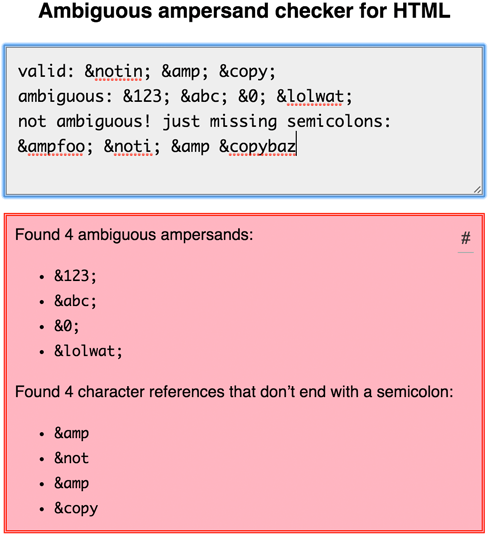
Note that this is not a complete HTML validator; it will only look for ambiguous ampersands and semicolon-free character references. (Hopefully, bug #841 will be fixed soon, so we can just rely on validator.nu instead.)
Understanding what ambiguous ampersands are and how they work is especially important for library authors wishing to deal with HTML entities. Not accounting for these edge cases might result in XSS or other security vulnerabilities in your code.
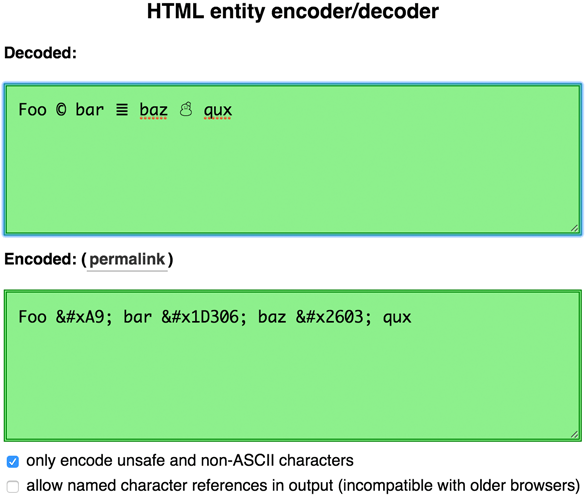
I’ve also created he (short for HTML entities), a JavaScript library that encodes/decodes HTML entities just like a browser would. he accounts for all the edge cases mentioned in this write-up, including legacy sans-semicolon named references, ambiguous ampersands, and more. An online demo of he is available.
Disclaimer: Kudos to Simon ‘zcorpan’ Pieters for helping me understand this mess.
Note: If you liked reading about character references in HTML, why not read up on CSS character escape sequences or JavaScript escapes?
此内容由惯性聚合(RSS阅读器)自动聚合整理,仅供阅读参考。 原文来自 — 版权归原作者所有。