


Fun fact: var foo = { H̹̙̦̮͉̩̗̗ͧ̇̏̊̾Eͨ͆͒̆ͮ̃͏̷̮̣̫̤̣Cͯ̂͐͏̨̛͔̦̟͈̻O̜͎͍͙͚̬̝̣̽ͮ͐͗̀ͤ̍̀͢M̴̡̲̭͍͇̼̟̯̦̉̒͠Ḛ̛̙̞̪̗ͥͤͩ̾͑̔͐ͅṮ̴̷̷̗̼͍̿̿̓̽͐H̙̙̔̄͜: 42 }; is valid JavaScript. It may not be immediately obvious, but the real surprise here is that the Cthulhu-esque property name is not surrounded by quotes. Intrigued by this, and having written about the similar topic of JavaScript identifiers before, I decided to look into valid property names in JavaScript. When do they need to be quoted? When can the quotes be omitted? And in which cases can dot notation be used instead of bracket notation to get or set a property based on its name?
Looking at the ECMAScript spec grammar, we can see that a property name can be either an identifier name (i.e. identifiers + reserved words), a string literal, or a numeric literal.
Identifier names are a superset of identifiers; any valid identifier and any reserved word is a valid identifier name.
A string literal is any valid string, encapsulated in either single (') or double (") quotes. 'foo', "bar", 'qu\'ux', "" (the empty string), and 'Ich \u2665 B\xFCcher' are all valid string literals.
A numeric literal can be either a decimal literal (e.g. 0, 123, 123., .123, 1.23, 1e23, 1E-23, 1e+23, 12, but not 01, +123 or -123) or a hex integer literal (0[xX][0-9a-fA-F]+ in regex, e.g. 0xFFFF, 0X123, 0xaBcD).
Technically, octal literals (0[0-7]+ in regex, e.g. 010, 012, 01) are valid numeric literals too, but as they’re not allowed in strict mode it’s probably best to avoid them altogether.
The spec defines property names as strings:
The Property Identifier type is used to associate a property name with a Property Descriptor. Values of the Property Identifier type are pairs of the form
(name, descriptor), wherenameis a String anddescriptoris a Property Descriptor value.
This can make the use of numeric literals as property names a bit confusing. For example, if you were to use the number .12e3 as an (unquoted) property name, it would be coerced into a string first, and the actual object key would become '120'.
var object = {
	.12e3: 'wut'
};
object[.12e3]; // 'wut'
object['.12e3']; // undefined
object['120']; // 'wut'

// Let’s try another numeric literal:
object = {
	12e34: 'heh'
};
object[12e34]; // 'heh'
object['12e34']; // undefined
object[1.2e35]; // 'heh'
object['1.2e35']; // undefined
object[1.2e+35]; // 'heh'
object['1.2e+35']; // 'heh'
While you can easily check the string value of any number — String(number) or (number).toString() — it’s definitely simpler to just stick to string literals or identifier names for property names.
Note: ECMAScript 3 didn’t allow the use of unquoted reserved words as property names. Here’s the full list of ES3 reserved words: abstract, boolean, break, byte, case, catch, char, class, const, continue, debugger, default, delete, do, double, else, enum, export, extends, false, final, finally, float, for, function, goto, if, implements, import, in, instanceof, int, interface, long, native, new, null, package, private, protected, public, return, short, static, super, switch, synchronized, this, throw, throws, transient, true, try, typeof, var, void, volatile, while, and with. Avoid using these as unquoted property names if backwards compatibility is a concern.
Unless an object key is a numeric literal or a valid identifier name, you need to quote it to avoid a syntax error from being thrown. In other words, quotes can only be omitted if the property name is a numeric literal or a valid identifier name. Of course, if the property name is a string literal, it’s already quoted by definition.
var object = {
	// `abc` is a valid identifier; no quotes are needed
	abc: 1,
	// `123` is a numeric literal; no quotes are needed
	123: 2,
	// `012` is an octal literal with value `10` and thus isn’t allowed in strict mode; but if you insist on using it, quotes aren’t needed
	012: 3,
	// `π` is a valid identifier; no quotes are needed
	π: Math.PI,
	// `var` is a valid identifier name (although it’s a reserved word); no quotes are needed
	var: 4,
	// `foo bar` is not a valid identifier name; quotes are required
	'foo bar': 5,
	// `foo-bar` is not a valid identifier name; quotes are required
	'foo-bar': 6,
	// the empty string is not a valid identifier name; quotes are required
	'': 7
};
JSON only allows string literals that are quoted in double quotes (") as property names.
To get or set a value from an object based on a property name, you can always use bracket notation. Let’s say we want to get the value for the property name abc from the object in the previous example this way:
object['abc']; // 1Bracket notation can safely be used for all property names.
As you may know, there is an alternative that can be used in some cases: dot notation.
object.abc; // 1Dot notation can only be used when the property name is a valid identifier name. It cannot be used for property names that are numeric literals, or for strings that aren’t valid identifier names.
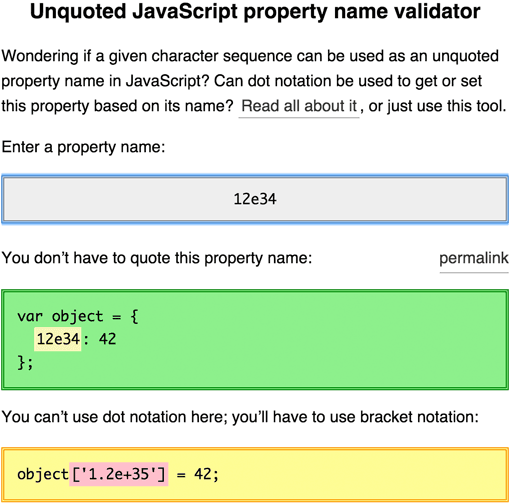
I made a tool that will tell you if any given property name can be used without quotes and/or with dot notation. Try it at mothereff.in/js-properties.
此内容由惯性聚合(RSS阅读器)自动聚合整理,仅供阅读参考。 原文来自 — 版权归原作者所有。