


With the release of my Advanced React Component Patterns course on egghead.io, a lot of people have been asking me about render props. Specifically with regards to testing. Maybe eventually I'll create a course on egghead.io about testing react components. Until then, I've decided to write this about some approaches that could help you when testing a component that renders a render prop component :)
Note: This isn't about how to test components that implement the render prop pattern. Rather, this is about how to tests components that_ use _components that implement the render prop pattern :)
In preparing this blog post, I created
this repo which
totally works and you can give it a look if you want more details :) In that
repo, we have a component called FruitAutocomplete which is (basically)
implemented like so:
import * as React from 'react'
import { render } from 'react-dom'
import Downshift from 'downshift'

const items = ['apple', 'pear', 'orange', 'grape', 'banana']

function FruitAutocomplete({ onChange }) {
	return (
		<Downshift
			onChange={onChange}
			render={({
				getInputProps,
				getItemProps,
				getLabelProps,
				isOpen,
				inputValue,
				highlightedIndex,
				selectedItem,
			}) => (
				<div>
					<label {...getLabelProps()}>Enter a fruit</label>
					<input {...getInputProps()} />
					{isOpen ? (
						<div data-test="menu">
							{items
								.filter((i) => !inputValue || i.includes(inputValue))
								.map((item, index) => (
									<div
										{...getItemProps({
											key: item,
											'data-test': `item-${item}`,
											index,
											item,
											style: {
												backgroundColor:
													highlightedIndex === index ? 'lightgray' : 'white',
												fontWeight: selectedItem === item ? 'bold' : 'normal',
											},
										})}
									>
										{item}
									</div>
								))}
						</div>
					) : null}
				</div>
			)}
		/>
	)
}

export default FruitAutocomplete
First off, I should say that render props are really just an implementation detail. So if you're writing E2E tests (with something like the amazing Cypress.io), then you shouldn't have to test anything any differently whether you're using render props or anything else. You just interact with the component the way the user would (type in the input, select an item, etc.). That may be obvious, but I think that brings up a pretty important point. The higher you're up on the "testing pyramid," the less implementation details matter, as you go down the pyramid, you have to deal with implementation details a little more.
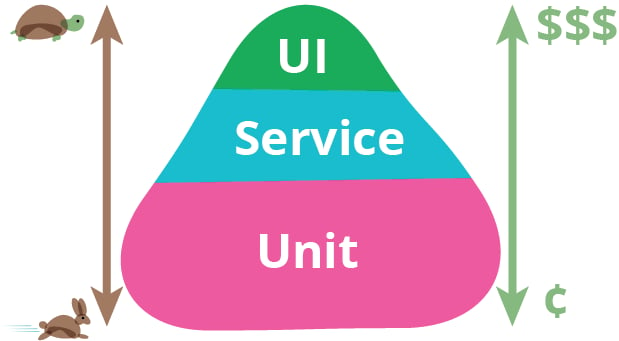
That said, I suggest focusing on integration tests. With an
integration test, you likewise don't have to change too much about how you test
the component. Here are the integration tests from the repo. You'll notice that
there's no indication that the FruitAutocomplete component is implemented with
a render prop component (an implementation detail):
import * as React from 'react'
import { mount } from 'enzyme'
import FruitAutocomplete from '../fruit-autocomplete'

// some handy utilities
// learn more about this `sel` function
// from my other blog post: http://kcd.im/sel-util
const sel = (id) => `[data-test="${id}"]`
const hasMenu = (wrapper) => wrapper.find(sel('menu')).length === 1

test('menu is closed by default', () => {
	const wrapper = mount(<FruitAutocomplete />)
	expect(hasMenu(wrapper)).toBe(false)
})

test('lists fruit with a keydown of ArrowDown on the input', () => {
	const wrapper = mount(<FruitAutocomplete />)
	const input = wrapper.find('input')
	input.simulate('keydown', { key: 'ArrowDown' })
	expect(hasMenu(wrapper)).toBe(true)
})

test('can search for and select "banana"', () => {
	const onChange = jest.fn()
	const wrapper = mount(<FruitAutocomplete onChange={onChange} />)
	const input = wrapper.find('input')
	input.simulate('change', { target: { value: 'banana' } })
	input.simulate('keydown', { key: 'ArrowDown' })
	input.simulate('keydown', { key: 'Enter' })
	expect(onChange).toHaveBeenCalledTimes(1)
	const downshift = expect.any(Object)
	expect(onChange).toHaveBeenCalledWith('banana', downshift)
	expect(input.instance().value).toBe('banana')
})
So how do you test a component that uses a render prop component? Whelp, if
you're using E2E or Integration tests, you pretty much don't need to do anything
different! Just mount your component and interact with it the way you would
normally. One thing I should note is that downshift itself is a very
well-tested component, so you shouldn't have to test interactions that it
provides out of the box. Just focus on what your component is doing. And that's
what I'd suggest: test your render prop component really well, then do some
high-level tests for the users of the component.
Things get a little tricky with unit tests. If you don't want to include
downshift in your tests, then you have to get access to the function you're
passing to the render prop. There are a few ways to do this.
The first and most obvious way to do this is to extract the renderprop
function and export that:
function FruitAutocomplete({ onChange }) {
	return <Downshift onChange={onChange} render={fruitAutocompleteRender} />
}

// NOTE: this is _not_ technically component, it's _like_ a function component
// but it's not rendered with React.createElement, so it's simply
// a function that returns JSX.
function fruitAutocompleteRender(arg) {
	return <div>{/* what you render */}</div>
}

export { fruitAutocompleteRender }
export default FruitAutocomplete
And now you can import that function directly into your test and use it to render JSX like so:
import * as React from 'react'
import { render } from 'enzyme'

const downshiftStub = {
	isOpen: false,
	getLabelProps: (p) => p,
	getInputProps: (p) => p,
	getItemProps: (p) => p,
}

const sel = (id) => `[data-test="${id}"]`
const hasMenu = (wrapper) => wrapper.find(sel('menu')).length === 1
const hasItem = (wrapper, item) =>
	wrapper.find(sel(`item-${item}`)).length === 1
const renderFruitAutocompleteRenderer = (props) =>
	render(fruitAutocompleteRender({ ...downshiftStub, ...props }))

test('shows no menu when isOpen is false', () => {
	const wrapper = renderFruitAutocompleteRenderer({ isOpen: false })
	expect(hasMenu(wrapper)).toBe(false)
})

test('shows the menu when isOpen is true', () => {
	const wrapper = renderFruitAutocompleteRenderer({ isOpen: true })
	expect(hasMenu(wrapper)).toBe(true)
})

test('when the inputValue is banana, it shows banana', () => {
	const wrapper = renderFruitAutocompleteRenderer({
		isOpen: true,
		inputValue: 'banana',
	})
	expect(hasItem(wrapper, 'banana')).toBe(true)
})
So this works fine. A few things to note:
downshift passes to usThose second points bother me a fair amount. There's another way to get at the render prop without extracting and exporting it though. Here's that last test implemented as if we didn't export the render prop function:
import * as React from 'react'
import { mount, render } from 'enzyme'
import Downshift from 'downshift'
import FruitAutocomplete from '../fruit-autocomplete'

const downshiftStub = {
	isOpen: false,
	getLabelProps: (p) => p,
	getInputProps: (p) => p,
	getItemProps: (p) => p,
}

test('when the inputValue is banana, it shows banana', () => {
	const fruitAutocompleteRender = mount(<FruitAutocomplete />)
		.find(Downshift)
		.prop('render')
	const wrapper = render(
		fruitAutocompleteRender({
			...downshiftStub,
			isOpen: true,
			inputValue: 'banana',
		}),
	)
	expect(hasItem(wrapper, 'banana')).toBe(true)
})
I also don't really like this because I don't like saying: "Hey, FruitAutocomplete, I know that you use Downshift and that Downshift uses a prop called render." And to me that's diving even further into implementation details.
Also, this still doesn't address my concern of stubbing out downshift. Read
more about how I feel about this in this blog post.
There's actually another way we could do this and that would be to use
jest.mock to mock the downshift module. But I'm not going to create an
example of that because it's no better :)
So I suggest that you just stick with an integration test here and don't bother trying to unit test your render function. I think you'll have more confidence that things wont break if you do.
I should note also that for some components that require a provider to exist
(like react-redux or React Router), that you simply render your component
within a provider. I have
some examples
of doing this in my
testing workshop for frontend masters.
I hope this is helpful to you! Good luck!
此内容由惯性聚合(RSS阅读器)自动聚合整理,仅供阅读参考。 原文来自 — 版权归原作者所有。