


The inspiration for this blogpost comes from seeing React tests that look like this:
const utils = render(<Foo />)

test('test 1', () => {
	// use utils here
})

test('test 2', () => {
	// use utils here too
})
So I want to talk about the importance of test isolation and guide you to a better way to write your tests to improve the reliability of the tests, simplify the code, and increase the confidence your tests and provide as well.
Let's take this simple component as an example:
import React, { useRef } from 'react'

function Counter(props) {
	const initialProps = useRef(props).current
	const { initialCount = 0, maxClicks = 3 } = props

	const [count, setCount] = React.useState(initialCount)
	const tooMany = count >= maxClicks

	const handleReset = () => setCount(initialProps.initialCount)
	const handleClick = () => setCount((currentCount) => currentCount + 1)

	return (
		<div>
			<button onClick={handleClick} disabled={tooMany}>
				Count: {count}
			</button>
			{tooMany ? <button onClick={handleReset}>reset</button> : null}
		</div>
	)
}

export { Counter }
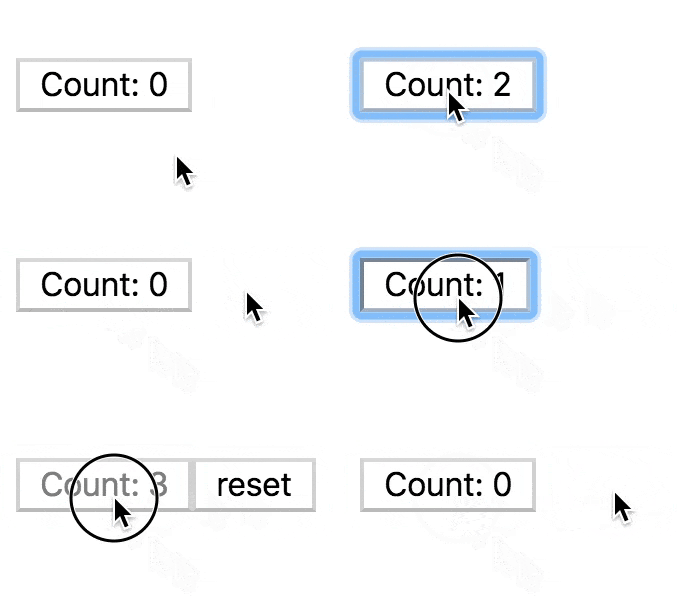
Here's a rendered version of the component:
Let's start with a test suite like the one that inspired this post:
// gives us the toHaveTextContent/toHaveAttribute matchers
import '@testing-library/jest-dom/extend-expect'
import { render } from '@testing-library/react'
import userEvent from '@testing-library/user-event'
import * as React from 'react'

import { Counter } from '../counter'

const { getByText } = render(<Counter maxClicks={4} initialCount={3} />)
const counterButton = getByText(/^count/i)

test('the counter is initialized to the initialCount', () => {
	expect(counterButton).toHaveTextContent('3')
})

test('when clicked, the counter increments the click', () => {
	userEvent.click(counterButton)
	expect(counterButton).toHaveTextContent('4')
})

test(`the counter button is disabled when it's hit the maxClicks`, () => {
	userEvent.click(counterButton)
	expect(counterButton).toHaveAttribute('disabled')
})

test(`the counter button does not increment the count when clicked when it's hit the maxClicks`, () => {
	expect(counterButton).toHaveTextContent('4')
})

test(`the reset button has been rendered and resets the count when it's hit the maxClicks`, () => {
	userEvent.click(getByText(/reset/i))
	expect(counterButton).toHaveTextContent('3')
})
First of all, as of @testing-library/react@9.0.0 this style of testing won't even work properly, but let's imagine that it would.
These tests give us 100% coverage of the component and verify exactly what they
say they'll verify. The problem is that they share mutable state. What is the
mutable state they're sharing? The component! One test clicks the counter button
and the other tests rely on that fact to pass. If we were to delete (or .skip)
the test called "when clicked, the counter increments the click" it would break
all the following tests:
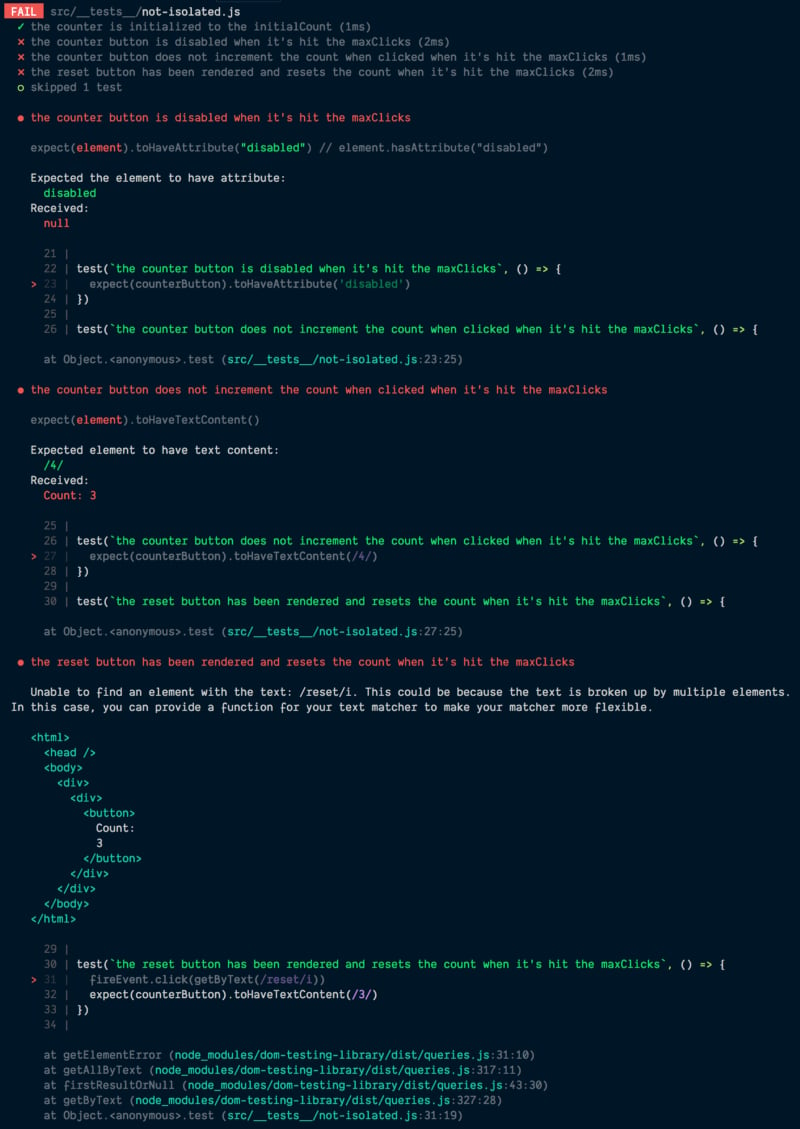
This is a problem because it means that we can't reliably refactor these tests, or run a single test in isolation of the others for debugging purposes because we don't know which tests are impacting the functionality of others. It can be really confusing when someone comes in to make changes to one test and other tests start breaking out of nowhere.
So let's try something else and see how that changes things:
import '@testing-library/jest-dom/extend-expect'
import { render } from '@testing-library/react'
import userEvent from '@testing-library/user-event'
import * as React from 'react'

import { Counter } from '../counter'

let getByText, counterButton

beforeEach(() => {
	const utils = render(<Counter maxClicks={4} initialCount={3} />)
	getByText = utils.getByText
	counterButton = utils.getByText(/^count/i)
})

test('the counter is initialized to the initialCount', () => {
	expect(counterButton).toHaveTextContent('3')
})

test('when clicked, the counter increments the click', () => {
	userEvent.click(counterButton)
	expect(counterButton).toHaveTextContent('4')
})

test(`the counter button is disabled when it's hit the maxClicks`, () => {
	userEvent.click(counterButton)
	expect(counterButton).toHaveAttribute('disabled')
})

test(`the counter button does not increment the count when clicked when it's hit the maxClicks`, () => {
	userEvent.click(counterButton)
	userEvent.click(counterButton)
	expect(counterButton).toHaveTextContent('4')
})

test(`the reset button has been rendered and resets the count when it's hit the maxClicks`, () => {
	userEvent.click(counterButton)
	userEvent.click(getByText(/reset/i))
	expect(counterButton).toHaveTextContent('3')
})
With this, each test is completely isolated from the other. We can delete or skip any test and the rest of the tests continue to pass. The biggest fundamental difference here is that each test has its own count instance to work with and it's unmounted after each test (this happens automatically thanks to React Testing Library). This significantly reduces the amount of complexity of our tests with minor changes.
One thing people often say against this approach is that it's slower than the previous approach. I'm not totally sure how to respond to that... Like, how much slower? Like a few milliseconds? In that case, so what? A few seconds? Then your component should probably be optimized because that's just terrible. I know it adds up over time, but with the added confidence and improved maintainability of this approach, I'd gladly wait an extra few seconds to render things this way. In addition, you shouldn't often have to run the entire test base anyway thanks to great watch mode support like we have in Jest.
So I'm actually still not super happy with the tests we have above. I'm not a
huge fan of beforeEach and sharing variables between tests.
I feel like they lead to tests that are harder to understand.
Let's try again:
import '@testing-library/jest-dom/extend-expect'
import { render } from '@testing-library/react'
import userEvent from '@testing-library/user-event'
import * as React from 'react'

import { Counter } from '../counter'

function renderCounter(props) {
	const utils = render(<Counter maxClicks={4} initialCount={3} {...props} />)
	const counterButton = utils.getByText(/^count/i)
	return { ...utils, counterButton }
}

test('the counter is initialized to the initialCount', () => {
	const { counterButton } = renderCounter()
	expect(counterButton).toHaveTextContent('3')
})

test('when clicked, the counter increments the click', () => {
	const { counterButton } = renderCounter()
	userEvent.click(counterButton)
	expect(counterButton).toHaveTextContent('4')
})

test(`the counter button is disabled when it's hit the maxClicks`, () => {
	const { counterButton } = renderCounter({
		maxClicks: 4,
		initialCount: 4,
	})
	expect(counterButton).toHaveAttribute('disabled')
})

test(`the counter button does not increment the count when clicked when it's hit the maxClicks`, () => {
	const { counterButton } = renderCounter({
		maxClicks: 4,
		initialCount: 4,
	})
	userEvent.click(counterButton)
	expect(counterButton).toHaveTextContent('4')
})

test(`the reset button has been rendered and resets the count when it's hit the maxClicks`, () => {
	const { getByText, counterButton } = renderCounter()
	userEvent.click(counterButton)
	userEvent.click(getByText(/reset/i))
	expect(counterButton).toHaveTextContent('3')
})
Here we've increased some boilerplate, but now every test is not only isolated technically, but also visually. You can look at a test and see exactly what it does without having to worry about what hooks are happening within the test. This is a big win in the ability for you to be able to refactor, remove, or add to the tests.
I like what we have now, but I think we need to take things one step further before I feel really happy about things. We've split our tests up by functionality, but what we really want to have confidence in is the use case that our component satisfies. It allows clicks until the maxClicks is reached, then requires a reset. That's what we're trying to verify and gain confidence in. I'm much more interested in use cases when I'm testing than specific functionality. So what would these tests look like if we concerned ourselves more with the use case than the individual functionality?
import '@testing-library/jest-dom/extend-expect'
import { render } from '@testing-library/react'
import userEvent from '@testing-library/user-event'
import * as React from 'react'

import { Counter } from '../counter'

test('allows clicks until the maxClicks is reached, then requires a reset', () => {
	const { getByText } = render(<Counter maxClicks={4} initialCount={3} />)
	const counterButton = getByText(/^count/i)

	// the counter is initialized to the initialCount
	expect(counterButton).toHaveTextContent('3')

	// when clicked, the counter increments the click
	userEvent.click(counterButton)
	expect(counterButton).toHaveTextContent('4')

	// the counter button is disabled when it's hit the maxClicks
	expect(counterButton).toHaveAttribute('disabled')
	// the counter button no longer increments the count when clicked.
	userEvent.click(counterButton)
	expect(counterButton).toHaveTextContent('4')

	// the reset button has been rendered and is clickable
	userEvent.click(getByText(/reset/i))

	// the counter is reset to the initialCount
	expect(counterButton).toHaveTextContent('3')

	// the counter can be clicked and increment the count again
	userEvent.click(counterButton)
	expect(counterButton).toHaveTextContent('4')
})
I really love this kind of test. It helps me avoid thinking about functionality and focus more on what I'm trying to accomplish with the component. It serves as much better documentation of the component than the other tests as well.
In the past, the reason we wouldn't do this (have multiple assertions in a single test) is because it was hard to tell which part of the test broke. But now we have much better error output and it's really easy to identify what part of the test broke. For example:
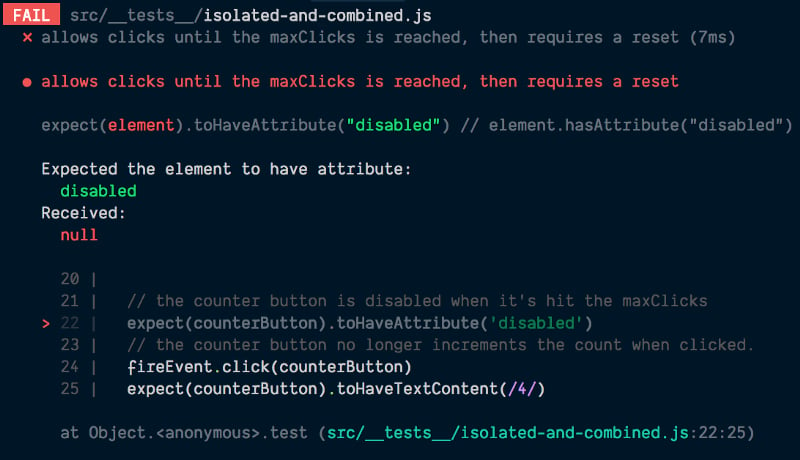
The code frame is especially helpful. It shows not only the line number, but the code around the failed assertion which shows our comments and other code to really help give us context around the error message that not even our previous tests gave us.
I should mention, this isn't to say that you shouldn't separate test cases for a component! There are many reasons you'd want to do that and most of the time you will. Just focus more on use cases than functionality and you'll generally cover most of the code you care about with that. Then you can have a few extra tests to handle edge cases.
I hope this is helpful to you! You can find the code for this example here. Try to keep your tests isolated from one another and focus on use cases rather than functionality and you'll have a much better time testing! Good luck!
此内容由惯性聚合(RSS阅读器)自动聚合整理,仅供阅读参考。 原文来自 — 版权归原作者所有。