


Watch "Lifting and colocating React State" on egghead.io (part of The Beginner's Guide to ReactJS).
One of the leading causes to slow React applications is global state, especially the rapidly changing variety. Allow me to illustrate my point with a super contrived example, then I'll give you a slightly more realistic example so you can determine how it can be more practically applicable in your own app.
Here's the code for that
function sleep(time) {
	const done = Date.now() + time
	while (done > Date.now()) {
		// sleep...
	}
}

// imagine that this slow component is actually slow because it's rendering a
// lot of data (for example).
function SlowComponent({ time, onChange }) {
	sleep(time)
	return (
		<div>
			Wow, that was{' '}
			<input
				value={time}
				type="number"
				onChange={(e) => onChange(Number(e.target.value))}
			/>
			ms slow
		</div>
	)
}

function DogName({ time, dog, onChange }) {
	return (
		<div>
			<label htmlFor="dog">Dog Name</label>
			<br />
			<input id="dog" value={dog} onChange={(e) => onChange(e.target.value)} />
			<p>{dog ? `${dog}'s favorite number is ${time}.` : 'enter a dog name'}</p>
		</div>
	)
}

function App() {
	// this is "global state"
	const [dog, setDog] = React.useState('')
	const [time, setTime] = React.useState(200)
	return (
		<div>
			<DogName time={time} dog={dog} onChange={setDog} />
			<SlowComponent time={time} onChange={setTime} />
		</div>
	)
}
Play around that for a second and you'll notice a significant performance
problem when you interact with either field. There are various things that we
can do to improve the performance of both the DogName and SlowComponent
components on their own. We could pull out the rendering bailout escape hatches
like React.memo and apply that all over our codebase where we have slow
renders. But I'd like to propose an alternative solution.
If you haven't already read Colocation, then I suggest you
give that a read. Knowing that colocation can improve the maintenance of our
application, let's try colocating some state. Observe that the time state is
used by every component in the App, which is why it was
lifted to the App. However
the dog state is only used by one component, so let's move that state to be
colocated (updated lines are highlighted):
function DogName({ time }) {
	const [dog, setDog] = React.useState('')
	return (
		<div>
			<label htmlFor="dog">Dog Name</label>
			<br />
			<input id="dog" value={dog} onChange={(e) => setDog(e.target.value)} />
			<p>{dog ? `${dog}'s favorite number is ${time}.` : 'enter a dog name'}</p>
		</div>
	)
}

function App() {
	// this is "global state"
	const [time, setTime] = React.useState(200)
	return (
		<div>
			<DogName time={time} />
			<SlowComponent time={time} onChange={setTime} />
		</div>
	)
}
And here's the result:
Wow! Typing in the dog name input is WAY better now. And what's more, the component's easier to maintain thanks to colocation. But how did it get faster?
I've heard it said that the best way to make something fast is to do less stuff.
That's exactly what's going on here. When we manage the state higher up in the
React component tree, every update to that state results in an invalidation of
the entire React tree. React doesn't know what's changed, so it has to go and
check all the components to determine whether they need DOM updates. That
process is not free (especially when you have arbitrarily slow components). But
if you move your state further down the React tree as we did with the dog
state and the DogName component, then React has less to check. It doesn't even
bother calling our SlowComponent because it knows that there's no way that
could have changed output because it can't reference the changed state anyway.
In short, before, when we changed the dog name, every component had to be
checked for changes (re-rendered). After, only the DogName component needed to
be checked. This resulted in a big performance win! Sweet!
Where I see this principle apply in real-world applications is when people put
things into a global Redux store or in a global context that don't really need
to be global. Inputs like the DogName in the example above are often the
places where this perf issue manifests itself, but I've also seen it happen
plenty on mouse interactions as well (like showing a tooltip over a graph or
table of data).
Often the solution that people try for this kind of problem is to "debounce" the user interaction (ie wait for the user to stop typing before applying the state update). This is sometimes the best we can do, but it definitely leads to a sub-optimal user experience (React's upcoming concurrent mode should make this less necessary in the future. Watch this demo from Dan about it).
Another solution people try is to apply one of React's rendering bailout escape
hatches like React.memo. This works pretty well in our contrived example
because it allows React to skip re-rendering our SlowComponent, but in a more
practical scenario, you often suffer from "death by a thousand cuts" which means
that there's not really a single place that's slow, so you wind up applying
React.memo everywhere. And when you do that, you have to start using useMemo
and useCallback everywhere as well (otherwise you undo all the work you put
into React.memo). Each of these optimizations together may solve the problem,
but it drastically increases the complexity of your application's code and it
actually is less effective at solving the problem than colocating state because
React does still need to run through every component from the top to determine
whether it should re-render. You'll definitely be running more code with this
approach, there's no way around that.
If you'd like to play around with a slightly less contrived example, give this codesandbox a look.
The principle of colocation is:
Place code as close to where it's relevant as possible
So, to accomplish this, we had our dog state inside the DogName component:
function DogName({ time }) {
	const [dog, setDog] = React.useState('')
	return (
		<div>
			<label htmlFor="dog">Dog Name</label>
			<br />
			<input id="dog" value={dog} onChange={(e) => setDog(e.target.value)} />
			<p>{dog ? `${dog}'s favorite number is ${time}.` : 'enter a dog name'}</p>
		</div>
	)
}
But what happens when we break that up? Where does that state go? The answer is
the same: "as close to where it's relevant as possible." That would be the
closest common parent. As an example, let's break the DogName component up
so the input and the p show up in different components:
function DogName({ time }) {
	const [dog, setDog] = React.useState('')
	return (
		<div>
			<DogInput dog={dog} onChange={setDog} />
			<DogFavoriteNumberDisplay time={time} dog={dog} />
		</div>
	)
}

function DogInput({ dog, onChange }) {
	return (
		<>
			<label htmlFor="dog">Dog Name</label>
			<br />
			<input id="dog" value={dog} onChange={(e) => onChange(e.target.value)} />
		</>
	)
}

function DogFavoriteNumberDisplay({ time, dog }) {
	return (
		<p>{dog ? `${dog}'s favorite number is ${time}.` : 'enter a dog name'}</p>
	)
}
In this case we can't move the state to the DogInput component, because the
DogFavoriteNumberDisplay needs access to that state, so we navigate up the
tree until we find the least common parent of these two components and that's
where the state is managed.
And this applies just as well as if your state needs to be accessed in dozens of components on a specific screen of your application. You can even put it into context to avoid prop drilling if you want. But keep that context value provider as close to where it's relevant as possible and you'll still benefit from the performance (and maintenance) characteristics of colocation. By this I mean that while some of your context providers could be rendered at the top of your application's React tree, they don't all have to be there. You can put them wherever they make the most sense.
This is the essence of what my Application State Management with React blog post is all about. Keep your state as close to where it's used as possible, and you'll benefit from a maintenance perspective and a performance perspective. From there, the only performance concerns you should have is the occasional especially complex UI interaction.
If you read "One simple trick to optimize React re-renders," then you know that you can make it so only components that actually use the changing state will be updated. So that can side step this issue. While this is true, people do still have performance problems with Redux. If it's not React itself, what is it? The problem is that React-Redux expects you to follow guidelines to avoid unnecessary renders of connected components, and it can be easy to accidentally set up components that render too often when other global state changes. The impact of that becomes worse and worse as your app grows larger, especially if you're putting too much state into Redux.
Fortunately, there are things you can do to help reduce the impact of these
performance issues, like
using memoized Reselect selectors to optimize mapState functions,
and the Redux docs have
additional info on improving performance of Redux apps.
I also want to note that you can definitely apply colocation with Redux to get these benefits as well. Just limit what you store in Redux to be actual global state and colocate everything else and you're golden. The Redux FAQ has some rules of thumb to help decide whether state should go in Redux, or stay in a component.
In addition, if you separate your state by domain (by having multiple domain-specific contexts), then the problem is less pronounced as well.
But the fact remains that if you colocate your state, you don't have these problems and maintenance is improved.
I made this decision tree chart to help:
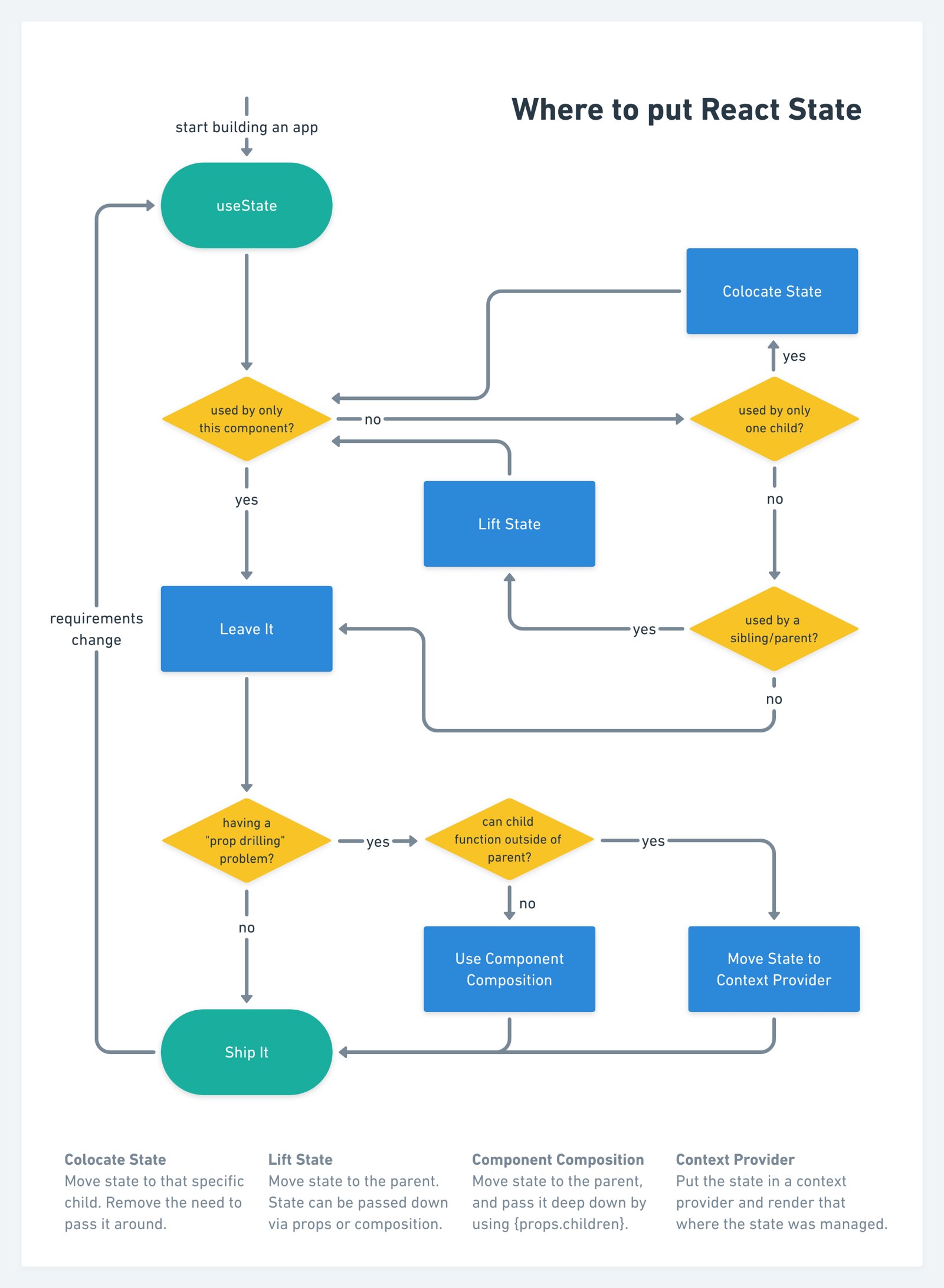
Chart perfected by Stephan Meijer
Here's that written out (for screen readers and friends):
It's important that this is something you do as part of your regular refactoring/app maintenance process. This is because lifting state up is a requirement of getting this working so it happens naturally, but your app will "work" whether you colocate your state or not, so being intentional about thinking through this is important to keep your app manageable and fast.
If you want to learn a bit more about that component composition step, read about that in One React mistake that's slowing you down.
In general, I think people are pretty good at "lifting state" as things change,
but we don't often think to "colocate" state as things change in our codebase.
So my challenge to you is to look through your codebase and look for
opportunities to colocate state. Ask yourself "do I really need the modal's
status (open/closed) state to be in Redux?" (the answer is probably "no").
Colocate your state and you'll find yourself with a faster, simpler codebase.
Good luck!
P.S. I wrote another article that covers this topic from the perspective of forms and "perf death by a thousand cuts". Head on over to EpicReact.dev to read: Improve the Performance of your React Forms
此内容由惯性聚合(RSS阅读器)自动聚合整理,仅供阅读参考。 原文来自 — 版权归原作者所有。