


What's wrong with this code?
function ContactList({ contacts }) {
	return (
		<div>
			<ul>
				{contacts.length &&
					contacts.map((contact) => (
						<li key={contact.id}>
							{contact.firstName} {contact.lastName}
						</li>
					))}
			</ul>
		</div>
	)
}
Not sure? Let me ask you another question. What would happen with the above code
if contacts was []? That's right! You'd render 0!
I shipped this mistake to production at PayPal once. No joke. It was on this page:
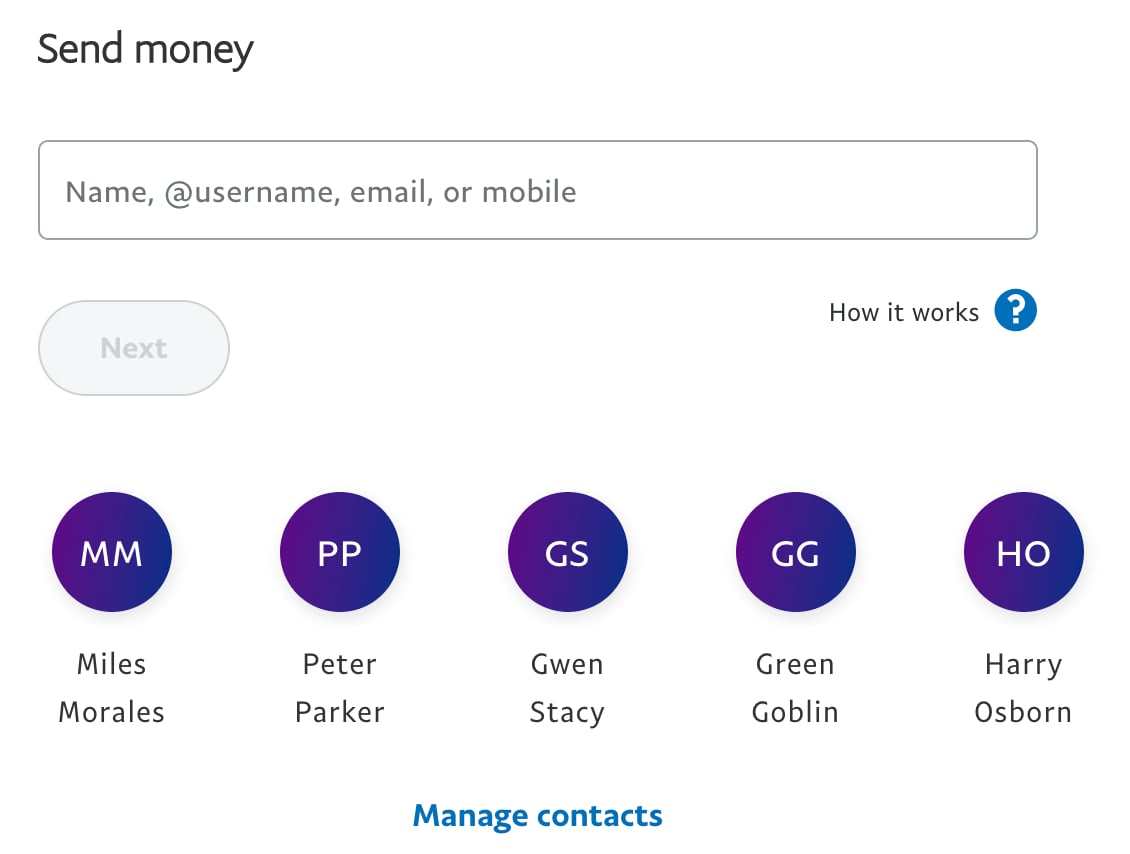
When a user came with no contacts, this is what they saw:
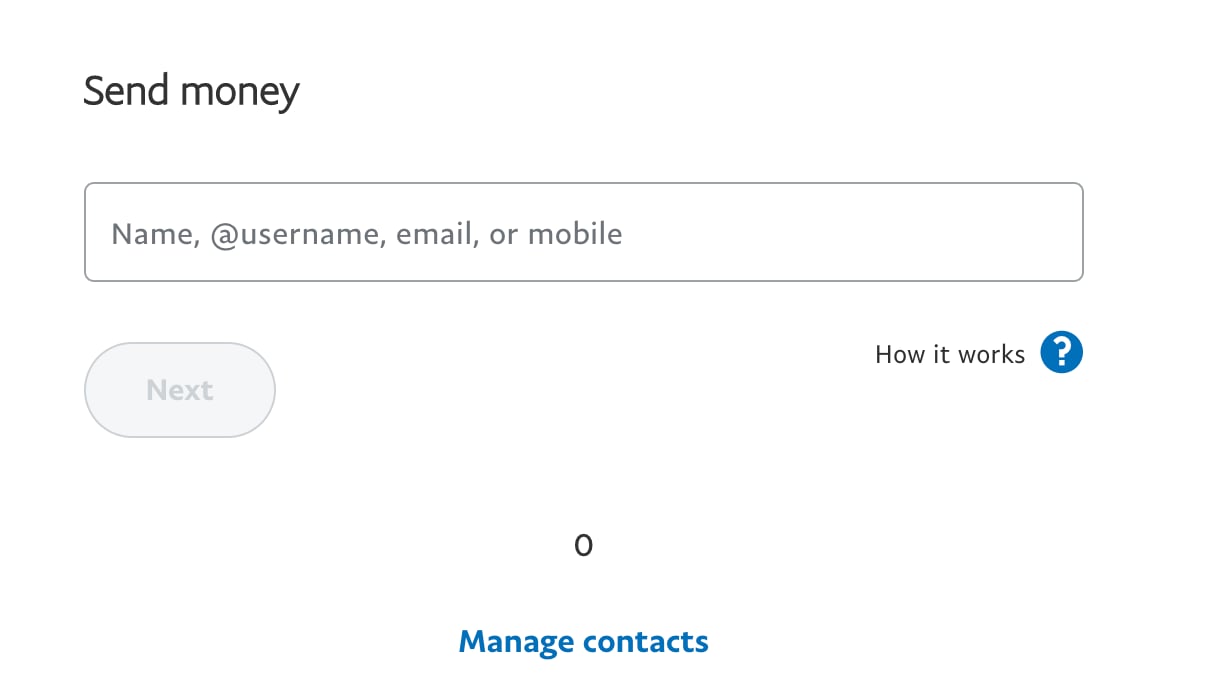
Yeah, that was not fun... Why is that? Because when JavaScript evaluates
0 && anything the result will always be 0 because 0 is falsy, so it
doesn't evaluate the right side of the &&.
The solution? Use a ternary to be explicit about what you want rendered in the
falsy case. In our case, it was nothing (so using null is perfect):
function ContactList({ contacts }) {
	return (
		<div>
			<ul>
				{contacts.length
					? contacts.map((contact) => (
							<li key={contact.id}>
								{contact.firstName} {contact.lastName}
							</li>
						))
					: null}
			</ul>
		</div>
	)
}
What about this code? What's wrong here?
function Error({ error }) {
	return error && <div className="fancy-error">{error.message}</div>
}
Not sure? What if error is undefined? If that's the case, you'll get the
following error:
Uncaught Error: Error(...): Nothing was returned from render. This usually means a return statement is missing. Or, to render nothing, return null.Or, in production, you might get this:
react-dom.production.min.js:13 Uncaught Invariant Violation: Minified React error #152; visit https://reactjs.org/docs/error-decoder.html?invariant=152&args[]=f for the full message or use the non-minified dev environment for full errors and additional helpful warnings.The problem here is that undefined && anything will always evaluate to
undefined.
Really, the problem in both of these cases is we're using && to do conditional
rendering. Said differently, we're using && to do conditional argument
passing. Remember,
JSX is a simple syntactic abstraction over calling React.createElement.
So it'd be like trying to write this:
function throwTheCandy(candyNames) {
	for (const candyName of candyNames) {
		throwCandy(candyName)
	}
}

throwTheCandy(candies.length && candies.map((c) => c.name))
That wouldn't make any sense right? We've got our types all messed up. The
reason React allows you to do this though is because rendering 0 is valid.
Luckily, TypeScript can help you avoid the second example of accidentally
returning undefined. But on top of that layer of protection, how about we be
more explicit about our intentions. If you want to do something conditionally,
don't abuse the logical AND operator (&&).
If you'd like an extra layer of protection, you can also use
eslint-plugin-react's jsx-no-leaked-render rule
to help catch cases where && might accidentally leak something like 0 into
your render output.
It actually seems counter-intuitive because we often use && in an if
condition to say: if both of these values are truthy, then do this thing,
otherwise don't. Unfortunately for our use-case, the && operator also has this
"feature" where if both values aren't truthy, it returns the value of the falsy
one:
0 && true // 0
true && 0 // 0
false && true // false
true && '' // ''
So I strongly suggest that rather than abusing && (or || for that matter) in
your JSX, you use actual branching syntax features, like ternaries
(condition ? trueConsequent : falseConsequent) or even if statements (and in
the future, maybe even
do expressions).
I'm personally a fan of ternaries, but if you'd prefer if statements, that's
cool too. Here's how I'd do the contacts thing with if statements:
function ContactList({ contacts }) {
	let contactsElements = null
	if (contacts.length) {
		contactsElements = contacts.map((contact) => (
			<li key={contact.id}>
				{contact.firstName} {contact.lastName}
			</li>
		))
	}

	return (
		<div>
			<ul>{contactsElements}</ul>
		</div>
	)
}
Personally, I think the ternary is more readable (if you disagree, remember that "readable" is subjective and the readability of something has much more to do with familiarity than anything else). Whatever you do, you do you, just don't do bugs.
Another benefit of using actual branching syntax is that test coverage tools can detect and indicate when your tests are not covering one of the branches.
I'm well aware that we could've solved the contact problem by using
!!contacts.length && ... or contacts.length > 0 && ... or even
Boolean(contacts.length) && ..., but I still prefer not abusing the logical
AND operator for rendering. I prefer being explicit by using a ternary.
To finish strong, if I had to write both of these components today, here's how I'd write them:
function ContactList({ contacts }) {
	return (
		<div>
			<ul>
				{contacts.length
					? contacts.map((contact) => (
							<li key={contact.id}>
								{contact.firstName} {contact.lastName}
							</li>
						))
					: null}
			</ul>
		</div>
	)
}
function Error({ error }) {
	return error ? <div className="fancy-error">{error.message}</div> : null
}
Good luck!
此内容由惯性聚合(RSS阅读器)自动聚合整理,仅供阅读参考。 原文来自 — 版权归原作者所有。