


I was building something for my product at PayPal (blog post maybe forthcoming) and got tired of writing components like this:
const styles = glamor.css({
	fontSize: 20,
	textAlign: 'center',
})
function MyStyledDiv({ className = '', ...rest }) {
	return <div className={`${styles} ${className}`} {...rest} />
}
So I decided to try out styled-components because the hype-train was strong 🚂. I REALLY liked it:
Ok, I was a styled-components hold-out (I really like JS objects). But I've been trying 💅 out for just 30 minutes... And I LOVE IT! 😍😍😍💅😍😍😍
It allowed me to write that same component like this:
const MyStyledDiv = styled.div`
	font-size: 20px;
	text-align: center;
`
Making composable components that carry their styling with them was just super awesome.
Unfortunately, I hit a wall when I realized that there isn't currently a solution for right-to-left conversion (like CSSJanus or rtl-css-js) and that's a hard requirement for what I'm building. I also had some issues with the size of styled-components at the time (note that you can transpile away a lot of the size if you're willing to give up some dynamic capabilities, which I was unwilling to do).
So after evaluating a bunch of other solutions and trying to enhance existing solutions to be what I wanted them to be, I decided to create my own.
glamorous is React component styling solved with an elegant
(inspired) API, small
footprint (<5kb gzipped), and great performance (via
glamor). It has a very similar API
to styled-components and uses similar tools under the hood
(glamor). The benefits being:
Let's get a quick look at what a glamorous component looks like:
// Create a <Title> react component that renders an <h1> which is
// centered, palevioletred and sized at 1.5em
const Title = glamorous.h1({
	fontSize: '1.5em',
	textAlign: 'center',
	color: 'palevioletred',
})

// Create a <Wrapper> react component that renders a <section> with
// some padding and a papayawhip background
const Wrapper = glamorous.section({
	padding: '4em',
	background: 'papayawhip',
})

function App() {
	return (
		<Wrapper>
			<Title>Hello World, this is my first glamorous component!</Title>
		</Wrapper>
	)
}
(thanks to styled-components for the example inspiration).
The beauty of glamorous is that all of the cool things you can do with glamor, you can do with glamorous. Here are a few examples:
const MyLink = glamorous.a({
	':hover': {
		color: 'red',
	},
})
child-selectors (the escape hatch you should rarely use, but is nice to have)
const MyDiv = glamorous.div({
	display: 'block',
	'& .bold': { fontWeight: 'bold' },
	'& .one': { color: 'blue' },
	':hover .two': { color: 'red' },
})

const ui = (
	<MyDiv>
		<div className="one bold">is blue-bold!</div>
		<div className="two">hover red!</div>
	</MyDiv>
)
const MyResponsiveDiv = glamorous.div({
	width: '100%',
	padding: 20,
	'[@media](http://twitter.com/media "Twitter profile for @media")(min-width: 400px)':
		{
			width: '85%',
			padding: 0,
		},
})
import { css } from 'glamor' // or require or whatever...

const bounce = css.keyframes({
	'0%': { transform: 'scale(1)', opacity: 0.3 },
	'55%': { transform: 'scale(1.2)', opacity: 1 },
	'100%': { transform: 'scale(1)', opacity: 0.3 },
})

const MyBouncyDiv = glamorous.div({
	animation: `${bounce} 1s infinite`,
	width: 50,
	height: 50,
	backgroundColor: 'red',
})
theming
With the new ThemeProvider (recently added by
Alessandro Arnodo), glamorous also supports
theming:
const Title = glamorous.h1(
	{
		fontSize: '10px',
	},
	(props, theme) => ({
		color: theme.main.color,
	}),
)

// use <ThemeProvider> to pass theme down the tree
const ui1 = (
	<ThemeProvider theme={theme}>
		<Title>Hello!</Title>
	</ThemeProvider>
)

// it is possible to nest themes
// inner themes will be merged with outers
const ui2 = (
	<ThemeProvider theme={theme}>
		<div>
			<Title>Hello!</Title>
			<ThemeProvider theme={secondaryTheme}>
				{/\* this will be blue */}
				<Title>Hello from here!</Title>
			</ThemeProvider>
		</div>
	</ThemeProvider>
)
And if you need global styles, you can just use glamor to do that (you can do this with styled-components as well). And there many other cool things you can do with glamor (including Server Side Rendering)!
Another great feature of glamorous is it will merge glamor class names
together automatically for you. Learn more about that
here.
In addition to the styled-components inspired API, glamorous exposes a
jsxstyle inspired API. Sometimes, you don't
want to give something a name because naming things is hard. Especially with
this stuff, you wind up with names like Container and Wrapper and who knows
which is which!? So, if you find that something doesn't really need a name, then
don't give it one!
const { Div, A } = glamorous

function App() {
	return (
		<Div textAlign="center" color="red">
			<A
				href="[https://brave.com/](https://brave.com)"
				textDecoration="none"
				color="darkorange"
				textShadow="1px 1px 2px orange"
			>
				Browse faster and safer with Brave.
			</A>
			<div>It's fast, fun, and safe!</div>
		</Div>
	)
}
<glamorous.Div>JSX!!</glamorous.Div>)Oh, and just for fun, all this excitement around CSS Grid got you salivating? It's trivially supported by glamorous:
// Example inspired by
// [http://gridbyexample.com/examples/example12/](http://gridbyexample.com/examples/example12)
const MyGrid = glamorous.div({
	margin: 'auto',
	backgroundColor: '#fff',
	color: '#444',
	// You can use [@supports](http://twitter.com/supports "Twitter profile for @supports") with glamor!
	// So you can use [@supports](http://twitter.com/supports "Twitter profile for @supports") with glamorous as well!
	'[@supports](http://twitter.com/supports "Twitter profile for @supports") (display: grid)':
		{
			display: 'grid',
			gridGap: 10,
			gridTemplateAreas: `
      "....... header header"
      "sidebar content content"
      "footer  footer  footer"
    `,
		},
})

const Box = glamorous.div({
	backgroundColor: '#444',
	color: '#fff',
	borderRadius: 5,
	padding: 10,
	fontSize: '150%',
})

const HeaderFooter = glamorous(Box)({
	backgroundColor: '#999',
})

function App() {
	return (
		<MyGrid>
			<HeaderFooter css={{ gridArea: 'header' }}>Header</HeaderFooter>
			<Box css={{ gridArea: 'sidebar' }}>Sidebar</Box>
			<Box css={{ gridArea: 'content' }}>
				Content
				<br />
				More content than we had before so this column is now quite tall.
			</Box>
			<HeaderFooter css={{ gridArea: 'footer' }}>Footer</HeaderFooter>
		</MyGrid>
	)
}
And you get:
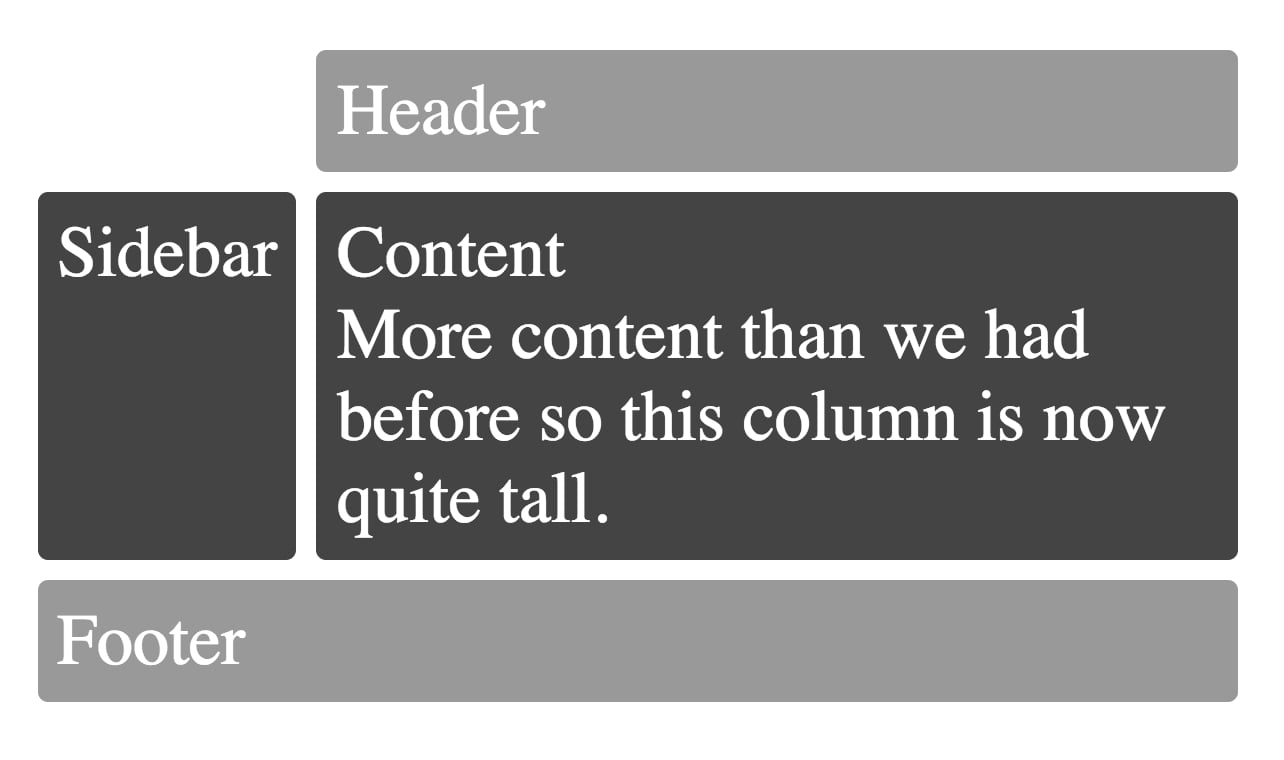
Example inspired by http://gridbyexample.com/examples/example12/
I hope you enjoy glamorous 💄 🌟 👀!
See you around on twitter: @glamorousCSS and @kentcdodds
With ❤️ from PayPal (we're hiring!)
此内容由惯性聚合(RSS阅读器)自动聚合整理,仅供阅读参考。 原文来自 — 版权归原作者所有。