
惯性聚合 高效追踪和阅读你感兴趣的博客、新闻、科技资讯
阅读原文 在惯性聚合中打开

推荐订阅源

WordPress大学
WordPress大学
Security Latest
Security Latest
C
Cisco Blogs
P
Palo Alto Networks Blog
Know Your Adversary
Know Your Adversary
Project Zero
Project Zero
C
Cyber Attacks, Cyber Crime and Cyber Security
NISL@THU
NISL@THU
Exploit-DB.com RSS Feed
S
Secure Thoughts
P
Privacy International News Feed
V
Vulnerabilities – Threatpost
D
Docker
Google Online Security Blog
K
KPMG report finds enterprise disconnect between AI and its ROI | CIO
Recent Announcements
T
The Exploit Database - CXSecurity.com
G
Google Developers Blog
Schneier on Security
小众软件
小众软件
爱范儿
爱范儿
GbyAI
GbyAI
J
Java Code Geeks
T
Tailwind CSS Blog
Cisco Talos Blog
Cisco Talos Blog
The Hacker News
The Hacker News
D
DataBreaches.Net
Blog — PlanetScale
Blog — PlanetScale
TaoSecurity Blog
TaoSecurity Blog
MyScale Blog
MyScale Blog
B
Blog RSS Feed
Cyberwarzone
Cyberwarzone
有赞技术团队
有赞技术团队
Martin Fowler
Martin Fowler
C
CXSECURITY Database RSS Feed - CXSecurity.com
S
Securelist
L
Lohrmann on Cybersecurity
cs.CL updates on arXiv.org
Y
Y Combinator Blog
S
Schneier on Security
Latest news
Latest news
Apple Machine Learning Research
博客园 - 叶小钗
F
Fortinet All Blogs
M
MIT News - Artificial intelligence
PCI Perspectives
PCI Perspectives
V
V2EX
V2EX - 技术
V2EX - 技术
O
OpenAI News
W
WeLiveSecurity

Articles on Smashing Magazine — For Web Designers And Developers

Designing For Distressed Users: Why Mental Health Apps Shouldn’t Follow Every UI Fashion Meet Kirki: WordPress’s First Visual Builder With An Infinite Canvas — Smashing Magazine Users Don’t Need More Tools: They Need Seamless Integrations — Smashing Magazine Matching AI Modality To User Intent: Designing The Right Interface — Smashing Magazine Why Accessibility Is An Operational Capability, Not A Feature — Smashing Magazine Snapshots Of Summer (July 2026 Wallpapers Edition) — Smashing Magazine Designing With Uncertainty: How AI Supercharges Probabilistic Thinking — Smashing Magazine The Impact Of Humanoid Robots On Humanity — Smashing Magazine The Benefits Of Cognitive Inclusion In UX Research — Smashing Magazine June Is For Exploring (2026 Wallpapers Edition) — Smashing Magazine Algorithmic Theming Engines: Building Self-Correcting Color Systems With contrast-color() — Smashing Magazine Your Prototype Is Not Being Honest With Your Users (And Here’s How To Fix It) — Smashing Magazine Four Levels Of Customer Understanding — Smashing Magazine Advanced Tree Counting: Mathematical Layouts With sibling-index() And sibling-count() — Smashing Magazine Ten Data-Backed Truths Of User Experience ROI — Smashing Magazine Practical Interface Patterns For AI Transparency (Part 2) — Smashing Magazine The Architecture Of Local-First Web Development — Smashing Magazine Rethinking The Experience Of System Tools — Smashing Magazine Designing Stable Interfaces For Streaming Content — Smashing Magazine A Fresh View In May (2026 Wallpapers Edition) — Smashing Magazine The “Bug-Free” Workforce: How AI Efficiency Is Subtly Disrupting The Interactions That Build Strong Teams — Smashing Magazine The UX Designer’s Nightmare: When “Production-Ready” Becomes A Design Deliverable — Smashing Magazine Session Timeouts: The Overlooked Accessibility Barrier In Authentication Design — Smashing Magazine How To Improve UX In Legacy Systems — Smashing Magazine Identifying Necessary Transparency Moments In Agentic AI (Part 1) — Smashing Magazine A Practical Guide To Design Principles — Smashing Magazine The Joy Of A Fresh Beginning (April 2026 Wallpapers Edition) — Smashing Magazine The Site-Search Paradox: Why The Big Box Always Wins — Smashing Magazine Testing Font Scaling For Accessibility With Figma Variables — Smashing Magazine Modal vs. Separate Page: UX Decision Tree — Smashing Magazine Anime vs. Marvel/DC: Designing Digital Products With Emotion In Flow — Smashing Magazine Moving From Moment.js To The JS Temporal API — Smashing Magazine Beyond border-radius: What The CSS corner-shape Property Unlocks For Everyday UI — Smashing Magazine Building Dynamic Forms In React And Next.js — Smashing Magazine Persuasive Design: Ten Years Later — Smashing Magazine Human Strategy In An AI-Accelerated Workflow — Smashing Magazine Now Shipping: Accessible UX Research, A New Smashing Book By Michele Williams — Smashing Magazine Getting Started With The Popover API — Smashing Magazine Fresh Energy In March (2026 Wallpapers Edition) — Smashing Magazine Say Cheese! Meet SmashingConf Amsterdam 🇳🇱 — Smashing Magazine
How To Make Your Design System AI-Ready — Smashing Magazine
About The Author · 2026-06-03 · via Articles on Smashing Magazine — For Web Designers And Developers

Practical guide on how to reduce drifts, minimize mistakes, maintain context, and improve the quality of AI-generated prototypes. Brought to you by Design Patterns For AI Interfaces, friendly video course on UX and design patterns by Vitaly.

AI-generated prototypes often don’t deliver consistently decent results because of tiny inconsistencies scattered all across a design system. I’s decisions made but not documented, hard-coded values never cleaned up, or relying too much on AI making sense of mock-ups or design flows on its own.

Yesterday I stumbled upon a useful practical guide by Hardik Pandya from Atlassian — on how to reduce drifts, minimize mistakes, maintain context, and improve the quality of AI-generated prototypes. Let’s see how it works.

A diagram comparing traditional with LLM-readable design systems by showing their processes and an example file structure.
To get better results, AI needs better guidance that minimizes assumptions and reduces ambiguity. Guide by Hardik Pandya. (Large preview)

1. Design Decisions Are Infrastructure

Unsurprisingly, better AI prototypes come from better data — but also from better human guidance. We shouldn’t assume that AI knows how to choose the right component and how to design with accessibility in mind. It needs priorities, a clear path on how we make decisions, design principles, examples, do’s and don’ts.

In fact, we should treat design decisions as infrastructure. That means that every time we make a decision — not just a design decision, but even a decision on how to actually prioritize our work and how we make decisions around here — it must find a path into the spec file that is then consumed by AI.

2. Auditing: FigmaLint

One of the useful tools to audit the quality of the design system is FigmaLint. It’s a useful free Figma plugin for auditing tokens, states, accessibility, binding tokens, renaming layers, detecting detached instances, missing interactive states and hard-coded values — and preparing the design documentation.

A screenshot showcasing FigmaLint, an AI-powered design system auditing and auto-fix tool within Figma, with various UI screens displaying features like component auditing, interactive states, design token usage, and property recommendations.
Neat little helper to streamline auditing: FigmaLint. (Large preview)

If you often have to work with vendors and third parties who supply you with their design systems and component libraries, that’s a great helper to have by your side — especially if you want to improve the quality of prototypes, AI-generated code, and AI-written documentation.

3. Three Layers: Spec Files + Token Layer + Auditing

To ensure quality, we establish design principles, guidelines, and rules in the form of “spec files”. It’s structured Markdown files that include spacing rules, color choices, component usage guidelines, priorities, etc. AI is going to read and reuse that spec file every time it’s going to generate a prototype.
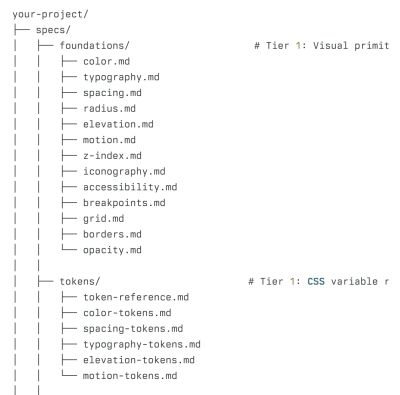
An example of a folder that organizes spec files to be AI-friendly.
An example of a folder that organizes spec files to be AI-friendly. Jump to full example. (Large preview)

Because the spec files are text files, it’s much more cost-effective but also much more accurate, just because we don’t rely on AI recognizing or decoding patterns from mock-ups but get specific guidelines instead. In fact, extending code is often a more effective way than generating code from mock-ups.

The token layer lists and keeps updated all tokens used throughout the design system. AI always chooses from a closed set of named variables instead of inventing plausible values ad hoc.

Five levels of context engineering
Context engineering is everything. Five levels of context engineering: a practical overview, by Matthew Alverson, via Addy Osmani. (Large preview)

An audit script catches what AI gets wrong. It scans the prototype and flags every hard-coded value and flags it if necessary. It can be a regular software doing that, with AI waiting for its feedback to come back.

Finally, when a design system ships updates, a sync routine flags which spec files need updating. The goal is to make sure that AI always reads up-to-date, current specs, not the ones written against an outdated version.

4. Examples of AI-Ready Design Systems

Wrapping Up

Ultimately, AI cannot magically resolve technical debt or design debt without proper guidance. It relies heavily on clear decisions, established priorities, and well-defined principles.

The more deliberate and precise designers are in guiding AI, the better the overall outcomes will be. This requires not just cleaning up and improving design systems but also maintaining them over time as decisions need to trickle down into Markdown files. We’ll be busy for years to come.

Meet “Design Patterns For AI Interfaces”

Meet Design Patterns For AI Interfaces, Vitaly’s new video course with 100s of real-life examples and UX guidelines to design AI features that people actually use — with a live UX training later this year. Jump to a free preview.

Design Patterns For AI Interfaces promo picture
Meet Design Patterns For AI Interfaces, Vitaly’s video course on interface design & UX.

Useful Resources

Smashing Editorial (yk)