


Progressive Web Applications help us build native-like web apps, thanks to amazing tools such as Service Workers, IndexDB, App Shell etc. Once the browser downloads all the static assets required by our app, the active Service Worker can cache them locally.
This way the user may experience slowdown during the initial page load, but each next time she opens the application her experience will be instant!
In order to help developers take advantage of the technologies behind the PWA as easy as possible, the Angular team is working on the Angular mobile-toolkit. However, a big concern for developing high-performance Angular apps is the framework size itself. For instance, a simple non-optimized “Hello world!” Angular application, bundled with browserify is 1.4MB! This is suicidal when your users are supposed to download it via an unreliable 3G connection.
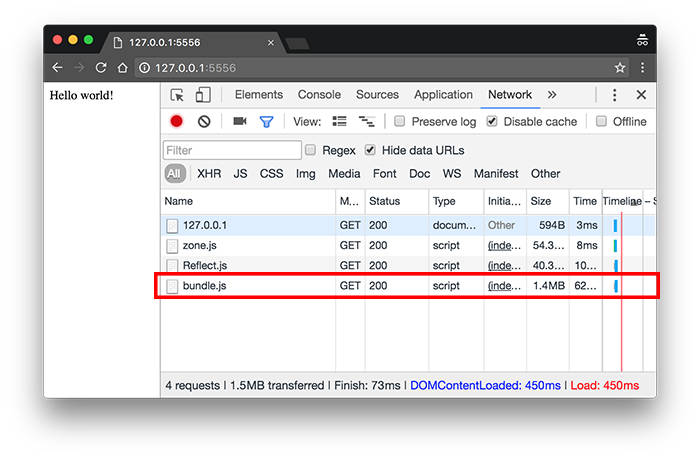
This is main reason Angular is (was) criticized for. During the keynote of ng-conf, Brad Green (manager of the Angular team) mentioned that the core team managed to drop the size of the “Hello world!” app to less than 50K!
In this blog post we’ll explain all the steps we need to go through in order to achieve such results!
*The experiments from this blog posts are located here:
In order to get a better understanding of the optimizations explained below, lets first describe the sample application that we’re going to apply them on.
Our app is going to consist the following three files:
// app.component.ts

import { Component } from '@angular/core';

@Component({
  selector: 'my-app',
  template: 'Hello world!'
})
export class AppComponent {}
// app.module.ts

import { NgModule } from '@angular/core';
import { BrowserModule } from '@angular/platform-browser';

import { AppComponent } from './app.component';

@NgModule({
  imports: [BrowserModule],
  bootstrap: [AppComponent],
  declarations: [AppComponent],
})
export class AppModule {}
..and
// main.ts
import { platformBrowserDynamic } from '@angular/platform-browser-dynamic';
import { AppModule } from './app.module';

platformBrowserDynamic().bootstrapModule(AppModule);
In app.component.ts we have a single component with a template which is going to render the text "Hello world!". main.ts is responsible for bootstrapping the application, using the bootstrap method exported by the @angular/platform-browser-dynamic package.
Our index.html page looks like:
<!DOCTYPE html>
<html lang="en">
<head>
  <meta charset="UTF-8">
  <title></title>
</head>
<body>
  <my-app></my-app>
  <script src="/node_modules/zone.js/dist/zone.js"></script>
  <script src="/node_modules/reflect-metadata/Reflect.js"></script>
  <script src="dist/bundle.js"></script>
</body>
</html>
And here’s the directory layout:
.
├── app
│   ├── app.component.ts
│   ├── app.module.ts
│   └── main.ts
├── dist
├── index.html
├── package.json
├── tsconfig.json
└── node_modules
dist is where the output is going to live (i.e. application bundles) and app is where our application is.
The two most obvious optimizations that we can apply are minification and compression. You can find the example explained in this section in my GitHub profile. I’d recommend you to clone the repository and run:
Now we can explore the build process by taking a look at package.json:
"scripts": {
  "clean": "rm -rf dist",
  "serve": "http-server . -p 5556",
  "build": "npm run clean && tsc",
  "build_prod": "npm run build && browserify -s main dist/main.js > dist/bundle.js && npm run minify",
  "minify": "uglifyjs dist/bundle.js --screw-ie8 --compress --mangle --output dist/bundle.min.js"
}
Our build script first cleans the dist directory and after that compiles our application by using the TypeScript compiler. This will produce three files - main.js, app.module.js and app.component.js, in the dist directory.
By using SystemJS we can already run them in the browser, but since we want to reduce the number of HTTP requests made by the browser in the process of loading the app, we can create a single bundle. This is what we do in build_prod:
npm run build && browserify -s main dist/main.js > dist/bundle.js && npm run minify
In the script above, first we use the TypeScript compiler. Once the app has been compiled, all we need to do is to create a “standalone” bundle with entry point the dist/main.js file, and output the bundles content to bundle.js within the dist directory.
In order to try the app you can use:
npm run build_prod
npm run serve
open http://localhost:5556
Now lets see what the bundle size is:
$ ls -lah bundle.js
-rw-r--r--  1 mgechev  staff   1.4M Jun 26 12:01 bundle.js
Wow…so we reached the disastrous point we described above! However, the bundle contains a bunch of useless content such as:
In order to reduce the size of the bundle we can now use the minify script:
uglifyjs dist/bundle.js --screw-ie8 --compress --mangle --output dist/bundle.min.js
It takes the bundle.js file, and optimizes it. The output is now produced in dist/bundle.min.js, and its size is:
$ ls -lah bundle.min.js
-rw-r--r--  1 mgechev  staff   524K Jun 26 12:01 bundle.min.js
So, we reduced the size of the bundle to 524K only by applying a simple minification!
Most HTTP servers support compression of the content, with gzip. The requested by the browser resources are compressed by the web server and sent through the network. Responsibility of the client is to decompress them.
Lets find out what the size of the compressed bundle is:
$ gzip bundle.min.js
$ ls -lah bundle.min.js.gz
-rw-r--r--   1 mgechev  staff   128K Jun 26 12:01 bundle.min.js.gz
We reduced the size of the bundle with another ~75% only by applying compression! But we can do even better!
In this section we’ll use very important property of the ES2015 modules - they are tree-shakable!


What does tree-shaking means:
Tree-shaking is excluding unused exports from bundles.
Because the ES2015 modules are static, by performing a static code analysis over them we can decide which exports are used and which are not used in our application. In contrast, CommonJS modules are not always tree-shakable because of the dynamic nature of their format.
For instance:
const readline = require('readline');

const rl = readline.createInterface({
  input: process.stdin,
  output: process.stdout
});

rl.question('Algorithm you want to use for sorting the numbers? ', answer => {
  const sort = require(answer);
  sort([42, 1.618, 4]);
});
It is impossible to guess which algorithm will be chosen by the user by performing a static code analysis.
With ES2015 we can do something like:
import {Graphs} from './graphs';
import {Algorithms} from './algorithms';

const rl = readline.createInterface({
  input: process.stdin,
  output: process.stdout
});

rl.question('Algorithm you want to use for sorting the numbers? ', answer => {
  const sort = Algorithms[answer];
  sort([42, 1.618, 4]);
});
In this way, we will be able to perform tree-shaking and remove the ./graphs module from the final bundle since we’re not using Graphs anywhere. On the other hand, we need to import all sorting algorithms because we have a level of non-determinism - we’re not sure what the input of the user is going to be so we can’t get rid of anything from Algorithms.
Rollup.js is a module bundler which is optimized for ES2015 modules. It is a new, extensible tool which allows us to perform tree-shaking over ES2015 and CommonJS (in most cases) by using a plugin.
We’re going to integrate Rollup in the example above, trying to achieve even smaller bundle size! The example from this section is available here.
Now, lets take a look at the scripts section in our package.json in order to explore the build process:
"scripts": {
  "test": "echo \"Error: no test specified\" && exit 1",
  "clean": "rm -rf dist",
  "clean": "rm -rf dist",
  "serve": "http-server . -p 5557",
  "build": "tsc -p tsconfig.json",
  "rollup": "rollup -f iife -c rollup.config.js -o dist/bundle.es2015.js",
  "es5": "tsc --target es5 --allowJs dist/bundle.es2015.js --out dist/bundle.js",
  "minify": "uglifyjs dist/bundle.js --screw-ie8 --compress --mangle --output dist/bundle.min.js",
  "build_prod": "npm run clean && npm run build && npm run rollup && npm run es5 && npm run minify"
}
We have the same clean, serve, minify and build scripts like above. The new things here are rollup, es5, build_prod.
rollup is responsible for bundling our app and perform tree-shaking in the process.
TypeScript supports ES2015 modules, which means that we can apply tree-shaking directly over our non-transpiled app. This is further simplified by the TypeScript plugin for Rollup which allows us to perform the transpilation as the part of the bundling. This would work great if the dependencies of our application were distributed as TypeScript as well. However, Angular is distributed as ES5 and ES2015, and RxJS is distributed as ES5 and ES2015 (in the rxjs-es package).
Since we can’t apply tree-shaking directly over the original TypeScript files of our app, we’ll first need to transpile it to ES2015, after that create an ES2015 bundle by using rollup, and in the end transpile it to ES5.
Because of these changes in the flow of the build process, there’s a very important difference between the tsconfig.json presented in the example above, and the one used in this section:
{
  "compilerOptions": {
    "target": "es2015",
    "module": "es2015",
    // ...
  },
  "compileOnSave": false,
  "files": [
    "app/main.ts"
  ]
}
Our target version here is es2015 in order to transpile the TypeScript application to an ES2015 one, with ES2015 modules.
Now we can explore the rollup script:
rollup -f iife -c -o dist/bundle.es2015.js
Above we tell rollup to bundle the modules as IIFE (Immediately-Invoked Function Expression), use the configuration file provided in the root of the project (rollup.config.js) and output the bundle as bundle.es2015.js in dist.
Now lets take a look at the rollup.config.js file:
import nodeResolve from 'rollup-plugin-node-resolve';

class RollupNG2 {
  constructor(options){
    this.options = options;
  }
  resolveId(id, from){
    if (id.startsWith('rxjs/')){
      return `${__dirname}/node_modules/rxjs-es/${id.replace('rxjs/', '')}.js`;
    }
  }
}

const rollupNG2 = (config) => new RollupNG2(config);

export default {
  entry: 'dist/main.js',
  sourceMap: true,
  moduleName: 'main',
  plugins: [
    rollupNG2(),
    nodeResolve({
      jsnext: true, main: true
    })
  ]
};
Great thing about this configuration file is that it is pure JavaScript! We export the configuration object, and declare inside of it the entry point of the application, the module name (required if we use IIFE bundling), we also declare that we want to have sourceMaps, and the set of plugins that we want to use.
We use the nodeResovle plugin for rollup in order to hint the bundler that we want to use node-like module resolution; this means that once the bundler finds import like @angular/core, for instance, it’ll go to node_modules/@angular/core and read the package.json file there. Once it finds property called main:jsnext, the bundler will use the file set as its value. If such property is not found, the bundler will use the file pointed by main.
A problem comes that RxJS is distributed as ES5 by default. In order to solve this problem, for bundling the required RxJS operators we’ll use the package rxjs-es, which is already available in package.json. After installing this module, we need to make sure that the module bundler will use rxjs-es instead of rxjs from node_modules. This is exactly what the purpose of the rollupNG2 plugin is - to translate all the rxjs/* imports to rxjs-es/* ones.
Alright, now if we run:
npm run clean && npm run build && npm run rollup
We’ll get the bundle bundle.es2015.js. Now lets transpile this bundle to ES5.
This can be easily achieved by using the es5 script:
tsc --target es5 --allowJs dist/bundle.es2015.js --out dist/bundle.js
We use the TypeScript compiler and output the ES5 bundle to dist/bundle.js.
In order to get our final optimized, bundle we need to invoke npm run minify. To verify that the application still works use:
Lets find out what the size of our ES5 bundle is:
$ ls -lah bundle.js
-rw-r--r--  1 mgechev  staff   1.5M Jun 26 13:00 bundle.js
Great…it’s bigger with 100K! Let’s see how big the minified bundle is:
$ ls -lah bundle.min.js
-rw-r--r--  1 mgechev  staff   502K Jun 26 13:01 bundle.min.js
524K to 502K…not bad at all. This may look like an anomaly; our rollup bundle was bigger than the browserify bundle, but the rollup minified bundled is smaller compared to the browserify bundle…all this means is that we were able to perform better dead-code elimination with uglify. After gzipping we get:
$ ls -lah bundle.min.js.gz
-rw-r--r--  1 mgechev  staff   122K Jun 26 13:01 bundle.min.js.gz
Well, it’s smaller but I’m sure we can do even better!
Credits: Igor Minar published similar experiments in the official Angular repository. They can be found here.
As static code analysis enthusast, I’m following the progress around the Angular compiler (ngc).
The core idea of ngc is to process the templates of the components in our applications and generate VM friendly, tree-shakable code. The compilation can happen either run-time or build-time, but since in run-time (or Just-in-Time) compilation the application is already loaded in the browser we can’t take advantage of tree-shaking. The project is located here. In case we use ngc as part of our build process we call this type of compilation Ahead-of-Time compilation (or AoT).
Although in the previous example we already applied decent tree-shaking we still can do better! Why? Well, having an HTML template rollup is not completely sure what parts of Angular we can get rid of from the final bundle since HTML is not something that rollup can analyze at all. That’s why we can:
Alright, lets begin! The code explained in the paragraphs below can be found here.
Lets take a look at the scripts in package.json:
"scripts": {
  "clean": "rm -rf dist && rm -rf app/*.ngfactory.ts && cd compiled && find . ! -name 'main-prod.ts' -type f -exec rm -f {} + && cd ..",
  "serve": "http-server . -p 5557",
  "ngc": "ngc -p tsconfig.json && cp app/* compiled",
  "build": "tsc -p tsconfig-tsc.json",
  "rollup": "rollup -f iife -c rollup.config.js -o dist/bundle.es2015.js",
  "es5": "tsc --target es5 --allowJs dist/bundle.es2015.js --out dist/bundle.js",
  "minify": "uglifyjs dist/bundle.js --screw-ie8 --compress --mangle --output dist/bundle.min.js",
  "build_prod": "npm run clean && npm run ngc && npm run build && npm run rollup && npm run es5 && npm run minify"
}
build_prod just confirms the order into which the individual actions need to be performed. Lets take a look at the clean method, since it looks quite complicated this time:
rm -rf dist && rm -rf app/*.ngfactory.ts && cd compiled && find . ! -name 'main-prod.ts' -type f -exec rm -f {} + && cd ..
What we do here is to remove the dist directory, all files which match app/*.ngfactory.ts and also everything except main-ngc.ts from the compiled directory. ngc produces *.ngfactory.ts files. Since they are artifacts from the build process we’d want to remove them before the next build. But why we remove everything except main-ngc.ts from the compiled directory? Lets take a look at the file’s content:
import { enableProdMode } from '@angular/core';
import { platformBrowser } from '@angular/platform-browser';

import { AppModuleNgFactory } from './app.module.ngfactory';

enableProdMode();

platformBrowser().bootstrapModuleFactory(AppModuleNgFactory);
This is what the process of bootstrapping a precompiled (AoT compiled) app with Angular final is. Notice that we bootstrap the app by using AppComponentNgFactory, and import it from app.component.ngfactory, i.e. a generated by ngc file. So, once we compile our app with ngc, we want to move everything in the compiled directory, and after that invoke the TypeScript compiler, in order to make it produce ES2015 code. That is why our tsconfig.json is slightly changed as well:
// tsconfig-tsc.json
{
  "compilerOptions": {
    "target": "es2015",
    "module": "es2015",
    // ...
  },
  "compileOnSave": false,
  "files": [
    "compiled/main-ngc.ts"
  ]
}
We are using compiled/main-ngc.ts as entry file. Also notice that we have two tsconfig files: one for ngc and one for tsc.
Alright…now lets run npm run ngc. Once the scripts completes its execution, here’s the directory structure of the app:
.
├── README.md
├── app
│   ├── app.component.ngfactory.ts
│   ├── app.component.ts
│   ├── app.module.ngfactory.ts
│   ├── app.module.ts
│   └── main.ts
├── compiled
│   ├── app.component.ngfactory.ts
│   ├── app.component.ts
│   ├── app.module.ngfactory.ts
│   ├── app.module.ts
│   ├── main-prod.ts
│   └── main.ts
├── index.html
├── package.json
├── rollup.config.js
├── tsconfig-tsc.json
└── tsconfig.json
Now we can transpile the application to ES2015:
At this point we already have the ES2015 version of our app located in dist. The only steps left are:
This is process we’re already familiar with so lets invoke the individual scripts one by one without providing further explanation:
# Bundle the app
npm run rollup

# Transpile to ES5
npm run es5

# Minify the app
npm run minify
In order to make sure that everything works you can use:
Lets see how big is our precompiled, tree-shaked app!
$ ls -lah bundle.min.js
-rw-r--r--  1 mgechev  staff   201K Jun 26 14:22 bundle.min.js
The application got more that twice smaller that it was without ngc!
If we gzip it, we’ll get the following results:
$ ls -lah bundle.min.js.gz
-rw-r--r--  1 mgechev  staff    49K Jun 26 14:22 bundle.min.js.gz
The final result is 47K!
Credits: Rob Wormald who did experiments with ngc here.
Note that for large to medium size applications the bundle produced after performing AoT compilation will most likely be bigger compared to same application using JiT compilation. This is because the VM friendly JavaScript produced by
ngcis more verbose compared to the HTML-like templates, and also includes dirty-checking logic. In case you want to drop the size of the app you can perform lazy loading which is supported natively by the Angular router!
Brotli is a generic-purpose lossless compression algorithm. It is similar in speed with deflate but offers more dense compression. You can try it with:
npm i -g brotli
bro --force --quality 10 --input bundle.min.js --output bundle.js.brotli
Now when we check the size again:
$ ls -lah bundle.js.brotli
-rw-------  1 mgechev  staff    39K Oct 15 17:05 bundle.js.brotli
Which reduces the size with 8K more! However, bare in mind that brotli is not widely supported yet.
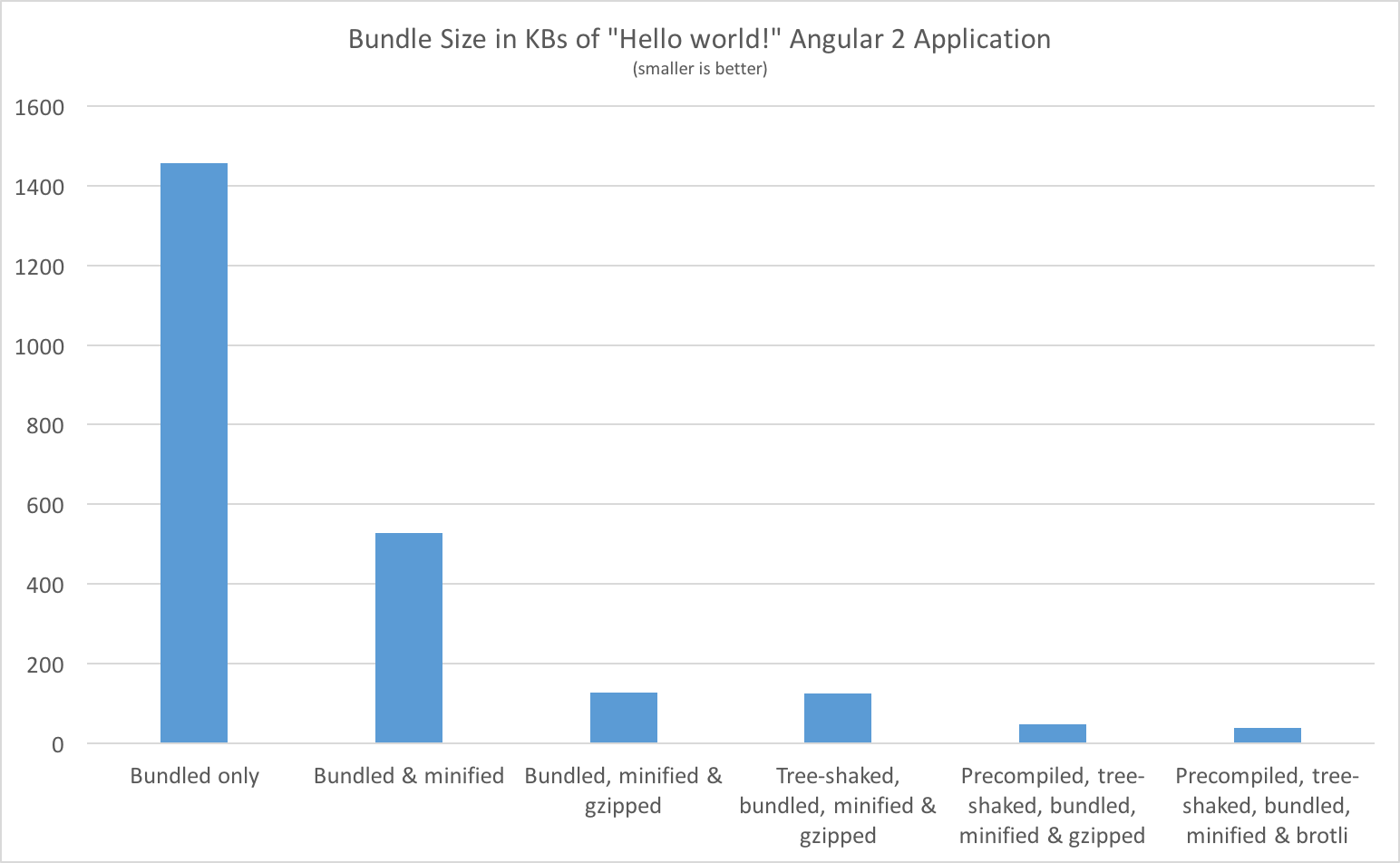
As we can see from the chart above, by applying a set of optimizations over our production bundle we can reduce the size of our application up to 36 times!
This is thanks to a couple of techniques:
Definitely there’s some overhead at first, before being able to get all the things going on in this process. Luckily, in the end, all this is going to happen automatically with tools like angular-cli, and angular-seed. For instance, angular-seed already allows AoT compilation of your applications which provide huge performance boost for the initial rendering of your app.
As a matter of fact, we are already planning to add automated production build, which performs all the listed steps above in angular-seed. This is definitely going to happen in near future and we’re already ready with most of the listed practices.
By then, we can easily reduce the bundle size to ~140K only by applying AoT, minification and compression!
此内容由惯性聚合(RSS阅读器)自动聚合整理,仅供阅读参考。 原文来自 — 版权归原作者所有。