


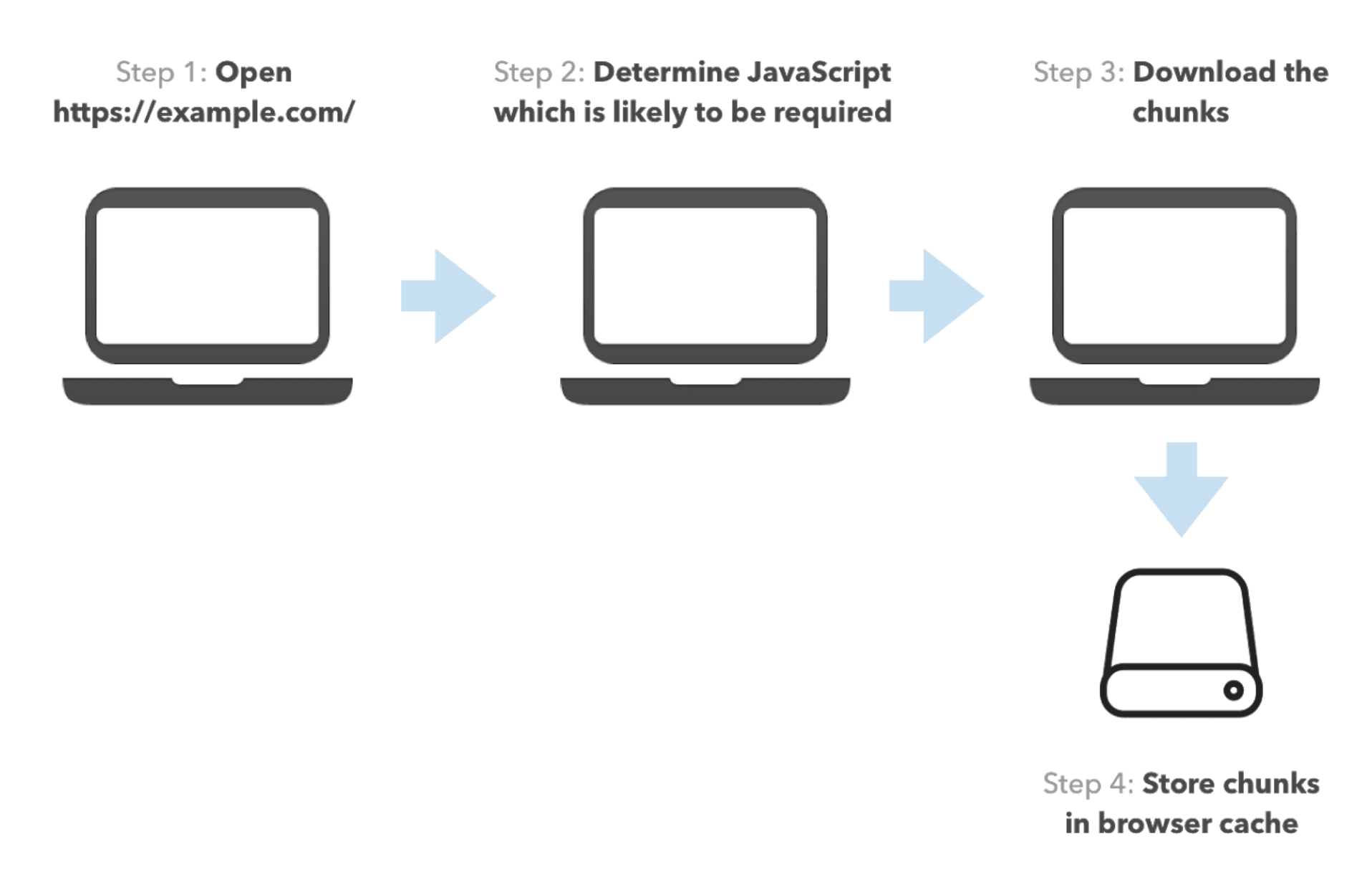
In this post, we’re going to focus on web performance. In particular, we’ll be discussing optimizing user experiences preemptively. When it comes down to speeding future actions up in Web UI development, we usually apply prefetching. With prefetching, we download and cache resources relying on assumptions for the user’s behavior. This way, we proactively perform a slow operation that the user would eventually have to execute while interacting with the app.
We can categorize different prefetching strategies based on three dimensions:
link[rel=prefetch], a service worker, or HTTP/2 server pushIn this post, we’ll focus on different prefetching heuristics. For simplicity, we’ll discuss script prefetching, although most of the strategies are applicable for other resources as well. We’ll also briefly discuss the advantages and disadvantages of different prefetching mechanisms.
Just like the solutions of any problem in software engineering, different prefetching heuristics have their trade-offs. A few dimensions we need to consider are:
We can define a heuristic accuracy by the ratio of the number of resources we provided to the user from the cache over the number of resources they requested. For example, if the user needed two scripts while interacting with the apps and had one of them in the cache, the accuracy is 1/2.
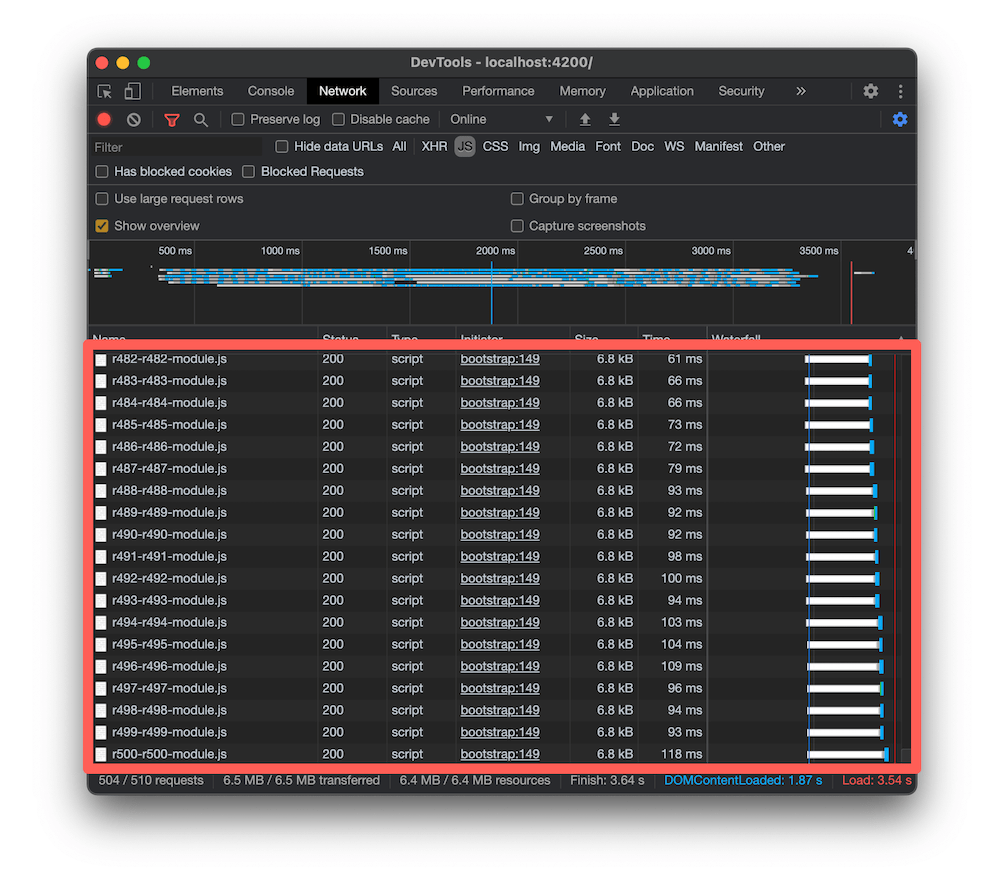
This dimension is pretty self-explanatory. The more aggressive a prefetching strategy is, the higher network usage it’ll have. Often folks ignore network usage giving arguments such as “Internet nowadays is fast and cheap!” or “Prefetching a few megabytes of scripts is not a big deal.” These assumptions could be accurate in some situations (for example, internal dashboards), but I’d argue that even in tech hubs such as Silicon Valley, high network usage can cause headaches.
For example, Google Fi charges $10 per gigabyte, which is ~1¢ per 10MBs. Knowing I’ll spend 1¢ just by visiting a web page that will aggressively prefetch resources I’d never need doesn’t seem like fair use of my money. The average internet user in the US surfs 138.1 pages a day, meaning you could spend $1 and 30¢ a day just browsing the web and downloading resources you’d never use.
High network usage
Some prefetching heuristics and mechanisms are more computationally intensive than others. For example, when you need to prefetch transitive dependencies of resources, you’d often have to parse them. Parsing is not a cheap operation and can cause frame drops when executed at the wrong time and faster battery consumption.
A prefetching heuristic could require a significant effort to set up. The setup effort does not only depend on the heuristic itself but also the underlying technologies. For example, Angular, Next.js, and Gatsby have static route declarations, which often allow a more straightforward setup for advanced prefetching strategies.
The smaller our app is, the faster it’ll load. Having a large prefetching algorithm that takes 500KB to 1MB might defeat its purpose in certain situations.
In this section, I’d want to introduce a few prefetching heuristics. The practices are mostly technology agnostic, so you should be able to apply them across the board. To make the article more practical, I’ve applied links to implementations for different frameworks.
In the article below I'll be using the terms prefetching and preloading interchangeably. In the context of link[rel=prefetch] and link[rel=preload] they have different meanings, but for the purpose of this article we won't need to go into prioritization.
In this table you can find a summary how the prefetching strategies from below compare to one another given the trade-offs from above:
| Heuristic | Accuracy | Network | CPU | Setup | Size |
|---|---|---|---|---|---|
| Prefetch all | High | High | High | Low | Low |
| Precaching | High | High | Low | Low | Low |
| Quicklink | High | Medium | Medium | Low | Low/Medium |
| Hover | Medium | Low | Low | Low | Low/Medium |
| Predictive | Medium/High | Low | Low | High | Medium/High |
Prefetching all resources has the highest accuracy but also the highest network and CPU usage. Usually, you can implement it in just a few lines of code, so it’ll not add up much to your bundles.
Angular has a preloading strategy called PreloadAllModules. The router will prefetch all lazy-loaded modules and all of their children’s routes using dynamic imports. The router needs to parse each preloaded module to discover its children’s routes, making the strategy very inefficient from a network usage point of view and CPU cycles. Check the profile below:
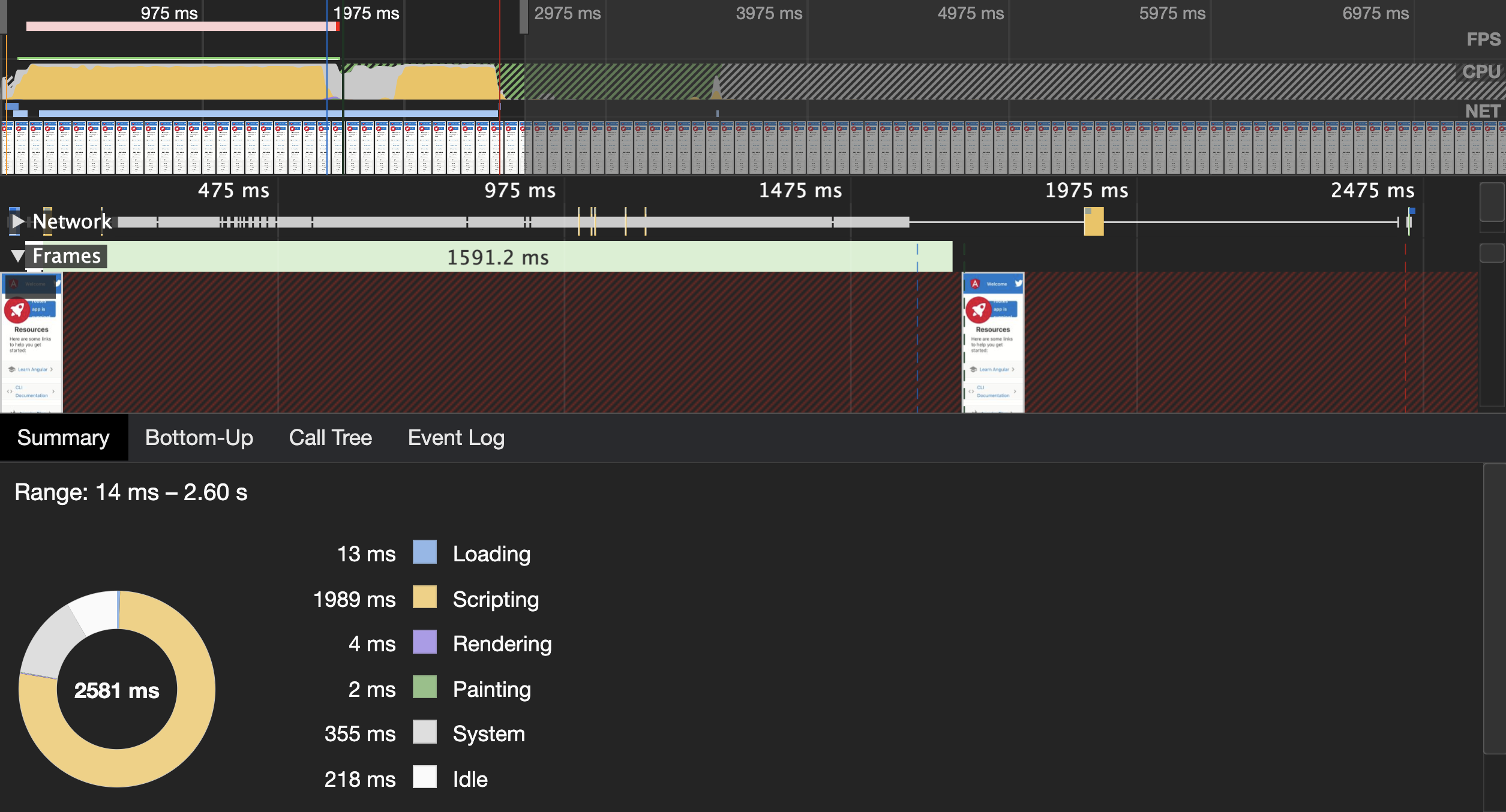
It is from an app with 500 automatically generated routes, which uses PreloadAllModules. It’s an artificial example but still shows accurately how inefficient this strategy could be in large apps.
Does this mean that you should never be using PreloadAllModules? No. If your app has a dozen routes or so, preloading all routes will not significantly negatively impact your users’ experience. At the same time, the setup cost and maintenance will be very low.
An alternative approach is using precaching with a service worker. By default, you’re getting this behavior from the Angular Service Worker. At build time, the Angular CLI will generate a manifest file with all your static assets and associated hash sums that the service worker will download and parse. At runtime, the service worker will download all the resources from the manifest and cache them.
This strategy is still costly in terms of network consumption, but it has a much lower impact on the CPU usage because it is not running in the main UI thread.

People often refer to this heuristic as “quicklink.” Instead of downloading all the app scripts, it relies on the IntersectionObserver API to download only the scripts associated with links visible on the page.

There are implementations which work with static pages and Angular.
This strategy is often much cheaper than prefetching all the modules, but it could still have significant CPU and network usage for some apps. For example, imagine a Wikipedia-like app where developers can go to 100 different pages. Prefetching all of them could consume lots of data.
I have another post which explains the Angular implementation and the trade-offs in depth.
With this heuristic, we start prefetching a page when the user hovers a corresponding link on the page. Usually, there is a 50-400ms delay before the user hovers the link and clicks it, which gives the browser enough time to start downloading the associated resources or at least initiate the chain of requests.
There are popular solutions implemented for different technologies. One of the most popular ones is instant.page. I recently implemented such a prefetching strategy for Angular.
This heuristic is relatively cheap in terms of network and CPU usage. I’d say that the majority of applications would benefit from using it.
Predictive prefetching is the most advanced heuristic. Based on user navigational patterns, we try to predict their subsequent action and download the resources we assume they need next. We can manually provide predictive prefetching instructions, hardcoding them in the source code, or use something like Guess.js.
I’ve written a lot about this strategy in the past in “Machine Learning-Driven Bundling. The Future of JavaScript Tooling” and “Introducing Guess.js - a toolkit for enabling data-driven user-experiences on the Web”.

Usually, the setup cost for this heuristic is higher. It requires integration with a data source that collects users’ journeys in the web app, and you need to plug it as part of the build process. Depending on the approach, predictive prefetching may also have a larger implementation size. Imagine you need to ship a TensorFlow model to predict user actions, for example. Guess.js takes a more straightforward approach, allowing it to send a distributed Markov chain that is relatively cheap and efficient, but it’s also less accurate than a more advanced model.
The apps which benefit from this prefetching heuristic are usually larger, with many pages where the navigation speed is critical. For example, e-commerce or content-heavy apps.
Often prefetching is a micro-optimization and a significant investment in this space could be a bad use of your time. I’d recommend using some of the off-the-shelf solutions already available for your technology. Going this way will provide low cost performance benefits.
Hover and quicklink prefetching works for the vast majority of web apps. I’d recommend starting with hover prefetching moving to quicklink approach if fast navigation is from a high-priority and you don’t have many links.
In case you’re building a complex app with a lot of possible transitions to other pages, predictive prefetching is something you may want to explore.
Hope you enjoyed this post! Until next time and happy coding!
此内容由惯性聚合(RSS阅读器)自动聚合整理,仅供阅读参考。 原文来自 — 版权归原作者所有。