


JavaScript is a weird language although, we love it the way it is. However, I’ve had quite a painful experience working on big JavaScript projects. It was painful in the same way it gets painful working on huge Ruby, Python, PHP projects.
Once you have code base above 10-15k lines of code and you decide to do some refactoring…well it gets messy. Although grep and sed are powerful tools for text manipulation, when you start replacing code with them, you’re missing the semantics (or the context) of the snippets you substitute.
Another common problem - you simply misspell a variable or property name and once in a while your code breaks telling you: undefined is not a function (alright, we passed these days…)
How we can deal with these problems using our favorite language? Well, writing a lot of tests may help. Testing everything is good but testing everything in order to make our refactoring process slightly smoother and staying away from typos…seems kind of unpractical and workaround.
What we can do is change the language we’re using. Replace it with something more powerful - TypeScript. TypeScript is JavaScript superset. Using TypeScript gives us a couple of benefits:
So you get smoother refactoring experience (yey!), faster code and a compiler, which can slap your hands if you misspell a property or a variable name. And the static typing - it is optional. If you don’t want to, you don’t need to provide type information (however, I’d recommend you to be consistent in most cases). You can learn more about TypeScript here.
However, famous frameworks and libraries, like React, AngularJS 1, Backbone, jQuery, etc. are not written in TypeScript so we don’t gain any benefits like auto-completion and type checking when using them.
On top of this React has this weird extension of JavaScript called JSX, which allows us to embed markup inside our JavaScript…
The guys from Microsoft, designing TypeScript, were quite smart and took the first problem under consideration. From the first version of the language were introduced the ambient type definitions. Basically, you can provide definition of the interface of an external library and include reference to it inside the files where you use it. This way you get type checking and text editors auto-completion support. How awesome is that?
In DefinitelyTyped you can find up-to-date type definitions for most libraries you may want to use. Once you got, lets say the React type definition, you can simply add a reference to it inside the files you use React like:
/// <reference path="react.d.ts" />

// ... your awesome code here
Alright, TypeScript introduced these ambient type definitions. Cool. However, this doesn’t solve our JSX problem. What if we want to use JSX inside our TypeScript & React project? Well, for a couple of weeks, I’m following this GitHub issue, which aims decoupling of TypeScript from JSX. A few days ago a patch was merged into the master branch of TypeScript, which allows to transform your TypeScript to JavaScript and keep your JSX markup or transpile it to React calls instead!
Install TypeScript and react via npm:
npm init
npm install typescript react
In order to verify that you’ve installed proper TypeScript version use:
./node_modules/typescript/bin/tsc --version
You should see output similar to:
message TS6029: Version 1.6.2
If npm have installed older version of TypeScript on any reason use:
npm install typescript@1.6.2
If you want have the TypeScript’s compiler as global executable (tsc) use:
npm install -g typescript
Now create an app directory and enter it:
Create a sample file called test.tsx (notice the extension tsx, it is mandatory) and add the following content:
/// <reference path="../typing/react.d.ts" />

import * as React from 'react';

class DemoProps {
  public name:string;
  public age:number;
}

class Demo extends React.Component<DemoProps, any> {
  private foo:number;
  constructor(props:DemoProps) {
    super(props);
    this.foo = 42;
  }
  render() {
    return <div>Hello world!</div>
  }
}
In the code above we defined a component called Demo. It accepts properties, which are instances of the class DemoProps and state, which could be of any kind.
Alright, we’re almost there!
Create a directory called typing inside the root of your project:
cd ..
mkdir typing
cd typing
Now take the React’s ambient type declaration from here and save it inside typing. Make sure the file is called react.d.ts. This will prevent us from getting any compile-time errors.
Now the directory structure should look like:
.
├── app
│   └── test.tsx
├── typings
│   └── react.d.ts
├── package.json
└── node_modules
The last step is to compile the test.tsx file:
cd ..
# This line will run the typescript compiler over your `test.tsx` file and
# output the transpiler content in `./app/test.js`
./node_modules/typescript/bin/tsc --jsx react --module commonjs ./app/test.tsx
Thats it. Now you can check out the content of ./app/test.js. There you should find the transpiled content.
Did you notice the --jsx option of the TypeScript compiler? It may accepts two different values:
react - Transpiles JSX to React callspreserve - Preserves the JSX the way it was defined in the source fileThe JSX support in TypeScript is part of the roadmap for version 1.6. This means that in the next a couple of weeks you won’t have to build TypeScript from scratch but use it with the standard build tools you’re used to.
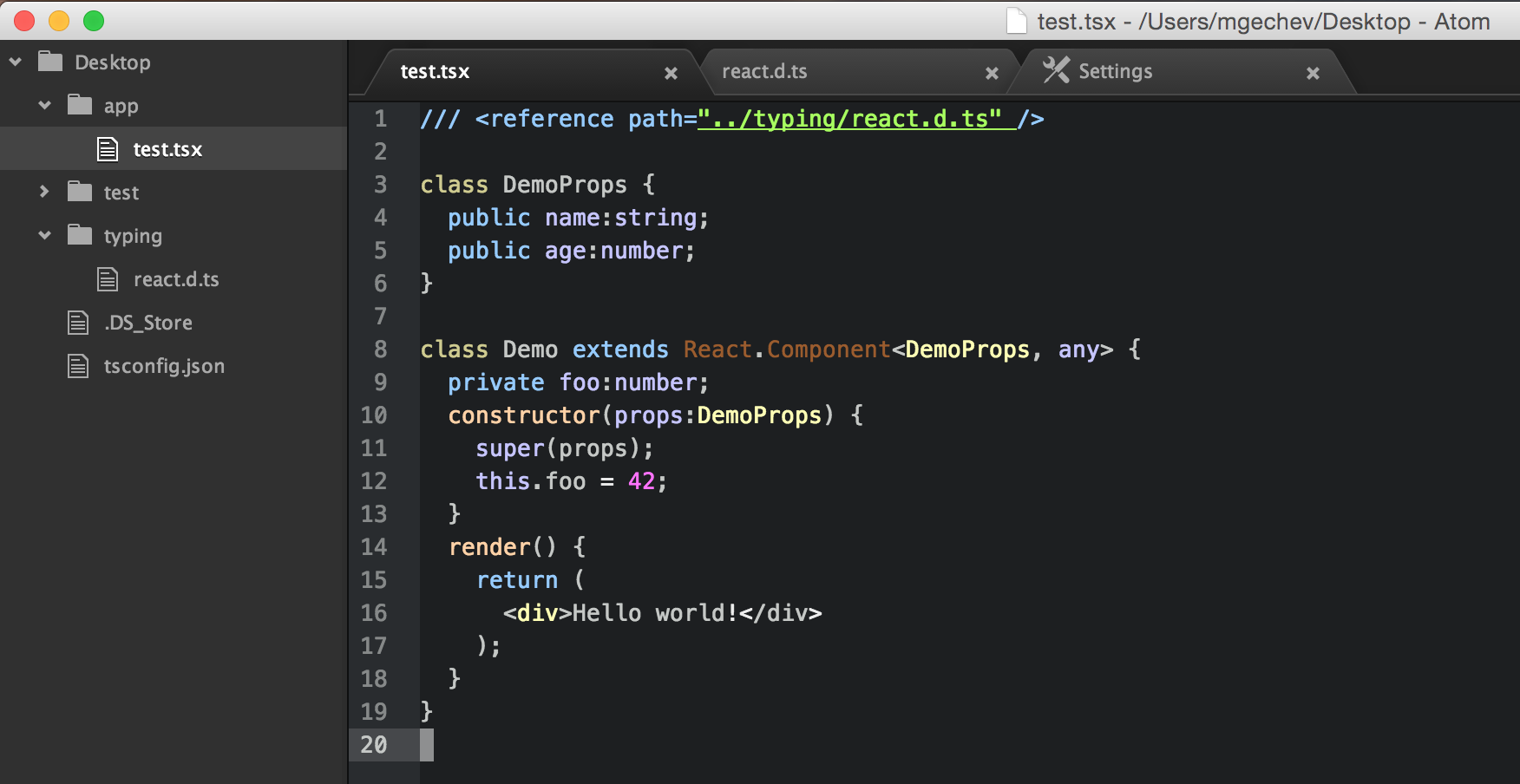
This is how you can use TypeScript with React and JSX for projects that scale. Support for tsx files is already implemented in atom-typescript. If you use Atom, you’ll see something like this:
此内容由惯性聚合(RSS阅读器)自动聚合整理,仅供阅读参考。 原文来自 — 版权归原作者所有。