
惯性聚合 高效追踪和阅读你感兴趣的博客、新闻、科技资讯
阅读原文 在惯性聚合中打开

推荐订阅源

U
Unit 42
P
Proofpoint News Feed
The Last Watchdog
The Last Watchdog
S
Secure Thoughts
cs.AI updates on arXiv.org
N
News | PayPal Newsroom
Application and Cybersecurity Blog
O
OpenAI News
S
Security @ Cisco Blogs
宝玉的分享
宝玉的分享
Hacker News: Ask HN
Hacker News: Ask HN
T
Troy Hunt's Blog
Google Online Security Blog
WordPress大学
WordPress大学
有赞技术团队
有赞技术团队
TaoSecurity Blog
TaoSecurity Blog
Help Net Security
Help Net Security
Latest news
Latest news
NISL@THU
NISL@THU
S
Security Affairs
博客园_首页
C
CXSECURITY Database RSS Feed - CXSecurity.com
博客园 - 聂微东
AI
AI
www.infosecurity-magazine.com
Recent Announcements
P
Privacy & Cybersecurity Law Blog
小众软件
小众软件
cs.CV updates on arXiv.org
Hugging Face - Blog
Hugging Face - Blog
博客园 - 司徒正美
AWS News Blog
AWS News Blog
W
WeLiveSecurity
Google DeepMind News
I
InfoQ
Schneier on Security
Recent Commits to openclaw:main
T
The Exploit Database - CXSecurity.com
IT之家
IT之家
T
Threatpost
Scott Helme
Scott Helme
L
LINUX DO - 热门话题
腾讯CDC
CTFtime.org: upcoming CTF events
N
News and Events Feed by Topic
L
LINUX DO - 最新话题
F
Full Disclosure
大猫的无限游戏
大猫的无限游戏
H
Heimdal Security Blog
S
SegmentFault 最新的问题

Minko Gechev's blog

skillgrade Unit Tests for AI Agent Skills You Should Care About AI Generative Development LLM-first Web Framework Reactive framework in ~200 lines of JavaScript Managing Angular Are LLMs going to replace us? Prefetching Heuristics Design Patterns in Open Source Projects - Part II Design Patterns in Open Source Projects - Part I What I learned doing 125 public talks - Part I Dynamic imports solve all the problems, right? 5 Angular CLI Features You Didn't Know About Angular quicklink Preloading Strategy Introducing Bazel Schematics for Angular CLI Building TypeScript Projects with Bazel Joining Google Playing Mortal Kombat with TensorFlow.js. Transfer learning and data augmentation Fast, extensible, configurable, and beautiful linter for Go Introducing Guess.js - a toolkit for enabling data-driven user-experiences on the Web Machine Learning-Driven Bundling. The Future of JavaScript Tooling. JavaScript Decorators for Declarative and Readable Code 3 Tricks For Using Redux and Immutable.js with TypeScript Follow Your Dream Career with Open Source. Personal Story. Redux Anti-Patterns - Part 1. State Management. Faster Angular Applications - Understanding Differs. Developing a Custom IterableDiffer Faster Angular Applications - Part 2. Pure Pipes, Pure Functions and Memoization Faster Angular Applications - Part 1. On Push Change Detection and Immutability Understanding Dynamic Scoping and TemplateRef Implementing a Simple Compiler on 25 Lines of JavaScript Developing Statically Typed Programming Language WebVR for a Gamified IDE 7 Angular Tools That You Should Consider Announcing ngrev - Reverse Engineering Tool for Angular Implementing Angular's Dependency Injection in React. Understanding Element Injectors. Distributing an Angular Library - The Brief Guide Angular in Production Ahead-of-Time Compilation in Angular 2.5X Smaller Angular 2 Applications with Google Closure Compiler Using Stripe with Angular (Deprecated) Building an Angular Application for Production Implementing the Missing "resolve" Feature of the Angular 2 Router Scalable Single-Page Application Architecture Managing ambient type definitions and dealing with the "Duplicate identifier" TypeScript error Static Code Analysis of Angular 2 and TypeScript Projects Enforcing Best Practices with Static Code Analysis of Angular 2 Projects ViewChildren and ContentChildren in Angular Dynamically Configuring the Angular's Router Angular 2 Hot Loader Lazy Loading of Route Components in Angular 2 Aspect-Oriented Programming in JavaScript Flux in Depth. Store and Network Communication. Using JSX with TypeScript Flux in Depth. Overview and Components. Even Faster AngularJS Data Structures Boost the Performance of an AngularJS Application Using Immutable Data - Part 2 Angular2 - First Impressions Build Your own Simplified AngularJS in 200 Lines of JavaScript Persistent State of ReactJS Component Boost the Performance of an AngularJS Application Using Immutable Data Processing Binary Protocols with Client-Side JavaScript Stream your Desktop to HTML5 Video Element Multi-User Video Conference with WebRTC Asynchronous calls with ES6 generators Binary Tree iterator with ES6 generators WebRTC chat with React.js AngularJS in Patterns (Part 3) AngularJS in Patterns (Part 2). Services. Using GitHub Pages with Jekyll! AngularJS in Patterns (Part 1). Overview of AngularJS Singleton in JavaScript Express over HTTPS What I get from the JavaScript MV* frameworks Remote Desktop Client with AngularJS and Yeoman The magic of $resource (or simply a client-side Active Record) AngularJS Inheritance Patterns AngularAOP v0.1.0 Advanced JavaScript at Sofia University AngularJS style guide Lazy prefetching of AngularJS partials VNC client on 200 lines of JavaScript Aspect-Oriented Programming with AngularJS CSS3 flipping effect Practical programming with JavaScript Why I should use publish/subscribe in JavaScript JavaScript, the weird parts Functional programming with JavaScript plainvm Looking for performance? Probably you should NOT use [].sort (V8) JavaScript image scaling ELang Self-invoking functions in JavaScript (or Immediately Invoked Function Expressions) Asus N56VZ + Ubuntu 12.04 (en) Asus N56VZ + Ubuntu 12.04 Debian Squeeze + LXDE on Google Nexus S (or having some fun while suffering) HTML5 image editor Курсови проекти – ФМИ Carousel Gallery SofiaJS...
Caching CSS with localStorage
2012-09-04 · via Minko Gechev's blog

Since HTML5 became wide supported the most popular aspects I hear about were it’s canvas, WebSockets and localStorage. I’ve got very close experience with the first two of the mentioned but the localStorage was somehow unknown for me since a month. I’ve researched the topic. Actually it’s quite interesting and useful as you might guess. Using localStorage you can save different kinds of data locally into key-value pairs. The data lives on your local machine until it’s deleted (cleared). The localStorage allows you to use more storage than cookies and have no expiration interval (the expiration completely depends on the user). As you might guess again the data stored into the localStorage is saved on the hard drive. May be you know that it’s very expensive to take data from the hard drive because of the mechanical movements required for buffering the data. The localStorage size depends on the implementation. In Chrome, Firefox, Opera and Safari you can use 5 MBs. Actually it’s enough for caching all the CSS and JavaScript of your webpage (I really hope so).

Here comes the topic about the inline and referential CSS. As you know the inline CSS prevents you from many HTTP requests to the server but also prevents from caching. Which is the “bigger evil”? It depends on how big is your website, CSS and JavaScript. For bigger websites it’s not recommended to inline your CSS because you throw away the browser’s caching which very often is your biggest friend (when you’re looking for performance).

But what happens when the browser cache is empty, all your content isn’t cached and everything should be downloaded again? Well definitely an impact on the performance. How can be prevented? As you will see the localStorage is a sample solution. Of course you’ve got to be careful with the impact of the slower hard drives (slower than the memory) so you have to take as much data as possible with a single localStorage.getItem “request”. Browser’s cache is cleverer than our use of the localStorage but anyway. But how much can this feature of HTML5 can improve our performance? The line chart below is shows the time required for downloading all resources from an empty page with just six CSS files included.

The test is made using Google Chrome Version 20.0.1132.57.
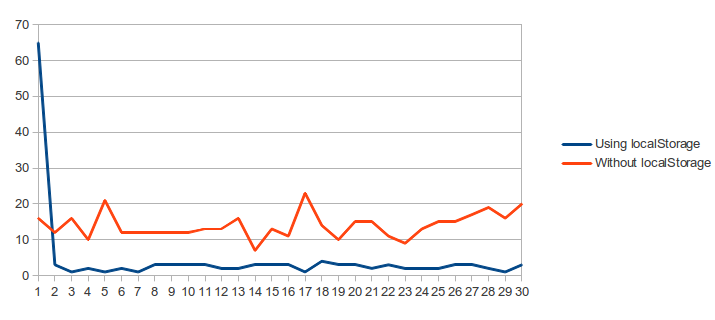
With the blue line is the variant using localStorage. The red line is using referential CSS (not inline).

For the localStorage caching I’ve wrote a simple script that checks whether the mentioned file is already into the localStorage, if it is it’s content is put inside a style element and added into the DOM tree (actually all CSS files are added into one step because of improving the performance). If the file is not into the localStorage, using XMLHttp request, it’s content is loaded and cached. The thing that isn’t considered here: multiple localStorage.getItem calls which are not preferable because of the hard drive latency.

As you see the difference is big enough. The average time required to load the page using localStorage cache is 4.47 ms versus 14 ms required for loading the page without localStorage cache.

The most critical stage for our local storage caching is when the page is loaded for first time. There’s a big overhead because of the XMLHttp requests which get the CSS.

This is just the half of the most exiting part. The impact on the time required for onload event to be fired is shown on the chart below.

The X-axis is the test ID and the Y-axis is the time required in ms. As you see here the browser’s caching wins. The average score for the localStorage is 42.19 versus 29.81.
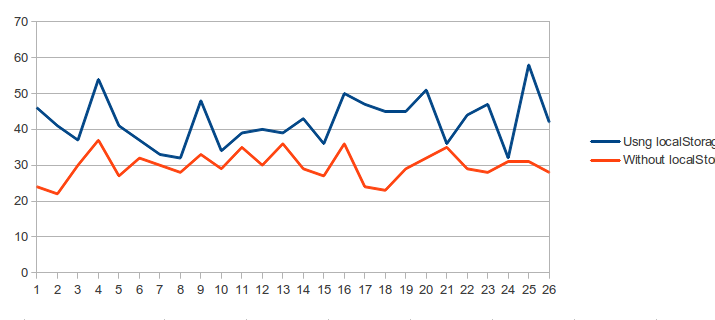
Time required for onload event to be fired. X axis is the test ID and the Y axis time in ms.

As conclusion I can said that it’s a matter of choice and need which approach will be chosen. If use a lot of CSS files may be reducing the HTTP requests will be preferable but also collecting all the files as different key value pairs into the localStorage, like in the example above, is not very recommended because of the hard drive latency. In any case your choice should be well considered and tested because the performance impact may be critical.