


Edit · May 21, 2016 · 14 minutes read · Follow @mgechev JavaScript Angular 2 Router
For the last a couple of months I’m working on an Angular 2 based PWA. The more complex the application gets, the more I appreciate that our choice was Angular! For routing we’re using the initial Angular 2 router that is now deprecated. For sure we will migrate to the newest one once it gets stable but until then we have some problems to solve.
One of the features that I miss most in both the new and the newest Angular 2 routes is the resolve functionality which the AngularJS 1.x router and the ui-router offer. In short, this functionality allows your application to load data on navigation events and render the routing component once the data has been successfully downloaded.
With the router-deprecated module we can get similar behavior by using @CanActivate decorator, unfortunately we cannot take advantage of the dependency injection mechanism without any dirty hacks.
In this article I’ll explain what solution we use until the resolve functionality is supported. Demo of the final result can be found here. The code associated to this article is at my GitHub account.
Disclaimer: This article is mostly for learning purposes. It uses already deprecated Angular 2 module and offers a custom solution which most likely will not be supported in future.
The article is structured in the following way:
- Background for the problem that we need to solve (and this section is already over :-)).
- Discussion of the API design of the solution.
- Explanation of example that uses the defined API.
- Background on how the deprecated Angular 2 router works.
- Implementation of the missing feature.
- A few words on how to use the router with the missing feature included.
- Conclusion.
If you’re not interested in implementation details I’d recommend you to skip section 5.
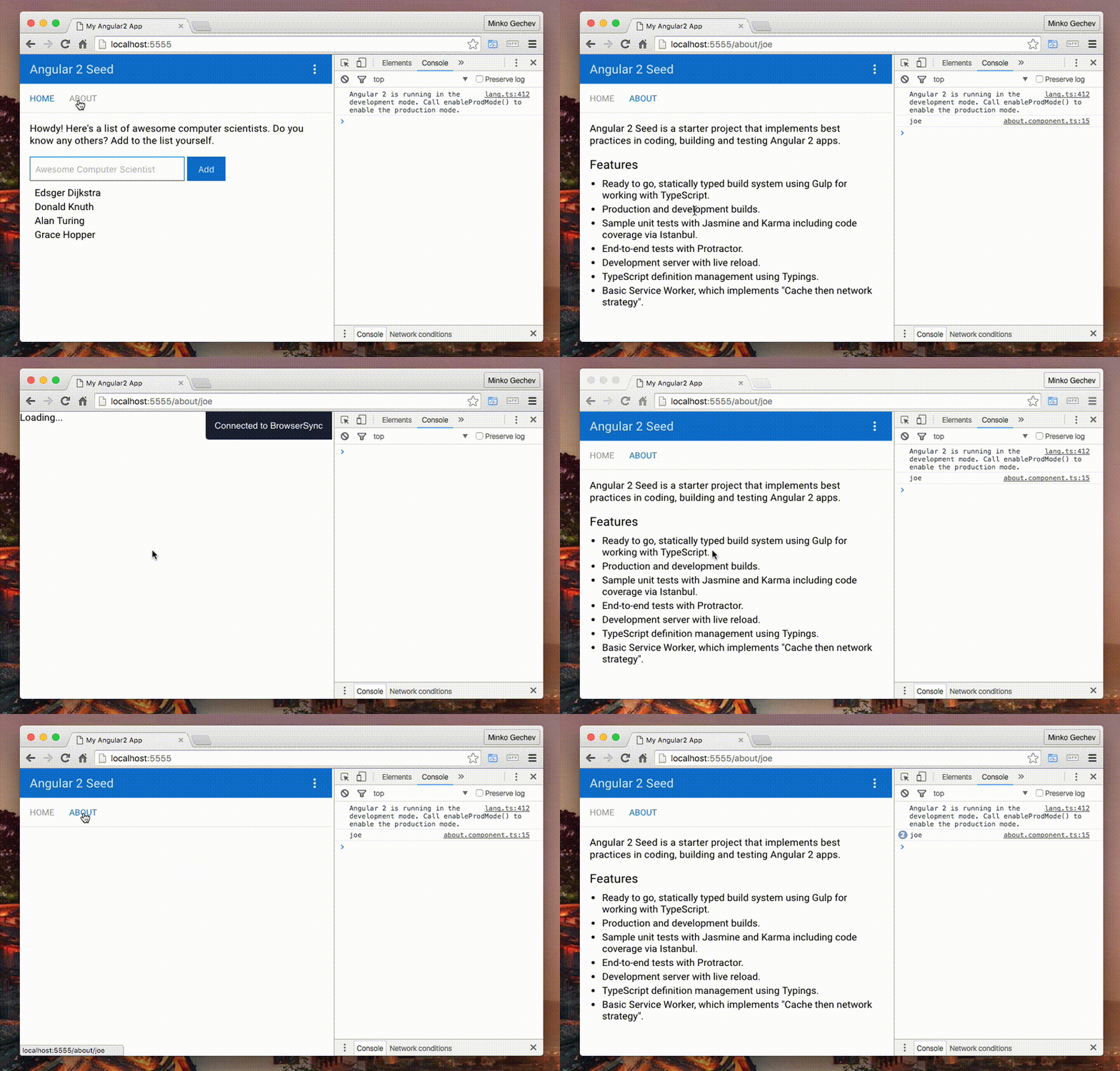
Demo
Here’s demo of final result of our implementation:
API Design
Using the deprecated router we can define our routing configuration by:
@Component(...)
@RouteConfig([
  {
    path: '/',
    name: 'Home',
    component: HomeComponent
  },
  {
    path: '/about/:name',
    name: 'About',
    component: AboutComponent
  }
])
export class AppComponent {}
Our goal is to be able to perform an asynchronous action on which given routing component depends before the component gets rendered. For instance, we may want to load the profile of the user associated with the :name parameter in the About route, before the AboutComponent gets rendered.
This means that we need to alter additional configuration data to the route definition objects:
@Component(...)
@RouteConfig([
  {
    path: '/',
    name: 'Home',
    component: HomeComponent
  },
  {
    path: '/about/:name',
    name: 'About',
    component: AboutComponent,
    defer: () => {
      return User.loadUsers();
    }
  }
])
export class AppComponent {}
Once the user navigates to /about/:joe, for instance, we will load all the users by using the loadUsers static method of the User service. This solution isn’t much better compared to @CanActivate because we’re not taking advantage of the Angular 2’s DI mechanism.
A better API will be:
@Component(...)
@RouteConfig([
  {
    path: '/',
    name: 'Home',
    component: HomeComponent
  },
  {
    path: '/about/:name',
    name: 'About',
    component: AboutComponent,
    defer: {
      resolve: (model: User, params: RouteParams) => {
        return model.loadUser(params.get('name'));
      },
      deps: [User, RouteParams]
    }
  }
])
export class AppComponent {}
Although the route definition above looks a bit more complex at first, it provides great flexibility! First - we have access to all the registered in our Injector dependencies, second - we have access to all the local dependencies associated with the given route (RouteParams in this case).
Once the user navigates to /about/:joe, the resolve method of the defer object will be invoked, but before that, all the dependencies passed to the deps array will be instantiated in order to be passed to resolve. Based on the passed dependencies, the resolve method will call the model’s loadUser method with joe as argument. Once the promise returned by the loadUser method gets resolved, the component AboutComponent will be rendered.
Why to make the resolve method return a promise, why not observable instead? Observables will give us much greater flexibility (in case the loadUser method fails we can retry or we can just stop the request, etc, good discussion on this topic can be found here) but provide more complex API.
Now, in order to follow the API introduced by AngularJS 1.x more strictly and provide the entire functionality it has we can modify the interface of the defer property to:
@Component(...)
@RouteConfig([
  {
    path: '/',
    name: 'Home',
    component: HomeComponent
  },
  {
    path: '/about/:name',
    name: 'About',
    component: AboutComponent,
    defer: {
      user: {
        resolve: (model: User, params: RouteParams) => {
          return model.loadUser(params.get('name'));
        },
        deps: [User, RouteParams]
      },
      auth: {
        resolve: (auth: Auth, params: RouteParams) => {
          return auth.isAuthorized(params.get('name'));
        },
        deps: [Auth, RouteParams]
      }
    }
  }
])
export class AppComponent {}
Later we will be able to inject the “deferred” parameters to our component’s constructor like:
@Component(...)
class AboutComponent {
  constructor(@Inject('user') user: User, @Inject('auth') isAuthorized: boolean) {
    // ...
  }
}
Notice that the tokens of the dependencies are the keys associated to the specific deferred properties in the defer configuration object.
Sweet!
Simple example
In order to get a better idea of what we want to achieve, lets take a look at a specific example based on the angular2-seed. You can find the code for the demo here.
Lets define our base component:
@Component(...)
@RouteConfig([
  {
    path: '/',
    name: 'Home',
    component: HomeComponent
  },
  {
    path: '/about/:name',
    name: 'About',
    component: AboutComponent,
    defer: {
      name: {
        resolve: (params: RouteParams) => {
          return new Promise((resolve, reject) => {
            setTimeout(() => resolve(params.get('name')), 2000);
          });
        },
        deps: [RouteParams]
      }
    }
  }
])
export class AppComponent {}
Inside of it we define an About route which has a defer property. In the resolve function we return a promise which we resolve after two seconds with the value of the name routing parameter, gotten from the RouteParams’s instance.
In order to get the value that we resolved the promise with we can do the following:
import { Component, Inject } from '@angular/core';

@Component(...)
export class AboutComponent {
  constructor(@Inject('name') name: any) {
    console.log(name);
  }
}
Once the user navigates to /about/:name in 2 seconds we’ll see the value of the :name parameter logged in the console. Notice that the value of the token we inject is the same as the key inside of the defer property in the route definition object.
For demo take a look here.
Now lets start our…implementation! But before that…
Background
In order to get a better understanding be the content below, lets make a quick introduction to how the Angular router works.
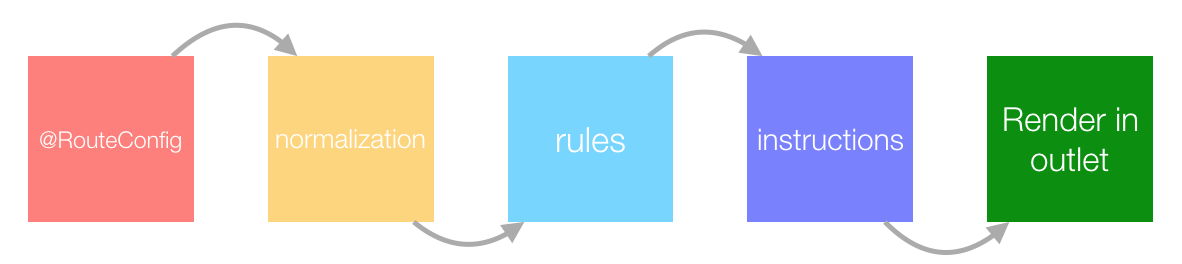
- First the user declares her routing configuration in the
@RouteConfigdecorator. - After that the input goes through normalization.
- As next step the routing objects get translated to routing rules.
- On navigation the router creates different navigation instructions.
- In the end the
router-outletrenders the target component by using a specific sequence of instructions.
This means that we need to go through the following steps:
- Allow the route definition objects to carry information about how we should perform the async actions.
- Keep this information in the route rules and instructions.
- Just before we render the component in the
router-outletwe’ll need to perform the async actions and get the result.
Implementation
Step 1
As first step we will fork the router-deprecated module located here and removed all *.dart files (sorry Dart…you complicate the things too much with all the facades required for you…).
Since we want to provide slightly different APIs for routes definition we need to modify the route_definition.ts file:
export interface RouteDefinition {
  // All the properties we're familiar with...
  defer?: Defer;
}

export interface Defer {
  [key: string]: DeferredFactory;
}

/**
 * An object which needs to be resolved until we are able to render the route component.
 *
 * @example
 * const baz: DeferredFactory = { resolve: () => Promise.resolve(), deps: [] };
 */
export interface DeferredFactory {
  resolve: (...deps: any[]) => Promise<any>;
  deps?: any[];
}
The only new property we introduced here is an optional one called defer. It must be an object having the “shape” defined by the Defer interface. On the other hand, the Defer interface defines a set of key-value pairs with strings as keys and objects of type DeferredFactory as values. We will be able to inject the values gotten from the resolved promises, returned by the resolve functions, by using the tokens associated with the DeferredFactory instance. Notice that we also have a deps property inside of the DeferredFactory. This array contains a list of tokens that we want to be injected inside of the resolve function.
Doesn’t the DeferredFactory interface look similar to a factory provider definition?
new Provider(String, { useFactory: (value) => { return "Value: " + value; },
                    deps: [Number] })
Hell yeah! We are going to use a list of providers like this one once when we reach the point when we need to resolve all the deferred values. The benefits we get here:
- We are able to inject dependencies associated to any token.
- After minification everything is going to work since we’re passing tokens which are either direct references to the dependencies instances of which we want to invoke, or references to any other tokens which will not be influenced by minification.
Step 2
Notice that in the RouteDefinition the deps property is optional. This means that our router can break in case the user doesn’t provide value for it, in any of the deferred factories. That is why we need to normalize the route definition in the route_config_normalizer.ts file. This module provides a method called normalizeRouteConfig which accepts a RouteDefinition object and normalizes it depending on the properties it has. What we’d do here is:
export function normalizeRouteConfig(config: RouteDefinition,
                                     registry: RouteRegistry): RouteDefinition {
  if (!config.defer) {
    config.defer = {};
  } else {
    Object.keys(config.defer).forEach(key => {
      let d = config.defer[key];
      d.deps = d.deps || [];
    });
  }
  // ...
}
Above we define a dummy defer object in case the user hasn’t provided one. On the other hand, if we have definitions of deferred factories we loop over all of them and set the deps property to an empty array in case it is not defined or has a falsy value.
The normalizeRouteConfig method is also responsible for creating different route definition objects such as AsyncRoutes and Routes. In order to not loose the defer property from our RouteDefinition we need to pass it to the constructors of any RouteDefinition-like class:
...
if (componentDefinitionObject.type == 'constructor') {
  return new Route({
    path: config.path,
    component:<Type>componentDefinitionObject.constructor,
    name: config.name,
    data: config.data,
    useAsDefault: config.useAsDefault,
    defer: config.defer
  });
} else if (componentDefinitionObject.type == 'loader') {
  return new AsyncRoute({
    path: config.path,
    loader: componentDefinitionObject.loader,
    name: config.name,
    data: config.data,
    useAsDefault: config.useAsDefault,
    defer: config.defer
  });
} else {
  throw new BaseException(
      `Invalid component type "${componentDefinitionObject.type}". Valid types are "constructor" and "loader".`);
}
...
Everything so far works fine, except that the Route and AsyncRoute’s constructors need to preserve/handle this defer property somehow.
Step 3
There’s an abstract class called AbstractRoute which defines the base functionality for all the different route types. In order to make this class keep a reference to the defer value we need to:
export abstract class AbstractRoute implements RouteDefinition {
  name: string;
  useAsDefault: boolean;
  path: string;
  regex: string;
  serializer: RegexSerializer;
  data: {[key: string]: any};
  defer: Defer;

  constructor({name, useAsDefault, path, regex, serializer, data, defer}: RouteDefinition) {
    this.name = name;
    this.useAsDefault = useAsDefault;
    this.path = path;
    this.regex = regex;
    this.serializer = serializer;
    this.data = data;
    // It went through the normalizer
    this.defer = defer;
  }
}
The only three differences from the original implementation here are:
- We declare one more property of the class called
defer. - In the destructuring in the
constructorwe get one more property from the passed object, calleddefer. - We assign the value passed by the
defervariable to thedeferproperty of the route.
The rest of the changes we need to make are in the Route and AsyncRoute classes, were we should to pass the defer property to the base constructor call.
Step 4
Now, first add a _defer property to the RouteRule class like this:
export class RouteRule implements AbstractRule {
  // ...
  constructor(private _routePath: RoutePath, public handler: RouteHandler,
              private _routeName: string, private _defer: Defer) {
    this.specificity = this._routePath.specificity;
    this.hash = this._routePath.hash;
    this.terminal = this._routePath.terminal;
  }
  // ...
}
We need to do the same for the AsyncRoute.
From the diagram above we can notice that the route definition objects get translated to route rules. In order to preserve the defer definition object in the rules we need to do the following:
In rule_set.ts include the route’s defer property in the RouteRule instantiation process:
// ...
let newRule = new RouteRule(routePath, handler, config.name, config.defer);
// ...
The RouteRule class has a private _getInstruction method, which based on the state of the RouteRule instance and passed arguments returns an instruction. We need to update its implementation to:
private _getInstruction(urlPath: string, urlParams: string[],
                        params: {[key: string]: any}): ComponentInstruction {
  if (isBlank(this.handler.componentType)) {
    throw new BaseException(`Tried to get instruction before the type was loaded.`);
  }
  var hashKey = urlPath + '?' + urlParams.join('&');
  if (this._cache.has(hashKey)) {
    return this._cache.get(hashKey);
  }
  var instruction =
      new ComponentInstruction(urlPath, urlParams, this.handler.data, this.handler.componentType,
                               this.terminal, this.specificity, params, this._routeName, this._defer);
  this._cache.set(hashKey, instruction);
  return instruction;
}
We’re done with most of the work!
Step 5
The final, and the most exciting step is this one! In order to render the routing component once the associated with it data is resolved, we need to update the router-outlet directive. Open the file router_outlet.ts and take a look at the activate method:
// ...
activate(nextInstruction: ComponentInstruction): Promise<any> {
  var previousInstruction = this._currentInstruction;
  this._currentInstruction = nextInstruction;
  var componentType = nextInstruction.componentType;
  var childRouter = this._parentRouter.childRouter(componentType);

  var providers = ReflectiveInjector.resolve([
    provide(RouteData, {useValue: nextInstruction.routeData}),
    provide(RouteParams, {useValue: new RouteParams(nextInstruction.params)}),
    provide(routerMod.Router, {useValue: childRouter})
  ]);
  this._componentRef =
      this._loader.loadNextToLocation(componentType, this._viewContainerRef, providers);
  return this._componentRef.then((componentRef) => {
    this.activateEvents.emit(componentRef.instance);
    if (hasLifecycleHook(hookMod.routerOnActivate, componentType)) {
      return this._componentRef.then(
          (ref: ComponentRef<any>) =>
              (<OnActivate>ref.instance).routerOnActivate(nextInstruction, previousInstruction));
    } else {
      return componentRef;
    }
  });
}
// ...
The activate method accepts an instruction and renders the component associated with it once it gets available (i.e. its template is loaded, etc.).
Notice that inside of the method is created a custom set of providers which include the RouteData associated with the given route, as well as RouteParams and the Router. After that the activate method loads the target component next to the router-outlet directive. It does this with the DynamicComponentLoader by taking all the defined above providers plus all the providers which reside in the _viewContainerRef (for a reference take a look here).
Now we can use the defer property of the nextInstruction which is accessible via:
const defer = nextInstruction.defer;
In order to invoke the resolve method of the defer object in the context of the current injector (which includes providers for RouteData and RouteParams) we can:
// ...
var commonProviders = [
  provide(RouteData, {useValue: nextInstruction.routeData}),
  provide(RouteParams, {useValue: new RouteParams(nextInstruction.params)}),
  provide(routerMod.Router, {useValue: childRouter})
];
var tokens = Object.keys(defer);
var localProviders = tokens.map((token: string) => {
  var current = defer[token];
  return provide(token, {
    useFactory: current.resolve,
    deps: current.deps
  });
});
var providers = ReflectiveInjector.resolve(commonProviders.concat(localProviders));
var parentInjector = this._viewContainerRef.parentInjector;
var injector = ReflectiveInjector.fromResolvedProviders(providers, parentInjector);
// ...
This way we create an injector which has all providers from the _viewContainerRef (which are all the providers visible at this position of the component tree), as well as all the local ones. In order to instantiate all the providers associated with the keys in the defer object we can:
var deferPromises = tokens.map((token: string) => injector.get(token))
…which will return an array of promises. We can wait for all promises to be resolved by using Promise.all. Once the promise returned by Promise.all is resolved we are supposed to activate the component so in the end we’ll have:
// ...
return deferPromises.then((data) => {
  localProviders = tokens.map((token: string, idx: number) => {
    return provide(token, {
      useValue: data[idx]
    });
  });
  var deferResolvedProviders = ReflectiveInjector.resolve(commonProviders.concat(localProviders));
  this._componentRef =
      this._loader.loadNextToLocation(componentType, this._viewContainerRef, deferResolvedProviders);
  return this._componentRef.then((componentRef) => {
    this.activateEvents.emit(componentRef.instance);
    if (hasLifecycleHook(hookMod.routerOnActivate, componentType)) {
      return this._componentRef.then(
          (ref: ComponentRef<any>) =>
              (<OnActivate>ref.instance).routerOnActivate(nextInstruction, previousInstruction));
    } else {
      return componentRef;
    }
  });
}, (e) => {
  throw e;
});
If the promise gets rejected we throw the error gotten from it. An important thing to notice is that we invoke the loadNextToLocation method with different set of providers. To the keys used in the defer object we associate values instead of factories. These are the values gotten from the resolved promises returned by the factories. We don’t want the users of our router to be able to inject the promises in the constructors of their components, but only the data that they were resolved to.
How to use?
You can install the modified router using:
npm i git://github.com/mgechev/ng2-router.git#dist
For a project which uses the modified router take a look at the following repository.
Conclusion
This article was mostly for learning purposes.
The provided solution is something that we use in our Angular 2 application but only until we get this feature implemented by the newest Angular 2 router itself. I would not recommend you to introduce this modified version of the deprecated Angular 2 router as dependency of your project.