


Edit · Apr 11, 2015 · 11 minutes read · Follow @mgechev Immutable.js JavaScript AngularJS Benchpress
A few weeks ago I posted the article “Boost the Performance of an AngularJS Application Using Immutable Data”. It shows how to speedup your AngularJS application when having a lot of bindings to big data collections. The idea behind the optimization is quite simple - create a new collection when the data changes. This way you can reduce the watchers execution from O(n) to O(1).
In the post I did simple profiling using the built-in Date but it didn’t give enough information in exactly which cases it is more suitable to use immutable data and when you should bet on the standard collections. It also didn’t include any information about the garbage collection, although we know that using immutable collections will eventually lead to highly intensive memory management. All the code for the benchmarks and the charts generation is available in my GitHub account.
On ng-conf 2015, Jeff Cross, gave a talk about Benchpress, which fits perfectly in my profiling purposes. Basically, benchpress uses the WebDriver for Selenium, through protractor to profile your application. It can run multiple samples of the code you want to profile in order to take the mean and give you a meaningful result. It also includes a few output values, most useful in our case are:
scriptTime- the execution time of your scriptgcTime- time required for garbage collection of given sample
Benchpress can render the output of the benchmarks as tables, printed onto the stdout or save it into json files.
Benchmarks
With every collection you can have the following primitive operations:
- Create collection
- Read collection
- Update collection
- Delete collection
We can read given collection in JavaScript or render it inside a template. If we get a new collection each time we change (update) the current one, we have an immutable collection. This means that if we want to check if the collection have changed compared to the last time we’ve seen it we simply need to compare the current reference of the collection with the previous one (before the change was made):
let list = Immutable.List([1, 2, 3]);
let changed = list.set(1, 3);
console.log(list === changed); // false
Side note
*But what if:
var a = [1, 2, 3];
function changeA() {
  a = [1, 2, 3];
}
var oldA = a;
changeA();
console.log(a === oldA); // false
console.log(angular.equals(a, oldA)); // true
So, if we strictly want to perform given action only when the structure of the collection or the data inside it have changed (not only the reference) we will need to loop over both collections (old one and new one) and check whether they contains the same data.*
If we delete, update or create additional entries in the collection, this is considered as update. If we use immutable data, a new collection will be returned on each such manipulation:
let list = Immutable.List([1, 2, 3]);

// update
let list1 = list.set(1, 42);
console.log(list === list1); // false
console.log(list.toJS()); // [ 1, 2, 3 ]
console.log(list1.toJS()); // [ 1, 42, 3 ]

// remove
let list2 = list.delete(0);
console.log(list === list2); // false
console.log(list.toJS()); // [ 1, 2, 3 ]
console.log(list2.toJS()); // [ 2, 3 ]

// insert (create entry)
let list3 = list.push(4);
console.log(list === list3); // false
console.log(list.toJS()); // [ 1, 2, 3 ]
console.log(list3.toJS()); // [ 1, 2, 3, 4 ]
That said, we can build a sample script, which will be used for profiling. Initially we will create a single collection and attach watchers to it. Once this is done, protractor will start clicking a button, which will update a random element of the collection. Here is our SampleCtrl, which is responsible for initialization and handling the update requests:
var benchmarks = angular.module('benchmarks', ['immutable']);

function SampleCtrl($scope, $location) {
  'use strict';
  var dataSize = parseInt($location.search().dataSize, 10);
  var bindingsCount = parseInt($location.search().bindingsCount || 0);
  var watchers = {
    immutable: [],
    standard: []
  };

  function addWatchers(expr, count, collection) {
    for (var i = 0; i < count; i += 1) {
      collection.push($scope.$watch(function () {
        return $scope[expr];
      }, function () {
      }, false));
    }
  }

  function addCollectionWatchers(expr, count, collection) {
    for (var i = 0; i < count; i += 1) {
      collection.push($scope.$watchCollection(expr, function () {
      }));
    }
  }

  function clearWatchers(watchers) {
    var listeners = watchers || [];
    listeners.forEach(function (l) {
      l();
    });
  }

  // Math.random() returns element in the interval [0, 1)
  function generateRandomIndx(length) {
    return Math.floor(Math.random() * length);
  }

  // Updates the current value of the `standard` collection
  $scope.updateStandard = function () {
    if (!$scope.standard) {
      $scope.standard = generateData(dataSize);
    } else {
      var idx = generateRandomIndx(dataSize);
      $scope.standard[idx] = Math.random();
    }
  };

  // Updates the current value of the `immutable` collection
  $scope.updateImmutable = function () {
    if (!$scope.immutable) {
      $scope.immutable = Immutable.List(generateData(dataSize));
    } else {
      // We can cache the plain collection here
      var idx = generateRandomIndx(dataSize);
      $scope.immutable = $scope.immutable.set(idx, Math.random());
    }
  };

  // In case we are running benchmark, which changes the array
  if ($location.search().testType === 'update') {
    var dataType = $location.search().dataType;
    switch (dataType) {
      case 'immutable':
        addWatchers(dataType, bindingsCount, watchers.immutable);
        break;
      default:
        addCollectionWatchers(dataType, bindingsCount, watchers.standard);
    }
  }

  // Clears the `immutable` collection and removes all
  // listeners attached to it (except ng-repeat in the template).
  function clearImmutable() {
    $scope.immutable = null;
    clearWatchers(watchers.immutable);
    watchers.immutable = [];
  }

  // Clears the `standard` collection and removes all
  // listeners attached to it (except ng-repeat in the template).
  function clearStandard() {
    $scope.standard = null;
    clearWatchers(watchers.standard);
    watchers.standard = [];
  }

  // Clears the both collections and all attached listeners to them.
  $scope.clear = function () {
    clearStandard();
    clearImmutable();
  };
}

benchmarks
  .controller('SampleCtrl', SampleCtrl)
And the template…
<!DOCTYPE html>
<html lang="en">
<head>
  <meta charset="UTF-8">
  <title></title>
</head>
<body data-ng-app="benchmarks" data-ng-controller="SampleCtrl">
<section>
  <button id="clear-btn" data-ng-click="clear()">Clear</button>
  <button id="update-immutable-btn" data-ng-click="updateImmutable()">
    Update Immutable
  </button>
  <button id="update-standard-btn" data-ng-click="updateStandard()">
    Update Standard
  </button>
</section>
<section>
  <ul>
    <li data-ng-repeat="item in immutable | immutable track by $index" data-ng-bind="item"></li>
  </ul>
</section>
<section>
  <ul>
    <li data-ng-repeat="item in standard track by $index" data-ng-bind="item"></li>
  </ul>
</section>
<script src="/node_modules/angular/angular.js"></script>
<script src="/node_modules/immutable/dist/immutable.js"></script>
<script src="/node_modules/angular-immutable/dist/immutable.js"></script>
<script src="/js/app.js"></script>
</body>
</html>
There are three main variables, which has the strongest impact over such benchmark in AngularJS:
- type of the collection (mutable, immutable)
- size of the collection
- count of the bindings added to the collection
In order to get clear understanding of what bindings count and collection size should make us prefer Immutable.js over the standard collections, I run the benchmarks with the following collections’ sizes: 5, 10, 20, 50, 100, 500, 1000, 2000, 5000, 10000, 100000 and bindings count: 5, 10, 20, 30, 40, 50, 60, 70, 80, 90, 100.
Application with 100 bindings might sounds not realistic to you but keep in mind that AngularJS adds bindings for (almost) all directives in your templates (ng-hide, ng-show, ng-bind, ng-repeat, ng-class, ng-model, etc.). Each $digest loop will lead to traversal of your data structures. For more information on this topic review the AngularJS source code or watch “Sasqwatch is Real” by William Scott Moss.
Results Representation
So far so good. The only thing left is to configure benchpress but this is pretty much a straightforward process. You can find my configuration scripts here and Jeff’s here. Note that it is not required to use benchpress with Angular, you can use it with any other framework or even without one.
After you’ve successfully configured benchpress and start protractor you should see something like:
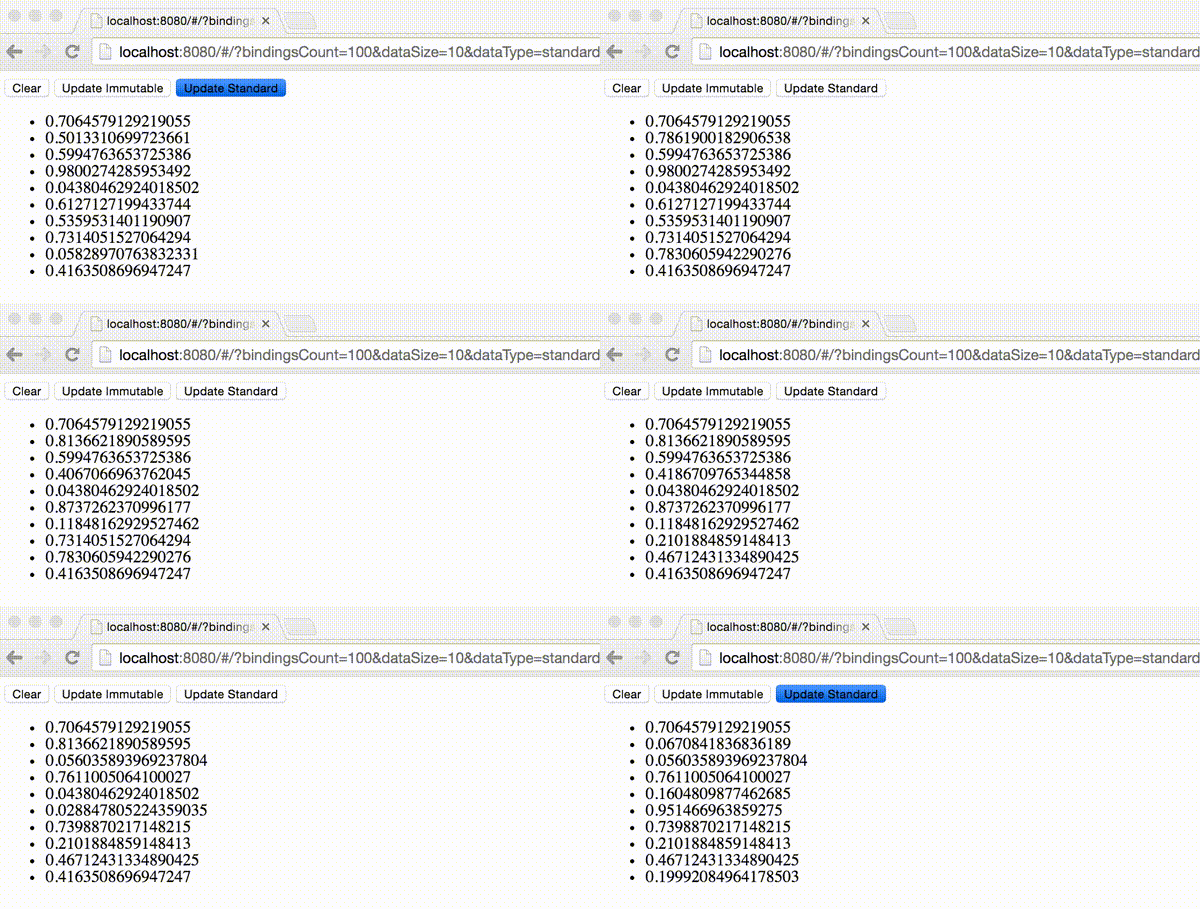
After we run the benchmarks and set the output directory, all the logs will be saved in there, in json format. What we can do is to aggregate the raw results (for example get the mean) and output them in another file or print them on the screen. This seems fine but visual representation is always better. For rendering the data as charts I used node.js with node-canvas. Later I found that there’s a “hacked” version of Chart.js, which could be run in node. The glue code for rendering benchpress logs onto Chart.js charts seems generic enough and it may get handy to anyone else, so next couple of weeks I may publish it as npm module.
Exploring the Results
The results contain the script running time and the garbage collection time, mostly because of the immutable data.
Script Time
This metric will have the strongest impact on the application’s performance, since the script time is single threaded. On the charts below are illustrated the script metrics concerning the script running time of the benchmarks above. The horizontal axis (x-axis) shows the bindings count and the vertical axis (y-axis) illustrates the script running time (in ms).
5 entries
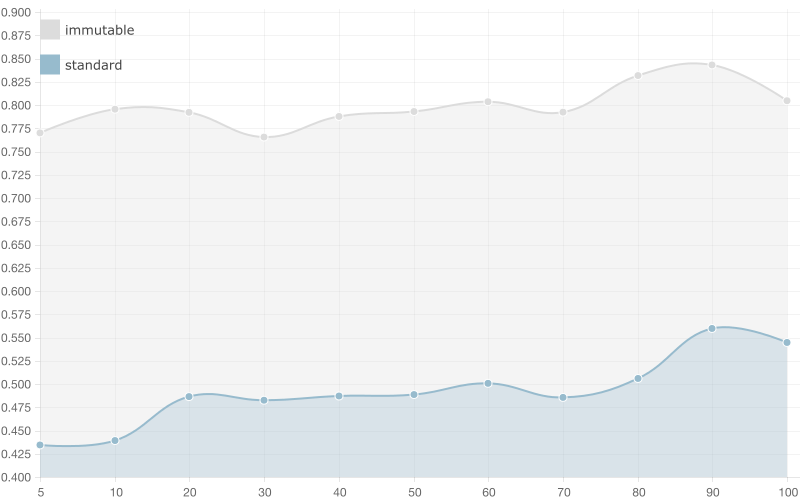
When having a collection with 5 entries the running time of the script using immutable list is almost double the running time of a standard array. When the bindings counts get bigger there are no significant changes in the time required for running the scripts (both immutable and standard array).
Basically when we have 100 bindings (+1 with the watcher added by ng-repeat) the AngularJS change detection mechanism needs to perform 5 * 100 iterations (in the worst case) in order to verify that the current value of the array is equals to the previous one for the standard array and a 100 comparisons (one for each binding using ===) in order to detect changes in the immutable data. Since we have overhead caused by the creation of new immutable list on change, the running time of the script using immutable data is bigger.
20 entries
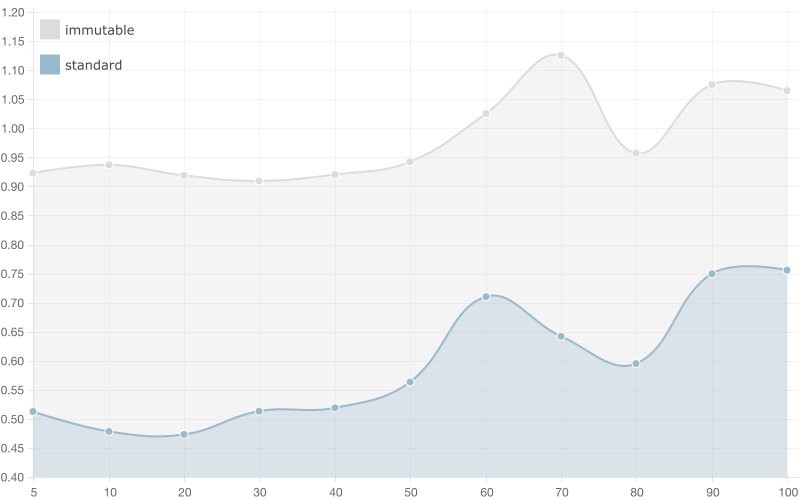
There are no significant changes in the results of the benchmark, which runs script with array/list with 20 entries. The only noticeable difference here is that the running time of the script using standard array gets significantly bigger when we increase the bindings count. Again, when we have 100 bindings and 20 element array we get 20 * 100 iterations in order to detect change, compared to 20 * 5 with only 5 bindings.
50 entries
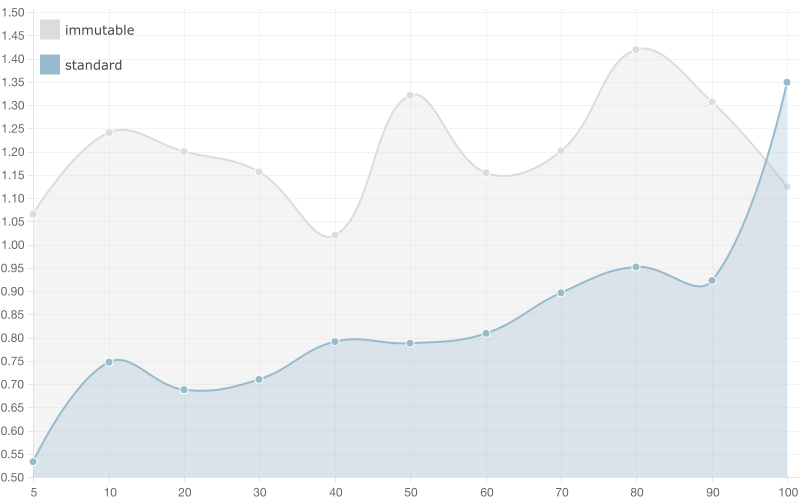
This is the first benchmark, which results show better performance of the immutable list compared to the standard one. In case of 100 bindings the immutable list wins!
100 entries
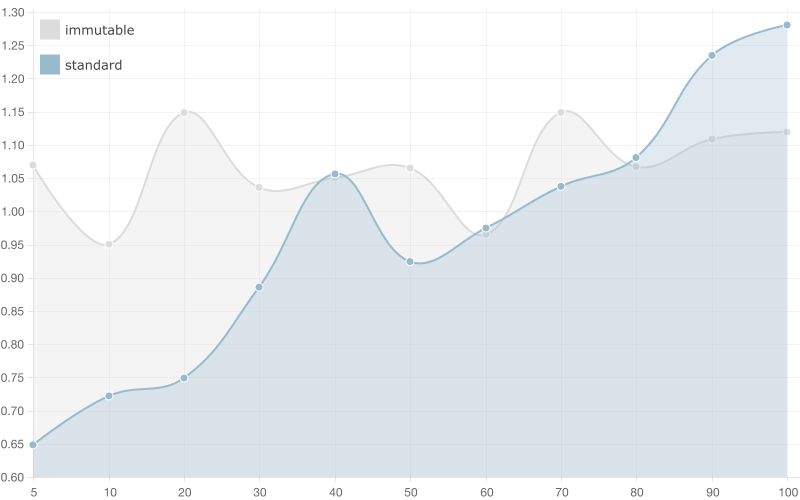
Here the competition gets ruthless! We see how much bigger the running time of the script using standard array gets when we have large amount of bindings. Anyway, still the standard array looks like the winner.
500 entries
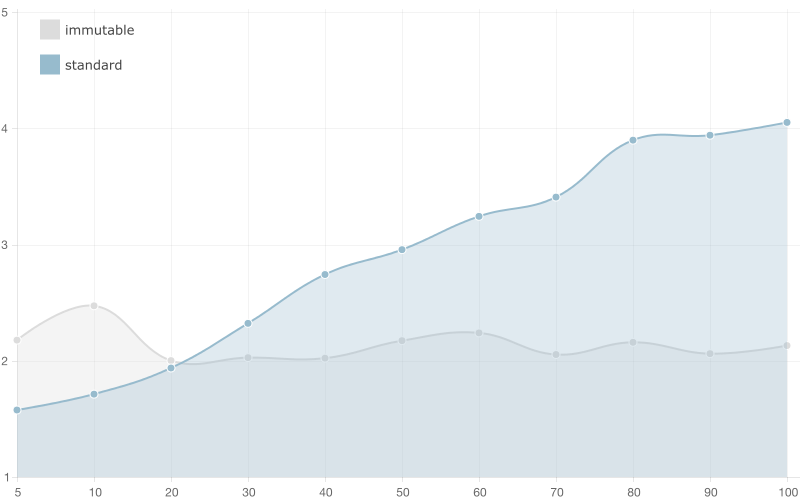
It looks like the supreme champion in this benchmark is the immutable array! You still have to watch out whether you have only a few bindings to the collection but definitely if you have more than 10 you should consider using immutable data.
10,000 entries
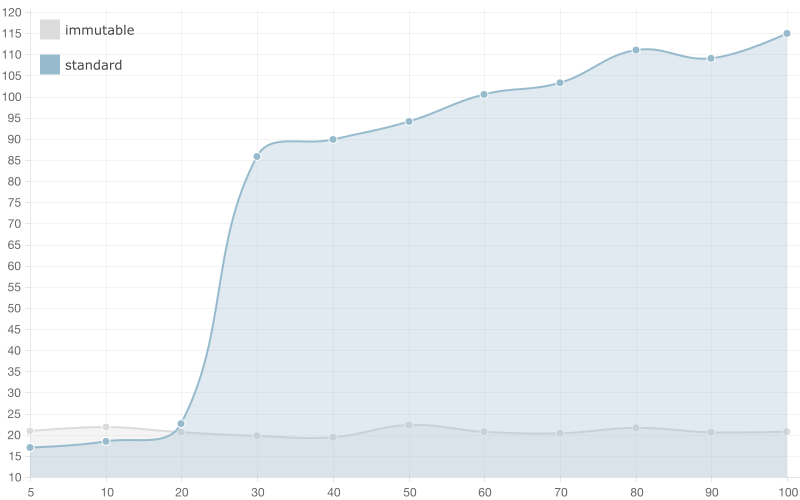
After 20 bindings the running time of the script using standard array gets crazy big! You can see how it gets bigger and bigger with every next binding, although the running time of the script using immutable list stays constant. I’d definitely recommend you to use immutable data with such big collections.
Garbage Collection Time

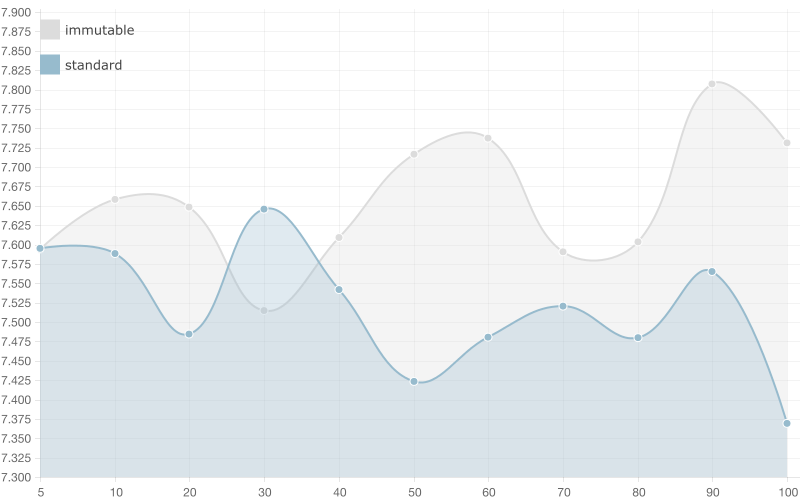
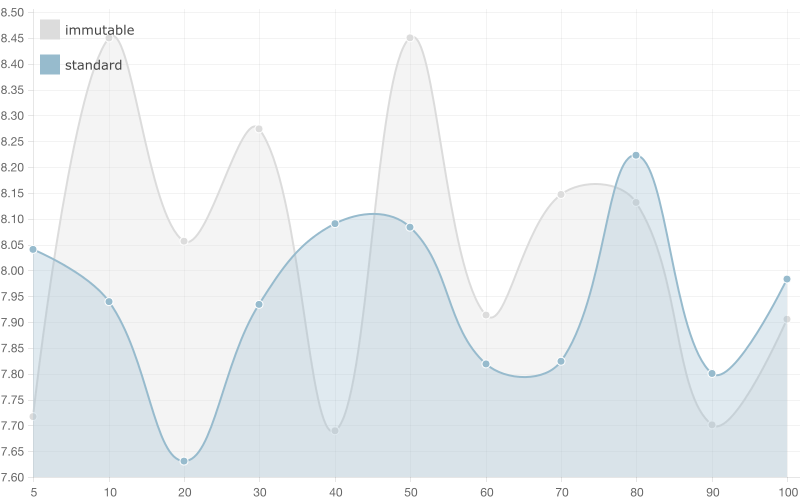
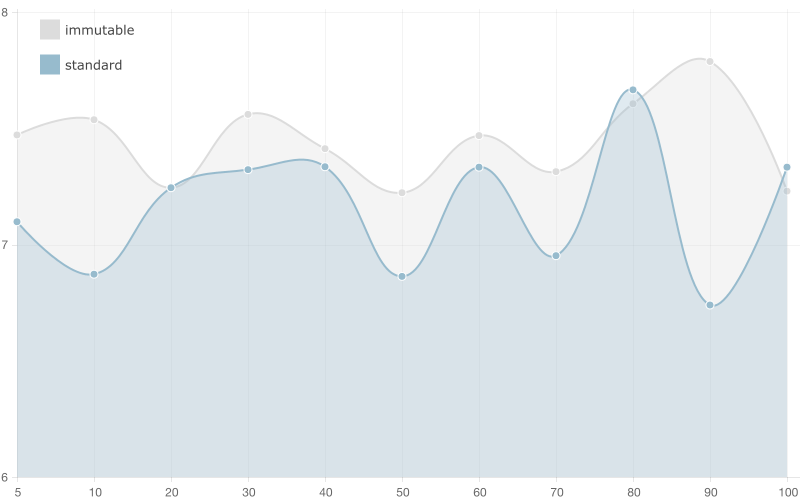
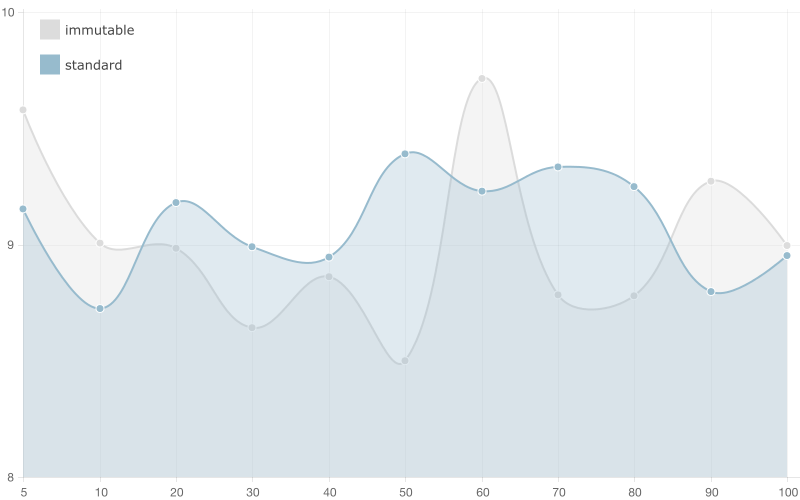
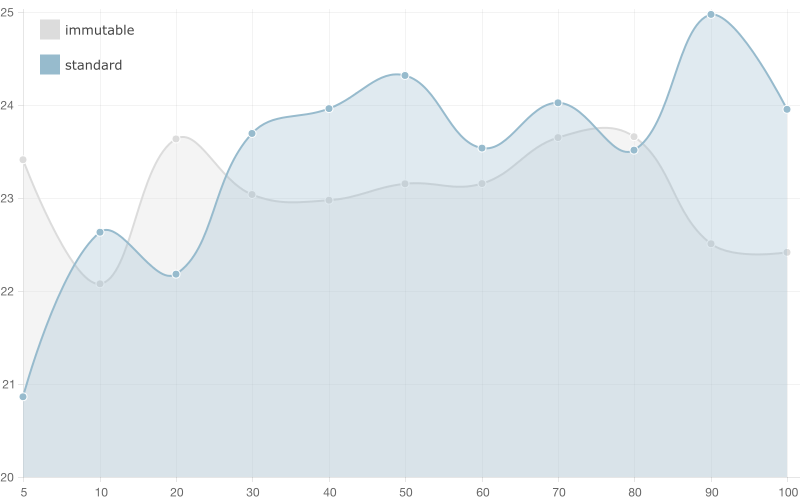
This metric indicates the time required for garbage collection. I’m exposing this metric as secondary one because the user may not notice directly the impact of the garbage collection time during her experience using our application. It is interesting that the information we got from the benchmarks doesn’t imply any significant advantage of the standard array compared to the immutable list.
I will not provide further explanation for the following sections because I think they are self explanatory. However, if you have any troubles understanding them or you think they deserve further discussions you’re welcome to drop a line as a comment or reach me over e-mail (take a look at the About section above).
5 entries
50 entries
100 entries
500 entries
1,0000 entries
Conclusion
Some of the ideas brought to us by the functional paradigm, such as: pure functions, referential transparency, immutable data, etc. constantly find broader and broader applications in building user interface. As we explored in details in the two parts of this blog post on using immutable data with AngularJS, immutability could be quite helpful when we have a lot of bindings on a big data collection. However, in the general use case I’d recommend usage of standard arrays.
The immutable data helps us speedup the watchers from O(n) (looping over the whole data structure) to O(1) (comparing only references, since on change a new immutable data structure will be created) but it also has its drawbacks:
- overhead of the creation of the new data structure on change
- overhead of the performed garbage collection (which wasn’t such a big deal, as show above)
But can’t we build something, which takes the best of both worlds? Can’t we build a specialized data structure used for super fast data binding, which doesn’t require creation of new instance on change but still allows O(1) check for change? This is what I’m going to explore in the last blog post of this series.