






OAuth 2.0 is the industry-standard protocol for authorization. OAuth 2.0 focuses on client developer simplicity while providing specific authorization flows for web applications, desktop applications, mobile phones, and living room devices.
One of OAuth 2.0 and OpenID Connect standard-compliant authentication service enabling developers to authenticate work or school accounts. It’s the implementation which supports OAuth 2.0. It’s the component of Microsoft Identity platform.
Open source libraries for several clients to authenticate users using AAD, Microsoft personal accounts (MSA), and social identity providers like Facebook, Google, LinkedIn, Microsoft accounts, etc.
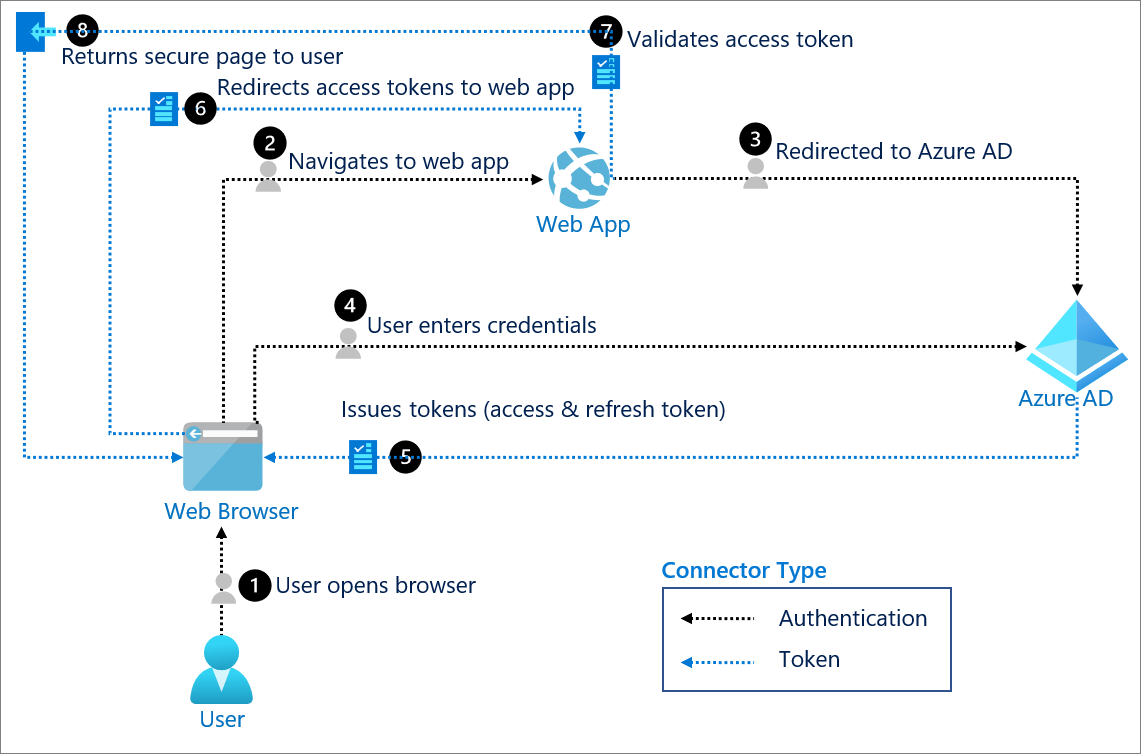
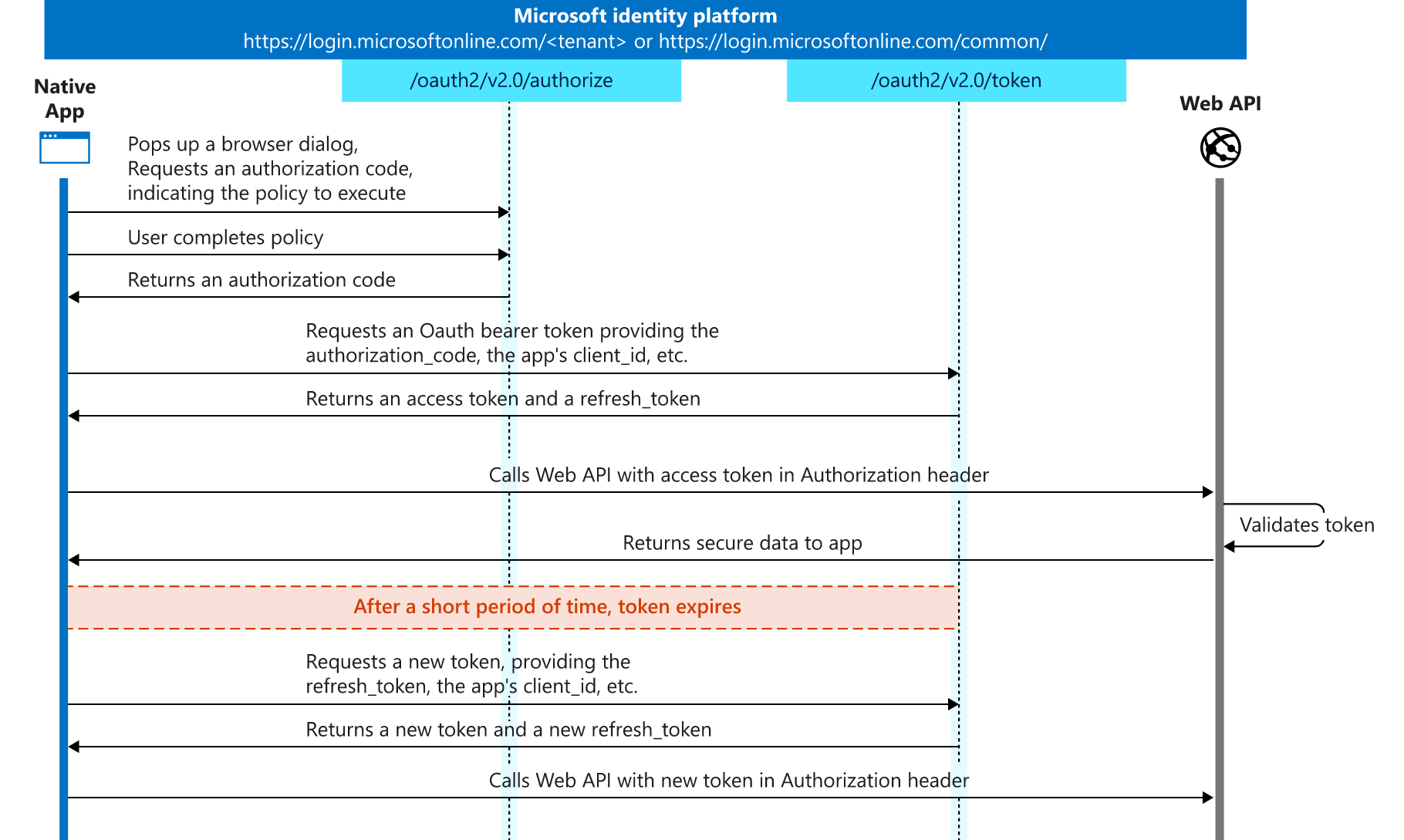
Only two APIs requested from client-side, very simple. Notice that /oauth2/v2.0/authorize is document type.
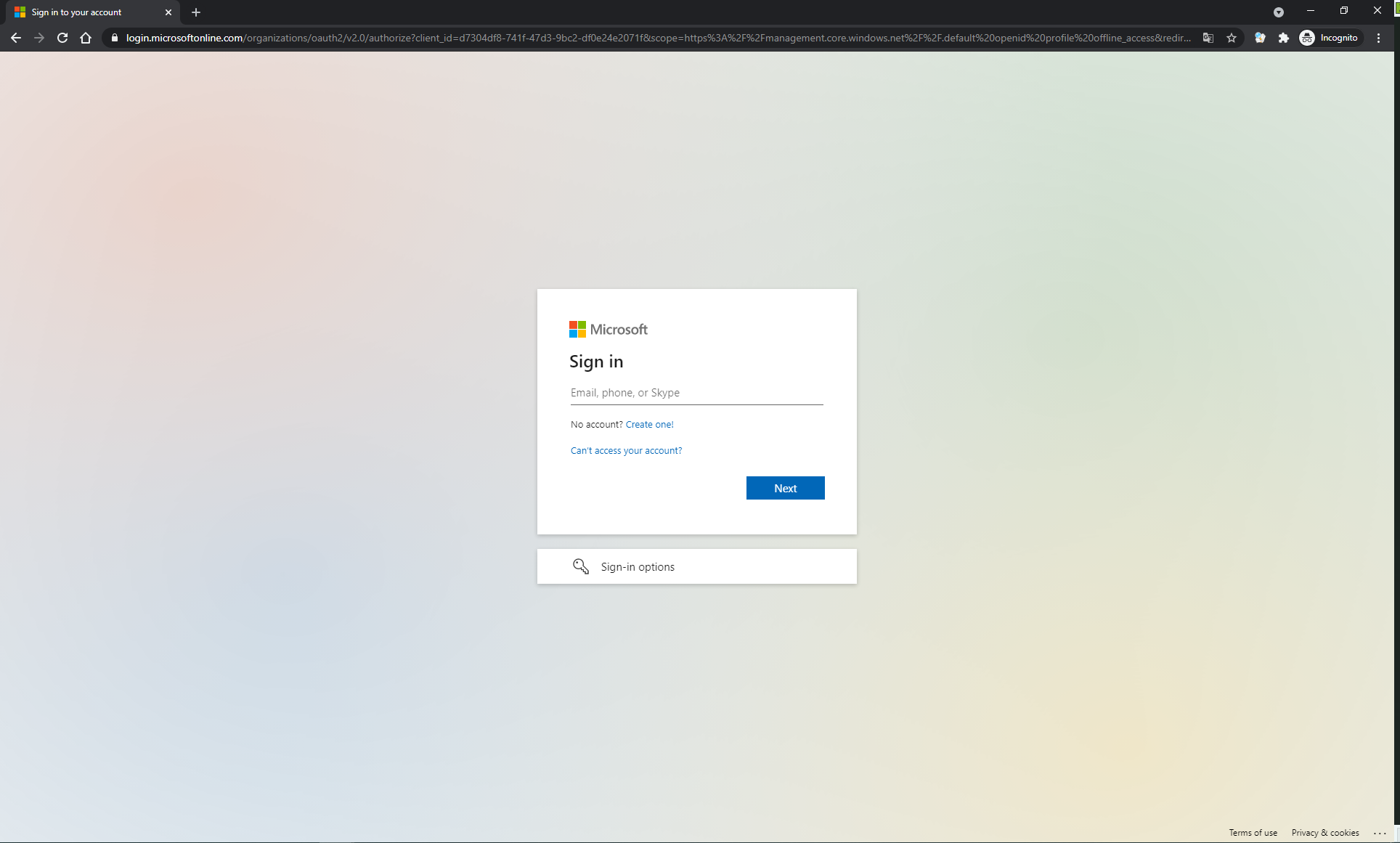
For CORS and redirect target from sign-in page usage, should configure it on both Azure Portal and codebase.
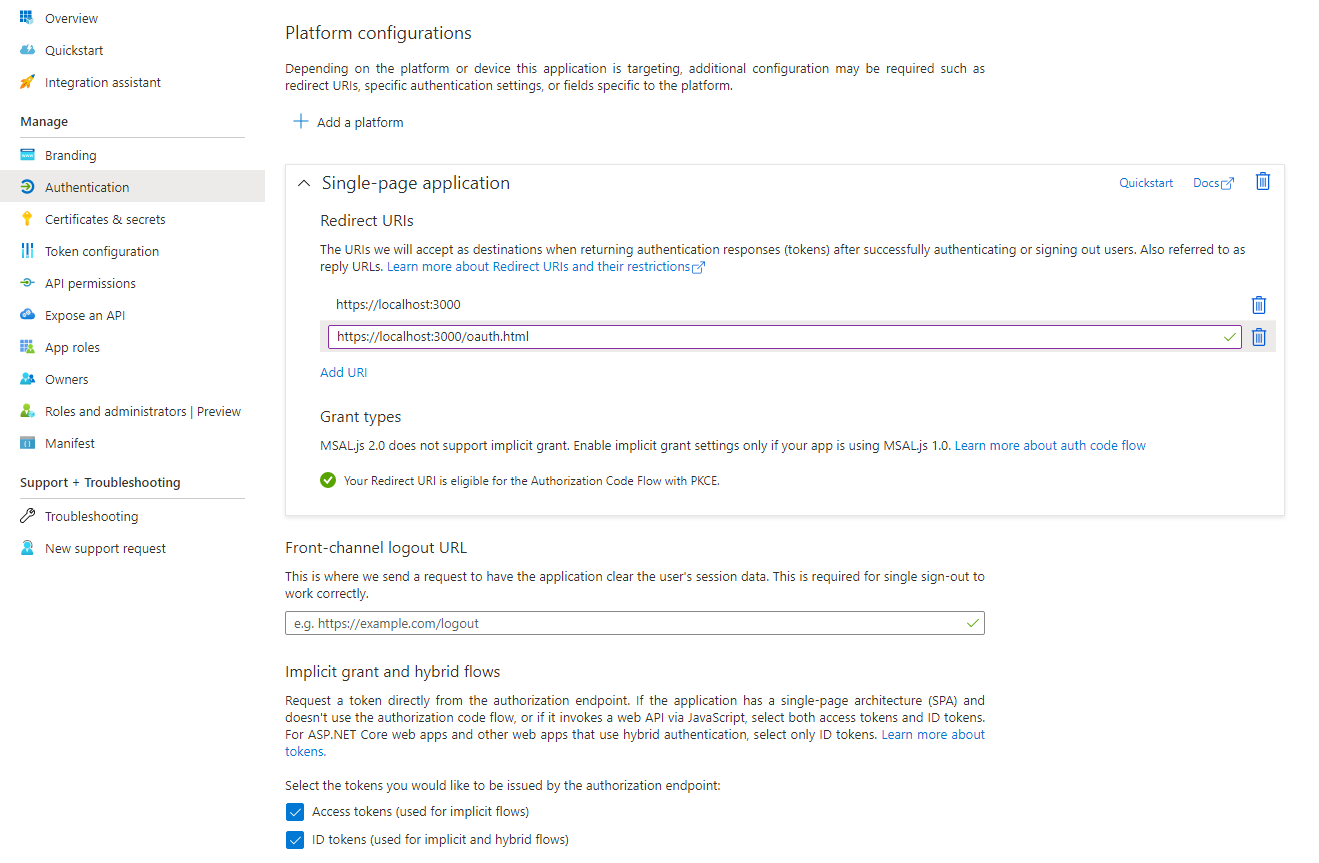
Usually we will set two reply URIs, one is probably the homepage as redirect target after signed in, another is used for requesting token silently. The silent token refresh loads an iframe using that empty oauth.html file, and that same oauth.html file needs to receive the response back, so the acquire token silent flow provides the /oauth.html endpoint as the redirect URI. This is different from the user-facing flow because there is no iframe that the middleware loads into the page, redirecting back to oauth.html will not hook into React or MSAL and auth would halt – it must redirect back to your react app in the user-facing flow.
1 | const config = { |
The authority is a URL that indicates a directory that MSAL can request tokens from, for more details check the MSAL Application configuration options.
Applications that integrate with the Microsoft identity platform follow an authorization model that gives users and administrators control over how data can be accessed. /.default represents OpenID Connect scopes, for more details check the Permissions and consent in the Microsoft identity platform.
It’s no need to redirect to sign-in page every time if auth is not expired, just go ahead. You can also sign-in with a pop-up window.
1 | let username = ""; |
After signed in successfully, page will redirect to the redirect URI we set before with the authorization code. MSAL.js library will handle it automatically, we can observe the code on the navigation bar.

Then the library will parse the authorization code and send the request to get token back directly, all logics encapsulated. Here is the structure of the decoded code.

The pattern for acquiring tokens for APIs with MSAL.js is to first attempt a silent token request by using the acquireTokenSilent method. When this method is called, the library first checks the cache in browser storage to see if a valid token exists and returns it. When no valid token is in the cache, it sends a silent token request to AAD from a hidden iframe.
The silent token requests to AAD might fail for reasons like an expired Azure AD session or a password change. In that case, we need to redirect or using a pop-up window to acquire tokens.
1 | const accessTokenRequest: AuthenticationParameters = { |
If users have browser constraints or policies where pop-ups windows are disabled, you can use the redirect method. Use the redirect method with the Internet Explorer browser, because there are known issues with pop-up windows on Internet Explorer.
You will find so many packages when you visit MSAL.js repository, APIs used above should be compatible across the packages, then question comes: how to make a choice?
Besides node package using in the server-side, I recommend msal-browser (Microsoft Authentication Library for JavaScript v2.x) or other UI framework wrappers based on it, for its implementation of OAuth 2.0 Authorization Code Flow with PCKE as well as it’s OpenID-compliant.
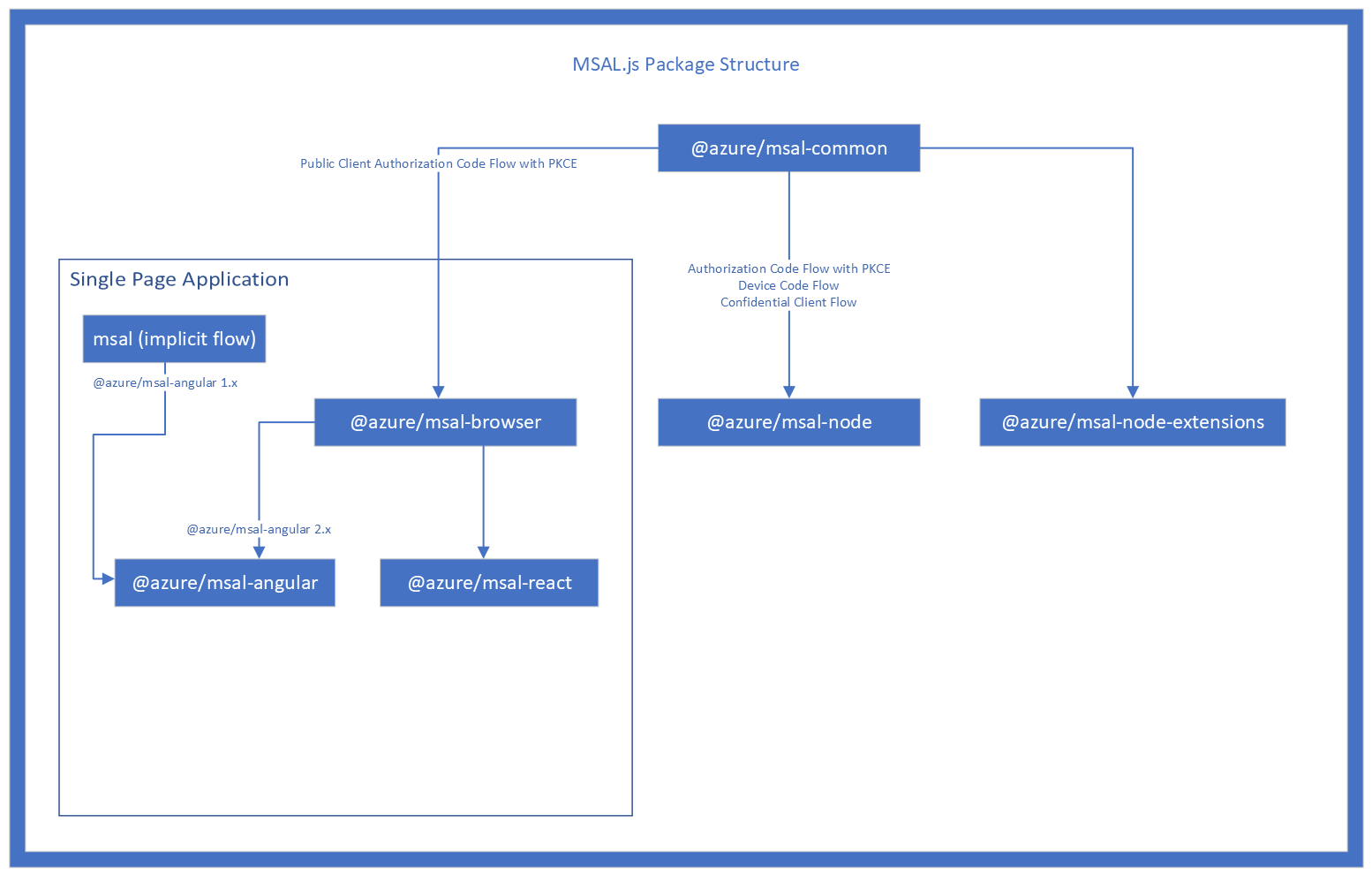
These packages are just official engineering implementations, not so well-documented yet, I had to read the source code for debugging before. Anyway as long as you master the workflow of authentication, it would not be too complicated.
AdalJS is the legacy library for AAD authentication used by so many dated products. If you don’t have any idea about this section, the official document explains Why switch to MSAL clearly.
Web to SPA as MSAL.js required. AdalJS supports both two types, so this change will not block online client services.accessTokenAcceptedVersion to 2 and signInAudience to AzureADandPersonalMicrosoftAccount in the manifest if you want to support both AAD account and MSA account. These settings will not break online client services as well.ssoSlient().PoC (Proof of concept) or verfication always needs quick moves. For the migration scenario, we have to make sure the AAD configurations are correct as well as compatible to make both AdalJS clients and MSAL.js clients login successfully at first stage. To do the quick login verification, the authentication client class need to be exposed to Window global no matter AdalJS or MSAL.js, then we can do experiment on the console of browser.
Please refer to the document, it’s similar to the codes demonstrated above.
The docs for AdalJS are much fewer than MSAL.js probably becasue it has been deprecated. And different versions of AdalJS seems to have few subtle API as well as behavior changes, so you may need to update the code below to make it work. My test code is based on AdalJS v1.0.8.
1 | var authContext = new AuthenticationContext({ |
You can’t verify your change until the production release, also the change for the production environment can’t be verified on other staging environment since they are using different hosts. So the question is how to debug or do verification?
Basically you can run a local server to host your application with adding a host record which points the production host to your local IP address like 127.0.0.1 to make it. Remember to enable HTTPS protocol for your local server.
And it’s better to verify your change on both common window and incognito window after the release.
We observed that /oauth2/v2.0/token return 3 tokens: access_token, id_token and refresh_token.
access_token enables clients to securely call protected web APIs, and are used by web APIs to perform authentication and authorization. For more details please check Microsoft identity platform access tokens.
id_token should be used to validate that a user is who they claim to be and get additional useful information about them, it can be sent alongside or instead of an access token. We have not used it. For more details please check Microsoft identity platform ID tokens.
access_token and id_token are both JWT which consists of a header, payload, and signature portion, that’s why they look so similiar though these two strings are base64 encoded. We mainly use access token for the application, it contains more information than ID token, and we can get user info like name, E-mail from it.
Because access tokens are valid for only a short period of time, authorization servers will sometimes issue a refresh token at the same time the access token is issued. MSAL.js will exchange the refresh_token while request token silently for a new access token when needed.
Please check this answer from StackOverflow.
This error need interaction sign in, thus catch the error and call acquireTokenRedirect method to sign in.
If the error message contains like this “The cookies used to represent the user’s session were not sent in the request to Azure AD. This could happen if the user is using Internet Explorer or Edge, and the web app sending the silent sign-in request is in different IE security zone than the Azure AD endpoint (login.microsoftonline.com).”, upgrade your MSAL.js v1.x to v2.x. Check more details here.
This error usually occurred while requesting token, mostly it’s caused by wrong reply URL which iframe could not load it to request token silently. So make sure your reply URL pointing to the blank static HTML resource is right. Additional, this error message is somehow confusing cause it does not tell the root cause directly, check more details here.
Check the protocol and be sure it’s HTTPS.
此内容由惯性聚合(RSS阅读器)自动聚合整理,仅供阅读参考。 原文来自 — 版权归原作者所有。