


从最开始的用 GitHub 的 Issues 写博客,到尝试用 GitHub 记录的年度数据已经二年有余了,从最开始有想法 2020, 到 2021 加了很多功能,把大部分的记录自动化,一点一点记录也算是有些心得了,这篇文章就介绍一下我是怎么做的,能帮助到同样感兴趣的大家就更好了。也算是践行这 2 年对我影响最大的文章之一
好,我们把这些结合起来,记录自己的一年~

上图这些数字区是怎么实现方式分为两部分:
每天早 8 点和晚 9 点,定时跑一次,计算数据进行整合,并配合 telegram 的 bot 提醒自己。
入口大家可以参考 Actions 的这个 workflow
Issues 的代码思路为获取 label -> 通过 label 找 issues -> issues 的评论特定格式 -> 通过函数解析 -> 整合 -> 通过正则替换 README 中的原有数据(文字) (README 可以写注释,而注释是不显示的,利用这个完成显示和替换)
def main(
    login_dict,
    github_token,
    repo_name,
):
    my_num_stat_str = MY_NUMBER_STAT_HEAD
    # API STAT STR
    for name, value_dict in MY_STATUS_DICT_FROM_API.items():
        try:
            url = value_dict.get("url")
            md_name = f"[{name}]({url})"
            # maybe a better way?
            total_data, streak, today_check = value_dict.get("daily_func")(
                *login_dict.get(name, tuple())
            )
            total_data_str = str(total_data) + value_dict.get("unit_str", "")
            my_num_stat_str += make_stat_str(
                md_name, total_data_str, streak, today_check
            )
        # just a tricky code for others for use
        except Exception as e:
            print(e)
            continue

    u = Github(github_token)
    # COMMENTS STAT STR
    for name, value_dict in MY_STATUS_DICT_FROM_COMMENTS.items():
        try:
            labels, map_func, reduce_func = LABEL_DAILY_DICT.get(name)
        except:
            # tricky for mine
            continue
        func = value_dict.get("daily_func")
        if not func:
            break

        issues = u.get_repo(repo_name).get_issues(labels=labels)
        total_data, streak, today_check, url, month_summary_dict = func(
            issues, map_func, reduce_func
        )
        # change the issue body for month summary
        unit = value_dict.get("unit_str", "")
        for i in issues:
            body = ""
            for b in i.body.splitlines():
                # from the summary table
                if b.startswith("|"):
                    break
                body += b + "\r\n"
            body = body + "\r\n" + make_month_summary_str(month_summary_dict, unit)
            # edit this issue body
            i.edit(body=body)
        name = f"[{name}]({url})"
        total_data_str = str(total_data) + unit
        my_num_stat_str += make_stat_str(name, total_data_str, streak, today_check)

    replace_readme_comments("README.md", my_num_stat_str, "my_number")
关于早起这个数据和 issue 因为自己喜欢诗歌,我找了一个获取一句诗的 API, 然后自动评论,评论是带时间戳的,正好记录自己的起床时间。
那么是怎么触发的呢?
我用的是 iOS 系统,而 iOS 有个重要的功能是“捷径“。利用捷径可以触发 Actions workflow 的 api, 触发 api 就有时间戳了,再判断是不是早起,给自己发送就好了。
捷径的触发条件是闹钟关闭,为了保险起见,我可能比闹钟起的早,再加一条关闭背单词软件,解决了用 GitHub 记录早起的问题。
def make_get_up_message():
    sentence = get_one_sentence()
    now = pendulum.now(TIMEZONE)
    # 3 - 6 means early for me
    is_get_up_early = 3 <= now.hour <= 6
    get_up_time = now.to_datetime_string()
    body = GET_UP_MESSAGE_TEMPLATE.format(get_up_time=get_up_time, sentence=sentence)
    return body, is_get_up_early
关于如何利用捷径配合 Actions 我写过一篇文章 -- 巧妙利用 iOS 的快捷指令配合 GitHub Actions 实现自动化

而早起这句诗,我期待好久的 -- 苟利国家生死以,岂因福祸避趋之。还没随机到,随到这一天我决定跑 19.26 km.
利用了我写的 GitHubPoster 项目,自动生成 svg 引入,而自动跑的脚本也在那个项目上。
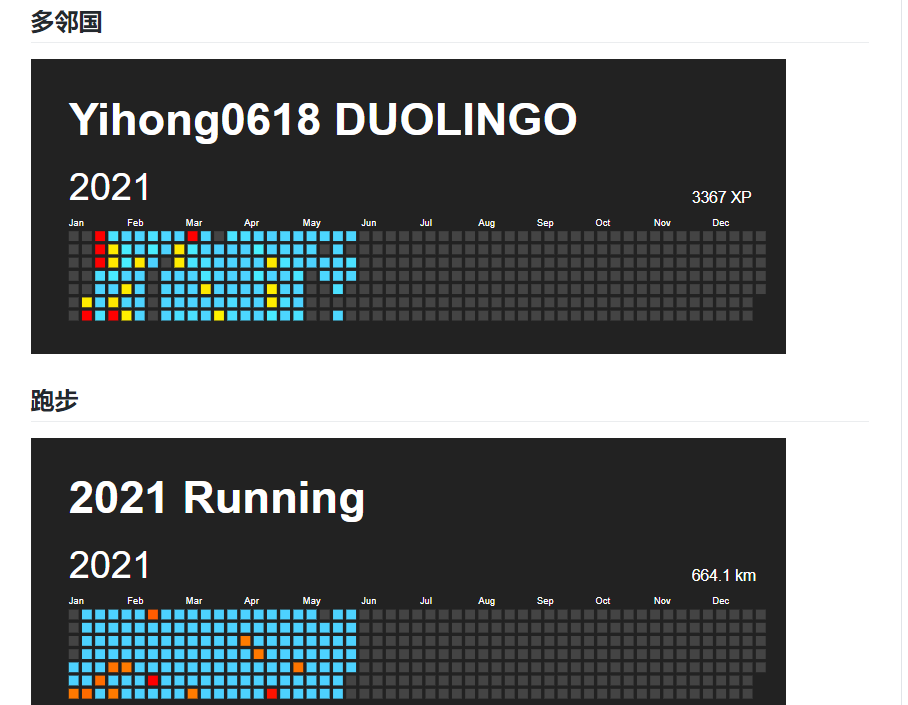
利用我写的 github-readme-stats 自动替换生成。


全部利用 Issues 评论 -> 触发 Actions -> 自动替换 README 的注释区域生成
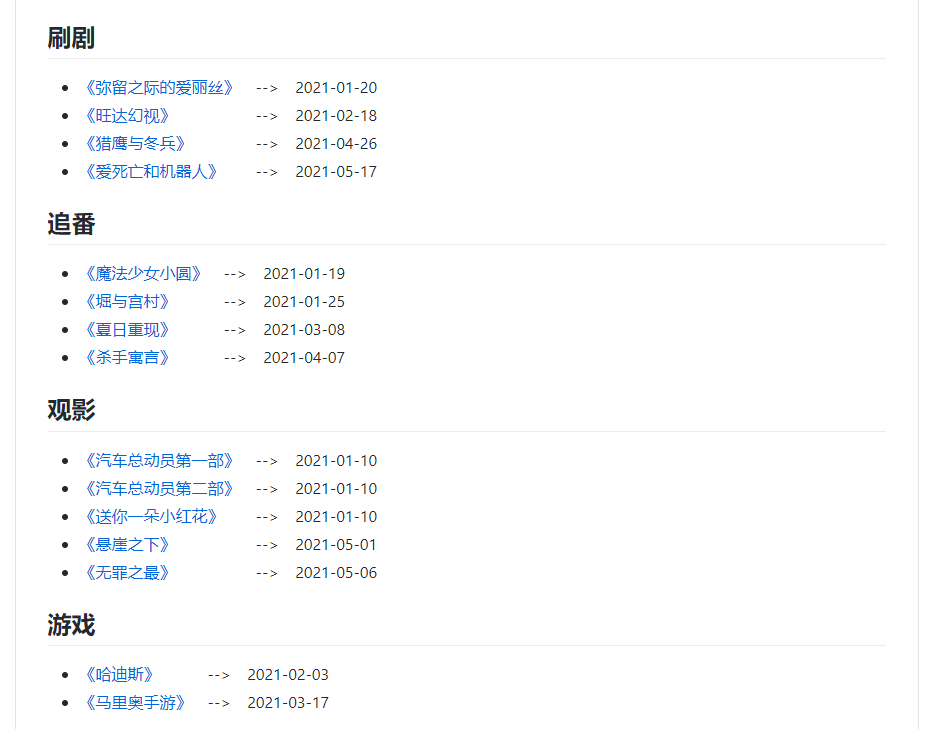
def replace_readme_comments(file_name, comment_str, comments_name):
    with open(file_name, "r+") as f:
        text = f.read()
        # regrex sub from github readme comments
        text = re.sub(
            GITHUB_README_COMMENTS.format(name=comments_name),
            r"\1{}\n\3".format(comment_str),
            text,
            flags=re.DOTALL,
        )
        f.seek(0)
        f.write(text)
        f.truncate()
和上面类似,因为做的太多,我生成了个表格

def parse_cook_issue_table(me, issues):
    comments_str = MY_FOOD_STAT_HEAD
    food_dict = defaultdict(lambda: ["", "", 0])
    for issue in issues:
        comments = issue.get_comments()
        for c in comments:
            if not isMe(c, me):
                continue
            date_str = format_time(c.created_at)
            food_list_str = c.body.splitlines()[0]
            food_list = food_list_str.split(" ")
            for food in food_list:
                if food not in food_dict:
                    food_dict[food][0] = f"[{date_str}]({c.html_url})"
                    food_dict[food][1] = f"[{date_str}]({c.html_url})"
                else:
                    food_dict[food][1] = f"[{date_str}]({c.html_url})"
                food_dict[food][2] += 1
    for k, v in food_dict.items():
        comments_str += MY_FOOD_STAT_TEMPLATE.format(
            name=k, first_date=v[0], last_date=v[1], times=v[2]
        )
    return comments_str
每次自动生成还会 edit issue 的内容生成月度数据整合

在 blog 的 repo 写 issue ->curl 2021 的 Actions workflow api -> 自动生成


这个完全手动添加,我想保留一些仪式感

如果大家想同样做一个这样的年度数据可以 follow 以下步骤:
COOK_LABEL_LIST = [
    "Cook",
]
MOVIE_LABEL_LIST = [
    "Movie",
]
READ_LABEL_LIST = [
    "Read",
]
DRAMA_LABEL_LIST = [
    "Drama",
]
PUSHUP_LABEL_LIST = [
    "PushUps",
]
BANGUMI_LABEL_LIST = [
    "Bangumi",
]
GAME_LABEL_LIST = [
    "Game",
]
MONEY_LABEL_LIST = [
    "Money",
]
MEDITATION_LABEL_LIST = [
    "Meditation",
]
MORNING_LABEL_LIST = [
    "Morning",
]
GTD_LABEL_LIST = [
    "GTD",
]
MY_BLOG_REPO = "yihong0618/gitblog"
GITHUB_README_COMMENTS = (
    "(<!--START_SECTION:{name}-->\n)(.*)(<!--END_SECTION:{name}-->\n)"
)

# add new label here
LABEL_DICT = {
    "Cook": {"label_list": COOK_LABEL_LIST, "comment_name": "my_cook"},
    "Movie": {"label_list": MOVIE_LABEL_LIST, "comment_name": "my_movie"},
    "Read": {"label_list": READ_LABEL_LIST, "comment_name": "my_read"},
    "Drama": {"label_list": DRAMA_LABEL_LIST, "comment_name": "my_drama"},
    "Bangumi": {"label_list": BANGUMI_LABEL_LIST, "comment_name": "my_bangumi"},
    "Game": {"label_list": GAME_LABEL_LIST, "comment_name": "my_game"},
}


##### SHANBAY ######
MY_SHANBAY_USER_NAME = "ufewz"
SHANBAY_CALENDAR_API = "https://apiv3.shanbay.com/uc/checkin/calendar/dates/?user_id={user_name}&start_date={start_date}&end_date={end_date}"
MY_SHANBAY_URL = f"https://web.shanbay.com/web/users/{MY_SHANBAY_USER_NAME}/zone"

##### DUO ######
MY_DUOLINGO_URL = "https://www.duolingo.com/profile/yihong0618"

##### CICHANG ######
MY_CICHANG_URL = "https://twitter.com/yihong06181/status/1359040099107897344?s=20"


##### FOOD ######
MY_FOOD_STAT_HEAD = (
    "| Name | First_date | Last_date | Times | \n | ---- | ---- | ---- | ---- |\n"
)
MY_FOOD_STAT_TEMPLATE = "| {name} | {first_date} | {last_date} | {times} |\n"

##### Month Summary ######
MONTH_SUMMARY_HEAD = "| Month | Number | \n | ---- | ---- | \n"

MONTH_SUMMARY_STAT_TEMPLATE = "| {month} | {number} |\n"
此内容由惯性聚合(RSS阅读器)自动聚合整理,仅供阅读参考。 原文来自 — 版权归原作者所有。