
惯性聚合 高效追踪和阅读你感兴趣的博客、新闻、科技资讯
阅读原文 在惯性聚合中打开

推荐订阅源

C
Check Point Blog
AI
AI
CTFtime.org: upcoming CTF events
U
Unit 42
Vercel News
Vercel News
Stack Overflow Blog
Stack Overflow Blog
P
Proofpoint News Feed
Microsoft Security Blog
The GitHub Blog
The GitHub Blog
WordPress大学
WordPress大学
Martin Fowler
Martin Fowler
博客园 - 【当耐特】
B
Blog
Cyber Security Advisories - MS-ISAC
Apple Machine Learning Research
博客园_首页
F
Full Disclosure
Google DeepMind News
奇客Solidot–传递最新科技情报
奇客Solidot–传递最新科技情报
H
Help Net Security
Recorded Future
Recorded Future
N
News and Events Feed by Topic
雷峰网
雷峰网
V
Vulnerabilities – Threatpost
Schneier on Security
aimingoo的专栏
aimingoo的专栏
S
Schneier on Security
cs.AI updates on arXiv.org
O
OpenAI News
Project Zero
Project Zero
罗磊的独立博客
G
GRAHAM CLULEY
腾讯CDC
P
Privacy International News Feed
V
V2EX
Application and Cybersecurity Blog
Hugging Face - Blog
Hugging Face - Blog
爱范儿
爱范儿
H
Heimdal Security Blog
L
LINUX DO - 热门话题
Forbes - Security
Forbes - Security
美团技术团队
MongoDB | Blog
MongoDB | Blog
Security Latest
Security Latest
M
MIT News - Artificial intelligence
T
Tor Project blog
Cisco Talos Blog
Cisco Talos Blog
宝玉的分享
宝玉的分享
T
Threat Research - Cisco Blogs
TaoSecurity Blog
TaoSecurity Blog

蚊帐

用树莓派给 iMac 加上 Face ID 链接 小米 YU7 三个月驾乘体验 波分单线复用笑传之Custom Combo Broadband 新柏石KNX协议智能家居网关接入 HomeAssistant 双方无公网状态下 RouterOS 基于 WireGuard 的组网方案 广东联通 IPTV 鉴权&抓源脚本(以及碎碎念) 广东电信 IPTV 自助鉴权 + 获取播放列表 为什么我们要拒绝 PON 方案的 FTTR 高通410随身WiFi的进阶USB网络共享和IPv6配置 ThinkBook 14+ 锐龙版上手体验 ArchLinux + KDE 一周使用小结 修复 Edge/Chrome 在 GNOME 分数缩放下的窗口位置问题 轻松抓取并解析广东电信 IPTV 全部直播源 虚拟显示器终极解决方案 IndirectDisplay 基于PVE的新网络架构 - 踩坑回顾 蚊子
把 Windows 11/10 不完全转换为 Windows Server 2022
蚊子 · 2023-01-02 · via 蚊帐

把 Windows 11/10 不完全转换为 Windows Server 2022

大家都知道 Windows 的功能其实很强大,但你并不总能够在同一个 Windows SKU 上享用所有功能。这一点在 Hyper-V 方面尤其明显。常见的 Windows 10 和 11 专业版尽管支持部分 Hyper-V 功能,但是要想享受完整的功能,则必须使用 Server 版本。

前几天,我计划跟随 这篇教程,来把我的无线网卡透传进 Hyper-V 虚拟机并且运行 OpenWRT 软 AP。但不出意料的是,它所依赖的 PCIe 设备直通功能(Discrete Device Assignment)需要 Windows Server 系统才能正常使用。否则当你进行完 Add-VMAssignableDevice 之后,尝试启动虚拟机时,会得到以下提示:
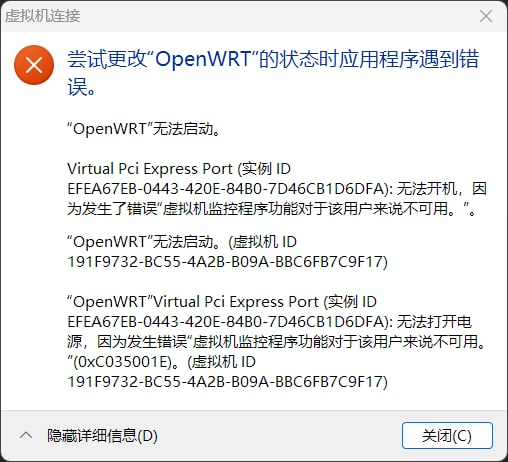
image-20230102115630587

但是,我并不想花费大力气把用得好好的系统抹掉然后重新安装 Server 版本。考虑到这里的启动限制应该只是检查一下 SKU,我们并不需要真正的完整 Server 功能,那么有没有一种办法能无损把系统记录的 SKU 从 Windows 11 Enterprise 变成 Windows Server 2022 呢?答案是有的。我在 reddit 找到了一个方案,具体操作步骤如下:

  1. 取得一个 Windows Server 2022 的 ISO,解压其中的 install.wim
  2. 把 wim 镜像里面 Datacenter 版本的 Windows\BrandingWindows\System32\spp\tokens\skus 两个文件夹提取出来(用7z即可)
  3. 把当前系统的这两个文件夹剪切出来,备份
  4. 把提取出的文件夹替换到当前系统的对应位置
  5. 使用管理员权限执行 slmgr.vbs /rilc 重新安装许可证文件。
  6. 使用 slmgr.vbs /ipk 密钥 来安装密钥。如果你使用 KMS,则可以在微软官方页面找到对应的密钥。
  7. 自行想办法激活 Windows
  8. 等待一会,重启一下。
  9. 然后再等待一会,重启第二次。这次重启应该会提示「正在配置功能」或者「正在安装更新」之类的。
  10. 第二次重启完进入系统,应该就能够使用 Server 的功能了,同时原来属于 Windows 10/11 的功能则会被隐藏(如 Windows 11 输入法、移动热点、Windows Hello等)

通过以上方式,我成功地启动了使用 DDA 功能的虚拟机,并使用透传其中的 AX200 开启热点。

image-20230102121202358

如果你希望把版本再度转换为 Windows 10/11,则只需要把之前备份的两个文件夹恢复回原位,并重启两次即可。