


Calling one provider directly means a single point of failure. When it goes down, your users get errors, and you find out from a support ticket an hour later. That’s the problem OpenRouter solves: it routes every request to keep it succeeding, across providers automatically and across models when configured.
With OpenRouter, you build reliability into your app with 2 separate configurations. Provider failover is automatic and on by default. Model fallbacks are opt-in.
The 2 layers cover different failures; if every provider for a primary model fails simultaneously, provider failover has nowhere to go. Model fallbacks are the second line of defense.
Here’s a config worth starting from on every project. Copy it and adjust:
from openrouter import OpenRouter

client = OpenRouter(api_key="<OPENROUTER_API_KEY>")

completion = client.chat.send(
    model="anthropic/claude-sonnet-4.6",
    models=["openai/gpt-5.4-mini"],  # fallback if the primary fails
    messages=[{"role": "user", "content": "Summarize this incident report."}],
)models array, recovers across models).models list in order. Once the list is exhausted, the last error comes back, so order it with a reliable floor model last.only/ignore/order trades reliability for control: a narrower candidate set means fewer fallbacks.Provider outages, rate limits (429), context-length validation errors, and content-moderation refusals are the predictable reasons an LLM request fails. A single direct provider integration has no recovery path for any of them, so each one becomes a user-facing error.
The simplest example is rate limits. You call one provider directly, hit its per-minute ceiling, and your only options are to back off, queue, or fail. None of that helps the user staring at a spinner.
There’s a reason the community calls a routing layer “the DNS of AI”: it stays up because it has more than one place to send the request.
Each of those 4 failure modes maps to a specific recovery layer in OpenRouter, and knowing which layer handles what is how you configure reliability correctly.
Here’s what fails, and which layer of OpenRouter recovers it.
| Failure mode | What it looks like | Recovered by |
|---|---|---|
| Provider outage / downtime | 5xx, timeouts, dropped connections | Provider-layer failover (next provider) |
| Rate limiting (429) | “Too Many Requests” from the provider | Provider-layer failover, then model fallback |
| Context-length error | Prompt exceeds the model’s window | Model-layer fallback (try a larger-context model) |
| Moderation refusal | Filtered model refuses to reply | Model-layer fallback (try an unfiltered model) |
The first 2 are infrastructure problems a second provider solves. The last 2 are model problems that a second model solves.
Short answer: no. When a request ultimately fails after failover is exhausted, you aren’t billed; you pay only for the successful run (zero-completion insurance).
This makes retries cheap to design for: a fallback chain that burns through 3 providers before succeeding costs you one successful completion. You can be aggressive with fallbacks without watching the meter on every failed try.
Real-world edge cases exist, and we’d rather you read about them here than find out from your billing dashboard. Some users have reported cases where error 429 consumed credits, or where partial outputs were counted despite an error. So the policy is “pay only for successful runs,” but a few 429 paths and partial outputs have slipped through.
Honest trade-off: zero-completion insurance is real, but it isn’t airtight. Check your activity log to confirm what you were charged for, and set hard spend limits so an edge case can’t run up a bill. Design with a spend cap instead of assuming every failed request is free.
OpenRouter recovers from failures in 2 distinct layers. Provider-layer failover is automatic and on by default; model-layer fallbacks are opt-in through a models array. One keeps a single model alive across providers, the other moves to a different model entirely.
OpenRouter fails over between providers automatically, and you shape the candidate set with ignore, only, and order. You don’t write retry logic for the common case.
ignore blocks specific providers by slug. only restricts to an allow-list. order sets an explicit try-this-first sequence.
All 3 narrow the candidate set, so use them deliberately; fewer eligible providers mean fewer fallback options.
| Provider-layer failover | Model-layer fallbacks | |
|---|---|---|
| What it recovers | Outage or 429 on the provider serving your model | A whole model being unavailable, plus context-length and moderation refusals |
| Default | On (allow_fallbacks: true) | Off until you set a models array |
| Config that controls it | allow_fallbacks, order, only, ignore | models array (priority order) |
| Scope of recovery | Same model, different provider | Different model entirely |
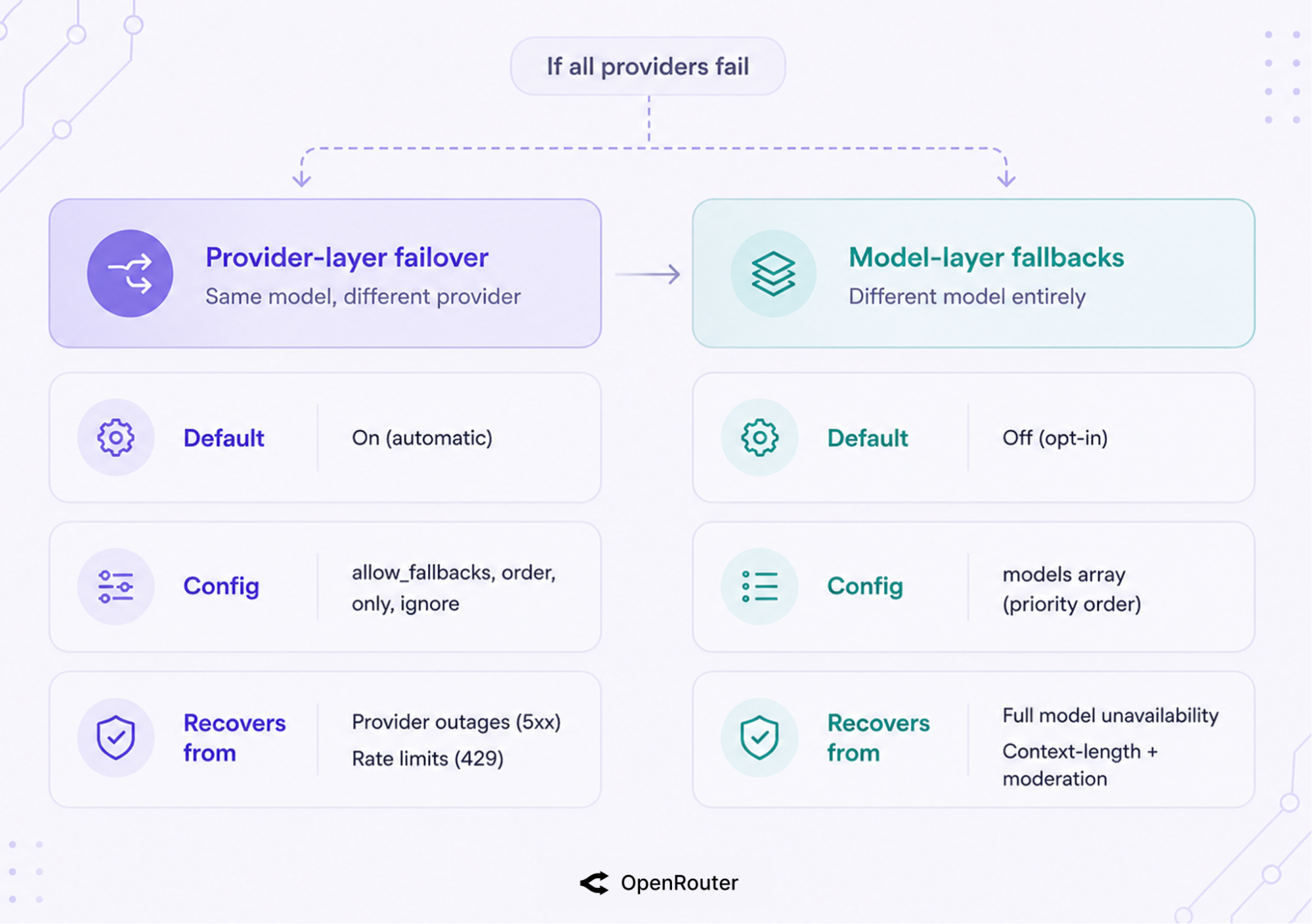
That’s the static view. The diagram below shows what actually happens at runtime: how a single request moves through both layers, and where it exits as a success or a final error.
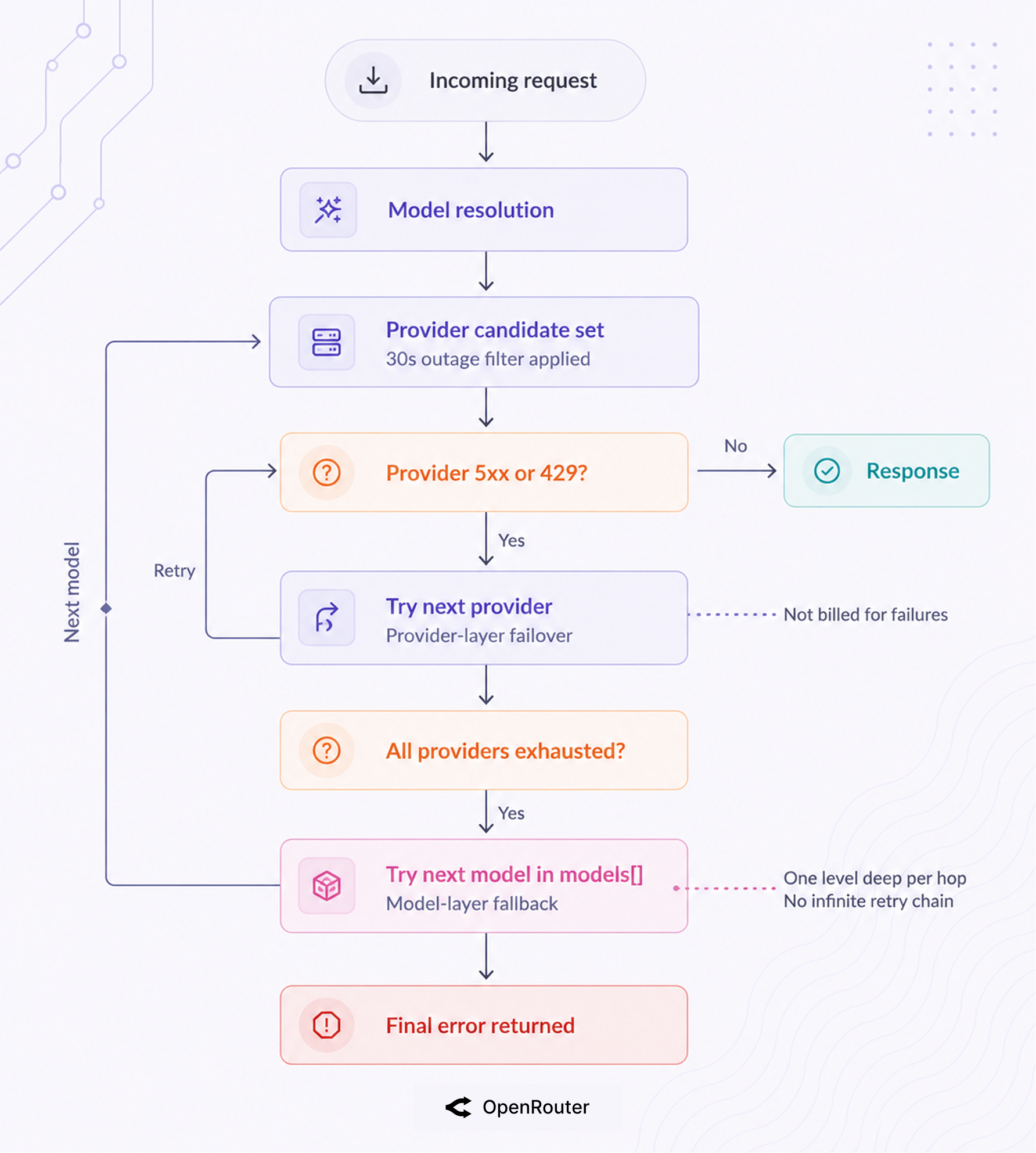
A single model like Claude Sonnet 4.6 is often served by several providers. If the provider OpenRouter picks returns a 5xx or rate-limits, it automatically tries the next provider for that same model. This is governed by allow_fallbacks, which defaults to true (provider-selection docs).
Zero config. You get this the moment you send a request.
If every provider for your primary model fails, provider-layer failover has nowhere left to go. That’s where the models array takes over: OpenRouter moves to the next model in your list (model-fallbacks docs). This layer is opt-in because it changes which model answers, which is a decision only you can make.
A context-length error or a moderation refusal also triggers this layer, since those are problems a different provider can’t fix.
The 2 layers work together, but they work differently behind the scenes. Provider-layer failover runs automatically with no setup. Here’s what it’s actually doing with each request.
For each model, OpenRouter load-balances across providers to maximize uptime using a published 3-step rule: prioritize providers with no significant outages in the last 30 seconds, pick the lowest-cost stable candidate weighted by the inverse square of price, and keep the rest as fallbacks (provider-selection docs). This is a reliability mechanism first and a cost mechanism second.
In practice, any provider that errored in the last 30 seconds drops to the back of the line, and among stable providers, the cheapest one is picked first at roughly the square of the price difference. Reliability-first, cost-second, automatic.
The 30-second outage window is the part that matters for uptime. A provider that hiccuped in the last half-minute drops out of the front of the line automatically, with no action from you.
The docs’ worked example shows how reliability and cost work together. Say Provider A costs $1/M tokens, Provider B costs $2/M, and Provider C costs $3/M, and B recently saw a few outages.
OpenRouter routes to A first, and A is roughly 9x more likely to be tried before C because of the inverse-square weighting (1/3² = 1/9). If A fails, C is next. B, the recently-flaky one, is tried last: the outage history pushes the unreliable provider to the back without excluding it.
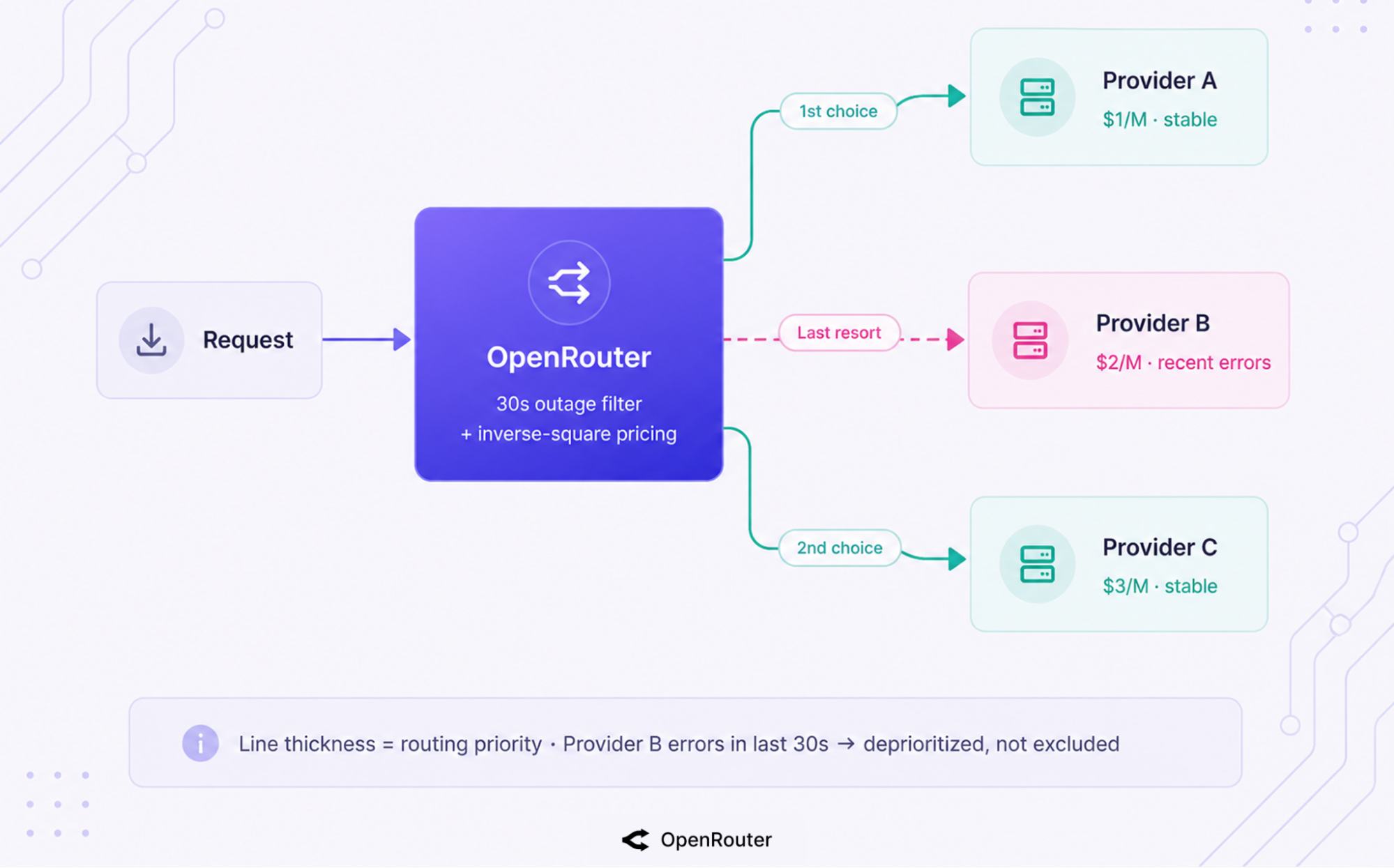
That’s the default behavior. But if you already know a provider is bad, you don’t have to wait for the routing math to figure it out.
You can shape which providers are eligible, which is how you block an unreliable provider:
order: try providers in an explicit sequence, e.g. order: ["anthropic", "together"].only: an allow-list of provider slugs for the request.ignore: a block-list, e.g. provider: { ignore: ["deepinfra"] } to skip an endpoint you’ve found serves an over-quantized model.allow_fallbacks: false: hard-stop to your chosen providers, no automatic backups.Honest trade-off: narrowing with only, ignore, or order “may significantly reduce fallback options and limit request recovery” (provider-selection docs, verbatim). Every provider you exclude is one fewer place to recover. Restricting the pool buys you control and costs you reliability, so prune deliberately.
If you need predictable latency, set preferred_max_latency or preferred_min_throughput with percentile cutoffs over a rolling 5-minute window (provider-selection docs). Endpoints that miss the threshold get deprioritized, rather than excluded. Here’s what that looks like combined with ignore:
completion = client.chat.send(
    model="deepseek/deepseek-v4-flash",
    provider={
        "preferred_max_latency": {"p90": 3},   # prefer <3s for 90% of requests
        "ignore": ["deepinfra"],               # skip a known-bad endpoint
    },
    messages=[{"role": "user", "content": "Classify this ticket."}],
)
Everything above keeps one model alive across providers. But if every provider for that model goes down, provider failover has nowhere left to go.
Model fallbacks take over and try the next model in your list. They’re sequential layers working together, and the models array is how you switch the second one on.
Pass a models array in priority order, and if the first model’s providers all error, OpenRouter tries the next model (model-fallbacks docs). One array, no retry code. The OpenRouter SDKs take models as a first-class field; with the OpenAI SDK you pass it through extra_body.
cURL:
curl https://openrouter.ai/api/v1/chat/completions \
  -H "Authorization: Bearer $OPENROUTER_API_KEY" \
  -H "Content-Type: application/json" \
  -d '{
    "models": ["anthropic/claude-sonnet-4.6", "openai/gpt-5.4-mini"],
    "messages": [{"role": "user", "content": "Draft a release note."}]
  }'
TypeScript:
import { OpenRouter } from '@openrouter/sdk';

const openRouter = new OpenRouter({ apiKey: process.env.OPENROUTER_API_KEY });

const completion = await openRouter.chat.send({
  models: ['anthropic/claude-sonnet-4.6', 'openai/gpt-5.4-mini'],
  messages: [{ role: 'user', content: 'Draft a release note.' }],
});Understanding what triggers a fallback matters more than knowing it exists. Any of these 4 conditions can trigger it, straight from the model-fallbacks docs:
| Trigger | What it means | Which layer recovers it |
|---|---|---|
| Downtime | The provider is unreachable or 5xxing | Provider-layer, then model-layer |
| Rate-limiting | The provider returns a 429 | Provider-layer, then model-layer |
| Context-length validation error | Your prompt exceeds the model’s window | Model-layer (move to a larger-context model) |
| Moderation flag | A filtered model refuses to reply | Model-layer (move to an unfiltered model) |
Pricing follows the model that actually answered, returned in the response model field. Check that field to confirm which model served the request, especially when a fallback fired.
The trigger list covers when the fallback fires. What it doesn’t tell you is when it stops.
Fallback stops at the end of your list. “If the fallback model is down or returns an error, OpenRouter will return that error” (model-fallbacks docs). It walks your models array once, in order, never an infinite retry chain.
A fallback also won’t fire when the failure isn’t an error OpenRouter classifies as fallback-eligible (a 400 for a malformed request comes straight back, for example).
The practical fix is to order your models array so that the last entry is your most reliable floor model, the one you’d trust to answer when everything ahead of it has failed.
OpenRouter continuously monitors response times, error rates, and availability across all providers and routes on that live feedback (uptime-optimization docs). You get automatic provider-health detection without building your own monitoring, which is the reliability feature enterprise evaluators ask about first. This live data feeds the 30-second outage window: a provider degrading right now gets routed around right now, before a status page catches up.
The docs embed live uptime widgets for models such as Claude Sonnet 4.6 and GLM 5.1, so provider availability is something you can watch rather than take on faith (uptime-optimization docs). 3 signals feed the routing decision:
If you’re evaluating this for production, that’s your answer: real-time health routing, a 30-second outage window, and published per-model uptime you can actually verify, rather than an uptime percentage on a slide.
Per-provider routing health is what steers individual requests in real time. Platform-level health, the gateway itself, lives at status.openrouter.ai.
Monitor the status page for incidents that affect the gateway as a whole; trust the live routing to handle one flaky provider on its own.
OpenRouter handles the routing health automatically. The gateway itself is on you to monitor. But what does failover not cover?
Failover recovers from provider and model errors, and that’s the boundary. It doesn’t retry forever, doesn’t catch non-error bad responses, doesn’t refund cancelled streams on every provider, and can’t make the gateway itself immune to its own outages. Here’s exactly where it stops and what you do about each one.
| Limit | What it means | Your mitigation |
|---|---|---|
| Bounded by your list | When every model in your models array has errored, the last error is returned | Order models with a reliable floor model last |
| Non-error refusals | A “bad” but non-error response isn’t a fallback trigger | Validate responses yourself when correctness matters |
| Stream cancellation | Aborting a stream still bills on some providers (Bedrock, Groq, Google, Mistral among them) | Route to cancellable-stream providers, or budget for it |
| Gateway dependency | The routing layer has its own outages (Aug 2025, ~50 min) | Design retries on your side; watch status.openrouter.ai |
Fallback tries each model in your models array in order. When the last one also fails, that error comes back to you (model-fallbacks docs); there’s no retry chain beyond what you listed.
Worse, if a model returns garbage with a 200 status, the fallback never fires at all. OpenRouter only triggers on classified errors. Order your models array with your most reliable floor model last, and validate responses yourself when correctness matters.
When a stream stops rendering on the client but the full credit cost still hits your account, your first instinct is usually to dig into the logs. You assume the prompt tripped a content moderation flag, or you waste time hunting for a 5xx that never happened.
A subset of providers, including Bedrock, Groq, Google, and Mistral, don’t support stream cancellation (streaming reference). When you abort the stream mid-response, the connection closes on your side, but the model keeps generating (and billing) on theirs.
To handle this, explicitly route your cost-sensitive streaming paths only to cancellable-stream providers, or budget for the overrun.
In August 2025, a roughly 50-minute database outage took the routing layer down. A routing layer has its own single points of failure.
The Hacker News thread’s own conclusion is fair: “uptime is still better than any single provider,” but it isn’t zero-risk. Design retries on your side and watch status.openrouter.ai for gateway-level incidents.
Combine both layers and a spend guardrail. The config below is the shape most production setups want: a model chain with a reliable floor, default provider failover left on, a known-bad endpoint excluded, and a latency cutoff for user-facing paths.
| Step | Action |
|---|---|
| 1 | Set a models array with a reliable floor model last, so the final fallback is the one you trust most. |
| 2 | Leave allow_fallbacks: true (the default) unless a compliance or BYOK contract forces a single provider. |
| 3 | Use ignore to exclude provider endpoints you’ve found serve poorly; the provider uptime tab on each model page is how you spot them. |
| 4 | Add preferred_max_latency percentile cutoffs for user-facing paths to bound the tail. |
| 5 | Lean on zero-completion insurance, but set spend limits and watch the activity log for the 429 edge case. |
| 6 | Monitor status.openrouter.ai for gateway-level incidents. |
This is the recommended starting configuration for every project. Copy it and adjust:
from openrouter import OpenRouter

client = OpenRouter(api_key="<OPENROUTER_API_KEY>")

completion = client.chat.send(
    model="anthropic/claude-sonnet-4.6",
    models=["openai/gpt-5.4-mini", "google/gemini-3.5-flash"],  # floor model last
    provider={
        "ignore": ["deepinfra"],               # exclude a known-bad endpoint
        "preferred_max_latency": {"p90": 3},   # bound worst-case latency
        # allow_fallbacks stays true by default
    },
    messages=[{"role": "user", "content": "Summarize this thread."}],
)

print(completion.model)  # confirm which model answered
Get an API key, and the failover defaults are already on. We recommend adding a models array on day one. It’s the cheapest safety net you’ll set up.
For a single model served by multiple providers, OpenRouter automatically tries the next provider when the chosen one returns a 5xx or rate-limits. This provider-layer failover is on by default (allow_fallbacks: true) and requires no configuration (provider-selection docs).
Provider-layer failover keeps one model alive by switching providers, and it’s automatic. Model-layer fallbacks switch to a different model entirely via a models array, and they’re opt-in. The first recovers from provider outages and rate limits; the second also recovers from context-length errors and moderation refusals.
4 conditions: downtime, rate-limiting, context-length validation errors, and moderation flags for filtered models (model-fallbacks docs). Downtime and rate limits are handled at the provider layer first, then the model layer; context-length and moderation are handled at the model layer.
No. You pay only for the successful run; a request that fails after failover is exhausted is not billed (zero-completion insurance). Plan for one documented exception: users have reported that some 429 paths and partial outputs still consumed credits, so set spend limits and check your activity log.
It routes around provider outages in real time using a 30-second health window and published per-model uptime (uptime-optimization docs), which makes worst-case uptime better than any single provider integrated directly. It isn’t zero-risk: an August 2025 gateway outage showed the routing layer has its own dependencies. Design retries and monitor status.openrouter.ai.
Pass a models array in priority order. The OpenRouter SDKs take models as a first-class field, e.g. models=["openai/gpt-5.4-mini"]; with the OpenAI SDK pass it through extra_body (model-fallbacks docs).
Put your most-reliable model last so the final fallback is your floor.
此内容由惯性聚合(RSS阅读器)自动聚合整理,仅供阅读参考。 原文来自 — 版权归原作者所有。