
惯性聚合 高效追踪和阅读你感兴趣的博客、新闻、科技资讯
阅读原文 在惯性聚合中打开

推荐订阅源

人人都是产品经理
人人都是产品经理
D
Docker
GbyAI
GbyAI
B
Blog RSS Feed
博客园 - 司徒正美
博客园 - Franky
美团技术团队
Cyber Security Advisories - MS-ISAC
aimingoo的专栏
aimingoo的专栏
C
Check Point Blog
IT之家
IT之家
让小产品的独立变现更简单 - ezindie.com
www.infosecurity-magazine.com
AI
AI
O
OpenAI News
Attack and Defense Labs
cs.CV updates on arXiv.org
T
Tailwind CSS Blog
酷 壳 – CoolShell
酷 壳 – CoolShell
S
Secure Thoughts
博客园 - 聂微东
L
LINUX DO - 最新话题
U
Unit 42
SecWiki News
SecWiki News
A
Arctic Wolf
Schneier on Security
Threat Intelligence Blog | Flashpoint
V
Visual Studio Blog
量子位
The Cloudflare Blog
cs.AI updates on arXiv.org
大猫的无限游戏
大猫的无限游戏
Google DeepMind News
G
Google Developers Blog
T
Threat Research - Cisco Blogs
TaoSecurity Blog
TaoSecurity Blog
Recent Commits to openclaw:main
B
Blog
博客园 - 【当耐特】
C
CERT Recently Published Vulnerability Notes
Scott Helme
Scott Helme
Last Week in AI
Last Week in AI
D
Darknet – Hacking Tools, Hacker News & Cyber Security
Microsoft Security Blog
Apple Machine Learning Research
F
Full Disclosure
Hacker News: Ask HN
Hacker News: Ask HN
A
About on SuperTechFans
博客园 - 三生石上(FineUI控件)
Latest news
Latest news

OpenRouter Blog

Choosing the Optimal Image Input Detail Level in LLMs — OpenRouter Blog DeepSeek V4 Is Earning Agentic Token Share — OpenRouter Blog The Open Weight Models that Matter: June 2026 — OpenRouter Blog The OpenRouter MCP Server — OpenRouter Blog Introducing the Unified Image API — OpenRouter Blog The AI Governance Checklist That Maps to Your Stack — OpenRouter Blog Enforce AI Data Residency at the Routing Layer — OpenRouter Blog OpenRouter vs Portkey: Routing Network vs Control Plane — OpenRouter Blog OpenRouter vs LiteLLM: Managed vs Self-Hosted Gateway — OpenRouter Blog Connect OpenClaw to OpenRouter: One Key, Failover, Free Models — OpenRouter Blog Connect SillyTavern to OpenRouter: Setup, Models, Fixes — OpenRouter Blog A Robot is Sprinting Towards You: Do You Want it Running on Claude or Grok? Kilo Code + OpenRouter: Setup, Routing, and Free Models — OpenRouter Blog Codex CLI with OpenRouter: config.toml Setup and Models — OpenRouter Blog Claude Code with OpenRouter: Setup, Models, and Costs — OpenRouter Blog How to Use OpenRouter With Any Coding Agent or AI Tool — OpenRouter Blog Subagent: Let Your Model Delegate the Busywork — OpenRouter Blog Free LLM API in 2026: 13 Options Ranked and Compared — OpenRouter Blog How to Enforce Agentic AI Governance at the API Layer — OpenRouter Blog Keep Your Agent Running When Models Disappear — OpenRouter Blog Hermes Agent + OpenRouter: Setup, Model Choice & Routing Config — OpenRouter Blog Lowest-Cost LLM Inference: The Complete OpenRouter Guide — OpenRouter Blog How OpenRouter Model Routing Works: Providers, Fallbacks & Auto Router — OpenRouter Blog OpenRouter Failover: Provider Failover vs Model Fallbacks Explained — OpenRouter Blog Surpassing Frontier Performance with Fusion — OpenRouter Blog Dinner is Served — OpenRouter Blog LLM Gateway: What It Is and How to Choose One — OpenRouter Blog Advisor: Give Any Model a Lifeline to a Smarter One — OpenRouter Blog Gemini 2.5 Flash API - Pricing, Quickstart & Provider Comparison — OpenRouter Blog EU AI Act & Colorado ADMT Compliance: Human Oversight for AI Agents — OpenRouter Blog May Release Spotlight — OpenRouter Blog Guardrails: Protect your Agents, Data, and Costs — OpenRouter Blog OpenRouter Raises $113M Series B — OpenRouter Blog Human-in-the-Loop Tools for the Agent SDK — OpenRouter Blog Consistent Web Search and Fetch Across Every Model — OpenRouter Blog GPT-5.5 Price Increase: What It Actually Costs — OpenRouter Blog New Audio APIs for Speech and Transcription — OpenRouter Blog Response Caching: Zero Cost for Identical Requests — OpenRouter Blog April Release Spotlight — OpenRouter Blog Create OpenRouter Accounts via CLI with Stripe Projects — OpenRouter Blog Opus 4.7 Agent SDK: Building Multi-turn Agent Workflows on OpenRouter — OpenRouter Blog Introducing Workspaces — OpenRouter Blog Announcing Video Generation — OpenRouter Blog Auto Exacto: Adaptive Quality Routing, On by Default — OpenRouter Blog February Release Spotlight — OpenRouter Blog OpenRouter Outages on February 17 and 19, 2026 — OpenRouter Blog January Release Spotlight — OpenRouter Blog Distillable Models and Synthetic Data Pipelines with NeMo Data Designer — OpenRouter Blog December Release Spotlight — OpenRouter Blog Response Healing: Reduce JSON Defects by 80%+ — OpenRouter Blog The 2025 State of AI Report — OpenRouter Blog Is Implicit Caching Prompt Retention? — OpenRouter Blog Provider Variance: Introducing Exacto — OpenRouter Blog 1 million free BYOK requests per month — OpenRouter Blog The First-Ever Image Model Is Up on OpenRouter — OpenRouter Blog GPT-5 is now live — OpenRouter Blog Audio Inputs and PDF URLs for Apps — OpenRouter Blog Presets: How To Seamlessly Transfer Model Configurations Across Apps — OpenRouter Blog New Privacy-Focused Provider Drop: Venice — OpenRouter Blog Use OpenRouter Models in Cursor: Try it with Moonshot AI Updates to Our Free Tier: Sustaining Accessible AI for Everyone — OpenRouter Blog New Stealth Model: "Cypher Alpha" — OpenRouter Blog Introducing Presets: Manage LLM Configs from Your Dashboard! — OpenRouter Blog Dev & BYOK Updates: Uptime API + Smarter Key Management — OpenRouter Blog Simplifying Our Platform Fee — OpenRouter Blog GIF Prompts, Omni Search, Tool Caching, and BYOK Flags — OpenRouter Blog New Features: Reasoning Streams, Crypto Invoices, End-User IDs & More — OpenRouter Blog Passkeys, DevEx Upgrades, and a New Guide for TypeScript Agents — OpenRouter Blog New Provider Drop: Cerebras Is Here — OpenRouter Blog Better Insights, Faster Metrics, and New Developer Power Tools — OpenRouter Blog Privacy Clarity, New Providers, OAuth Upgrade, and Gemini Gets Parallel Tools — OpenRouter Blog Universal PDF Support — OpenRouter Blog Smarter Charts, Inline SVGs, and Live Usage Accounting — OpenRouter Blog Quasar Alpha and Optimus Alpha Reveal — OpenRouter Blog "Stealth" model: Optimus Alpha — OpenRouter Blog “Stealth” model: Quasar Alpha — OpenRouter Blog Never Pay for Empty AI Responses Again — OpenRouter Blog Deep Research & Many New Models — OpenRouter Blog Introducing Nitro and Floor Price Shortcuts — OpenRouter Blog Introducing Cloudflare as a new provider — OpenRouter Blog Reasoning Tokens for Thinking Models — OpenRouter Blog Introducing Web Search via the API — OpenRouter Blog Standardized finish reasons — OpenRouter Blog Happy New Year! Introducing a new Auto Router — OpenRouter Blog Holiday launches: Web Search & Price Cuts — OpenRouter Blog Bring Your Own API Keys — OpenRouter Blog Crypto Payments API — OpenRouter Blog Structured Outputs & Free Gemini Flash 2.0 — OpenRouter Blog Price Drops and Llama 3.3 70b — OpenRouter Blog Author Pages & Amazon Nova — OpenRouter Blog
Build Your Own Harness with the Agent SDK — OpenRouter Blog
Brian Thomas · 2026-04-24 · via OpenRouter Blog

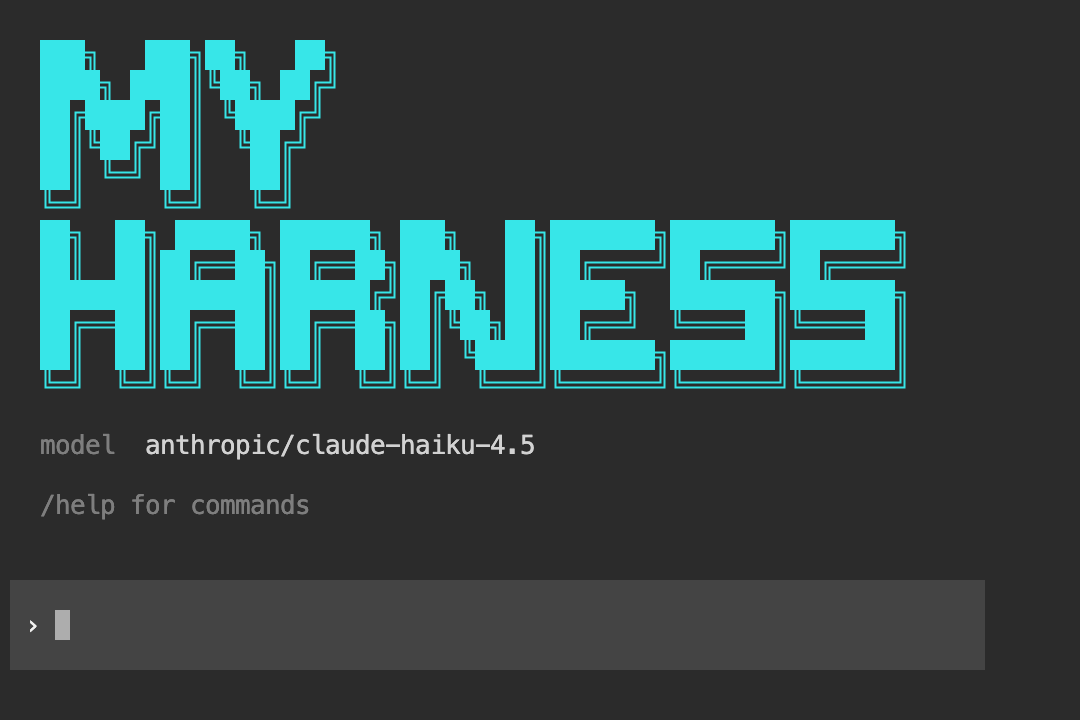
We built two skills for building your own agent harness. The first, create-agent-tui, scaffolds a full terminal UI with customizable looks — banners, tool display styles, and input fields you can match to Codex’s style or Claude Code’s style. The second, create-headless-agent, scaffolds a headless agent for CLI tools, API servers, queue workers, and pipelines — no terminal UI, just structured input/output.

Point Claude Code, Codex, Cursor, or any skill-compatible agent at either skill, describe what you want, and it generates a complete, runnable TypeScript project. Both run on the recently launched Agent SDK and work with any model on OpenRouter.

Why do this when there are many great commercial harnesses out there?
  • You want fine-grained control over the look, tools, or the loop
  • You want a minimal harness you can ship as part of a product
  • You want to learn how agents work to get better at using and debugging them

Agent TUI input style

Try building your own now

  1. Get an OpenRouter API key if you don’t have one
  2. Install the skill you want in your coding agent:
    • Agent TUI: gh skill install OpenRouterTeam/skills create-agent-tui
    • Headless agent: gh skill install OpenRouterTeam/skills create-headless-agent
  3. Tell your agent to build you a coding assistant and what will make your assistant unique
  4. Run the generated project:
    • Agent TUI: bun install && bun run start
    • Headless agent: bun install && bun run src/cli.ts -m '~anthropic/claude-opus-latest' -p "What's in this repo?"

The skill presents an interactive checklist when invoked. You pick what you need: server tools (web search, datetime, image generation), local tools (file read/write/edit, grep, glob, shell, and more), harness modules (session persistence, context compaction, tool approval gates), and slash commands (/model to switch models on the fly, /new for fresh conversations, /export to save as Markdown). After you make your selections, it generates the full project and verifies types with tsc.

Every part of the terminal UI is customizable out of the box. Three tool display styles (emoji markers, grouped action labels, or minimal one-liners), three input styles (full-width block that adapts to your terminal theme, bordered lines, or plain readline), three loader animations (gradient shimmer, spinner, or trailing dots), and custom ASCII banners. You can also describe what you want directly and the skill will generate a custom style.

The generated project is yours to modify. Add domain-specific tools, wire up a different entry point (the skill includes templates for HTTP API servers), bolt on context compaction for long conversations, or strip it down to the bare minimum.

Both skills rely on the Agent SDK for a trustworthy inner loop

Both skills generate two layers of code. The inner layer is the Agent SDK: one callModel call that handles the entire agentic loop (model calls, tool execution, multi-turn cycling, stop conditions, streaming, cost tracking). The outer layer is everything the skill generates around it: configuration, tool definitions, session management, the entry point, and — in the TUI skill’s case — the terminal interface.

Here’s the generated src/agent.ts, stripped to the essentials:

import { OpenRouter } from '@openrouter/agent';
import type { Item } from '@openrouter/agent';
import { stepCountIs, maxCost } from '@openrouter/agent';
import { tools } from './tools/index.js';

const client = new OpenRouter({ apiKey: config.apiKey });

const result = client.callModel({
  model: config.model,
  instructions: config.systemPrompt,
  input: userMessage,
  tools,
  stopWhen: [stepCountIs(config.maxSteps), maxCost(config.maxCost)],
});

That single callModel call is the entire agent loop. The SDK calls the model, inspects the output for tool requests, validates arguments against your Zod schemas, executes the tools, feeds results back, and repeats until a stop condition fires.

The skill wires up streaming on top of this by iterating over result.getItemsStream(). Each item is typed and carries the complete current state: message items carry the full assistant text so far, function_call items carry tool invocations, function_call_output items carry results, and reasoning items carry model thinking. The generated src/renderer.ts turns these into a clean terminal display with token counts and tool call summaries.

Tools live in src/tools/, one file per tool. Each tool uses the SDK’s tool() function with a Zod schema for input and a typed execute function. Server tools (web search, datetime) are even simpler: serverTool({ type: 'openrouter:web_search' }) and OpenRouter executes them server-side with zero client code.

Configuration flows through three layers: hardcoded defaults, an optional agent.config.json file, and environment variables. You can set your preferred model and cost limits in a config file and override them per-session with AGENT_MODEL=openai/gpt-5 npm start.

Session persistence writes every message to a JSONL file. On the next run, the harness can reload conversation history and pass it back into callModel as an Item[] array, picking up where you left off.

These patterns come from the top harnesses

The skill draws from three production agent architectures:

  • pi-mono’s coding agent: three-layer separation (config, agent loop, tools), JSONL sessions, pluggable tool operations
  • Claude Code: tool metadata with read-only and destructive flags, system prompt composition from static and dynamic context
  • Codex CLI: layered configuration (defaults, config file, environment variables), approval flows with session caching

These patterns are baked into the generated code, but the Agent SDK is what makes the whole thing compact. Without callModel handling the agentic loop, tool validation, streaming, and cost tracking, you’d be writing hundreds of lines of loop management code yourself. The skill focuses entirely on the app-specific parts because the SDK handles everything else.

The headless skill follows the same architecture but strips away the TUI layer entirely. Instead of a REPL, the generated CLI accepts prompts via --prompt, positional arguments, or piped stdin, and outputs plain text, NDJSON event streams, or just an exit code.

Two features stand out for production use. Safe retry on 429/5xx: the generated runAgentWithRetry wrapper retries transient API errors with exponential backoff — but only if no tool calls have executed yet. Once a mutating tool like file_write or shell has run, replaying the agent from the initial prompt would double-execute side effects, so retries throw immediately instead. Structured output with --output-schema: pass a JSON Schema file and the CLI validates the agent’s final response against it with Ajv, exiting with code 2 on validation failure. The parser is tolerant of markdown fences, so it works even when models wrap JSON in code blocks.

For the full callModel API reference, check the SDK docs. For detailed walkthroughs, see the Build Your Own Agent TUI and Build Your Own Headless Agent guides. To build your own skills on top of the Agent SDK, start with the skills repo.