


If Anthropic rate-limits you mid-traffic, your app shouldn’t return a 500. That single failure mode is a big reason teams reach for an LLM router in the first place. OpenRouter routes every request across 70+ providers, and you control how, down to the provider order, the price ceiling, and the fallback chain.
Routing in OpenRouter is 2 independent decisions: which model answers the request and which provider serves that model. Every configuration option in this guide maps to one of those 2 decisions. Keeping them separate is what lets you configure the right layer when something breaks.
The OpenRouter Python SDK (pip install openrouter) gets you there in a few lines, and switching models is a one-string change. (Already on the OpenAI SDK? Point its base URL at https://openrouter.ai/api/v1 and it works too.)
from openrouter import OpenRouter

client = OpenRouter(api_key="<OPENROUTER_API_KEY>")

resp = client.chat.send(
    model="anthropic/claude-sonnet-4.6",  # change this string to switch models
    messages=[{"role": "user", "content": "Summarize this changelog."}],
)
That’s the whole integration. The routing happens behind that one endpoint, and the rest of this guide works through the routing layers it exposes, with the exact config you copy in.
Those 2 decisions sit inside a bigger job. A router takes one request to one endpoint and handles the handoff to whatever model and provider should answer it. Every router does 4 of these jobs, and OpenRouter handles all 4:
| Job | What it decides | Where OpenRouter does it |
|---|---|---|
| Model selection | Which model answers the prompt | model field, or openrouter/auto |
| Provider selection | Which provider serves that model | provider object (default: price-based) |
| Load balancing | How to distribute across stable providers | Inverse-square price weighting |
| Failover | What to try when something errors | models array + provider fallback |
Open-source projects like RouteLLM and LLMRouter are routing libraries you self-host and wire into your own infrastructure. OpenRouter is a router you call: a managed service with a single endpoint in front of 400+ models.
The distinction matters when you’re deciding whether to own the routing logic or hand it off, and we come back to it in the router-vs-gateway section.
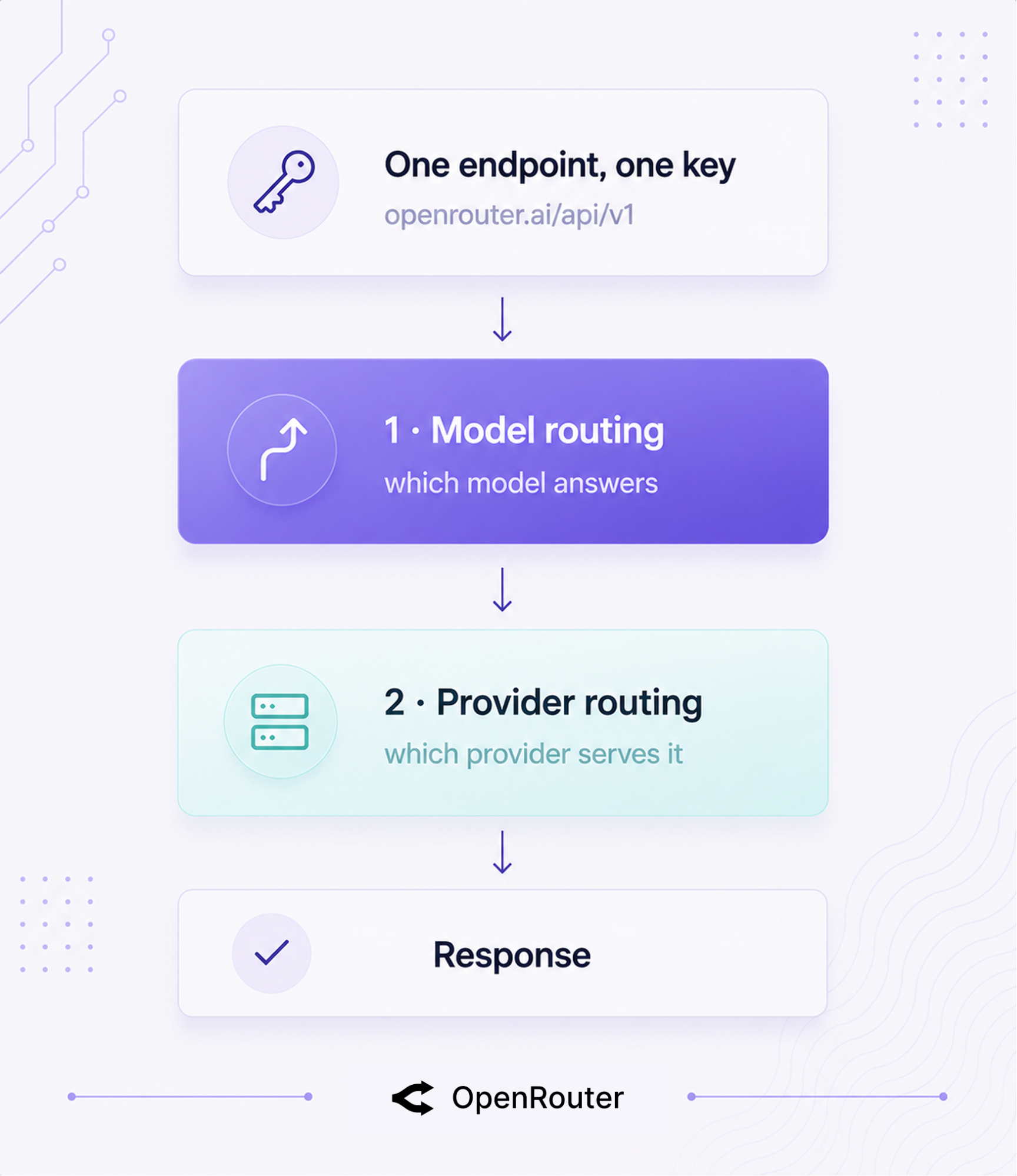
OpenRouter routes on 2 independent layers: model routing (which model answers) and provider routing (which provider serves that model). Hold those 2 apart, and every config below clicks into place.
One OpenAI-compatible endpoint sits in front of both layers: https://openrouter.ai/api/v1, one API key, 400+ models across 70+ providers. You call OpenRouter the same way you’d call OpenAI, and it fans out behind the scenes.
The minimal request shows both decisions in one payload.
curl https://openrouter.ai/api/v1/chat/completions \
  -H "Authorization: Bearer $OPENROUTER_API_KEY" \
  -H "Content-Type: application/json" \
  -d '{
    "model": "anthropic/claude-sonnet-4.6",
    "messages": [{"role": "user", "content": "Hello"}]
  }'
The model field is your model routing decision. If a given model is served by several providers, OpenRouter’s provider routing picks which one handles this specific call. You explicitly set the model; provider selection runs automatically unless you override it.
The single-key setup means you use one OpenRouter API key to access multiple providers. If you want to use your own provider keys instead, the BYOK guide covers that path. It keeps your existing provider agreements while adding failover and routing on top.
Before the mechanics, here’s the map. The sections after this one show how each mode works. Use overrides for the constraints the default can’t see: compliance, latency budgets, cost caps, and cross-model resilience.
| Your situation | Use | Why |
|---|---|---|
| Cheapest reliable, don’t care which provider | Default load balancing | Inverse-square weighting handles it |
| Must hit one provider (compliance, BYOK, region) | provider.order + allow_fallbacks: false | Hard stop, no silent fallback |
| Latency-sensitive (user-facing chat) | :nitro | Routes for throughput |
| Cost-capped batch jobs | :floor / max_price | Routes for price, enforces a ceiling |
| Need cross-model resilience | models fallback array | Survives a whole model going down |
| Don’t know what prompts users send | openrouter/auto | NotDiamond picks per prompt |
The rest of this guide works through these modes in order, starting with the one that runs when you set nothing.
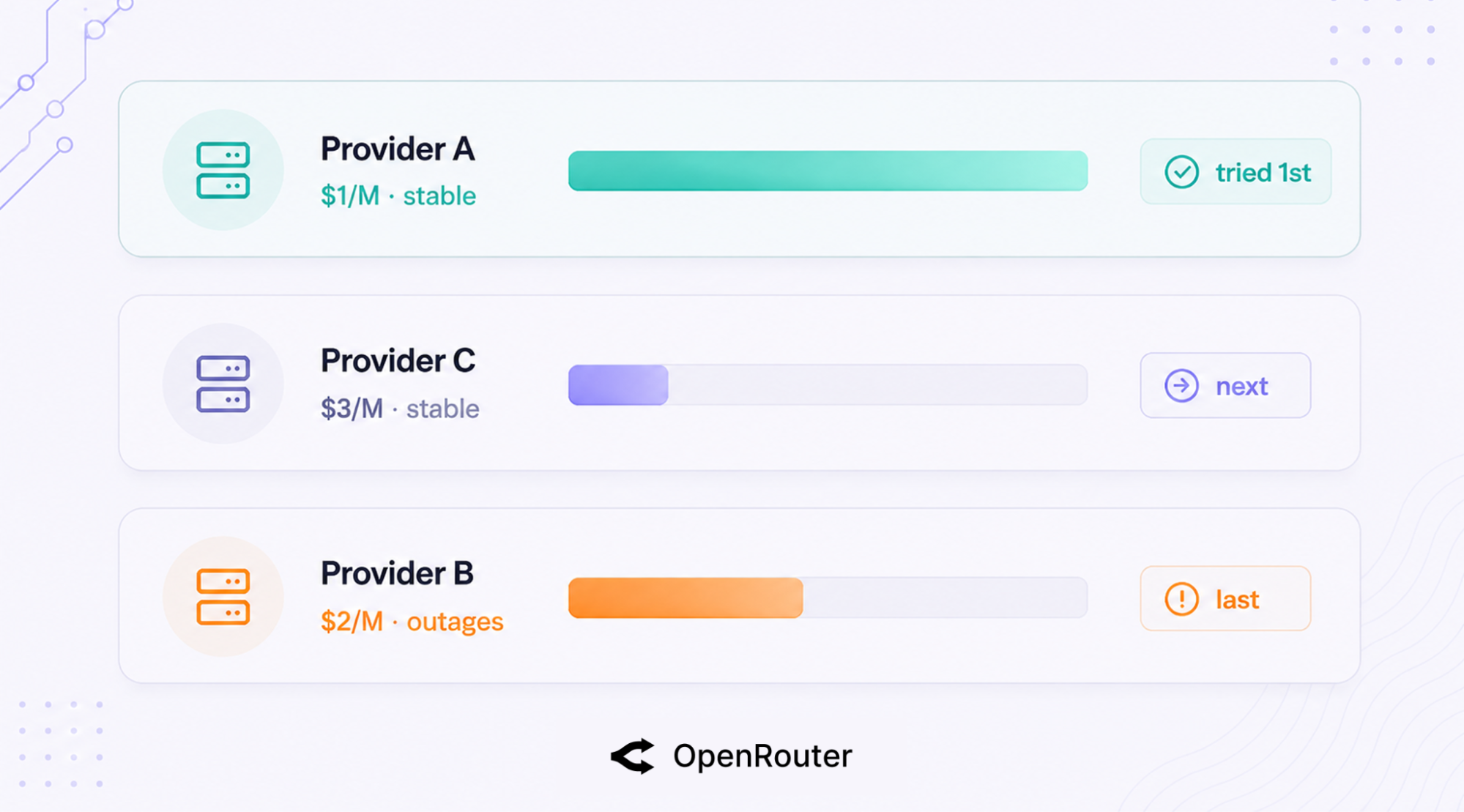
By default, OpenRouter sends your request to the cheapest reliable provider, weighted by the inverse square of price. This is the layer that makes routing decisions and runs on every request unless you override it.
When a model has multiple providers and you haven’t set sort or order, OpenRouter runs 3 steps, per the provider-routing docs:
Setting sort or order turns load balancing off and routes by your rule instead. Leave them unset and you get the price-weighted default.
Here’s the docs’ worked example of how that default plays out. Say a model is served by 3 providers: Provider A at $1/M tokens, Provider B at $2/M, and Provider C at $3/M, and Provider B recently had outages.
Inverse-square weighting means A is roughly 9x more likely than C to be tried first (1/3² gives C 1/9 the weight of A). If A fails, C is next. B, fresh off outages, gets tried last.
The squaring pulls traffic hard toward the cheapest stable option instead of spreading it evenly, so you’re not paying $3/M when a healthy $1/M provider is sitting right there.
OpenRouter runs this strategy in production across 70+ providers at 100 trillion tokens a month, which is the operating reality the example is drawn from. The 2 rules to remember: the 30-second outage window and the inverse-square price weighting.
One caveat on that default: it governs standard requests. Requests that include tools route through Auto Exacto, OpenRouter’s quality-first routing step for tool calls, which tiers providers by tool-call quality signals (pushing the lowest performers to the back, with price order kept within each tier) and runs by default. To put price-weighting back on a tool-calling request, force it with :floor or provider.sort: "price".
Add a provider object to the request body and you override the default entirely. The full object is documented here; these are the fields developers reach for first.
| Field | What it does | Default |
|---|---|---|
order | Try providers in this exact order | unset |
allow_fallbacks | Fall through to other providers if your picks fail | true |
sort | Route by "price", "throughput", or "latency" | unset |
only | Restrict to this allowlist of providers | unset |
ignore | Exclude these providers | unset |
quantizations | Restrict to specific quantization levels | unset |
data_collection | "allow" or "deny" providers that train on data | unset |
zdr | Require Zero Data Retention (ZDR) providers | unset |
max_price | Cap the per-token price you’ll accept | unset |
preferred_min_throughput | Prefer providers above this throughput | unset |
preferred_max_latency | Prefer providers under this latency | unset |
require_parameters | Only use providers supporting your request params | unset |
When you must hit one specific provider (a compliance requirement, a BYOK contract, a region constraint) and nothing else, set the order and turn fallbacks off.
{
  "model": "openai/gpt-5.5",
  "provider": { "order": ["openai", "azure"], "allow_fallbacks": false }
}
OpenRouter tries OpenAI, then Azure, and stops. It never falls back to a third provider you didn’t approve.
Provider quality varies, and OpenRouter says so plainly. Some providers serve more heavily quantized variants of a model that underperform the same model hosted elsewhere. There’s no quality score you can sort or filter by, but you can exclude a provider outright.
{
  "model": "meta-llama/llama-4-maverick",
  "provider": { "ignore": ["deepinfra"] }
}
For finer control, quantizations restricts to the precision levels you trust. This is the controllable surface for that quality variance.
Provider slugs match by base name. A slug like "google-vertex" matches every Vertex region and endpoint OpenRouter has for that provider. To pin a single variant, use the full slug, for example "deepinfra/turbo" instead of "deepinfra".
Base slug is the broad net; the full slug is the scalpel.
Append :nitro to optimize a model for speed, :floor to optimize for cost. They’re shortcuts: :nitro is exactly provider.sort: "throughput", and :floor is exactly provider.sort: "price". No object, no extra config, just a change to the model string.
| Slug | Optimizes for | Equivalent to |
|---|---|---|
model:nitro | Throughput (speed) | provider.sort: "throughput" |
model:floor | Price (cost) | provider.sort: "price" |
model (bare) | Cheapest-reliable balance | Default price-weighted routing |
Here it is as a one-line change:
model="meta-llama/llama-4-maverick:nitro"   # route for speed
model="meta-llama/llama-4-maverick:floor"   # route for cost
Reach for :nitro on user-facing chat where latency is felt, and :floor on batch jobs where cost is the constraint. For cost-capped work, pair :floor with max_price and BYOK economics.
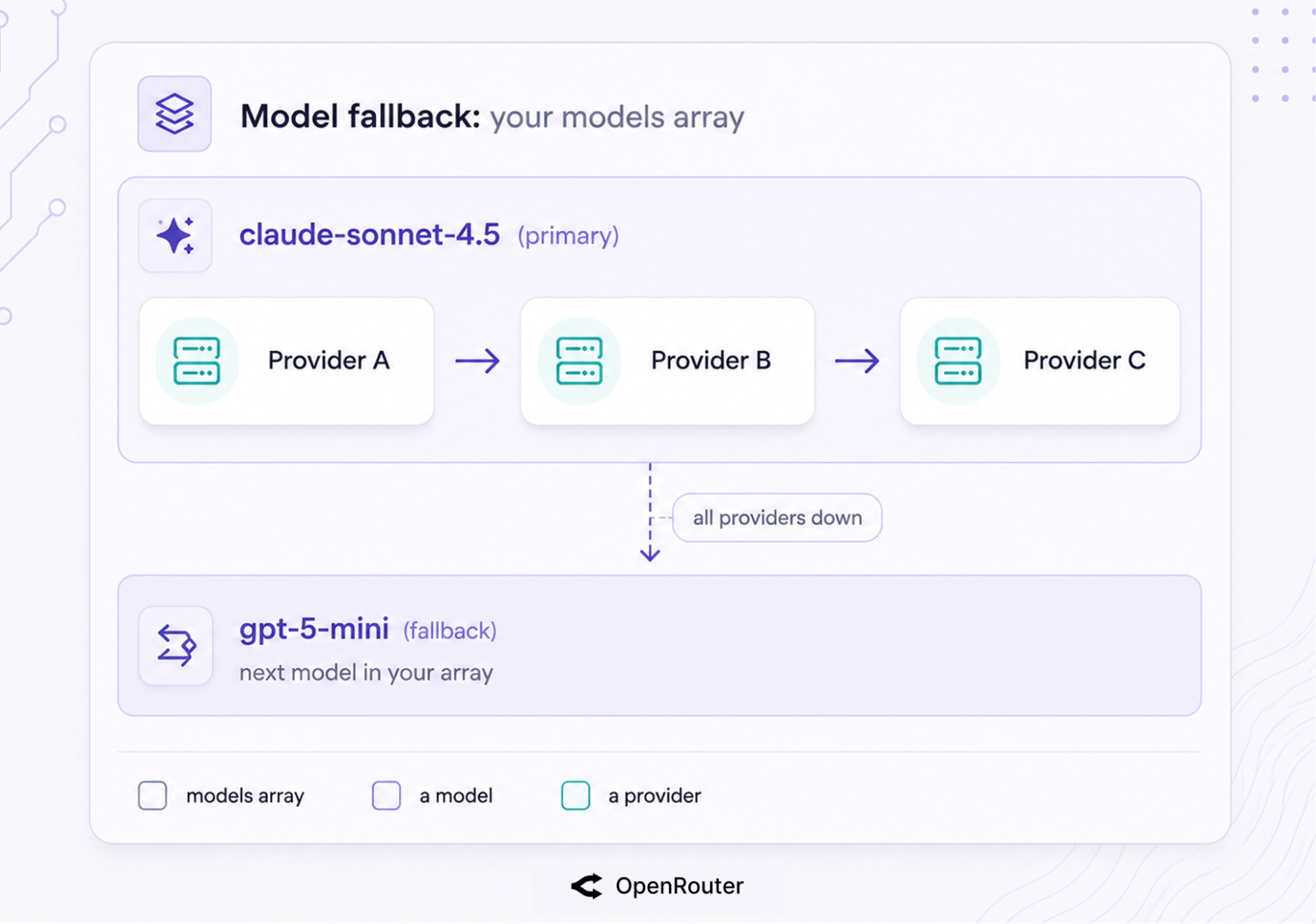
To survive provider errors, configure a models fallback array and rely on OpenRouter’s automatic provider failover. 2 mechanisms stack here, and they operate at different layers. Provider routing keeps a single model alive across providers, and model fallbacks handle the case where all providers for that model fail at once.
That covers most provider errors, but it doesn’t protect you from every service-wide outage.
The short version: list backup models, let provider failover handle the rest, and you won’t pay for the requests that fail.
Pass models in priority order. If the first errors, OpenRouter tries the next.
resp = client.chat.send(
    model="anthropic/claude-sonnet-4.6",
    models=["openai/gpt-5.4-mini"],  # tried in order if the primary fails
    messages=[{"role": "user", "content": "..."}],
)
The OpenRouter SDKs take models as a first-class field. (On the OpenAI SDK, pass it through extra_body, since it’s an OpenRouter extension.) Fallbacks trigger on context-length errors, moderation flags, rate-limiting, and downtime. You’re billed for the model that actually runs, not the ones that errored out first.
Underneath model fallbacks, there’s a second safety net. Within a single model, if the chosen provider returns a 5xx or rate-limits you, OpenRouter automatically falls through to the next provider serving that model. This is on by default (allow_fallbacks: true), and any provider with an outage in the last 30 seconds gets deprioritized.
The economics make this safe to lean on. Failed requests aren’t billed; OpenRouter’s zero-completion insurance means you pay only for the run that completes.
Failover has limits worth knowing about. Aborting a stream doesn’t stop billing on a subset of providers (Bedrock, Groq, Google, and Mistral among them, per the streaming docs), so a cancelled stream can still cost you on those.
And failover routes around provider-level failures, but it can’t route around OpenRouter itself: the August 2025 outage (a roughly 50-minute database incident) took the whole service down, fallbacks included. Provider failover is real and it’s automatic; it’s a layer of resilience rather than an SLA guarantee. Plan for both.
Send a request to openrouter/auto and you hand model selection to OpenRouter instead of picking yourself. Use it when the best model for a prompt varies, such as a mixed workload where some requests need strong reasoning and others need fast completion. When you know exactly which model you want, set it explicitly.
The Auto Router is powered by NotDiamond, which selects a model per prompt from a curated pool.
The pool is a rotating set of strong models; the Auto Router docs list the current lineup. After the call, the response model field tells you which one actually answered, so you’re never guessing.
You steer the choice through the auto-router plugin. cost_quality_tradeoff is a 0-10 dial that defaults to 7. Set it to 0 and the router always reaches for the most capable model; set it to 10 and it goes cheapest.
allowed_models keeps selection inside a provider family with wildcard patterns like anthropic/*.
{
  "model": "openrouter/auto",
  "plugins": [
    {
      "id": "auto-router",
      "cost_quality_tradeoff": 3,
      "allowed_models": ["anthropic/*", "openai/*"]
    }
  ]
}
On pricing, there’s no Auto Router surcharge. You pay the standard rate for whichever model gets selected, same as calling that model directly.
Both are “routing,” but the control surface flips. With openrouter/auto, OpenRouter decides the model. With a models fallback array, you decide the order and OpenRouter just walks it on error.
Use the Auto Router when you don’t know what prompts users will send; use a fallback array when you know your model preference and want resilience behind it.
A gateway is the unified access point (one endpoint, auth, rate limiting, observability); a router makes the per-request decision (which model, which provider). OpenRouter is the gateway you call, and it includes routing logic that decides which model and provider handle each request.
| Capability | Router | Gateway | OpenRouter |
|---|---|---|---|
| Per-request model/provider decision | Yes | Access only | Yes |
| Automatic failover | Yes | Sometimes | Yes |
| Single unified endpoint | Sometimes | Yes | Yes |
| Managed vs self-hosted | Either | Either | Managed |
Our LLM gateway guide defines the gateway tier in full; routing is the mechanism inside it. If you want a self-hosted gateway-plus-router you run yourself, LiteLLM is the host-it option. OpenRouter is the call-it option.
A router sits between your app and multiple models and providers, and decides where each request goes. It handles 4 jobs: model selection, provider selection, load balancing, and failover. You send one request to one endpoint, and the router picks the destination.
By default it deprioritizes any provider with a significant outage in the last 30 seconds, then picks among the lowest-cost providers, weighted by the inverse square of price, and keeps the rest as fallbacks. Setting sort or order overrides this default.
A gateway is the unified access point (one endpoint, auth, observability). A router makes the per-request decision about which model and provider handle the call. OpenRouter is both: a gateway you call that also routes.
Pass a models array in priority order for model-level fallback (triggers on context-length errors, moderation flags, rate limits, and downtime). For provider-level failover within one model, OpenRouter does it automatically by default (allow_fallbacks: true). Failed requests aren’t billed.
:nitro appended to a model slug optimizes for throughput (it’s provider.sort: "throughput"). :floor optimizes for cost (provider.sort: "price"). Both are one-line changes to the model string.
No. You pay the standard rate for whichever model openrouter/auto selects, with no additional Auto Router fee.
此内容由惯性聚合(RSS阅读器)自动聚合整理,仅供阅读参考。 原文来自 — 版权归原作者所有。