


High performance is one of the most important features of an AI Inference stack, and is often misunderstood by many developers who are new to AI. Improving performance is always a balance of tradeoffs between accuracy, throughput, latency, quality, time and cost. Complicating matters even more, these tradeoffs are almost always correlated to some desired product outcome. We see this first hand at Modular, where many of our design partners and early customers are trying to figure out the best way to deploy high performance AI workloads.
We help many AI Engineers and Deployers understand that cumulative performance gains can make previously unthinkable applications possible-crossing the chasm from something that is “possible”, to something “practical”, and then commonplace. In this light, we often explain to customers how benchmarking is always challenging, and in this post we explore how benchmarking performance for AI inference servers like MAX Serve on GPU is no different.
Try the benchmarks out for yourself! Full instructions and scripts available in this Benchmark Tutorial.
LLM performance is influenced by many factors, including the underlying model, hardware architecture, prompt and response length distributions, and request patterns–among many other aspects. Adding to this complexity are a variety of ways to characterize performance, including time-to-first-token (TTFT), time-per-output-token (TPOT), request and token throughput, and goodput.
For the initial 24.6 release of MAX GPU, we focused on common workloads and metrics that reasonably represent both real-world use-cases and controlled test environments. We followed the methodology of the vLLM project and benchmarked the ShareGPTv3 and sonnet datasets with an asynchronous workload configuration, i.e. with all of the requests sent up-front at the start of the timeline. Choosing these benchmarks has the added benefit of providing a standard reference point for measuring the performance of MAX GPU.
These workloads emphasize throughput as the primary metric — asynchronous workloads don’t have a tight latency SLA and latency metrics like TTFT and TPOT turn into obfuscated throughput metrics when all the requests are sent up front. We’re excited to share high-level, initial performance results from the MAX GPU release preview on an a2-ultragpu-g1 GCP instance equipped with an A100-80GB SXM in bfloat16. We’ll note that these numbers do not include paged attention and some other optimizations yet, which will land in 2025.
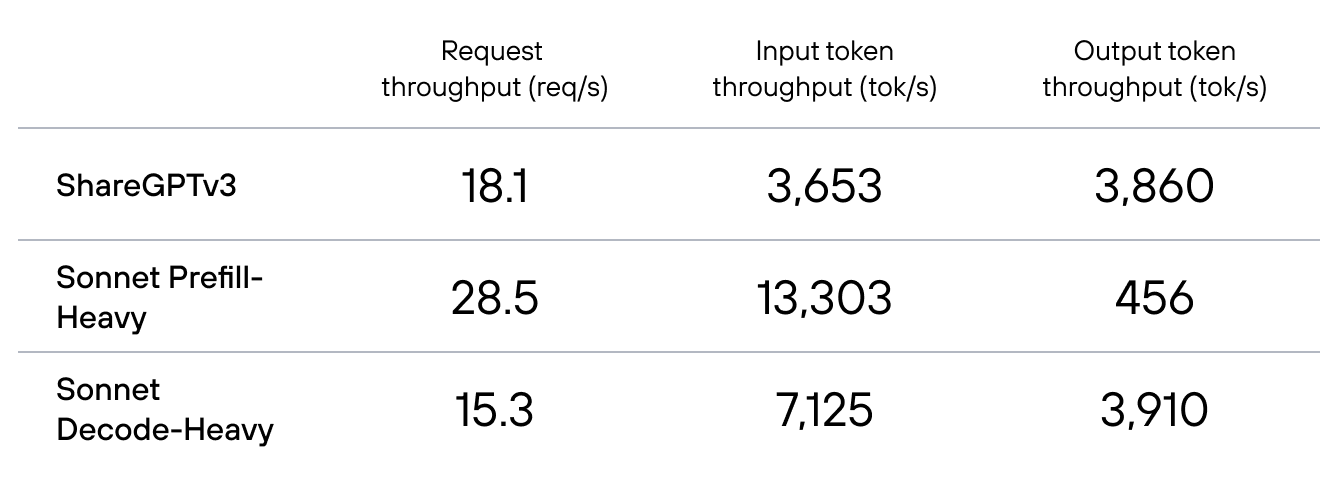
The following sections provide a detailed analysis of these performance metrics, and examine MAX GPU’s current capabilities, comparisons to other popular serving platforms, and areas for future improvements. For complete details on our benchmarking methodology, please refer to the appendix at the end of this post.
One of the simplest ways to understand the performance of MAX GPU is to compare it to something else. We decided to choose simple and easy to understand benchmarks to make this comparison as straightforward as possible. While we are experts in MAX GPU, we’re not experts in alternative stacks like vLLM–which are incredible in their own right. Our primary goal with comparisons to vLLM is to understand the capabilities, limitations, and ways to improve our own stack, rather than to make definitive performance claims.
Another caveat is that MAX GPU and vLLM use different KV cache algorithms. vLLM is built around the PagedAttention algorithm while MAX GPU uses a naive cache implementation in the 24.6 release. This limitation of MAX GPU affects performance most strongly through a parameter that controls the maximum number of requests that can be in flight simultaneously. On the ShareGPTv3 workload, MAX can only support up to 248 concurrent requests while vLLM can support 512, which covers every request in the benchmark. On the Sonnet Prefill-Heavy and Decode-Heavy workloads, which have shorter requests, the MAX naive cache can support 512 concurrent requests. Therefore, we present results for MAX at both values to demonstrate the effect on performance.
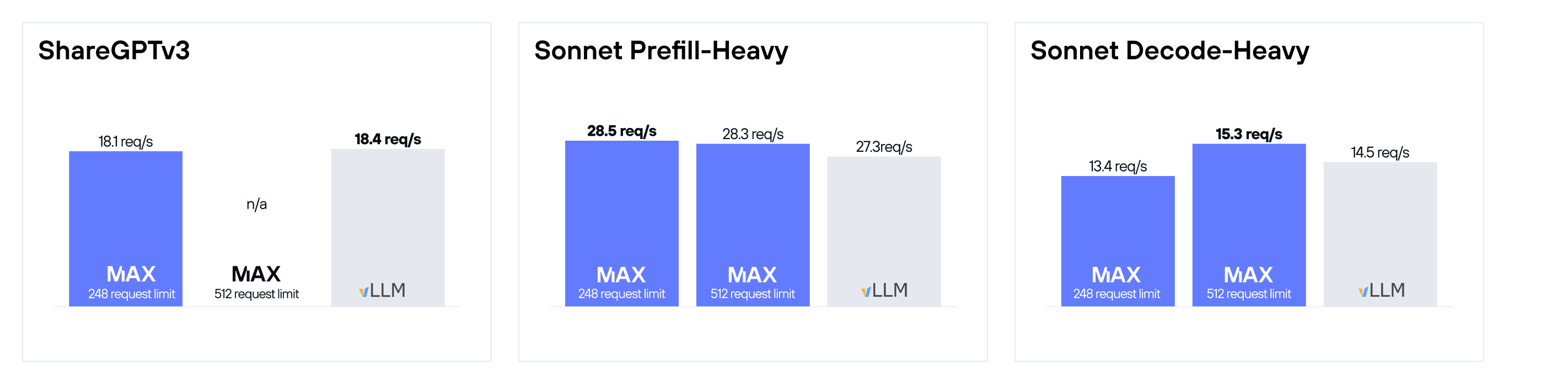
A few things jump out from this comparison:
These are all things we want to look into and fix, and it's why we consider our 24.6 release of MAX GPU to be a preview. We are also close to adding PagedAttention support–we believe could improve our performance in general, but are proud of our progress even without it.
It makes a lot of sense that increasing the concurrent request count increases the throughput of MAX GPU. At the risk of oversimplifying, an LLM inference engine spends most of its time doing three things:
The amount of work in parts 2 and 3 depend only on the particulars of the requests, i.e. their prompt and response lengths. The amount of work in step 1, however, doesn’t depend on the requests at all or even the number of them. The model weights are the same for each request, so they only need to be loaded once per batch per iteration. Large batch sizes amortize the cost of loading the model weights and therefore improve throughput.
In order to reach large batch sizes, an inference engine needs to fit a large number of requests into its KV cache. PagedAttention is more memory efficient than naive attention because it reserves space in the KV cache based on the actual request lengths rather than the maximum request length. In the ShareGPTv3 dataset, and also most real-world scenarios, the requests can have a wide variety of lengths. In contrast, the Sonnet Decode-Heavy and Prefill-heavy workloads are constructed to have nearly uniform request lengths, so the functional difference between PagedAttention and a naive KV cache is smaller. This is why we are able to benchmark MAX GPU with up to 512 concurrent requests for the Sonnet datasets but not ShareGPTv3. Doing so improves performance on Decode-Heavy by +14%!
But why does it hurt performance on Prefill-Heavy? MAX GPU builds prefill batches with a smaller maximum batch size than decode (32 in this specific instance), which is a common choice to balance throughput and latency. Therefore we don’t expect performance on the prefill heavy batches to depend on the concurrent request limit. That explains why performance didn’t improve much, but it doesn’t explain why it declined.
When building complex systems like MAX GPU, attributing performance changes to specific locations is the stack is very helpful during the development process. This is nearly impossible to do perfectly, but even imperfect attribution frameworks can be valuable.
One performance metric that we’ve found particularly helpful is GPU utilization. GPU utilization, as defined by NVIDIA’s toolchain, measures the percentage of time that GPU kernels are actively executing. This metric allows us to break down the total runtime into two components: kernel time, when a GPU is actively processing, and non-kernel time, when a GPU is idle.
We’ve added the measurement of GPU Utilization to our serving benchmark (using the excellent nvitop package), and can generate metrics for the Prefill-Heavy benchmark to help us understand the performance loss of larger batch-size requests.
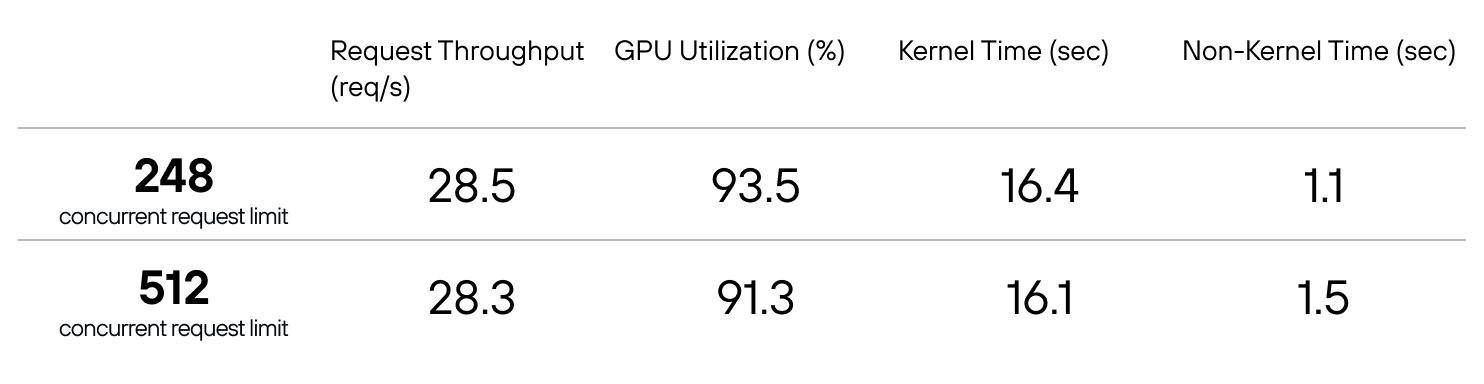
We can see that increasing the concurrent request limit actually slightly reduces the kernel time, which is what we’d expect. The overall throughput degradation can be attributed to the increase in Non-Kernel time, as indicated by the reduction in GPU Utilization.
Taking this insight back to the code, we’ve recognized that MAX Serve isn’t able to keep up with the burst of requests sent at the start of these throughput benchmarks and that the MAX Engine is waiting for the decode batch to fill up, leading to greater GPU down-time when the maximum batch size is larger. We are optimizing MAX Serve for these sorts of bursty-scenarios and expect to see consistent GPU Utilization in this scenario in our next release. This is a reminder of the criticality of measuring performance of the full AI Inference stack rather than just the AI Inference Engine.
We can also look at the GPU Utilization of vLLM, since we added GPU metric tracking to the benchmark client rather than to MAX GPU exclusively. This time, let’s look at the ShareGPTv3 workload with 500 prompts.
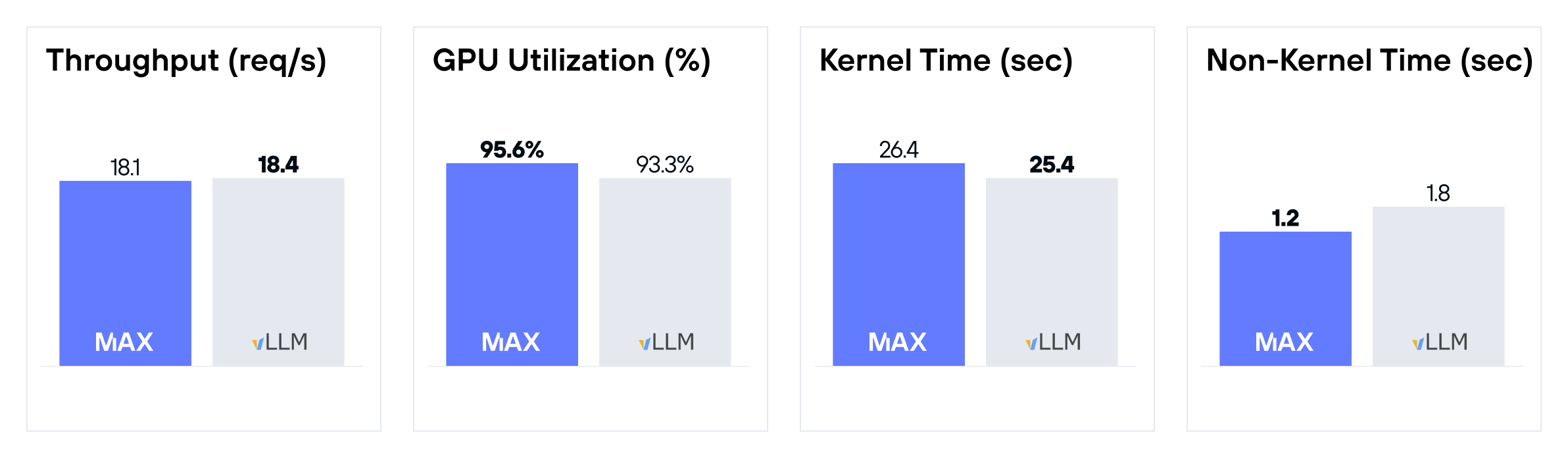
We can see that vLLM has a slight advantage in Kernel Time while MAX has a slight advantage in Non-Kernel Time. They wash out to very similar throughput–within 2%. This tells us that MAX can be improved via kernel performance whereas vLLM can be improved by reduced non-Kernel overhead. We expect MAX’s kernel performance to close the gap with support for larger batch sizes with paged attention.
We are proud of MAX GPU’s performance so far, and know there are workloads where we can deliver even higher performance in the future. There are several significant optimizations that didn’t quite make it in time for 24.6, headlined by PagedAttention and the memory and batch size improvements that it brings. We are also looking to generally improve performance at smaller batch sizes and share a performance analysis of latency metrics under lower load conditions in the future.
Alignment between benchmarking workloads and real-world use cases is always challenging, and we recognize that we can only go so far without feedback. We would love to hear about your workloads, whether or not you are using the MAX stack. We believe in the MAX GPU stack and are excited to optimize it for your problem. Come talk to us about them on the forum, and please give us feedback! Stay tuned for so much more that we are dropping soon in 2025!
The ShareGPTv3 dataset contains multi-turn chat conversations. The first turn in the conversation is treated as the prompt and the second turn is treated as the expected response. All other turns are discarded. The prompts and expected responses are tokenized to measure the prompt and response length and the dataset is filtered to prompts greater than 4 and less than or equal to 1024 tokens, responses that are greater than 4 tokens, and prompt + response lengths that are less than or equal to 2048 tokens. The response length is sent in the request as the maximum number of output tokens and the request is set to ignore end-of-sequence tokens. Therefore, the response length is set to match that from the dataset. The average prompt and response lengths are both around 200 tokens, with responses up to nearly 2048 input tokens. We ran with a random sample of 500 prompts, though 5000 is another popular choice.
The Sonnet dataset contains 518 lines from 37 Shakespearean Sonnets. The Sonnets are formed into two-part prompts: a prefix that is fixed for each prompt and a suffix that is sampled randomly from the 518 lines in the dataset. Unlike with ShareGPTv3 workload, the prompts are formatted with a chat template. Like with ShareGPTv3, the maximum output tokens is set explicitly and the request is set to ignore end-of-sequence tokens to provide maximum reproducibility and control of the size of the workload. This is the only way in which the Prefill-Heavy and Decode-Heavy workloads differ: Prefill-heavy has a response length set to 16 tokens whereas Decode-Heavy has a response length set to 256 tokens. Despite the name, the Decode-Heavy dataset is closer to an even split of time between Prefill and Decode iterations.
In order to minimize the difference in our benchmarking methodology, we based our benchmarking client on vLLM’s benchmark_serving.py script. You can find our version and detailed usage instructions in the MAX repo.
We benchmarked containerized versions of both MAX GPU and vLLM, and we configured vLLM consistent with vLLM’s nightly-tests.json configuration file. vLLM:
Bash
docker run --rm --gpus=1 \ --ipc=host \ -e HUGGING_FACE_HUB_TOKEN=${HUGGING_FACE_HUB_TOKEN} \ -p 8000:8000 \ vllm/vllm-openai:v0.6.3.post1 \ --model meta-llama/Meta-Llama-3.1-8B-Instruct \ --num-scheduler-steps 10 \ --max-num-seqs 512 \ --max-model-len 2048 \ --gpu-memory-utilization 0.9 \ --disable_log_stats \ --disable_log_requests
and MAX:
Bash
docker run --rm --gpus=1 \ --ipc=host \ -e HUGGING_FACE_HUB_TOKEN=${HUGGING_FACE_HUB_TOKEN} \ -p 8000:8000 \ -e MODULAR_STRUCTURED_LOGGING=0 \ modular/max-openai-api:24.6.0 \ --model-name meta-llama/Meta-Llama-3.1-8B-Instruct \ --huggingface-repo-id modularai/llama-3.1 \ --max-num-steps 10 \ --cache-strategy continuous \ --max-cache-batch-size 248 \ --max-length 2048 \ --pad-to-multiple-of 2
For the Prefill-Heavy and Decode-Heavy cases, we set --max-length 768 and --max-cache-batch-size to 248 or 512 when demonstrating performance vs the concurrent request limit.
To run the ShareGPTv3 workload with 500 prompts, first download the dataset:
Bash
wget https://huggingface.co/datasets/anon8231489123/ShareGPT_Vicuna_unfiltered/resolve/main/ShareGPT_V3_unfiltered_cleaned_split.json
and then run the benchmark client:
Bash
python benchmark_serving.py \ --backend vllm \ --model meta-llama/Meta-Llama-3.1-8B-Instruct \ --dataset-path ShareGPT_V3_unfiltered_cleaned_split.json \ --endpoint /v1/completions \ --num-prompts 500 \ --request-rate inf \ --collect-gpu-stats
To run the Prefill-heavy workload, first download the sonnet text file and duplicate it 4 times:
Bash
wget https://raw.githubusercontent.com/vllm-project/vllm/refs/tags/v0.6.3.post1/benchmarks/sonnet.txt echo "" > sonnet_4x.txt for _ in {1..4}; do cat sonnet.txt >> sonnet_4x.txt done
and then run the benchmark:
Bash
python benchmark_serving.py --backend vllm \ --model meta-llama/Meta-Llama-3.1-8B-Instruct \ --dataset-name sonnet \ --dataset-path sonnet_4x.txt \ --endpoint /v1/completions \ --num-prompts 500 \ --request-rate inf \ --sonnet-input-len 512 \ --sonnet-output-len 16 \ --sonnet-prefix 50 \ --collect-gpu-stats
The Decode-Heavy workload uses the same sonnet_4x.txt file as the Prefill-Heavy workload:
Bash
python benchmark_serving.py --backend vllm \ --model meta-llama/Meta-Llama-3.1-8B-Instruct \ --dataset-name sonnet \ --dataset-path sonnet_4x.txt \ --endpoint /v1/completions \ --num-prompts 500 \ --request-rate inf \ --sonnet-input-len 512 \ --sonnet-output-len 256 \ --sonnet-prefix 50 \ --collect-gpu-stats
We strongly recommend running each benchmark several times to warm-up the many caches present in modern LLM stacks. The numbers reported here came from 10 runs. We treated the first 5 as warm-ups and took the median of the final 5.
Note that in our testing, we found performance of vLLM v0.6.4 and v0.6.4.post1 to be worse than v0.6.3.post1. We wanted to compare with vLLM’s high-water mark, so this data is based on v0.6.3.post1.
此内容由惯性聚合(RSS阅读器)自动聚合整理,仅供阅读参考。 原文来自 — 版权归原作者所有。