
惯性聚合 高效追踪和阅读你感兴趣的博客、新闻、科技资讯
阅读原文 在惯性聚合中打开

推荐订阅源

The Last Watchdog
The Last Watchdog
博客园_首页
Martin Fowler
Martin Fowler
S
SegmentFault 最新的问题
美团技术团队
小众软件
小众软件
V
V2EX
博客园 - Franky
K
KPMG report finds enterprise disconnect between AI and its ROI | CIO
The GitHub Blog
The GitHub Blog
Microsoft Security Blog
Attack and Defense Labs
S
Security Affairs
Simon Willison's Weblog
I
Intezer
T
The Exploit Database - CXSecurity.com
有赞技术团队
有赞技术团队
S
Schneier on Security
人人都是产品经理
人人都是产品经理
Security Archives - TechRepublic
cs.CL updates on arXiv.org
K
Kaspersky official blog
PCI Perspectives
PCI Perspectives
AI
AI
钛媒体:引领未来商业与生活新知
钛媒体:引领未来商业与生活新知
罗磊的独立博客
O
OpenAI News
Cyber Security Advisories - MS-ISAC
The Register - Security
V
Vulnerabilities – Threatpost
GbyAI
GbyAI
博客园 - 【当耐特】
C
Cisco Blogs
大猫的无限游戏
大猫的无限游戏
Help Net Security
Help Net Security
Google DeepMind News
S
Securelist
Application and Cybersecurity Blog
P
Proofpoint News Feed
博客园 - 三生石上(FineUI控件)
雷峰网
雷峰网
L
LangChain Blog
SecWiki News
SecWiki News
博客园 - 叶小钗
奇客Solidot–传递最新科技情报
奇客Solidot–传递最新科技情报
V2EX - 技术
V2EX - 技术
让小产品的独立变现更简单 - ezindie.com
J
Java Code Geeks
L
LINUX DO - 热门话题
Cisco Talos Blog
Cisco Talos Blog

Modular Blog

Qualcomm to Acquire Modular Modular 26.4: SOTA MoE Serving, Model Bringup via Agent Skills, Mojo 1.0 Beta 2 and More ModCon 2026: Modular’s Developer Conference Day Zero: MiniMax M3 Open Weights on Modular Cloud Modverse #55: Mojo 1.0 Beta, Community Mojo Libraries, and Real-Time Patient Conversations Powered by MAX What about OpenCL and CUDA C++ alternatives? (Democratizing AI Compute, Part 5) Why LLM Inference Needs a New Kind of Router - Part 3 Three trends from MLSys 2026 Why LLM Inference Needs a New Kind of Router - Part 2 How I built a pure Mojo app (and 10 libraries) with AI agents Hippocratic AI partners with Modular to power flexible, high-quality inference for real-time patient conversations Translating to Mojo via AI Agents Inkwell: Why Your Inference Platform Matters As Much As Your Model Why LLM Inference Needs a New Kind of Router - Part 1 Modular 26.3: Mojo 1.0 Beta, MAX Video Gen, and more Modverse #54: AMD AI DevDay, New Modular Offices, and a Community That Keeps Shipping How Frontier Coding Agents Built a Video Diffusion Pipeline on MAX TileTensor Part 1 - Safer, More Efficient GPU Kernels Modular Opens Edinburgh & San Francisco Offices Structured Mojo Kernels Part 4 - Portability and the Road Ahead Day Zero Launch: Fastest Performance for Gemma 4 on NVIDIA and AMD Modverse #54: From GTC to Edinburgh, a Community Building Momentum Software Pipelining for GPU Kernels: Part 1 - The Pipeline Problem Structured Mojo Kernels Part 3 - Composition in Practice Modular 26.2: State-of-the-Art Image Generation and Upgraded AI Coding with Mojo Modular at NVIDIA GTC 2026: MAX on Blackwell, Mojo Kernel Porting, and DeepSeek V3 on B200 Structured Mojo Kernels Part 2 - The Three Pillars Modverse #53: Community Builds, Research Milestones, and a Growing Ecosystem Structured Mojo Kernels Part 1 - Peak Performance, Half the Code The Claude C Compiler: What It Reveals About the Future of Software BentoML Joins Modular The Five Eras of KVCache Modular 26.1: A Big Step Towards More Programmable and Portable AI Infrastructure How to Beat Unsloth's CUDA Kernel Using Mojo—With Zero GPU Experience 🔥 Modular 2025 Year in Review The path to Mojo 1.0 Modverse #52: Advancing AI Together — Community Projects & Platform Milestones Modular 25.7: Faster Inference, Safer GPU Programming, and a More Unified Developer Experience "TTS 1 Max" (powered by Modular Platform) Ranked #1 Speech Model on Artificial Analysis PyTorch and LLVM in 2025 — Keeping up With AI Innovation Achieving State-of-the-Art Performance on AMD MI355 — in Just 14 Days Modular Raises $250M to scale AI's Unified Compute Layer Modular 25.6: Unifying the latest GPUs from NVIDIA, AMD, and Apple Matrix Multiplication on Blackwell: Part 4 - Breaking SOTA Modverse #51: Modular x Inworld x Oracle, Modular Meetup Recap and Community Projects Matrix Multiplication on Blackwell: Part 3 - The Optimizations Behind 85% of SOTA Performance Matrix Multiplication on Blackwell: Part 2 - Using Hardware Features to Optimize Matmul Matrix Multiplication on Blackwell: Part 1 - Introduction Modverse #50: Modular Platform 25.5, Community Meetups, and Mojo's Debut in the Stack Overflow Developer Survey Modular Platform 25.5: Introducing Large Scale Batch Inference SF Compute and Modular Partner to Revolutionize AI Inference Economics AI Agents for AWS Marketplace Modverse #49: Modular Platform 25.4, Modular 🤝 AMD, and Modular Hack Weekend Inside Modular Hack Weekend: Top Projects and Community Highlights How is Modular Democratizing AI Compute? (Democratizing AI Compute, Part 11) Modular 25.4: One Container, AMD and NVIDIA GPUs, No Lock-In Introducing Mammoth: Enterprise-Scale GenAI Deployments Made Simple Modular + AMD: Unleashing AI performance on AMD GPUs Modverse #48: Modular Platform 25.3, MAX AI Kernels, and the Modular GPU Kernel Hackathon Exploring Metaprogramming in Mojo Modular GPU Kernel Hackathon Highlights: Innovation, Community, & Mojo🔥 Modular’s bet to break out of the Matrix (Democratizing AI Compute, Part 10) Modular Platform 25.3: 450K+ Lines of Open Source Code and pip Packaging A New, Simpler License for MAX and Mojo Why do HW companies struggle to build AI software? (Democratizing AI Compute, Part 9) Modverse #47: MAX 25.2 and an evening of GPU programming at Modular HQ What about the MLIR compiler infrastructure? (Democratizing AI Compute, Part 8) What about Triton and Python eDSLs? (Democratizing AI Compute, Part 7) MAX 25.2: Unleash the power of your H200's–without CUDA! What about TVM, XLA, and AI compilers? (Democratizing AI Compute, Part 6) Modverse #46: MAX 25.1, MAX Builds, and Democratizing AI Compute CUDA is the incumbent, but is it any good? (Democratizing AI Compute, Part 4) MAX 25.1 - Introducing MAX Builds How did CUDA succeed? (Democratizing AI Compute, Part 3) Paged Attention & Prefix Caching Now Available in MAX Serve What exactly is “CUDA”? (Democratizing AI Compute, Part 2) Modular DeepSeek's Impact on AI (Democratizing AI Compute, Part 1) Modular Hands-on with Mojo 24.6 Evaluating Llama Guard with MAX 24.6 and Hugging Face Modular Introducing MAX 24.6: A GPU Native Generative AI Platform MAX GPU: State of the Art Throughput on a New GenAI platform Understanding SIMD: Infinite Complexity of Trivial Problems Community Spotlight: Writing Mojo with Cursor Hands-on with Mojo 24.5 MAX 24.5 - With SOTA CPU Performance for Llama 3.1 Announcing stack-pr: an open source tool for managing stacked PRs on GitHub Write hardware-agnostic custom ops for PyTorch | Modular Take control of your AI Develop locally, deploy globally A brief guide to the Mojo n-body example What's new in MAX 24.4? MAX on macOS, fast local Llama3, native quantization and GGUF support What’s new in Mojo 24.4? Improved collections, new traits, os module features and core language enhancements MAX 24.4 - Introducing quantization APIs and MAX on macOS Deep dive into ownership in Mojo What ownership is really about: a mental model approach Fast⚡k-means clustering in Mojo🔥: a guide to porting Python to Mojo🔥 for accelerated k-means clustering
Debugging in Mojo🔥
No items found. · 2024-07-16 · via Modular Blog

Developer tooling is a big priority for Mojo and MAX, we want to vastly improve the debugging experience compared to the traditional Python, C++, and CUDA stack. Machine learning often requires inspecting the state of a program after a long running process, requiring more control than what "print debugging" gives you. Over time this tooling will extend to GPUs, allowing you to step through CPU code into GPU calls with the same developer experience.

This tutorial is for VS Code, but can be adapted to other editors using LLDB-DAP. It's aimed at general debugging if you have no experience with it, but goes over all the currently implemented Mojo features. The goal is to show you how simple and powerful debugging is with Mojo, to improve your velocity tracking down logic errors beyond writing and deleting print statements.

Debug current file

First make sure you've installed the Mojo extension, or Mojo Nightly if you've installed the nightly compiler.

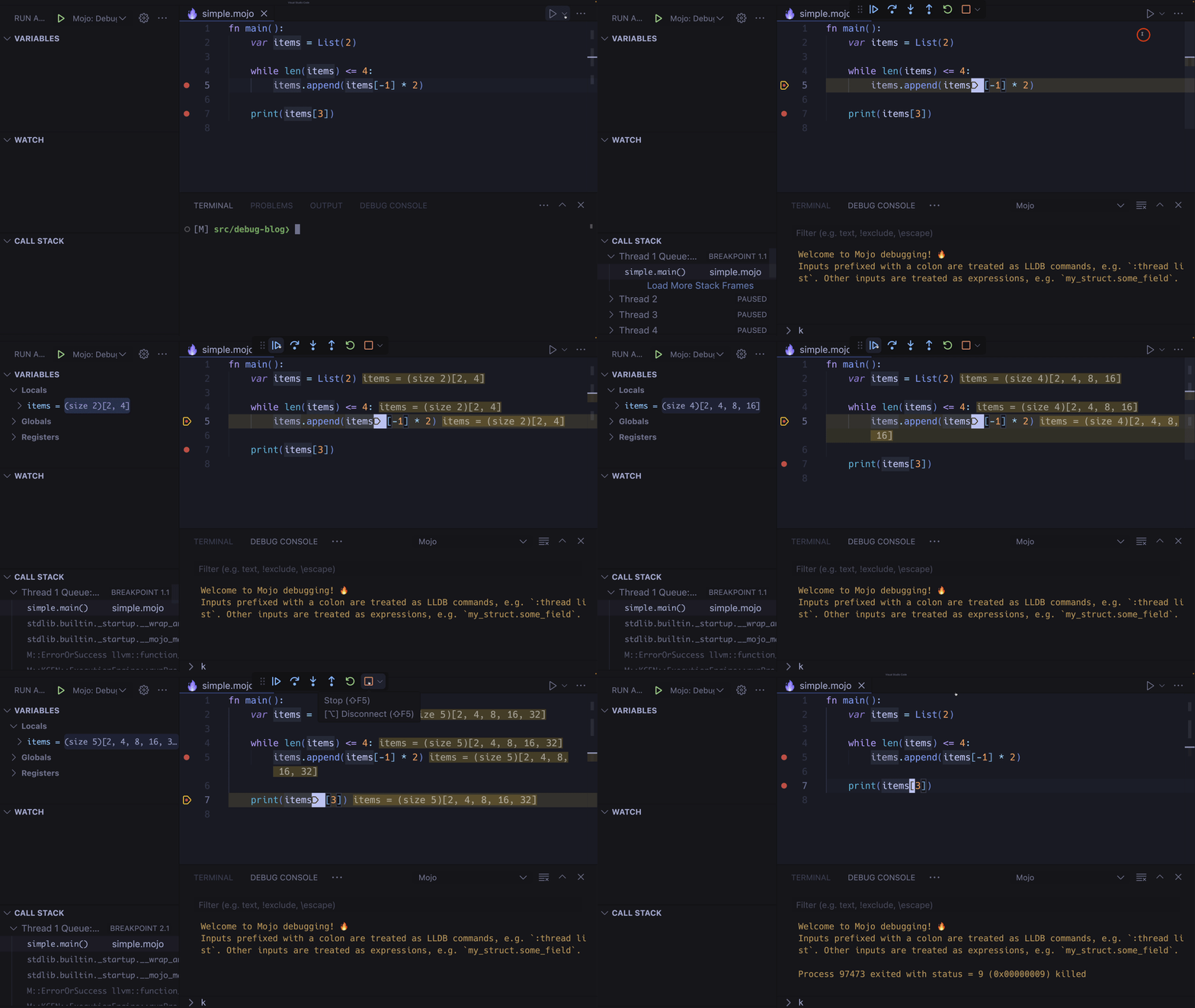
Let's start with the simplest way to boot up the debugger in VS Code, set a breakpoint by clicking to the left of a line to set a 🔴 Breakpoint, then press the to the right of the ▶️ Play button in the top-right, and choose Debug Mojo File:
__wf_reserved_inherit

Note: you can expand any GIF by clicking it, and minimize by clicking anywhere or pressing any key.

Pressing the |▶ Continue button advances to the next break point, if the same line of code is being hit in a loop, this will advance to the next iteration in the loop.

Default Keybindings:

  • F5: Start debugger (select Mojo on the first run if starting this way)
  • F5: Continue to next breakpoint if the debugger has started
  • Shift+F5: Stop the debug session
  • Control+Shift+P (Command+Shift+P on macOS): Restart the debug session
  • F9: Toggle breakpoint on the current line

You can also launch the debugger from a terminal with:

Bash

mojo debug --rpc main.mojo

Type in mojo debug --help for more options.

Step in, out, and over

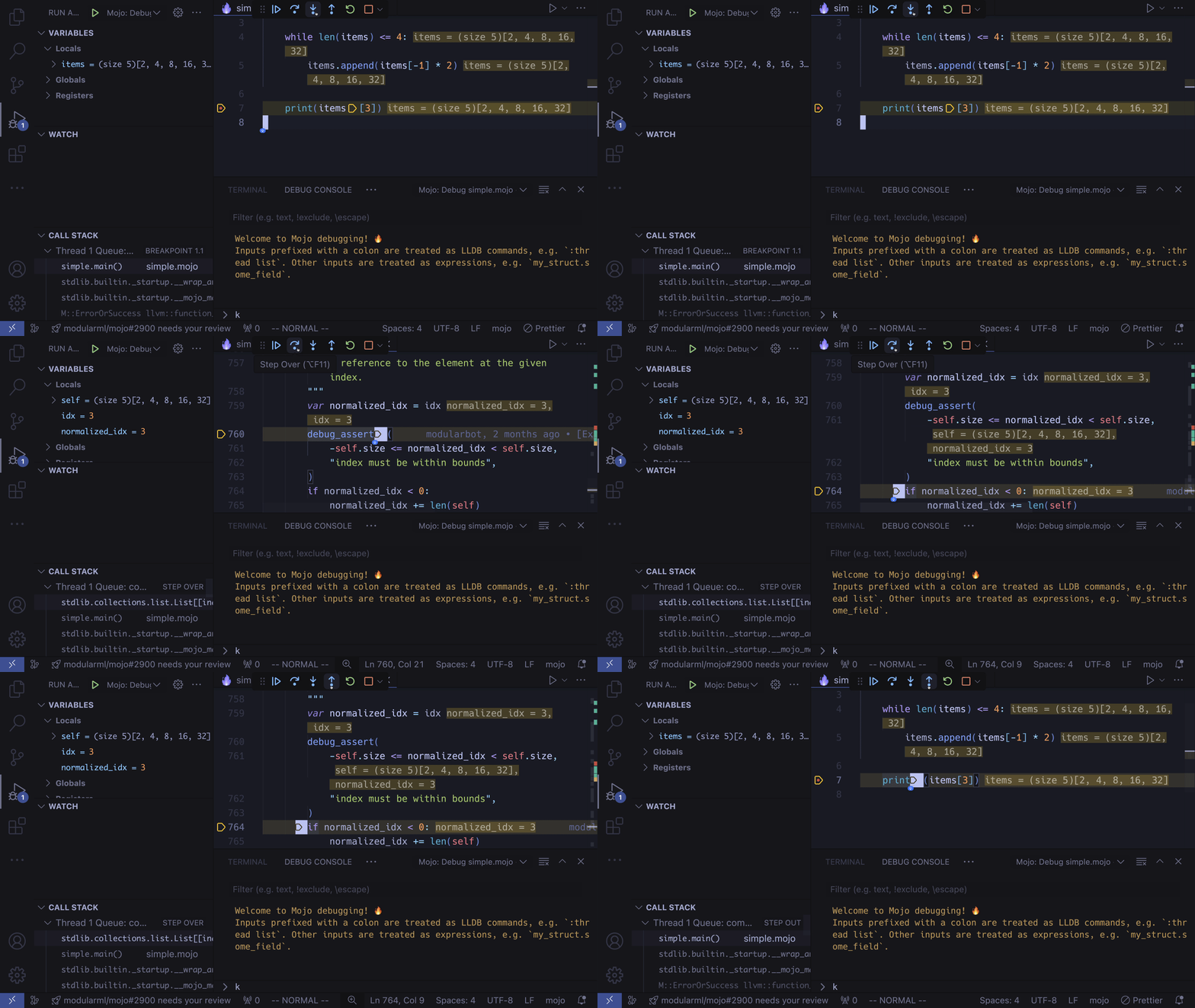
A powerful feature is stepping into functions, out of them, and over any breakpoints you've set:
__wf_reserved_inherit

The first action is a Step Into the List.append method, followed by 2x Step Over to break at the following expression, and finally a Step Out to return to the original List.append breakpoint.

Default Shortcuts:

  • F10: Step Over.
  • F11: Step Into.
  • Shift+F11: Step Out.

Mutating and inspecting variables

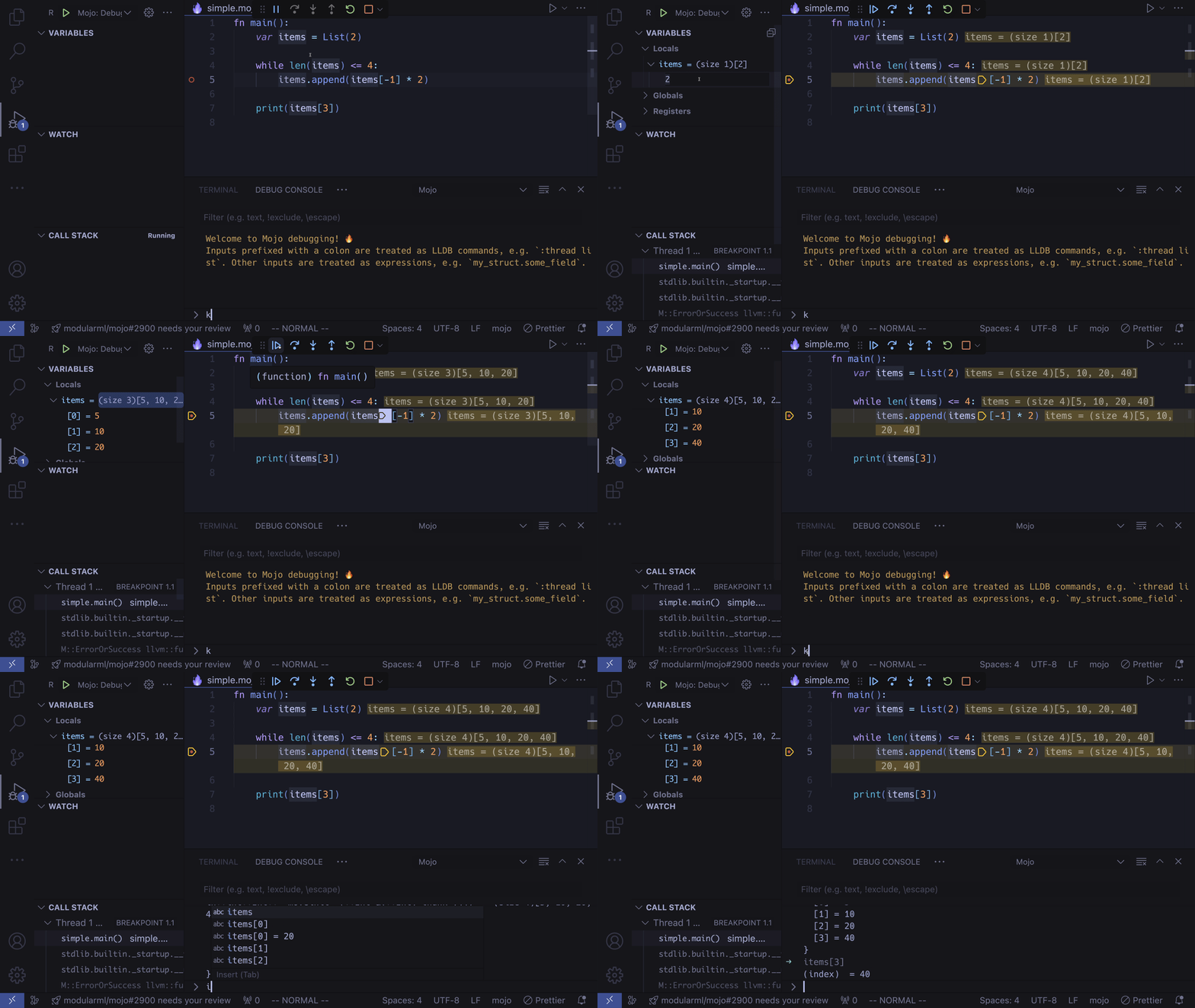
You can mutate variables mid-debug session! Simply click on a value to edit it. You can also use the debug console to index into variables:
__wf_reserved_inherit

Changing stack frame context

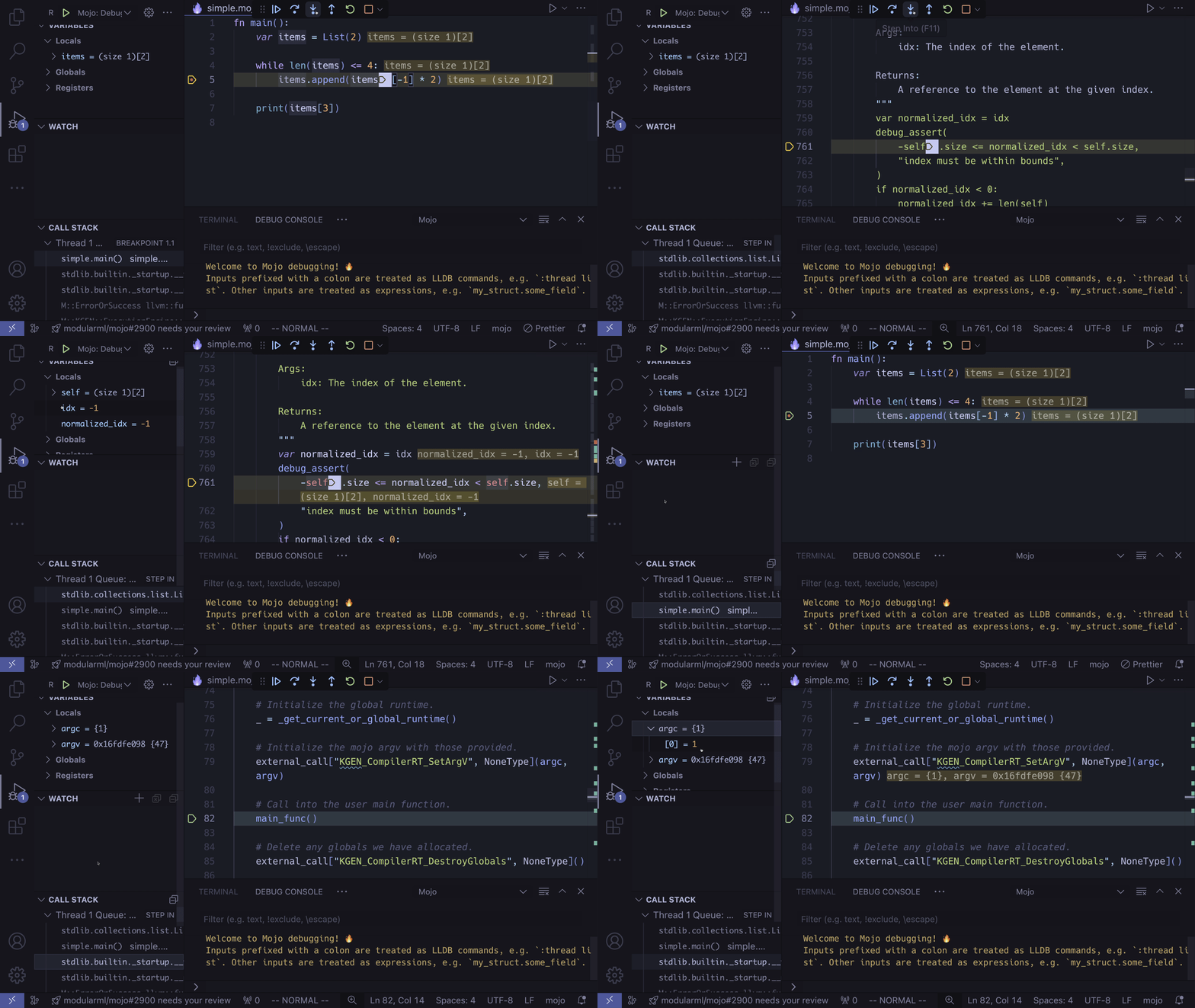
When you step into a function, the stack frame and local variables will change on the debug panel, you can view a different stack frame by clicking on it:
__wf_reserved_inherit

You'll notice the local variables in the debug panel change, you can inspect and modify them as usual.

Watches

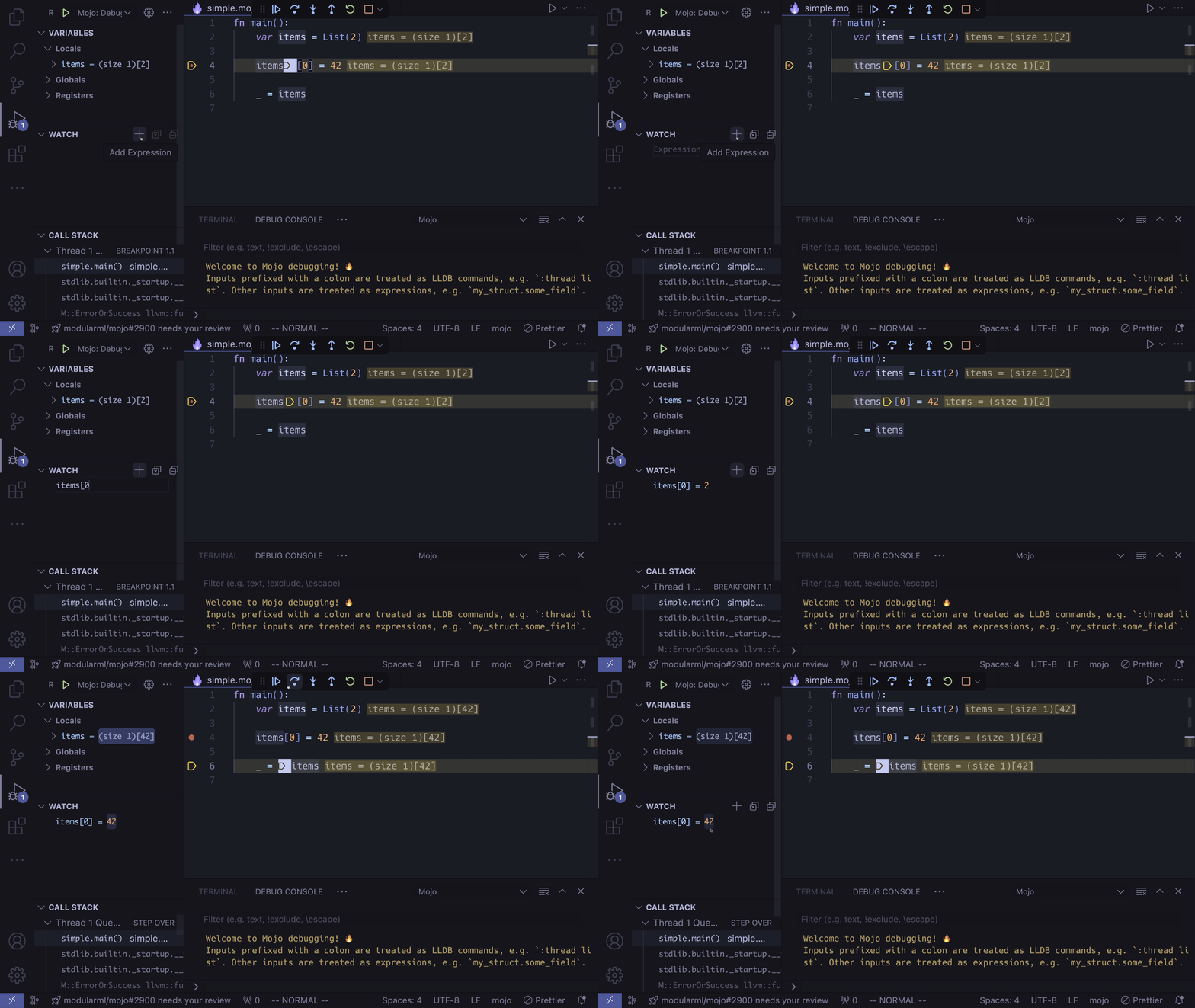
Sometimes the local variable you're interested in won't be in the Locals section, or perhaps there are too many variables there, and you want to keep a specific variable at the top of the list, or you might want to use an expression such as indexing into a list. To achieve this you can press the ✚ button next to WATCH:
__wf_reserved_inherit

Logpoints

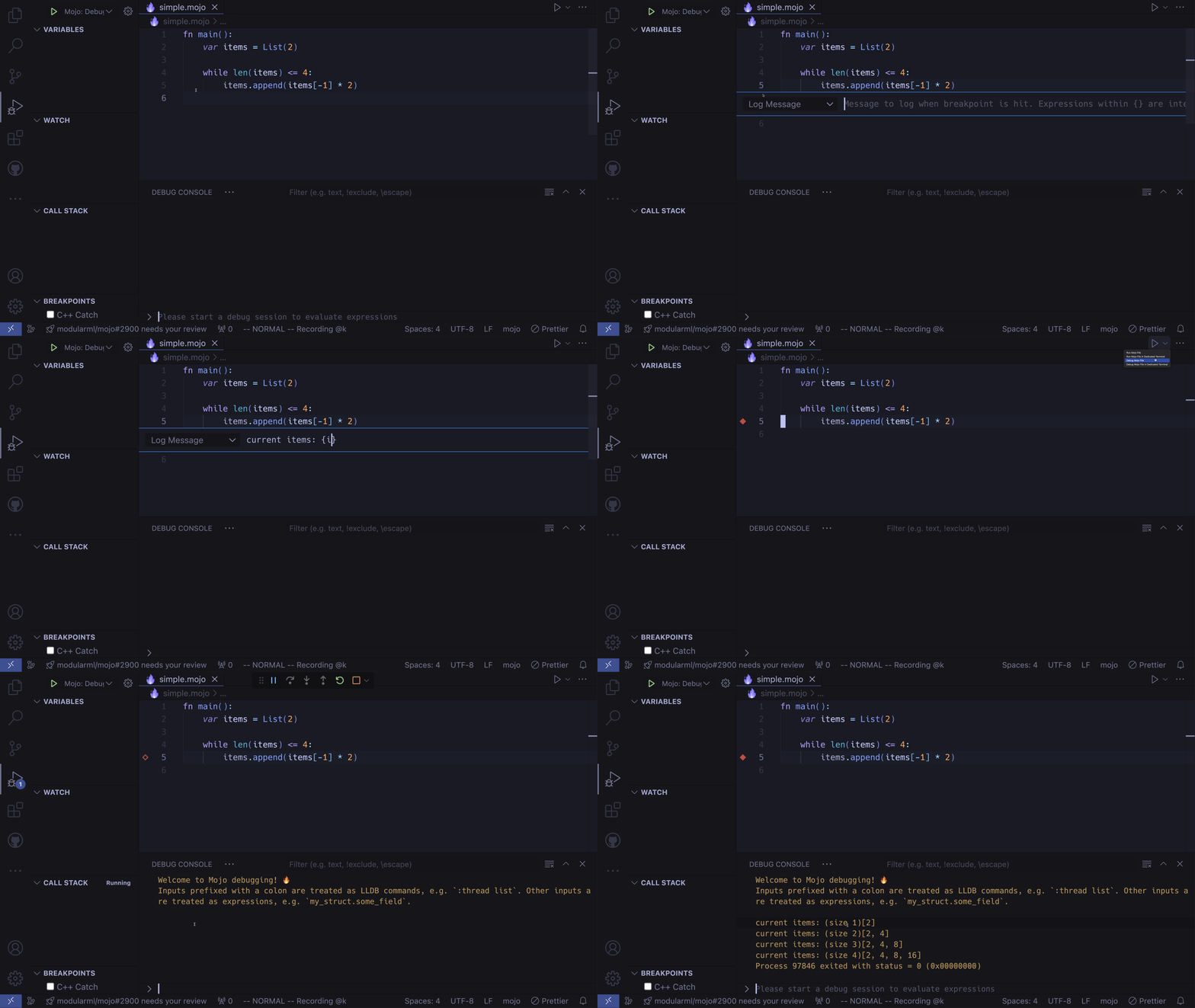
Instead of writing print statements into your program, and potentially committing them to your PR, you can use a log point expression which also has code completions via the Mojo LSP. Simple right click where you would normally set a breakpoint and choose Add Logpoint:
__wf_reserved_inherit

Hit Count

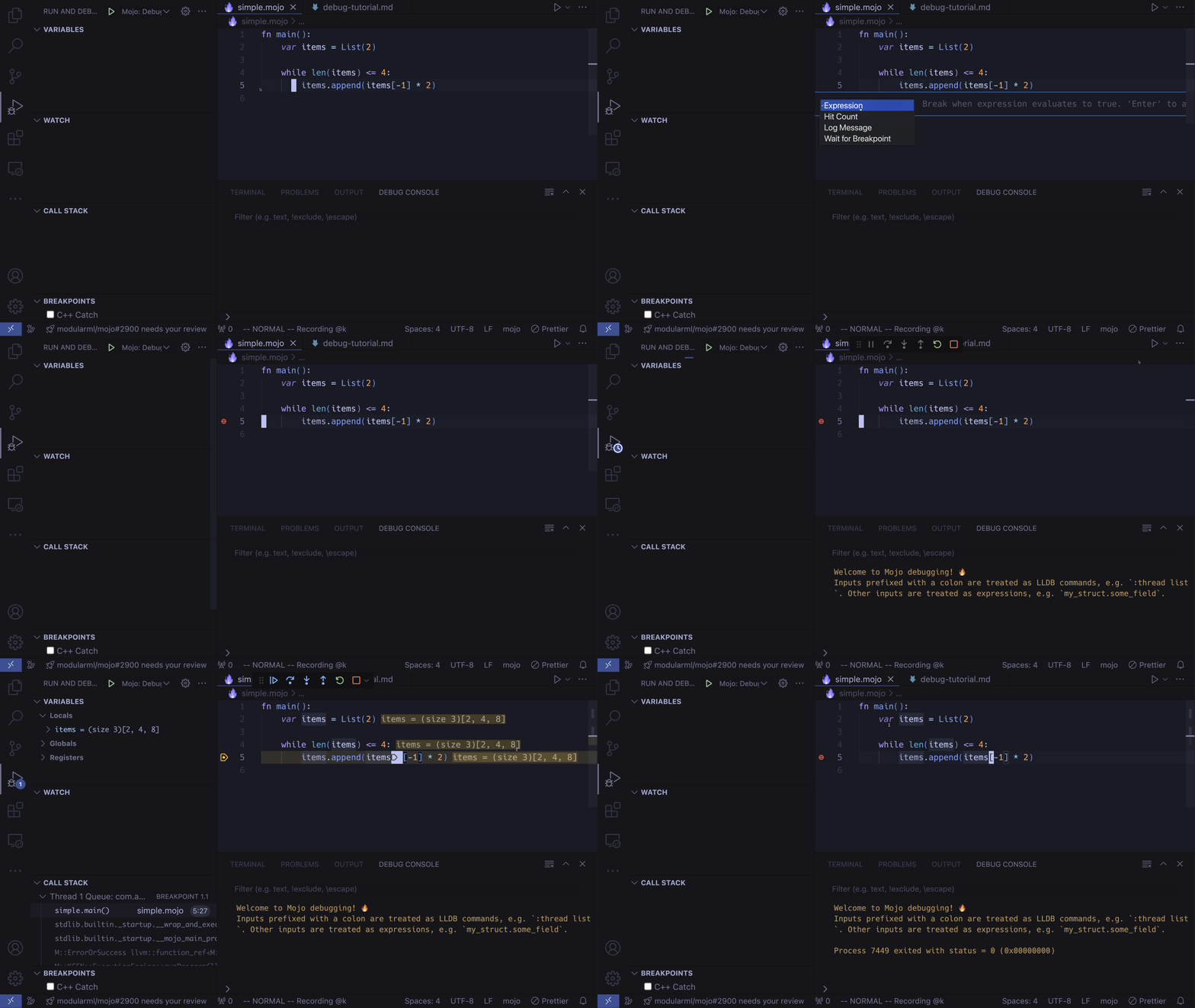
If you want to wait for x iterations until your breakpoint triggers, you can use a Hit Count. Right click a breakpoint location and select Conditional Breakpoint then change the selection to Hit Count, in the example I'm choosing the third iteration. Breakpoints are triggered just before the current line expression runs, which in this example is just before the third element is added to the List:
__wf_reserved_inherit

Wait for breakpoint

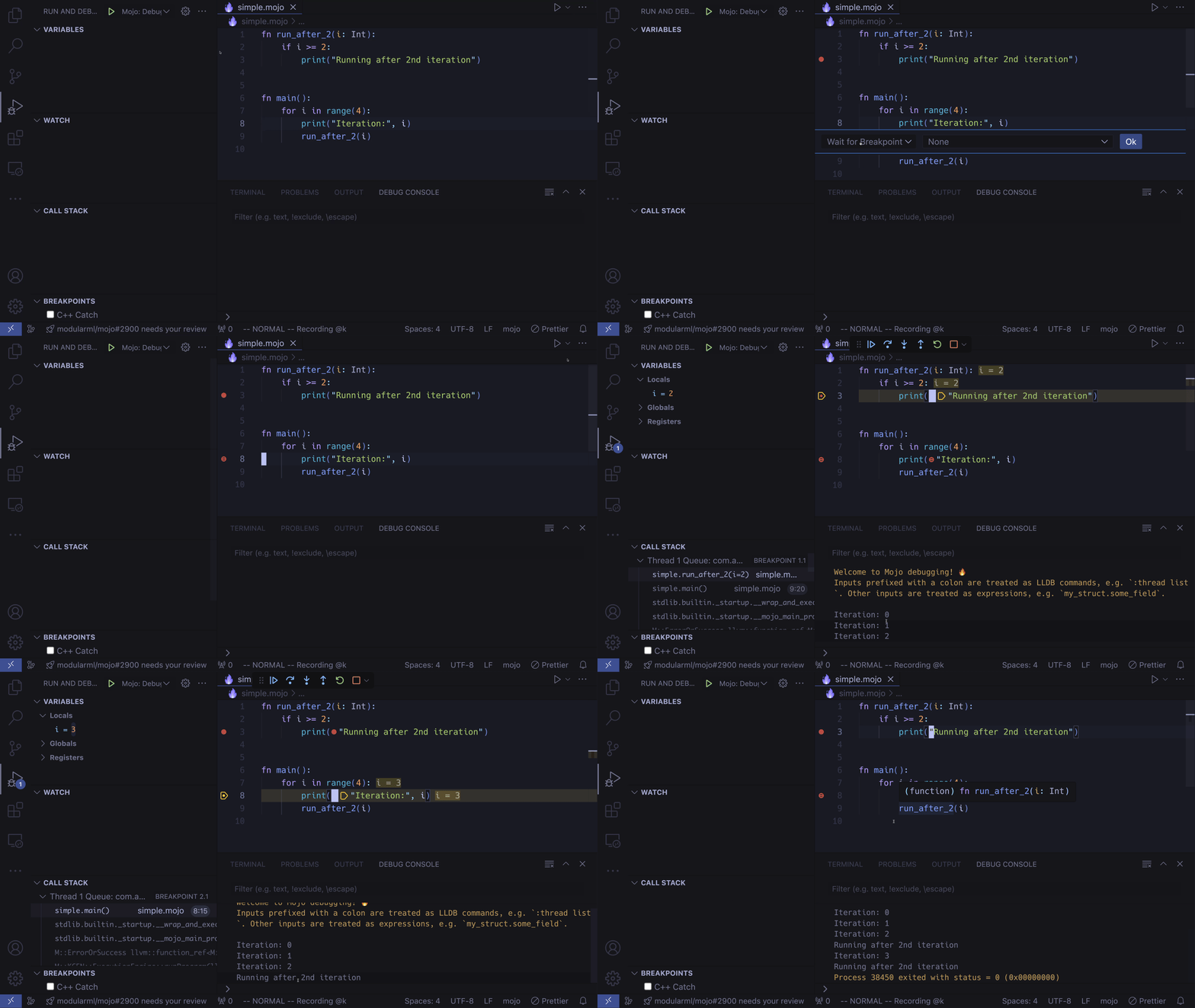
If you want to skip a breakpoint until another one has been triggered, you can use this. Right click a breakpoint location and select Triggered Breakpoint, then choose the other breakpoint you want to wait for:
__wf_reserved_inherit

Multithreaded debugging

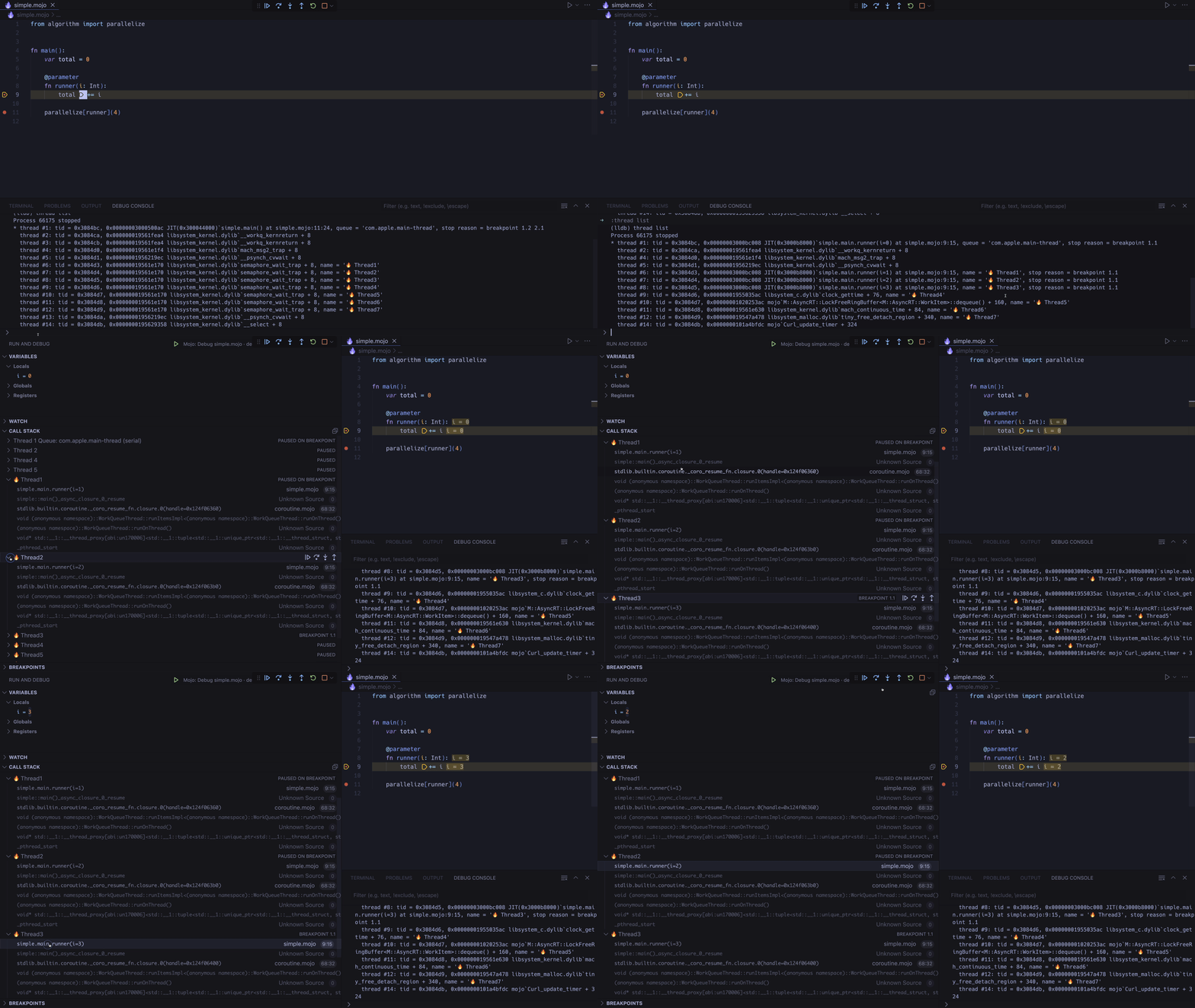
You can also debug in a multithreaded context. If you go to the command input of the DEBUG CONSOLE, type in :thread list to see a list of the current threads, any threads that are currently paused due to breakpoints will display here. You can then change the stack frame into those threads to inspect local variables:
__wf_reserved_inherit

Custom Launch Configuration

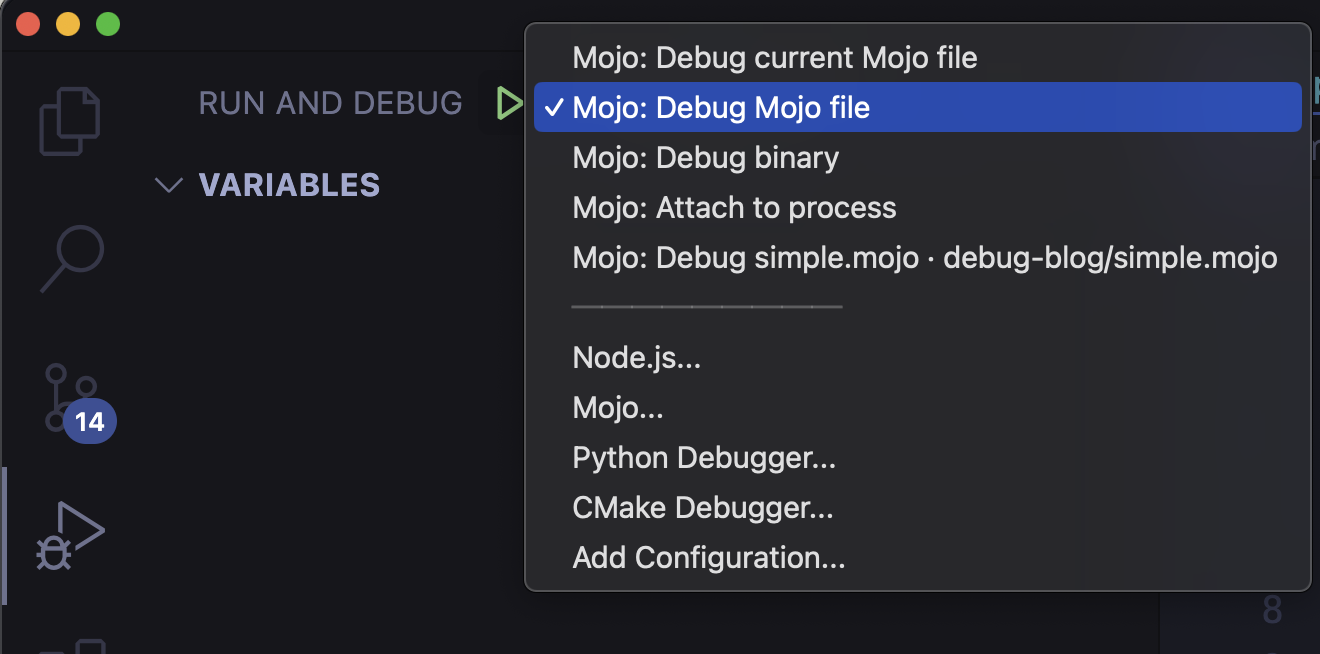
If you need more control over your debug launch configuration for a larger program, or you're running server and client and you need to attach to a process, you can create a launch.json file. You can also commit this to the repo so other users can easily start a debug session. First Press the Debug icon on the sidebar, then click create a launch.json file and select Mojo to create a file at .vscode/launch.json:

json

{    "version": "0.2.0",    "configurations": [        {            "type": "mojo-lldb",            "request": "launch",            "name": "Mojo: Debug current Mojo file",            "description": "Launch and debug the Mojo file that is active on the editor when the debug session starts.",            "mojoFile": "${file}",            "args": [ ],            "env": [ ],            "cwd": "${workspaceFolder}",            "runInTerminal": false        },        {            "type": "mojo-lldb",            "request": "launch",            "name": "Mojo: Debug Mojo file",            "description": "Launch and debug a Mojo file given its path.",            "mojoFile": "${workspaceFolder}/[your-program.mojo]",            "args": [ ],            "env": [ ],            "cwd": "${workspaceFolder}",            "runInTerminal": false        },        {            "type": "mojo-lldb",            "request": "launch",            "name": "Mojo: Debug binary",            "description": "Launch and debug a precompiled binary given its path.",            "program": "${workspaceFolder}/[your-binary]",            "args": [ ],            "env": [ ],            "cwd": "${workspaceFolder}",            "runInTerminal": false        },        {            "type": "mojo-lldb",            "request": "attach",            "name": "Mojo: Attach to process",            "description": "Search for a process to attach the debugger to.",            "pid": "${command:pickProcessToAttach}"        }    ] }

Press Control + Space to discover all the configuration options. Make sure to change [your-program.mojo] and [your-binary] to your desired targets, and delete any configuration you don't need.

Now on the top right of the debug panel, you can select a launch configuration which will run when you press F5:
__wf_reserved_inherit

Coming Soon

  • Break on error, for easily tracking down what part of your code is throwing.
  • Conditional breakpoints, for expressions to break on True.
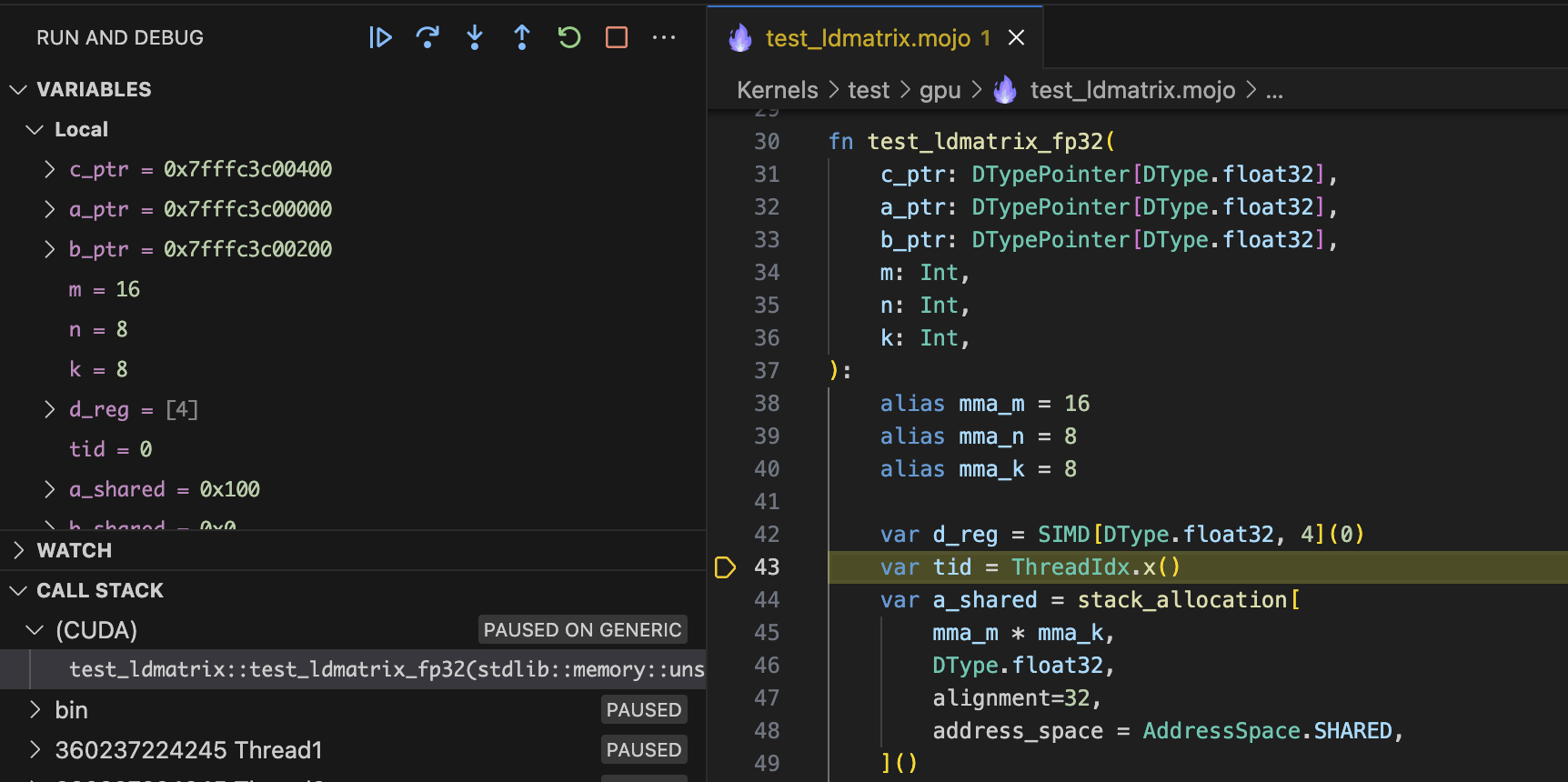
  • GPU Debugging! See a preview below:

__wf_reserved_inherit

For more details on Mojo debugging check out the debugging docs.

For more details on VS Code debugging, check out their docs here.

Thank you for reading! Here are some additional Mojo resources: