





Why do we have large tables?
Production database schemas can be complex, often containing hundreds or even thousands of individual tables. However, when dealing with very large data sets, it's often the case that only a small subset of these tables grow very large, into the hundreds of gigabytes or terabytes for a single table.
Consider the following, greatly simplified database schema for a workout-tracking application we'll call MuscleMaker:
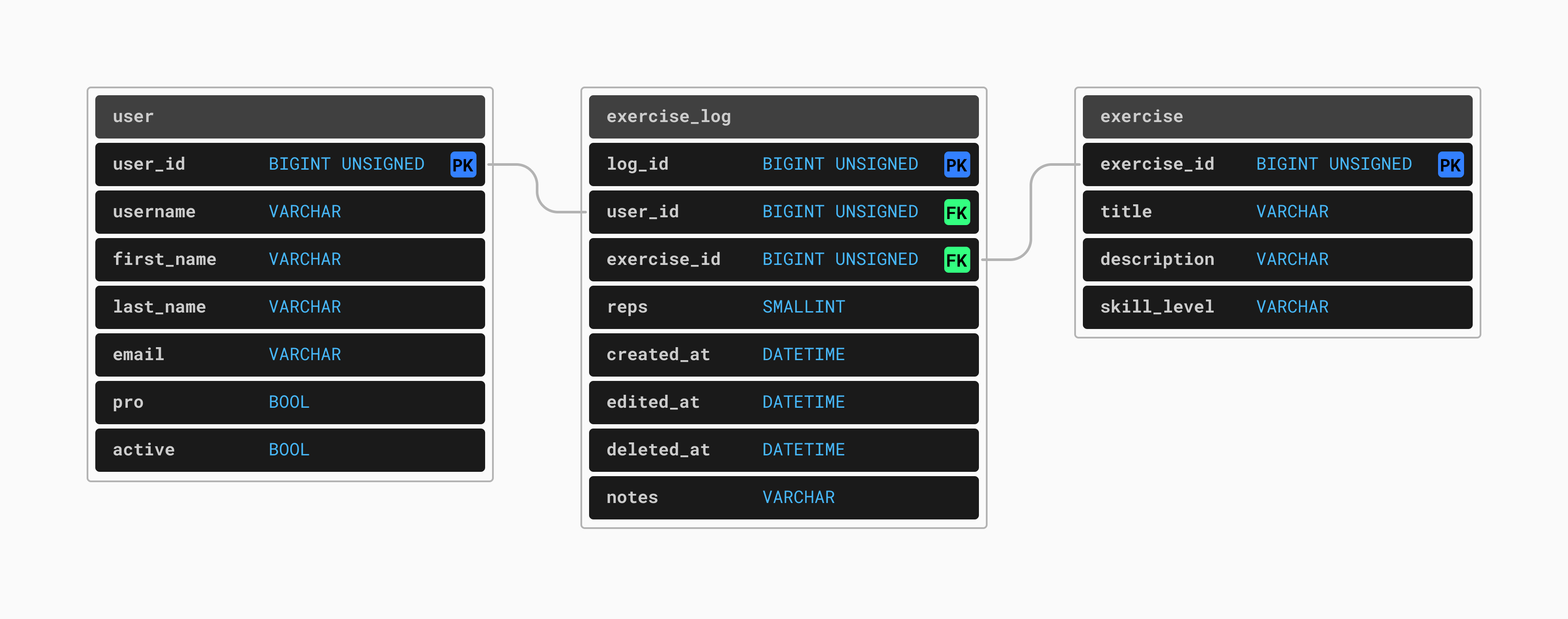
Early on in this product's lifecycle, none of these tables are large enough to cause problems. However, what if this application becomes extremely popular? What if our userbase grows from the thousands to the hundreds of thousands and then into the millions.
In this case, the user table would start small, but eventually would contain several million rows, one per registered user. This is large but still quite a manageable size, with no significant scalability concerns so long as some care is taken with how it is queried and what kinds of indexes we maintain.
As for the exercise table, there are only so many types of exercises that people do. Therefore, the exercise table should not grow larger than a few hundred or a few thousand rows. However, the exercise_log table will have a new row added every time a user completes one exercise. A typical workout is composed of many exercises. Each user will generate 5-10 new rows in the exercise_log each time they work out. Assuming all users work out every day (which, admittedly, might be expecting a lot) this table will grow quickly. This table will gain at least several million rows per day, quickly grow to a total size of many billions or even trillions of rows.
In this scenario, this is the table that could become difficult to scale. Not only will this table likely grow into the terabytes in size, it may also have a large set of hot rows — rows that are frequently accessed. Many users will want to search through their historical exercise data, meaning old rows will likely be queried and aggregated on a regular basis. We cannot treat this table as one with a small set of hot data.
One table growing at a rapid rate is not unique to exercise applications. For example, the message table for a popular chat application would also grow by millions of rows per day. A similar problem arises for a like table in a social media platform's database. There are many such situations where one, or a small number of tables grow much faster than the others. How do we deal with scaling such data, especially when we experience rapid growth?
Option 1: Vertical Scaling
Lets say that initially the database for MuscleMaker has all tables co-located in one PlanetScale database. PlanetScale provides fully-managed Vitess and MySQL powered databases. Vitess is a layer that sits above MySQL, and provides mechanisms for high-availability, scalability, sharding, connection pooling, and more. When connecting to a Vitess database, an application server makes a connection to a VTGate, which acts as a proxy layer. The VTGate then communicates with one or more VTTablets, which in turn communicates with MySQL. Hosted on PlanetScale and powered by Vitess, the architecture of the MuscleMaker database at this point would look like this:
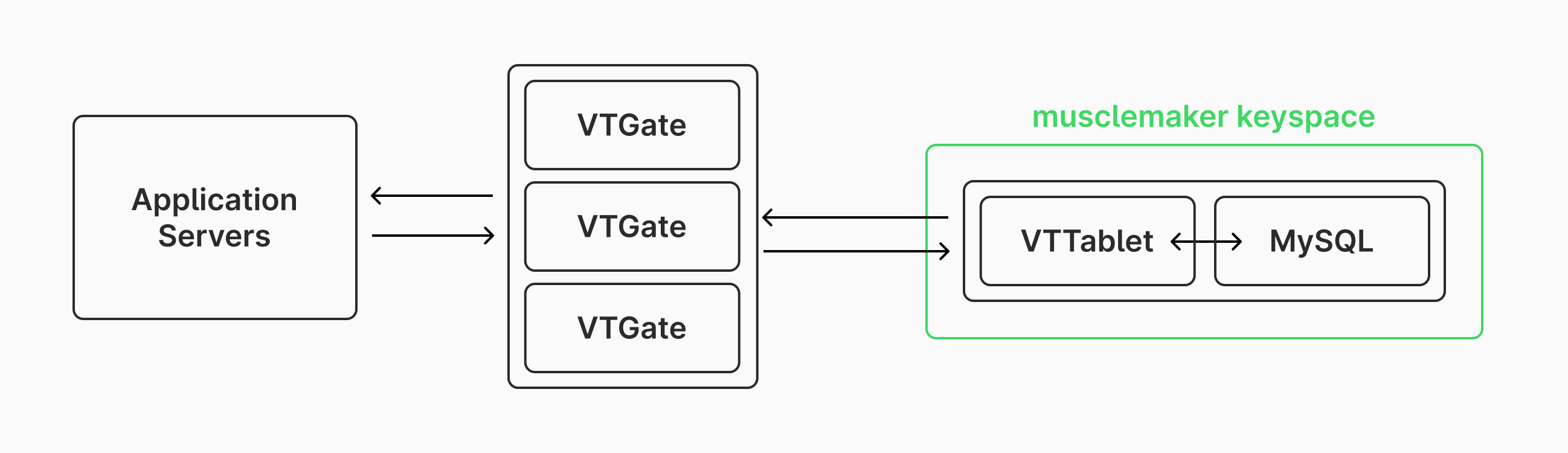
Note that typically we'd also have replica nodes set up for every MySQL instances in a keyspace. These are omitted in this article for simplicity, but it is best practice to use replicas for high availability and disaster recovery.
The most straightforward solution to handling a fast growing table is to scale this database vertically. When it is time to scale vertically, we'll need to increase the capacity of the server running the musclemaker keyspace. When scaling like this is needed, we often consider both compute resources (CPUs and RAM) as well as growing the underlying storage capacity (disk). When you have a fast-growing table but your current levels of compute can handle your workload just fine, you may only need to grow your disk size. How difficult this is depends greatly on how your database is managed.
If you are managing a bare-metal machine, then this will require installing and configuring new disks, as well as migrating your data to the new disks or expanding your existing file system.
If you're running your database on a cloud VM such as an EC2 instance, this process is a bit simpler as you don't have to manage hardware yourself. To grow your disk size, you'll want to:
- Take a snapshot of the disk before resizing for backup / safety purposes.
- Use the AWS UI or CLI to grow the volume to the desired size
- Connect to your instance and tell the OS to grow your disk partition to utilize the added capacity.
With this system, you can do the resize online without taking down your server. However, some other solutions may required migrating to a new server with a larger disk.
On a fully managed solution like PlanetScale, storage scales automatically as usage increases.
However, for our workout app, we will need to grow compute resources along with the increasing table size. We'll be doing a huge amount of inserts and will also be executing queries that access and aggregate historic data on this large table.
With a managed service like PlanetScale, resizing to get more compute is as easy as a few clicks of a button. We also auto-resize storage as your data grows, so handling these cases is simple. If you are managing your own cloud infrastructure or managing bare-metal machines, the process of scaling vertically like this will be more tedious.
This type of scaling works well up to a point. When you have a multi-terabyte database, you typically want a large amount of RAM to keep as much as possible in memory. However, physical machines and cloud VMs can become prohibitively expensive as you start to reach machines that have hundreds of gigabytes of RAM and many CPU cores. Even with a large machine, memory contention can become a problem, slowing down your database and causing problems with your application. A good next step to consider is vertical sharding.
Option 2: Vertical Sharding
Vertical sharding is a fancy phrase with a simple meaning — moving large tables onto separate servers. When sharding vertically, you typically want to identify either the tables that are the largest or have the most reads and writes, and then isolate these onto separate servers. In MuscleMaker, the clear candidate for this is the exercise_log table.
Let's take a look at how we would go about this with a Vitess database.
Before, all of the tables are in the
musclemakerkeyspace powered by a server with 32 VCPUs with 64 Gigs or RAM and 4 terabytes of provisioned disk space. This machine is having issues keeping up with all of the demand from our application servers.The next step is to assess what size machine we will need to handle just the
exercise_logtable on it's own. If this table is currently 2 terabytes and we know that it grows quickly, we will want to start off with extra disk space. We'll choose a machine with 4 TB of disk space, 32 VCPUs and 64 GB of RAM. We will also want to downsize the machine handling the rest of the database to 16 vCPUs and 32 GB of RAM. These two new machines will need to be set up with MySQL, Vitess, and must get added to the Vitess cluster. We'll refer to these two new keyspaces asmusclemaker_logandmusclemaker_mainrespectively.At this point, all of the data (2.5 TB in total) is in the
musclemakerkeyspace. In Vitess, we must use theMoveTablesworkflow of thevtcltdclientcommand line tool to copy the tables into their new keyspaces. The commands to do this look something like this:vtctldclient MoveTables --workflow musclemakerflow create --target-keyspace musclemaker --source-keyspace musclemaker_log --tables "exercise-log" vtctldclient MoveTables --workflow musclemakerflow create --target-keyspace musclemaker --source-keyspace musclemaker_main --tables "user,exercise"With large tables, these two steps will take a while (hours). While this is happening, all production traffic will still be routed to
musclemaker. Vitess gives us the ability to separately run a command to switch query traffic to the new keyspaces. The commands look like:vtctldclient MoveTables --workflow musclemakerflow --target-keyspace musclemaker_log switchtraffic vtctldclient MoveTables --workflow musclemakerflow --target-keyspace musclemaker_main switchtrafficAt this point, production traffic is switched to using the two separate keyspaces. After you are confident everything is working well, the
musclemakerkeyspace can be taken offline. The architecture of the Vitess cluster now looks like this: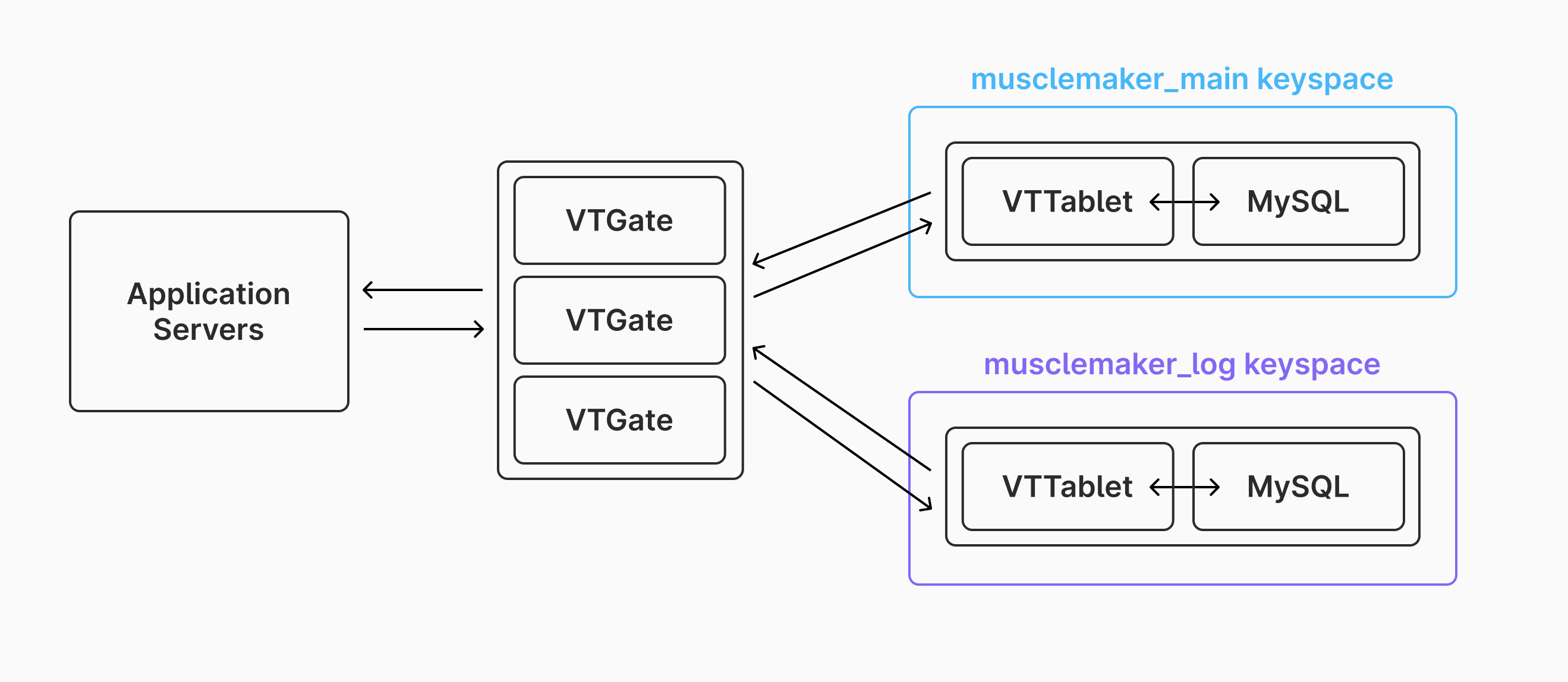
After doing this, you've gained the ability to separately scale the storage and compute for the main database and the log database. This is an excellent solution used by many organizations to divide up their large tables, allowing them to continue to scale when they start to encounter limitations with single-primary setups for heavy write workloads. Over time, the musclemaker_log keyspace can be grown to handle more load. But what happens when even one very large server can't handle a gigantic table?
Option 3: Horizontal Sharding
Horizontal sharding is the ultimate solution for scaling massive tables. Horizontal sharding takes a single table and spreads the rows out across many separate servers based on a sharding strategy. Vitess supports many sharding strategies, one of the most common of these being hashing. With this sharding strategy, we choose a table we want to shard, and then select one of the columns to be our hashed sharding key. Each time we get a new row, a hash is generated for the column value, and this hash is used to determine which server to store the row on. It's important to put some thought into which column is to be used for this, as it can have big implications on the distribution of your data, and therefore the performance of the database.
For example, for exercise_log, one option would be to shard based on a hash of the log_id column. Each time we need to write a new exercise_log row, we would generate the ID for the row, hash the ID, and then use this hash to determine which shard to send the row to. Since a hash is used, this provides a (roughly) even distribution of data across all of the shards. There is a problem with this though: the logs for any given user will be spread out across all shards, as shown in the below diagram:
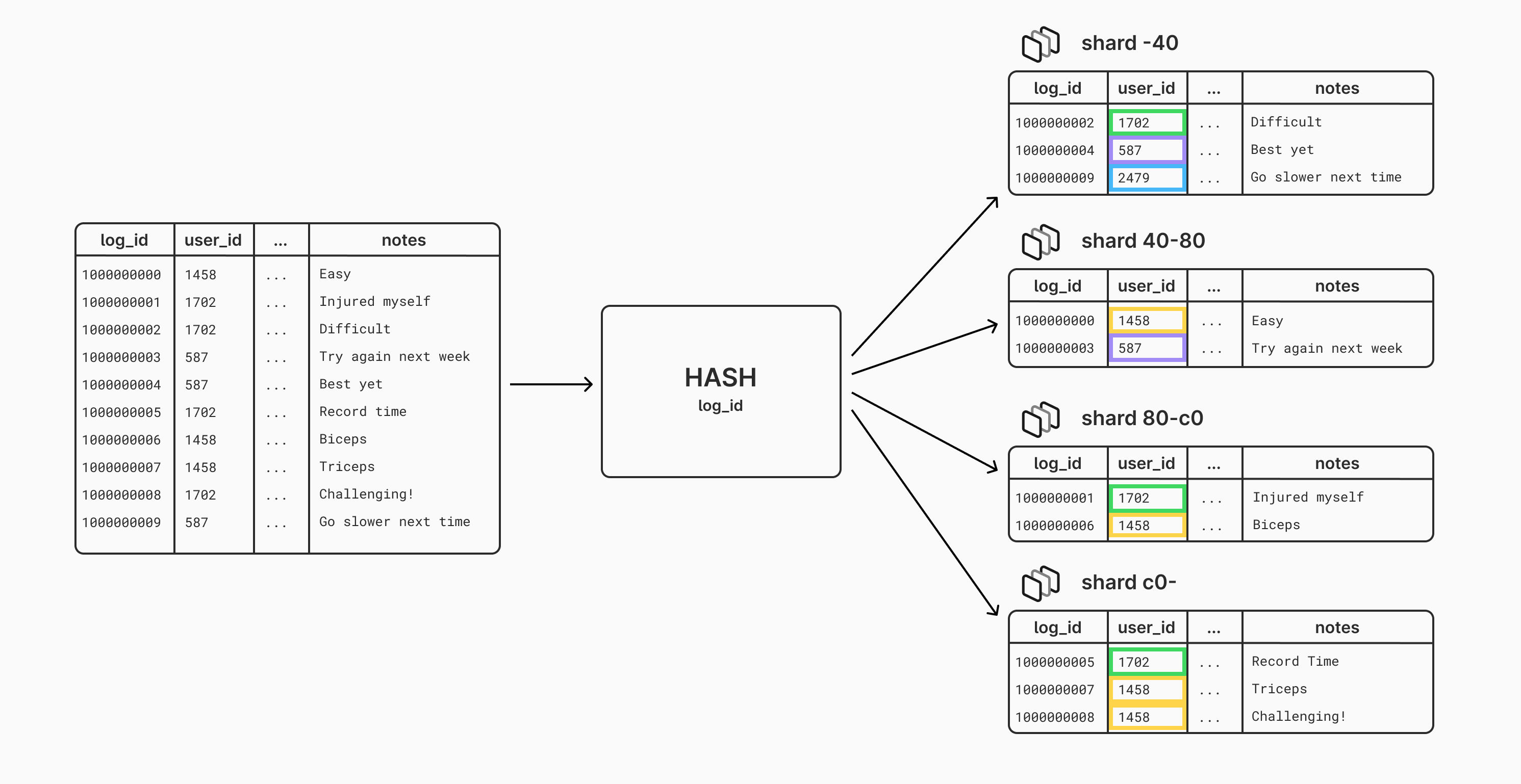
This means that any time we need to query the log history for one user, we might need to access data on many or all of our MySQL instances. This will be terrible for performance.
We can solve this problem by instead using the user_id as the hashed shard key. Each user_id will produce the same hash, and thus get sent to the same server. This means that when a user adds log events or reads their log, it will all hit the same server. Take a look at how the data is distributed when hashing by user_id instead:
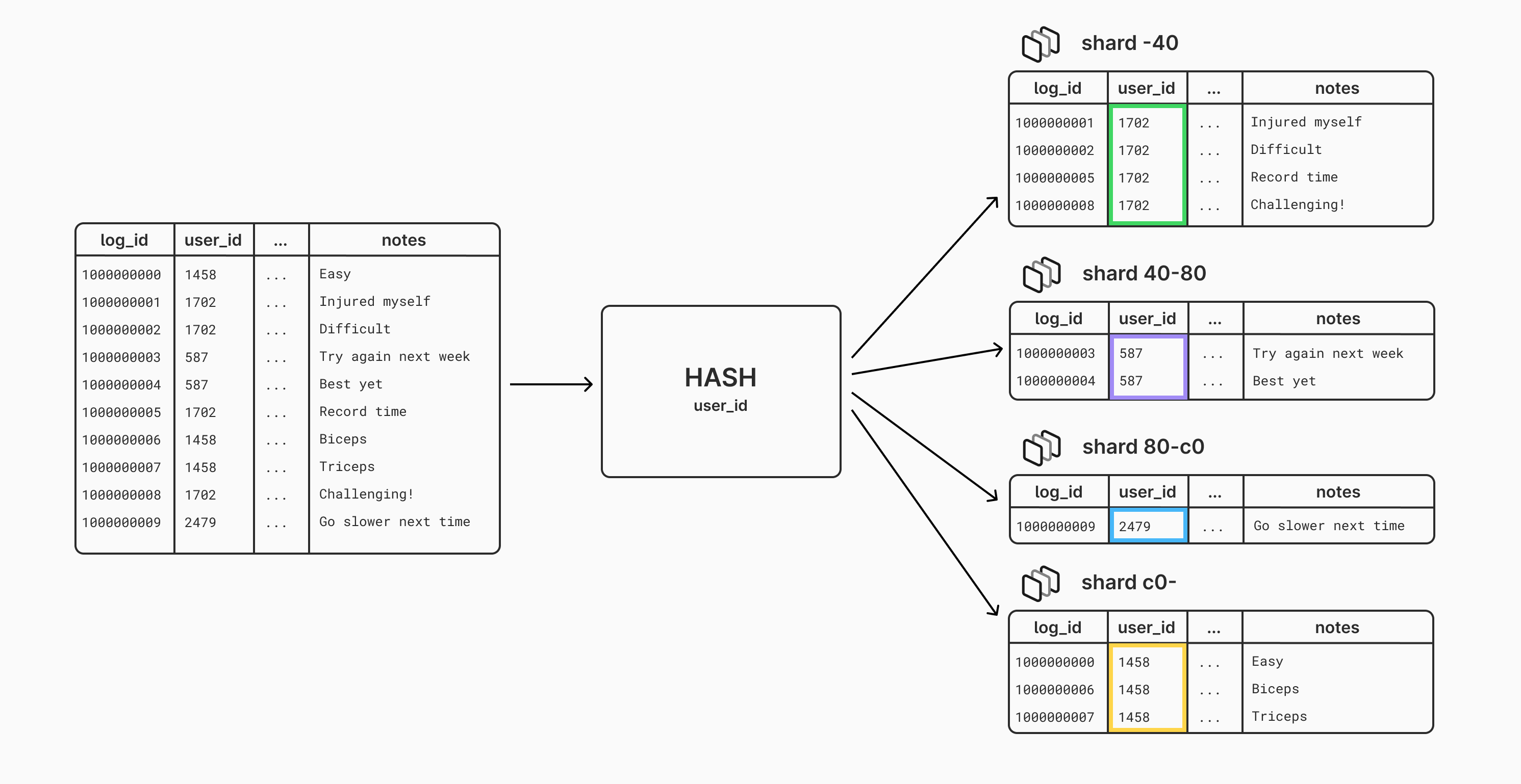
Continuing with the same example Vitess cluster from before, let's see how we would spread out this log table across four shards:
First, we must make changes to the schema and vschema (Vitess schema) of our cluster. We'll kick this process off by adding a table to handle ID generation for the sharded table:
create table if not exists exercise_log_id_sequence(id int, next_id bigint, cache bigint, primary key(id)) comment 'vitess_sequence';
insert into exercise_log_id_sequence(id, next_id, cache) values(0, 1000, 100);
We also need to tell Vitess about this new table and that it is going to be used for ID generation. The
vtctldclient ApplyVSchemacommand can be used for this, with the following VSchema:{ "tables": { "exercise_log_id_sequence": { "type": "sequence" } } }Next up is to tell Vitess that we want to shard the
exercise_logtable byuser_idand use theexercise_log_id_sequencetable for ID generation. This would also be applied usingvtctldclient ApplyVSchemawith this VSchema:{ "sharded": true, "vindexes": { "hash": { "type": "hash" } }, "tables": { "customer": { "column_vindexes": [ { "column": "user_id", "name": "hash" } ], "auto_increment": { "column": "log_id", "sequence": "exercise_log_id_sequence" } } } }Finally, change the schema of the
exercise_logtable to removeauto_increment. Assigning IDs has shifted to be Vitess' responsibility instead of MySQL:alter table exercise_log change log_id log_id bigint not null;Next, we need to spin up four new servers that will be our shards. These will be created within the
musclemaker_logkeyspace. We'll spin up four machines, each with 16 vCPUs, 32 Gigs of RAM, and 2 terabytes of storage. These will be named using Vitess' convention of shard hash range naming:-40,40-80,80-c0,c0-.When the shards are ready, we need to issue a command to shard the data, which will copy it from the unsharded
musclemaker_logserver into the four shards, also in themusclemaker_logkeyspace.vtctldclient Reshard --workflow shardMuscleMakerLog --target-keyspace musclemaker_log create --source-shards '0' --target-shards '-40,40-80,80-c0,c0-'When this finishes, we can switch the traffic to the sharded table:
vtctldclient Reshard --workflow shardMuscleMakerLog --target-keyspace musclemaker_log switchtrafficThe sharding process is now complete. The new architecture of the Vitess cluster looks like this:
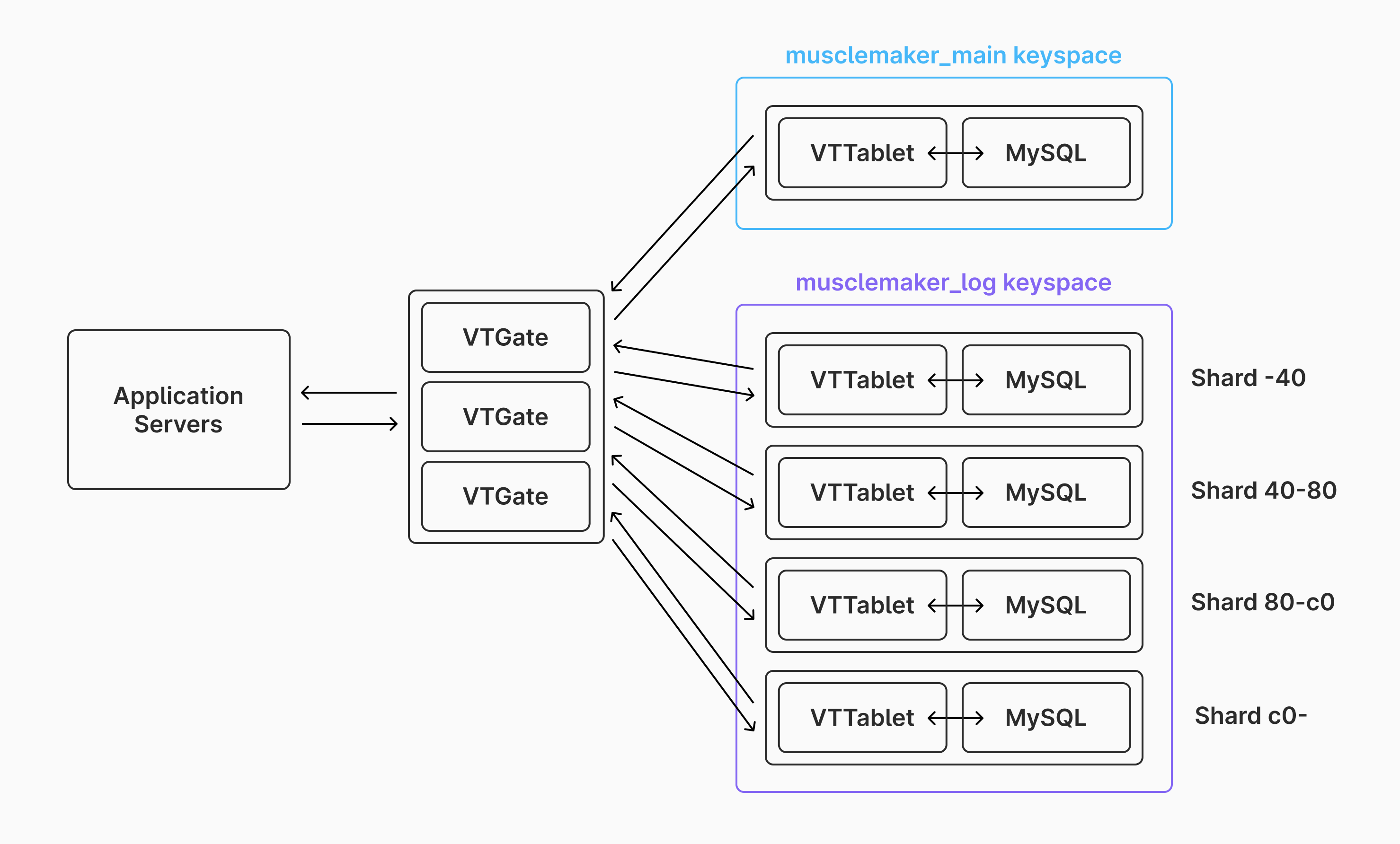
Sharding in this way has many benefits beyond just being able to spread out the data across many disks. A few of these include:
- Increased write throughput. We are no longer reliant on a single primary to handle all writes. Whenever write performance is bottlenecking, we can upsize shards or add new shards.
- Backup speed. Instead of backing up a single table on 1 machine, the table is divided up across many shards. Therefore, taking backups of the table can happen in parallel, vastly speeding up overall backup time.
- Failure isolation. Any node that goes down only effects a subset of the table, not the whole data set. We also would typically use replication, and Vitess' auto-failover features to mitigate issues here.
- Cost savings. In some instances, running many small cloud VM instances is more affordable than a single, top-of-the-line instance.
Vitess also has support for resharding an already-sharded table. This means that as the data size and I/O workload continues to grow, we can expand out to using more and more shards. We can also downsize or use less shards if demand decreases, or data is purged, in the future. Horizontal sharding gives us infinite options for scaling the capacity of a table.
Conclusion
Vertical scaling, vertical sharding, and horizontal sharding are useful techniques for scaling to handle large tables. Each technique is useful for different phases of the growth of a table. Typically, you scale your entire database vertically, then shard vertically, then use horizontal sharding for ultimate scalability of large workloads.