









In previous blog posts I talked about QEMU’s qcow2 file format and how to make it faster. This post gives an overview of how the data is structured inside the image and how that affects performance, and this presentation at KVM Forum 2017 goes further into the topic.
This time I will talk about a new extension to the qcow2 format that seeks to improve its performance and reduce its memory requirements.
Let’s start by describing the problem.
One of the most important parameters when creating a new qcow2 image is the cluster size. Much like a filesystem’s block size, the qcow2 cluster size indicates the minimum unit of allocation. One difference however is that while filesystems tend to use small blocks (4 KB is a common size in ext4, ntfs or hfs+) the standard qcow2 cluster size is 64 KB. This adds some overhead because QEMU always needs to write complete clusters so it often ends up doing copy-on-write and writing to the qcow2 image more data than what the virtual machine requested. This gets worse if the image has a backing file because then QEMU needs to copy data from there, so a write request not only becomes larger but it also involves additional read requests from the backing file(s).
Because of that qcow2 images with larger cluster sizes tend to:
Unfortunately, reducing the cluster size is in general not an option because it also has an impact on the amount of metadata used internally by qcow2 (reference counts, guest-to-host cluster mapping). Decreasing the cluster size increases the number of clusters and the amount of necessary metadata. This has direct negative impact on I/O performance, which can be mitigated by caching it in RAM, therefore increasing the memory requirements (the aforementioned post covers this in more detail).
The problems described in the previous section are well-known consequences of the design of the qcow2 format and they have been discussed over the years.
I have been working on a way to improve the situation and the work is now finished and available in QEMU 5.2 as a new extension to the qcow2 format called extended L2 entries.
The so-called L2 tables are used to map guest addresses to data clusters. With extended L2 entries we can store more information about the status of each data cluster, and this allows us to have allocation at the subcluster level.
The basic idea is that data clusters are now divided into 32 subclusters of the same size, and each one of them can be allocated separately. This allows combining the benefits of larger cluster sizes (less metadata and RAM requirements) with the benefits of smaller units of allocation (less copy-on-write, smaller images). If the subcluster size matches the block size of the filesystem used inside the virtual machine then we can eliminate the need for copy-on-write entirely.
So with subcluster allocation we get:
This figure shows the average number of I/O operations per second that I get with 4KB random write requests to an empty 40GB image with a fully populated backing file.
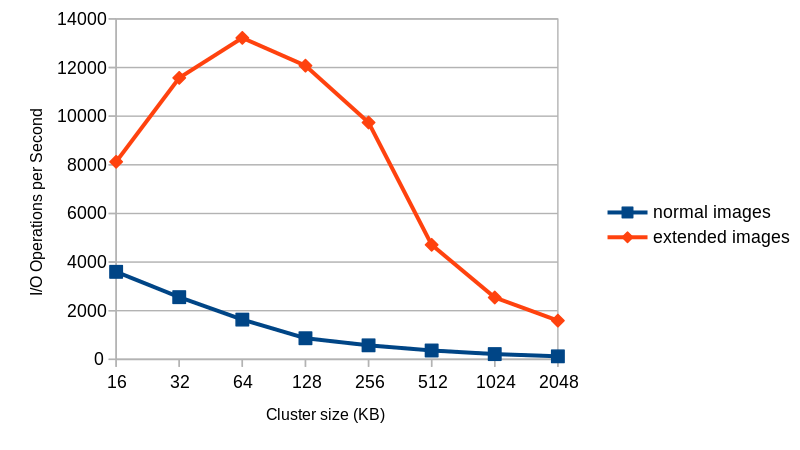
Things to take into account:
Extended L2 entries are available starting from QEMU 5.2. Due to the nature of the changes it is unlikely that this feature will be backported to an earlier version of QEMU.
In order to test this you simply need to create an image with extended_l2=on, and you also probably want to use a larger cluster size (the default is 64 KB, remember that every cluster has 32 subclusters). Here is an example:
$ qemu-img create -f qcow2 -o extended_l2=on,cluster_size=128k img.qcow2 1T
And that’s all you need to do. Once the image is created all allocations will happen at the subcluster level.
This work was presented at the 2020 edition of the KVM Forum. Here is the video recording of the presentation, where I cover all this in more detail:
You can also find the slides here.
This work has been possible thanks to Outscale, who have been sponsoring Igalia and my work in QEMU.

And thanks of course to the rest of the QEMU development team for their feedback and help with this!
此内容由惯性聚合(RSS阅读器)自动聚合整理,仅供阅读参考。 原文来自 — 版权归原作者所有。