


Secret Scanning with Gitleaks
I have built a deliberately vulnerable Flask app to use as a target for building a real DevSecOps pipeline. The repo is at
https://github.com/pkkht/devsecops-demo.
This part covers the first gate in the pipeline — secret scanning.
Why secrets in code are such a big deal?
AWS access keys, API tokens, database passwords — they end up in source code more often than you would think. A developer hardcodes a key to test something locally, forgets to remove it, and commits it. If the repo is public even for a minute, bots are scanning GitHub continuously and will find it.
It is one of the most preventable attack vectors and one of the most common. The fix is to catch it before the commit happens.
The demo app already has secrets in it - intentionally added.
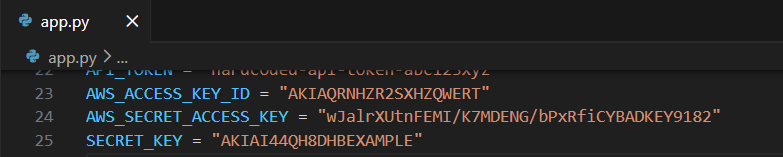
We will use Gitleaks to catch the exposed secrets.
What is Gitleaks
Gitleaks is an open source secret scanner. It scans your code and git history for secrets using a set of regex rules covering AWS keys, GitHub tokens, private keys, generic API keys, and more. It is free, fast, and has no dependencies on any cloud service.
Setting it up locally with pre-commit
The goal is to stop secrets at the developer's machine — before they even
become a commit.
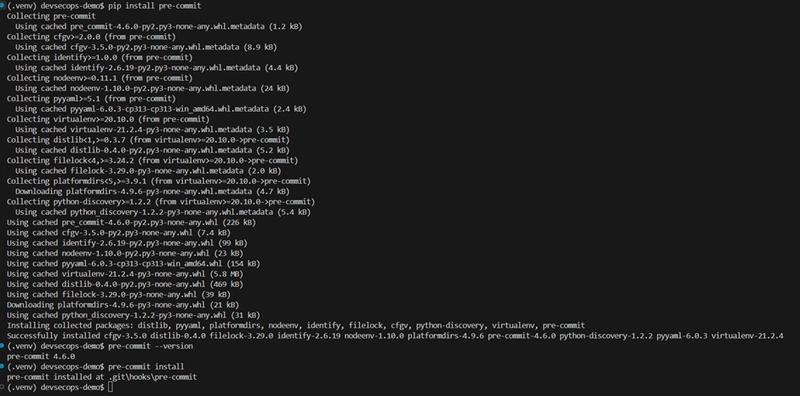
Step 1: Install pre-commit
pre-commit is a framework for managing git hooks. It handles downloading and running Gitleaks automatically — you do not need to install Gitleaks separately.
pip install pre-commit
pre-commit --version
pre-commit install
The last command wires Gitleaks into your .git/hooks/pre-commit so it runs automatically on every git commit.
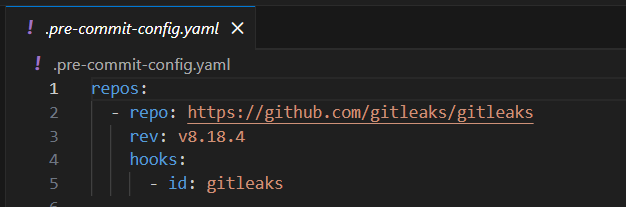
Step 2: Create the config file
Create .pre-commit-config.yaml in your repo root:
Seeing it in action
Let's try to commit app.py with the secrets still in it:
git add app.py
git commit -m "add task manager app"
First attempt — before the config file was in place:
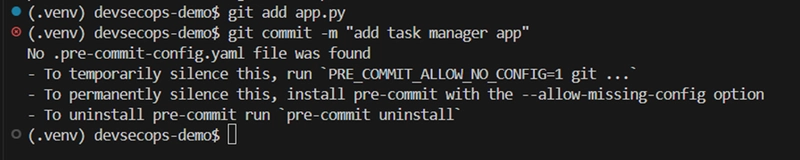
pre-commit requires a .pre-commit-config.yaml to be present. Once that is added, try again:
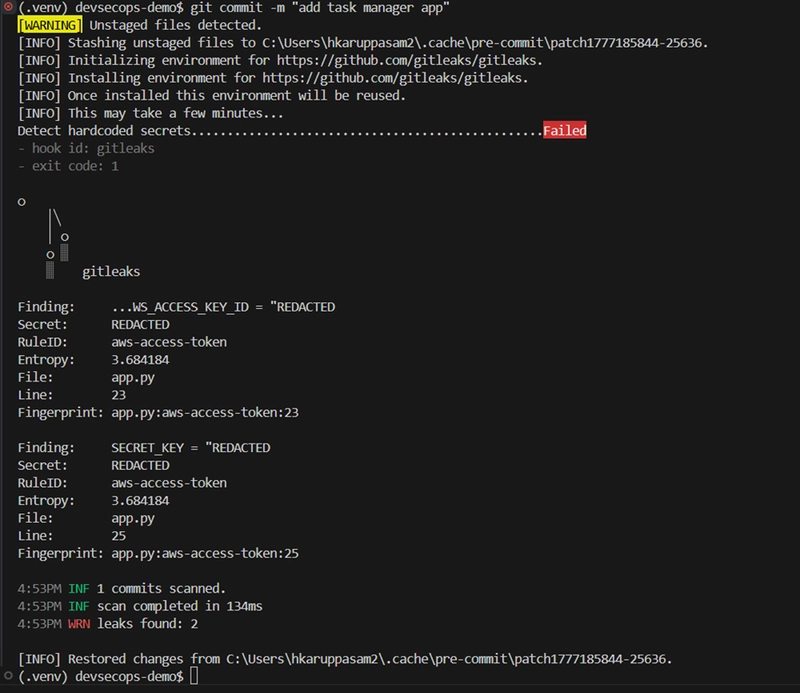
The commit is blocked. Gitleaks downloads itself, scans the staged files, and reports two findings — the AWS access key and the secret key — with the exact file and line number. The commit never happens. This is the behaviour you want. A developer cannot accidentally push a secret
without actively bypassing the hook.
Handling intentional secrets in a demo repo
In a real codebase, a finding like this means: remove the secret, rotate it, use an environment variable instead. But this is a demo repo — the secrets are intentional. We need a way to tell Gitleaks "I know about these, ignore them."
That's what .gitleaksignore is for. You add the fingerprints of known,
intentional findings:
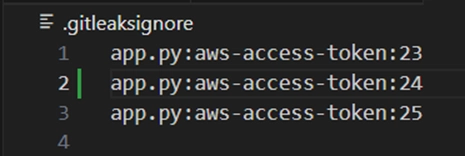
The fingerprints come directly from the Gitleaks output and an additional line that you may wish to add — file:rule:line.
Once added, the commit goes through:

"Detect hardcoded secrets... Passed"
In a real project, .gitleaksignore is useful for allowlisting known false
positives — test fixtures, example keys in documentation. It is not a way to skip real secrets.
Wiring it into GitHub Actions
The pre-commit hook covers local commits. But what if someone bypasses it with --no-verify, or clones the repo without setting up pre-commit? The pipeline is the safety net.
Create .github/workflows/secret-scan.yml:
name: Secret Scanning

on:
  push:
    branches: ["**"]
  pull_request:
    branches: ["**"]

jobs:
  gitleaks:
    name: Gitleaks Secret Scan
    runs-on: ubuntu-latest
    steps:
      - uses: actions/checkout@v4
        with:
          fetch-depth: 0

      - name: Run Gitleaks
        uses: gitleaks/gitleaks-action@v2
        env:
          GITHUB_TOKEN: ${{ secrets.GITHUB_TOKEN }}
fetch-depth: 0 is important — it tells GitHub Actions to check out the full git history, not just the latest commit. Gitleaks needs the full history to scan previous commits for secrets.
GITHUB_TOKEN is automatically provided by GitHub on every workflow run —
you don't need to create it. Gitleaks uses it to post findings as job summaries.
Push the workflow file and watch it run in the Actions tab:
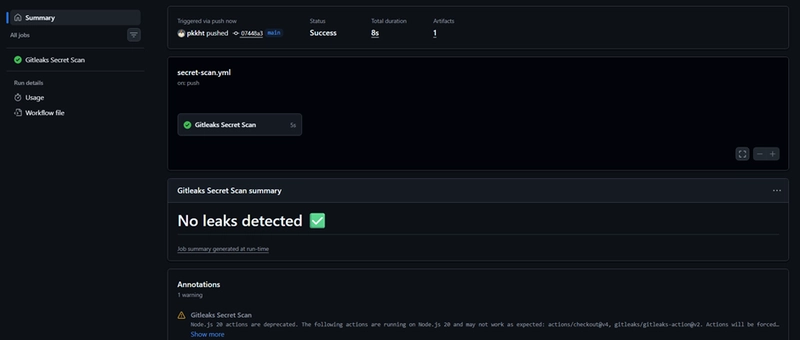
"No leaks detected" — the pipeline passes because the .gitleaksignore
covers the intentional secrets in the repo.
What we've built so far
Two layers of secret scanning are now in place:
- Pre-commit hook — catches secrets at the developer's machine before commit
- GitHub Actions workflow — catches anything that slips through at push time
The pipeline now has its first gate. Every push and pull request is
automatically scanned for secrets.