







Coding agents don't understand your codebase.
Yeah, sounds weird I know.
They edit your files, run your tests, fix bugs across multiple modules. It feels like they get it. But they don't.
I spent a while looking into how these tools actually work under the hood. There's no deep understanding happening.
I mean, there IS reasoning - but not as deep as you may think. They can't look at your repo and form a mental model the way a human engineer does. They don't "know" your architecture. They don't reason about your system. They process text, make a guess, and check what happens.
That's not me being negative. I actually think knowing this is useful. Once you understand how these agents work internally, even at a basic level, you start using them differently.
That's happend to me acutally. I stopped expecting them to "just figure it out" and start giving them what they actually need. I started to understand why they get stuck, why they repeat themselves, why they sometimes nail it on the first try and sometimes spiral. It made me better at using what they're actually good at.
So what's going on inside? Agents are LLMs using tools within a feedback loop.
That loop (the same one in every coding agent I've looked at) is actually pretty straightforward and easy to understand, and it's enough to explain how these systems behave.
Of course, the engineering around that loop is anything but simple. Error recovery, context management, streaming, and safety layers—those are all sophisticated, and I'm not downplaying them. I'm just trying to show that there's no magic at the center.
A chatbot with a while loop
The building block of every coding agent is the LLM (Large Language Model). An LLM is a text-in, text-out function. You send it a system prompt, a conversation history, and a message. It uses all of that to generate a response. That's it. One API call, one response.
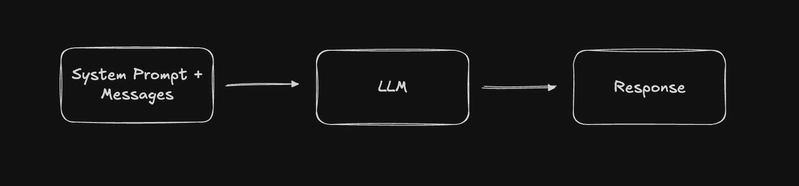
The important thing: this LLM works from what's in its context window. It has general knowledge from training, but it knows nothing about your code until you feed it in. It doesn't remember previous conversations unless they're included in the input. It doesn't have access to anything outside of what you send it.
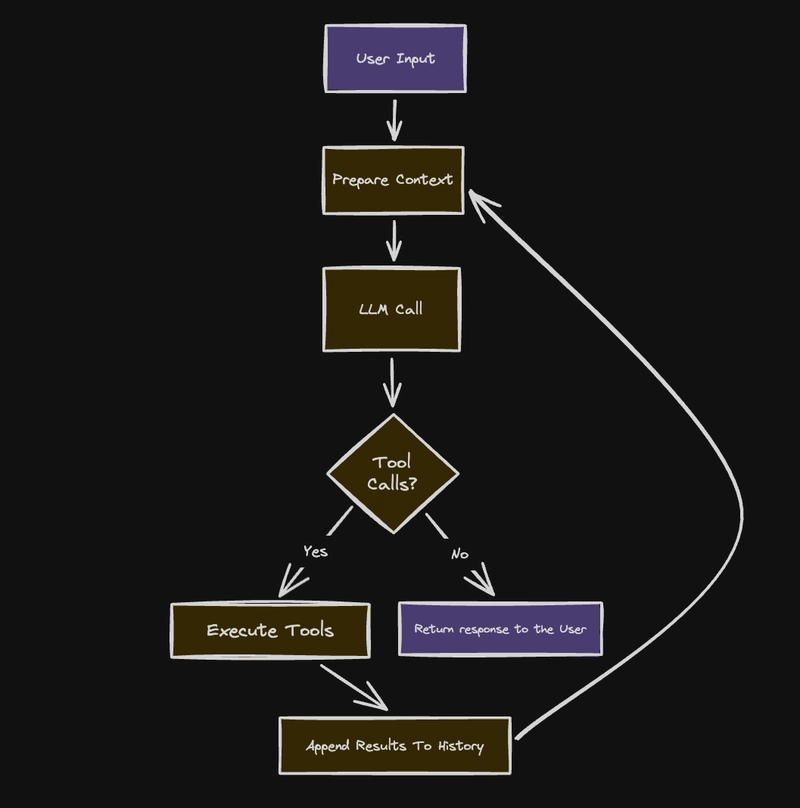
So a coding agent is what happens when you put that API call in a loop and give the model tools.
Instead of one call and done, the model can say "I need to read a file" or "run this test," the agent executes that, adds the result to the context, and calls the model again. Now it knows something it didn't know a second ago.
That's really the only difference between an LLM and an agent. One call vs. a loop. The model decides what to do next, the runtime decides what's allowed.
The five-step cycle
Every coding agent I've looked at implements the same five steps, regardless of language or framework:
- Prepare context — assemble the system prompt, conversation history, and available tools into a single request.
- Call the LLM — send that request to the model and stream the response back.
- Parse the response — figure out what the model returned. Plain text? Tool calls? Both?
- Execute tool calls — run whatever the model asked for: read a file, run a command, edit code.
- Check if we're done — if the model called tools, append the results to the history and go back to step 1. If not, return the response to the user.
Wait, what is tool calling?
When you call an LLM API, you can pass a list of tools, basically function signatures that describe what each tool does and what arguments it takes. The model doesn't execute anything itself. It just returns a structured response saying "I want to call this function with these arguments."
The agent code is responsible for actually running that function, collecting the result, and sending it back to the model in the next call. The model sees the result and decides what to do next: call another tool, or respond to the user.
So when we say "the model reads a file," what really happens is: the model outputs a tool call like read_file({ path: "src/index.ts" }), the agent runs that, and sends the file contents back as a message. The model never touches your file system. It just asks, and the loop delivers.
In TypeScript, the core of it looks something like this:
async function agentLoop(userMessage: string) {
  const messages = [{ role: "user", content: userMessage }];

  while (true) {
    // 1. Call the LLM with the full conversation
    const response = await llm.chat({
      model: "your-model",
      system: systemPrompt,
      messages,
      tools: availableTools,
    });

    // 2. Add the assistant's response to history
    messages.push({ role: "assistant", content: response });

    // 3. Check for tool calls
    const toolCalls = response.toolCalls;
    if (!toolCalls?.length) {
      break; // No tools called — the model is done
    }

    // 4. Execute each tool and collect results
    for (const call of toolCalls) {
      const result = await executeTool(call.name, call.arguments);
      messages.push({
        role: "tool",
        toolCallId: call.id,
        content: result,
      });
    }

    // 5. Loop back — the model will see the tool results
    //    and decide what to do next
  }
}
That's roughly 25 lines. Everything else a coding agent does (streaming, permissions, error recovery, context management) is built on top of this skeleton.
The messages array is the state. It grows with every iteration. The LLM only knows what's in its context, and this array is the context. Every tool result, every previous response, gets appended here. That's how the model knows what it tried, what worked, and what to do next.
Where the complexity hides
You've seen the whole loop in 25 lines. But the system built around it is serious engineering, and that's what turns a basic while loop into something that can actually ship code.
Tool execution: parallel or sequential?
When the LLM asks to read three files at once, do you run them in parallel or one at a time?
Reading files in parallel is faster. But what about writing? If the model asks to edit two files that depend on each other, running those writes simultaneously could cause race conditions.
Most production agents land on a hybrid: read-only tools run in parallel, mutations serialize. Some add a per-file queue, so two edits to different files run in parallel, but two edits to the same file wait in line.
Errors are results, not exceptions
One design decision matters more than most here: when a tool fails, you don't throw. You return the error as a tool result.
async function executeTool(name: string, args: unknown) {
  try {
    return await tools[name].execute(args);
  } catch (err) {
    // Don't throw - return it as a result
    return `Error: ${err.message}`;
  }
}
Why? Because the LLM can read errors. If you return "Error: file not found: src/utils.ts", the model will often correct itself. It'll check the right path, try a different approach, or ask the user for help. If you throw, the turn crashes and the agent loses all context about what it was doing.
That's where the self-correcting behavior comes from. The model gets a chance to recover on every failure.
Streaming: showing work in real time
Nobody wants to stare at a blank screen for 30 seconds. Streaming fixes that.
The LLM response arrives token by token as Server-Sent Events. The agent pipes these to the UI as they come in, so you see the model "thinking" in real time. Some agents stream tool execution too: you see "Reading src/index.ts..." the moment the tool starts, not after it finishes.
The most aggressive implementations start executing tools during the LLM stream. As soon as a tool call block is complete, before the full response has even finished. That shaves seconds off each loop iteration.
Context compaction: when the conversation gets too long
Here's a problem that's unique to loops: each iteration adds to the message history. After enough turns of reading files, running tests, editing code, the conversation can blow past the model's context window.
But it's not just about hitting a size limit. As the context grows, the model's performance degrades. Older messages get "buried" under newer ones, the model starts losing track of what it already did, and its reasoning gets worse. This is sometimes called context rot — the context is technically there, but the model can't make good use of it anymore.
This is a whole concept in itself (context engineering) and bigger than this post. But the basic mechanism most agents use is compaction: when the history gets too long, summarize the older messages and replace them with the summary. The tricky part is never splitting a tool call from its result. The model needs to see these as pairs, or it gets confused about what happened.
Turn 1:  user message         ─┐
Turn 2:  read_file → result    │  Summarized → "Previously: read config,
Turn 3:  edit_file → result    │               edited database settings,
Turn 4:  run_tests → result   ─┘               tests passed"
Turn 5:  user follow-up       ← kept as-is
Turn 6:  read_file → result   ← kept as-is
Some agents compact proactively (before hitting the limit), others reactively (after getting a "context too long" error from the API). The best do both.
Doom loop detection
Sometimes the model gets stuck. It calls the same tool with the same arguments, gets the same error, and tries again. And again.
Agents detect this by hashing recent tool call signatures and checking for repetition. If the same pattern shows up three or more times, the agent injects a warning: "You appear to be repeating the same action. Try a different approach."
If the model still can't break out, circuit breakers kick in. Hard limits on turns per request, errors per tool, or total API calls.
Permissions: the human in the loop
Reading a file is safe. Running rm -rf / is not. So agents classify tools by risk:
- Allow — execute immediately (read files, search code)
- Ask — pause and get user approval (shell commands, file writes)
- Deny — never execute (destructive operations)
When a tool requires approval, the loop pauses. It sends a permission request to the UI, waits for the user's response, then proceeds. The loop doesn't break. It just waits. This is another large concept on its own, but I've tried to simplify it here.
What I'm taking from this
The whole reason I went down this rabbit hole was to become more productive with these tools. Understanding the internals, even at this level, changed how I use them day to day.
I write better prompts now. Knowing the model only sees what's in its context window changed how I talk to agents. I front-load the important stuff: file paths, expected behavior, constraints. I stopped assuming the agent "knows" things about my project that I didn't explicitly tell it.
I structure my repos to be agent-friendly too. Clear file names, good READMEs, co-located tests. If the agent is going to read my codebase one file at a time through tool calls, I want each file to make sense on its own. The easier it is for a human to navigate, the easier it is for an agent.
I understand why agents fail now. When one spirals or repeats itself, I don't just retry and hope. I know it's probably a context problem, either the history got too long and the model lost track, or the information it needs was never there to begin with. That makes debugging way faster.
And I don't trust them blindly. They're not reasoning about my system. They're generating the most likely next token given what they've seen. That's powerful, but it means they can be confidently wrong. I review everything, especially code I don't fully understand yet.
Wrapping up
Coding agents aren't magic. They're a while loop, an LLM call, and a set of tools. The impressive part is that this simple pattern, with good engineering around it, actually works.
Understanding that changed how I work with them. I give better context, I know when to trust them and when not to, and when they fail I have a mental model for why.