Enterprise storage comes in many different shapes. Two of the most common -- and longstanding -- ways to add storage capacity to a network architecture are through a SAN or NAS. But you can also bypass networked storage altogether in favor of storage that's directly connected to an application server, known as DAS. The best option isn't the same for every organization, but by looking at the advantages and disadvantages of each, you should be able to choose the right data storage system for your organization.
When to use SAN vs. NAS vs. DAS
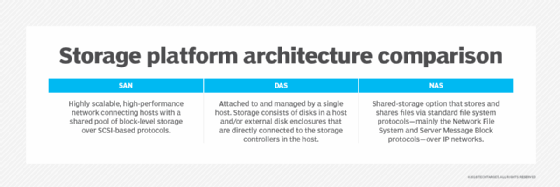
If your application requires block I/O or if there's a significant performance requirement, use a SAN. If your application uses file-based I/O or if you're file sharing and want simple administration, NAS would be the best option. DAS, which is also block-oriented, looms as a third option particularly when an application server is to be isolated for higher performance or security, or if overall systems operations don't require networked, shared storage.
Although the above is a good rule of thumb for knowing when to use each system, there are nuances to each approach and every use case. Below, with the help of some simple visuals, we outline the differences between DAS, SAN and NAS; describe how each system works; and explain where each one works best.
What is direct-attached storage?
DAS is the simplest and most familiar storage implementation in which storage resources are directly connected to a server, PC or other computing device. DAS isn't installed on the network, so its storage and data typically aren't shared by multiple servers. It is, in effect, an isolated storage installation with intentionally limited access.
DAS can refer to any storage directly connected to any type of computer, but for our purposes, we'll consider DAS that provides storage for application servers.
Two types of DAS
DAS might be internal, residing in the same enclosure as the server's CPU and supporting chipsets and other peripherals, or it might be housed in a separate box connected by cabling to the server or PC. Although DAS might be external to its host system, that doesn't mean it's a networked, shareable storage resource.
As noted, DAS is block storage appropriate for applications such as database management systems. However, the host server's OS can also make some or all storage capacity available as user shares in a manner similar to how NAS allocates shares over a network.
How DAS works
Effectively part of the overall array of server components, DAS operation is relatively simple, as it's controlled by the server's OS, which is typically Windows or some variation of Linux.
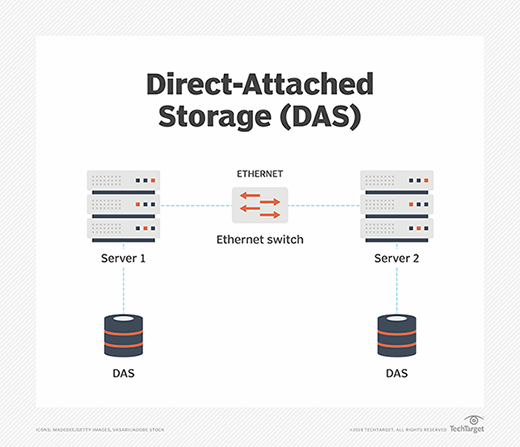
Internal DAS generally connects to the rest of the system by a serial or parallel host bus adapter (HBA) or a similar hardware interface arrangement. Internal DAS might use a variety of storage protocols to communicate with the server, including SATA, SAS, NVMe or SCSI. For modern servers, especially those that will be used for applications that require exceptional performance, NVMe is the preferred protocol.
External DAS connects to the server using a similar set of protocols, including SATA, eSATA and SAS, but can also use the Fibre Channel (FC) protocol that's at the core of SAN technology. With external DAS, the server might also have a drive internally installed to ensure the server can boot up even if the external storage isn't available. External DAS might be connected to multiple servers to share storage capacity, but not applications.
External DAS might be an array of drives that resembles a NAS system, SAN storage or a JBOD device, but it's not networked storage.
Given the nature of DAS, the storage it connects to and makes available to the server might be any type of storage device(s), including tape for special applications.
Advantages of DAS
Although DAS represents perhaps the simplest storage configuration for a server, it does have the following benefits compared to the more complex networked storage alternatives.
- Easy to install, configure and expand. Installing DAS might only involve inserting drives into the open bays in the server or, for external DAS, attaching the unit's cable to the server's drive interface card. Configuration is handled by the server OS, so it's generally uncomplicated. Expansion typically involves slotting in additional drives and adjusting the server's configuration or, in some cases, letting the server discover the new capacity and making it available.
- Inexpensive. The cost of DAS is generally limited to the price of the drives and the interface gear, although most servers have built-in drive connections. No additional software is required, and the cost of expansion is just the price of a new drive or two.
- Performance. A DAS arrangement might provide better disk performance for high-end applications than networked storage because of its generally lower latency. With solid-state drives (SSDs) using a PCIe 5.0 bus and drives supporting NVMe 2.0, enhanced performance is easily achieved for critical applications.
- Isolation and security. Because DAS isn't networked, access to its storage resources is limited, so it's easy to isolate a critical application or sensitive data. Without other servers and applications sharing the data, it might be easier to protect the data and ensure that it's backed up properly.
Disadvantages of DAS
The following are some caveats about using DAS rather than NAS or SAN, most of which are scale-oriented.
- No central management. Because DAS isn't networked, there are no facilities to manage multiple DAS installations centrally.
- Potential for wasted capacity. In a networked environment, excess capacity can be allocated for new applications or users, but with DAS, unused capacity can't be allocated beyond the needs of currently hosted apps and users, so overprovisioning is a common DAS issue.
- Lack of advanced management features. Most DAS systems don't offer the kinds of tools that are readily available with NAS or SAN systems, such as data replication and snapshots, which can make data protection and DR more difficult.
DAS use cases
NAS and SAN storage products are easier than ever to manage and use, but there are still cases where networked storage might be overkill or inappropriate for business needs.
- Small office, branch office deployments. DAS is a cost-conscious alternative for smaller installations where a storage network isn't required, such as small businesses or departments in larger organizations running specialized applications.
- Hosting a single application. For businesses or business units that rely on access to one application and its data, DAS might be the best choice to provide ample performance without contention from other applications.
- Securing data. DAS enables greater isolation of data, which might be important to businesses that must comply with regulations such as HIPAA and the Sarbanes-Oxley Act.
What is a storage area network?
A SAN is a dedicated high-speed storage network that interconnects and presents shared pools of storage to servers. A SAN is an independent storage network that enables high-performance access to storage in a similar manner to how DAS works.
How a SAN works
There are three primary components in a SAN, which include the following:
- Cabling. SAN cabling is designed to support the FC protocol or Ethernet for iSCSI SANs. As such, the cabling is typically copper or fiber.
- HBAs. HBAs used for storage are typically protocols such as FC or SAS. Ethernet-based iSCSI is another protocol option that small and midsize organizations more commonly use.
- Switches. In a SAN, the switch connects servers and shared pools of storage. An FC switch is most often used in a SAN because it's compatible with the FC protocol and is designed for high performance and low latency. Ethernet switches are also common, particularly for iSCSI-based SANs.
The architecture of a SAN, whether based on FC or Ethernet, is designed to enable many servers and other clients to access and share a central storage repository. Servers connected to the SAN communicate by sending out block storage-based data access requests to a storage device.
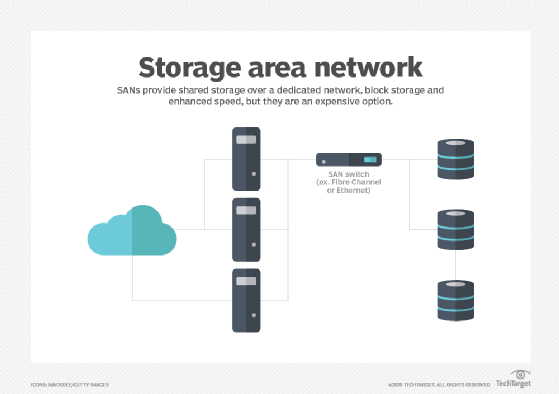
SANs can be managed centrally from a server linked to the SAN using management software or from a console PC hooked into the SAN array.
Advantages of a SAN
In the right environment, a SAN can provide a cost-effective, high-performance storage resource. The benefits of a SAN include the following:
- More flexible application deployment. A SAN can be used for distributed applications, thanks to speedy local network performance and high availability for applications.
- High performance. Because IT administrators can offload storage functions and separate storage networks, a SAN offers improved performance over storage systems that aren't as structured or scalable.
- Improved capacity utilization. Using a SAN enables admins to tier storage and consolidate resources, which contributes to more efficient capacity allocation.
- Security. A SAN is generally considered a secure storage system because it resides within its own -- and easily isolated -- network infrastructure.
- No effect on LAN bandwidth. A SAN can avoid the bandwidth issues associated with contention on LAN-based server storage, such as DAS or NAS.
- High availability. As a shared system, a SAN can achieve higher availability rates than DAS.
- Better data protection and DR. The pooled storage on a SAN is easier to back up efficiently, while the advanced replication and snapshotting tools that most SANs include ensure positive DR results.
Disadvantages of a SAN
Although the benefits of a SAN storage architecture are compelling, there are some drawbacks to SAN implementation, including the following:
- Cost. The hardware involved with building a SAN -- HBAs, cabling, switches and arrays -- is expensive compared to the gear required for Ethernet-based networking.
- Specialized network. By their very nature, FC SANs require a specialized network that can't directly leverage an installed LAN.
- Complexity. SAN implementation typically requires specialized services such as remote replication and failover, which adds to the bill.
- FC expertise is required. The FC protocol was developed specifically for storage and requires specialized knowledge to manage and maintain. FC is more expensive than the common Ethernet networking protocol, so deploying an FC SAN adds another layer of cost over that of an iSCSI SAN.
- Shared access needs to be carefully managed. With many servers, users and applications accessing shared storage resources, the possibility of data leakage from one app to another increases, which could affect the validity of application data.
- Not ideal for small deployments. A SAN's economy of scale only comes when a substantial number of servers and applications are connected to the SAN.
SAN use cases
A SAN's performance, scalability and security make it an ideal home for key organizational applications. Some uses of a SAN include the following:
- Big data centers. A large data center servicing many departments is an excellent environment for a SAN as it centralizes storage resources and storage management.
- High-performance apps. Performance-sensitive applications such as highly transactional relational databases will benefit from the performance a SAN can provide.
- Database hosting. Relational databases are among the most common SAN use cases, as SAN architecture does a very good job of supporting mission-critical applications.
- Scalability. Most SANs can grow capacity to meet future organizational requirements by adding drives or controllers that can accommodate additional drives. Scalability is especially important in large enterprise environments.
- Fault tolerance. Critical application processing can be assured on a SAN because of its ability to create a fault-tolerant environment by seamlessly failing over to an alternate controller and drives when primary resources are unavailable.
- VM storage. Because it pools storage resources, a SAN might enable the launch of additional VMs because it can offload the storage required by each one.
What is network-attached storage?
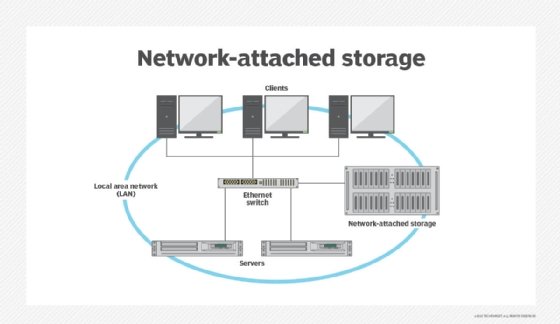
NAS is also a network-based storage system, but unlike a SAN, NAS uses dedicated file storage. NAS enables users and client devices to get data from centralized drives while still providing security and access control. NAS devices are typically managed like a browser, and they don't have a keyboard or display.
NAS resides on a LAN. NAS nodes are independent on the LAN, with each one having a unique IP address. Because of the collaborative nature of NAS, it's commonly deployed as the foundation for a cloud storage system.
How NAS works
NAS connects to an Ethernet network through a switch using storage protocols including Linux-based NFS and Windows SMB.
NAS uses the same networking components that a typical corporate LAN is built around, including network interface cards, switches and cabling. The NAS network can be part of an existing LAN or it can reside separately and connect to the LAN.
NAS devices typically come with minimal components to maintain and manage, and the cost varies by size and scope. NAS systems can be designed for home offices, smaller businesses and enterprises.
Advantages of NAS
NAS is often the first type of networked, shared storage an organization deploys, largely because of its relative familiarity and lower cost than a SAN. NAS benefits include the following:
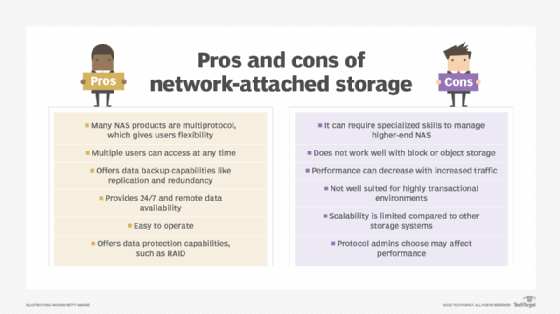
- Collaboration and data sharing. With NAS, storage resources can be allocated as user shares, enabling users to share data and collaborate.
- Lightweight database hosting. Many NAS systems can handle less-demanding databases and other applications, besides user-oriented productivity apps.
- Remote access. Teams that have users working remotely or in different time zones particularly benefit from NAS, which connects to a wireless router and is accessible to distributed work environments. If a device is connected to the network, a user can easily access the files residing on the storage network.
- Low-cost storage networking. Along with its accessibility and high capacity, NAS is a relatively low-cost data storage system.
- RAID. Depending on the size of the NAS installation and the number of drives, some level of RAID can be applied to all or some of the storage for added data protection and security.
- Easy to use and maintain. Because NAS' centralized management uses familiar configuration and administrative procedures, there's generally only a modest learning curve for an experienced sys admin.
- Growth options. Two types of NAS make adding storage capacity easy.
- Scale-up NAS is limited to integrated controllers, but it can accommodate additional capacity and an expanded file system.
- Scale-out NAS provides a broader growth path as NAS servers can be clustered into one large network.
- Better data protection than DAS. The centralized storage resources of NAS enables centralized backups, which can help ensure that all critical data is backed up appropriately.
Disadvantages of NAS
NAS is relatively inexpensive and easy to install and maintain, but it might not be the best choice for some environments. Some drawbacks include the following:
- Inadequate performance. NAS typically can't match the performance of a SAN or dedicated DAS, so some applications might perform poorly.
- More to manage than with DAS. Although NAS management is less taxing than overseeing a SAN, it requires greater oversight and more time than maintaining DAS. With scale-out NAS, as the system grows and becomes more complex, full-time or near full-time administration might be necessary.
- File system limitations. NAS systems have limited file systems, which means that as they approach their limit of files and objects to manage, they might be unable to store additional data even if capacity is available.
- Effect on LAN traffic. If the NAS system resides on the same LAN used for application servers and users, it might affect -- or be affected by -- LAN traffic.
- File orientation. Because NAS is file-based, applications that work best on block-based storage might perform poorly or not work at all on NAS.
NAS use cases
Despite some drawbacks compared to more costly SANs, NAS systems might produce excellent results for a variety of applications and use cases, including the following:
- Unstructured data. Any application that creates and uses unstructured data, such as popular office productivity apps, works well on NAS, so it's often used to support user shares.
- Applications that don't require high performance. Less demanding applications, such as flat-file databases and smaller relational database management system apps, often perform adequately on NAS despite its file orientation.
- Media production. NAS can often support post-production and media editing applications for video and audio production.
- Archive or backup target. NAS is often used as a backup target for in-house data protection operations; most backup applications support using NAS in a disk-to-disk backup process.
- VMs and virtual desktop infrastructure. NAS can be used to support servers that are virtualizing servers or desktop environments.
- Niche unstructured data apps. Other applications that use unstructured data, such as big data analytics and medical imaging, can use NAS to collect and rationalize data from different sources.
Differences between SAN and NAS
At a basic level, SAN is more like DAS than NAS, because it uses block storage. NAS works as a remote system, where file requests are redirected over a network to a NAS device.
Although NAS is designed to handle unstructured data, a SAN is used primarily for structured data that has been organized and formatted inside a database. Unstructured data is increasingly common today, thanks to massive amounts of data coming from diverse sources such as videos, audio files, photos and medical images that don't get consolidated and organized the way structured data does. Especially with all the unstructured data needed for AI workloads. If your organization deals with large amounts of unstructured data, NAS might be a better option.
If performance is your priority, SAN is the better option, although DAS might be appropriate if there are no other requirements for networked storage. The NAS file system tends to result in lower throughput and higher latency, while SAN is well-suited to high-speed traffic. Scalability is another point in SAN's corner; the architecture of a SAN enables scaling up or scaling out capacity and performance. Although higher-end enterprise NAS can be highly scalable, entry-level NAS is not.
As noted, there are numerous differences between NAS and SAN when it comes to cost. A SAN is not only more expensive than a NAS from the start because of its high-priced hardware and specialized services, but its complexity makes maintenance and management a great deal more costly. NAS deployment consists of plugging into the LAN, while a SAN means adding hardware and often bringing in administrators specialized in managing the network.
Using SAN and NAS together
At this point, you might be considering the benefits of DAS, SAN and NAS and wondering why you can't use them together. Some businesses do just that. Rather than debate SAN vs. NAS, these organizations use a combination of the two network types -- sometimes in the same multiprotocol storage array -- and often along with DAS. The systems can complement each other and meet different needs within the organization.
To add NAS to a SAN, a NAS gateway can be used to support both systems. A NAS gateway is a NAS system that externally attaches storage media, usually over an FC interface. This gives the IP network access to the SAN's block-level storage, while processing client requests through NFS and SMB sharing protocols. But many mainstream SAN arrays now support files without requiring a NAS gateway.
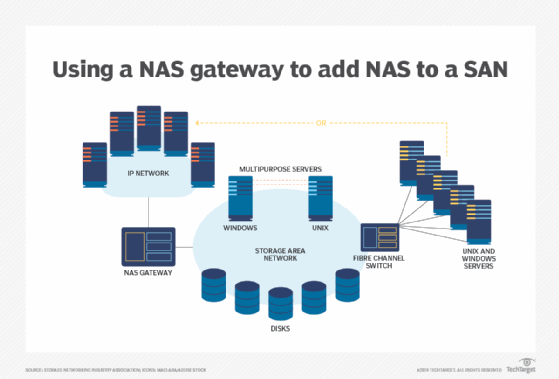
Combining SAN and NAS storage systems through a NAS gateway adds scalability and performance -- the best of both SAN and NAS worlds. A NAS gateway keeps costs down when consolidating the storage systems and isn't limited by storage capacity like a traditional appliance.
Which is better: DAS, SAN or NAS?
The decision to use DAS or a networked storage offering such as SAN or NAS comes down to the type of data stored in your data center, the computing environment and any special needs. With block I/O, DAS or SAN is used; with file I/O, NAS is used. When comparing SAN vs. NAS, keep in mind that NAS turns the file I/O request into block access for the attached storage devices. SANs are the preferred choice for structured data -- data found in a relational database, for instance. Although NAS can handle structured data, it's usually used for unstructured data such as files, email, social media, images, videos and communications, and any type of data outside of relational databases.
Object I/O for storage has become more prevalent because of its overwhelming use in cloud storage. As a result, the clear divide between SAN being used with block storage and NAS with file storage is becoming blurred.
As vendors move from block or file to object I/O for their storage needs, users still want to access data in the way they're used to: block storage for SAN or file storage for NAS. Vendors are offering systems with front ends or emulators that present a NAS or SAN experience, while the back end is based on object storage.
File vs. block vs. object
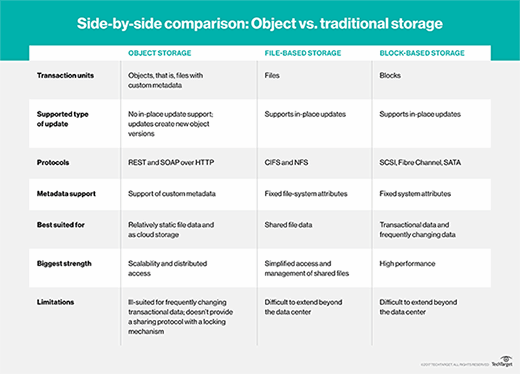
File I/O storage reads and writes data in the same manner as a user does on a dedicated drive on a local computer -- by using a hierarchical structure with files inside folders that can be inside more folders. NAS systems commonly use this approach, and it has the following important benefits:
- When used with NFS and SMB -- the most common NAS protocols -- a user can copy and paste files or entire folders.
- The IT department can easily manage these systems.
Block I/O storage treats each file or folder as various blocks of smaller bits of data and distributes multiple copies of each block across the drives and devices in a SAN system. The benefits of this approach include the following:
- Greater data reliability. Data can still be accessed if one drive or several drives fail.
- Faster access. Files can be reassembled from the blocks closest to the user and don't need to pass through a hierarchy of folders.
Object I/O storage treats each file as one object, like file I/O, but doesn't have a hierarchy of nested folders like block I/O. With object storage, all files or objects are put into a single, enormous data pool or flat database. Files are found based on the metadata associated with the file or added by the object storage OS.
Object storage has been the slowest of the three methods and is mainly used for cloud file storage. But recent advances in the way metadata is accessed and increased use of flash drives have narrowed the speed gap among object, file and block storage.
The rise of unified networked storage
Unified storage platforms have become an accepted standard -- as they provide the flexibility to run block, file or object protocols in the same storage pool. These multiprotocol systems consolidate SAN block-based, NAS file-based or S3 object-based data on one storage platform. Customers can start with either storage option and add support and connectivity later. Or they can buy a storage array that supports SAN and NAS.
Unified storage can use file protocols, such as SMB and NFS, along with block protocols, such as FC and iSCSI. One advantage of these systems is that they require less hardware than traditional storage. It’s also common to see newer unified storage offerings also incorporate object storage, cloud storage and storage virtualization.
The NVMe advantage
Much of the storage industry's activity has come from extending the NVMe protocol over fabric (NVMe-oF). NVMe-oF has become mainstream since its introduction, as it blurs traditional SAN/NAS lines. NVMe-OF over Ethernet, for example, enables parallel file systems to reach block-level performance while maintaining file-level accessibility -- critical for AI workloads.
The NVMe protocol is the fastest way to connect a flash storage device to a computer's motherboard, communicating using the PCIe bus. It greatly outperforms an SSD connected by SATA. NVMe over Fabrics extends that speedy NVMe connection across the fabric that knits together a SAN system.
NVMe can't be used to transfer data between a remote user and the storage array, so a messaging layer must be used. This makes NVMe seem more like an Ethernet-connected NAS system, which uses Ethernet's TCP/IP protocol to handle data movement. NVMe-oF addresses this through remote direct memory access (RDMA), which enables direct-to-memory data transfer that bypasses the CPU and noticeably reduces latency.
Rich Castagna has been involved with high-tech journalism for more than 20 years. Rich worked at TechTarget for 15 years, overseeing technical coverage and content creation as vice president of editorial. During his TechTarget tenure, Rich primarily covered storage and related technologies. Previous roles include executive editor of ZDNet Tech Update and CNET Enterprise; and editor in chief of Windows Systems magazine.