Document version control is no longer a niche enterprise content management (ECM) discipline. In modern content platforms, version history is a day-to-day collaboration, recovery and governance control.
The harder question for IT and content leaders is not whether version history exists. It is how long versions should be kept, who can restore them, how milestone or approved versions should be marked and where version history ends and retention or records policy begins.
A sound version control strategy reduces accidental overwrites, supports audits and approvals, and helps teams recover from mistakes without turning every shared library into an unmanaged archive.
How does document version control work?
Here's how it typically works:
Version history. Most content platforms automatically retain earlier versions so teams can review what changed and when.
Restore and comparison. Users can open earlier versions, compare changes and restore a prior copy when needed.
Permissions and access control. Teams can limit who edits, approves, restores or discards earlier versions.
Optional check-out/check-in workflows. Some environments still require files to be checked out before editing, but that is one control option rather than the only model.
Named, approved or official versions. Teams can mark milestone drafts, approvals or publication states so employees know which copy is authoritative.
Centralized storage. Documents remain easier to retrieve, manage and govern when version history lives in the same platform as the working file.
Retention-aware governance. In regulated environments, teams also need to decide which versions must be preserved, hidden or removed over time.
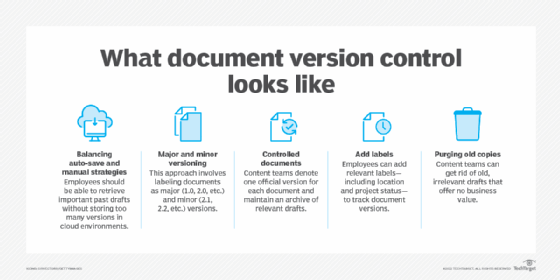
This graphic shows five common document version control approaches. The full article also covers archiving, parallel documentation and AI-assisted review.
Document version control examples
Content teams can take several approaches to document version control. Each approach corresponds to specific business needs, and organizations often use multiple approaches based on different requirements.
The following high-level strategies fit most business cases.
1. The autosave balancing act
A basic, incremental versioning scheme makes sense for collaborative content that is still in progress, especially when multiple editors are working at once.
But autosave and generous version counts can create more history than teams actually need. Organizations should decide how much version history they need for collaboration, recovery and auditing before default settings create unnecessary review and storage sprawl.
2. Iterative documentation
Documentation often has its own versioning scheme or a tie-in to an external numbering system. Employees can use both major -- 1.0, 2.0, etc. -- and minor -- 2.0, 2.1, etc. -- versions to see which iteration correlates with which state of the editing process.
Organizations often use minor versions for iterative drafts, while major versions represent final, approved documents. Afterward, content teams can purge minor copies, which become irrelevant when the major version publishes.
3. Controlled documentation
For controlled documents, the organization has one official version of a document. Even if one is newer, every other copy is either a draft or a historical record. When an approved version becomes the current one, content teams can place it in a central location, and it becomes the source of truth going forward. Content teams should keep a history of these copies to show when each version was effective if questions about past states arise.
While this approach is like iterative documentation, controlled documentation has a single location for the official version and archives previous official editions. These approaches also differ by the effective date, as published versions remain valid for some time. If content teams know which one was official during a specific time, this versioning can help with audit trails.
4. Labeling
Content teams can label specific versions in this scenario to represent status and relevance. This approach enables people to find a specific version for a particular state in the editing process. Used well, labels can also help teams distinguish between working drafts, milestone reviews and officially approved versions.
While approved, original and current are obvious labels, other naming conventions may be useful. For example, a team might use CEO comments to track a document where the CEO gave specific guidance. Labels can also mark key variations of a document. If an HR policy applies to employees in a specific country, the HR department could label the document to specify that location. Specific labels can ensure content teams don't mistakenly purge useful older documents.
5. Purging old versions
This example is part of most version control approaches. Old drafts lack value for organizations, and unapproved or unofficial statements risk losing context and causing confusion.
Even for collaborative content, content teams should determine if they must keep all drafts for any time. Organizations can benefit from a strategy to dispose of outdated and unnecessary documents and know which older versions to keep. Labeling and major versioning also come into play here. If the ECM system doesn't support those capabilities, content teams can move key versions out of working directories into a published, or archived, location.
6. Automatically archiving versions
Organizations with stricter governance or audit requirements can automate how older versions are handled after a milestone such as approval or publication.
The goal is not simply to move drafts into an archive folder. It is to keep active workspaces clean while preserving the versions the organization may still need for audit, policy or operational reasons.
7. Creating parallel documentation for specialized teams
During complex projects, multiple teams may work on different aspects of the same document. For example, a product manual might require input from both technical writers and marketing teams.
To speed up document creation and editing, organizations can create parallel versions labeled by team or purpose. When all teams finalize their contributions, they can merge those final versions into a single document.
AI can help teams review document changes faster, but it should support rather than replace formal version history.
8. Using AI to summarize changes
AI can help teams review document changes faster, but it should support rather than replace formal version history.
In high-volume environments, AI summaries can help users understand what changed between drafts more quickly. But organizations still need authoritative version history, clear approval states and a documented policy for what gets preserved, labeled or purged.
Not every type of document can fit into a specific bucket. Sometimes, content teams need a hybrid approach and may use many of these examples in their version control strategy. Yet, when these teams understand the purposes of different types of documents, they can identify the proper versioning approach.
Questions to ask before deployment
When picking the appropriate document versioning strategy, content teams should ask several questions in advance. Those questions are the following:
What goal does the organization want to achieve? Knowing the goal is the most critical step. Sometimes, the goal is to revisit older versions as documents evolve. Other times, organizations want to preserve specific versions.
What does the organization's ECM software do by default? Default behavior shows a vendor's plan when it implements versioning. If the software allows 50 or more versions, the vendor likely plans for collaborative content. Also, versioning for formal processes may require additional effort. Adopting a new ECM service to improve versioning is rarely cost-effective, so content teams should understand their software's features to form a strategy.
How should version history support governance and recovery? Teams should decide which versions matter most, who should be able to restore them and when older versions should be hidden, archived or removed.
Where should people look for documents? Content teams must determine where employees should search for official versions and if everyone should have access to drafts. For authorized employees, content teams should keep the search simple.
How important are old versions? If old versions have little value after a week or a month, organizations can benefit from a strategy to delete or hide these documents.
Can IT teams automate the versioning strategy? Teams may find success with automation. Requiring multiple people to take extra actions and follow specific versioning controls poses risks. People forget, rush and may not see value in taking the extra step. An unfollowed versioning strategy is worse than not having one.
IT and content leaders should treat version control as a governance decision, not just a platform feature. The right approach balances collaboration speed, recovery, approvals and compliance without turning every document library into a permanent archive.
Editor's note: This article was updated to reflect current collaboration, governance and version-control practices.
Laurence Hart is director of consulting services at CGI Federal and has more than 20 years of IT experience.
Christine Campbell is a freelance writer specializing in business and B2B technology.