








Some transport layers like the default OpenAIRealtimeWebRTC handle audio input and output automatically for you. For other transport mechanisms like OpenAIRealtimeWebSocket you have to handle session audio yourself:
import {
RealtimeAgent,
RealtimeSession,
TransportLayerAudio,
} from '@openai/agents/realtime';
const agent = new RealtimeAgent({ name: 'My agent' });
const session = new RealtimeSession(agent);
const newlyRecordedAudio = new ArrayBuffer(0);
session.on('audio', (event: TransportLayerAudio) => {
// play your audio
});
// send new audio to the agent
session.sendAudio(newlyRecordedAudio);
When the underlying transport supports it, session.muted reports the current mute state and session.mute(true | false) toggles microphone capture. OpenAIRealtimeWebSocket does not implement muting: session.muted returns null and session.mute() throws, so for websocket setups you should pause capture on your side and stop calling sendAudio() until the microphone should be live again.
Configure the session itself when you create RealtimeSession, usually through the model option and the config object. connect(...) is for connection-time concerns such as credentials, endpoint URL, and SIP call attachment rather than arbitrary session fields.
import { RealtimeAgent, RealtimeSession } from '@openai/agents/realtime';
const agent = new RealtimeAgent({
name: 'Greeter',
instructions: 'Greet the user with cheer and answer questions.',
});
const session = new RealtimeSession(agent, {
model: 'gpt-realtime-1.5',
config: {
outputModalities: ['audio'],
audio: {
input: {
format: 'pcm16',
transcription: {
model: 'gpt-4o-mini-transcribe',
},
},
output: {
format: 'pcm16',
},
},
},
});
Under the hood, the SDK normalizes this configuration into the Realtime session.update shape. If you need a raw session field that does not have a matching property in RealtimeSessionConfig, use providerData or send a raw session.update through session.transport.sendEvent(...).
Prefer the newer SDK config shape with outputModalities, audio.input, and audio.output. Older SDK aliases such as modalities, inputAudioFormat, outputAudioFormat, inputAudioTranscription, and turnDetection are still normalized for backwards compatibility, but new code should use the nested audio structure shown here.
For speech-to-speech sessions, the usual choice is outputModalities: ['audio'], which gives you audio output plus transcripts. Switch to ['text'] only when you want text-only responses.
For parameters that are new and do not have a matching parameter in RealtimeSessionConfig, you can use providerData. Anything passed in providerData is forwarded as part of the raw session object.
Additional RealtimeSession options you can set at construction time:
| Option | Type | Purpose |
|---|---|---|
context | TContext | Extra local context merged into the session context. |
historyStoreAudio | boolean | Store audio data in the local history snapshot (disabled by default). |
outputGuardrails | RealtimeOutputGuardrail[] | Output guardrails for the session (see Guardrails). |
outputGuardrailSettings | { debounceTextLength?: number } | Guardrail cadence. Defaults to 100; use -1 to only run once full text is available. |
tracingDisabled | boolean | Disable tracing for the session. |
groupId | string | Group traces across sessions or backend runs. Requires workflowName. |
traceMetadata | Record<string, any> | Custom metadata to attach to session traces. Requires workflowName. |
workflowName | string | Friendly name for the trace workflow. |
automaticallyTriggerResponseForMcpToolCalls | boolean | Auto-trigger a model response when an MCP tool call completes (default: true). |
toolErrorFormatter | ToolErrorFormatter | Customize tool approval rejection messages returned to the model. |
connect(...) options:
| Option | Type | Purpose |
|---|---|---|
apiKey | string | (() => string | Promise<string>) | API key (or lazy loader) used for this connection. |
model | OpenAIRealtimeModels | string | Present in the transport-level options type. For RealtimeSession, set the model in the constructor; raw transports can also use a model at connect time. |
url | string | Optional custom Realtime endpoint URL. |
callId | string | Attach to an existing SIP-initiated call/session. |
RealtimeSession sits on top of a long-lived Realtime connection. It keeps a local copy of conversation history, listens for transport events, runs tools and output guardrails, and keeps the active agent configuration synchronized with the transport.
The underlying API behavior still matters:
session.created event, and later config changes produce session.updated.model cannot change mid-conversation, voice can only change before the session has produced audio output, and tracing should be decided up front because the Realtime API does not let you modify tracing after it is enabled.At the SDK layer, await session.connect() means “the transport is ready enough to start the conversation”, but the exact point differs by transport:
session.update as soon as the data channel opens and tries to wait for the corresponding session.updated event before resolving connect(). This is there to avoid audio reaching the server before your instructions, tools, and modalities are applied. If that acknowledgement never arrives, connect() falls back to resolving after a short timeout.connect() resolves once the socket is open and the initial config has been sent. The matching session.updated event can therefore arrive after connect() has already resolved.If you need the raw event model, read the official Realtime conversations guide alongside this page.
Section titled “Turn detection and voice activity detection”
By default, Realtime sessions use built-in voice activity detection (VAD) so the API can decide when the user has started or stopped speaking and when to create a response. The SDK exposes this through audio.input.turnDetection.
import { RealtimeSession } from '@openai/agents/realtime';
import { agent } from './agent';
const session = new RealtimeSession(agent, {
model: 'gpt-realtime-1.5',
config: {
audio: {
input: {
turnDetection: {
type: 'semantic_vad',
eagerness: 'medium',
createResponse: true,
interruptResponse: true,
},
},
},
},
});
Two common modes are:
semantic_vad, which aims for more natural turn boundaries and can wait a little longer when the user sounds like they are not finished yet.server_vad, which is more threshold-driven and exposes settings such as threshold, prefixPaddingMs, silenceDurationMs, and idleTimeoutMs.Set audio.input.turnDetection to null if you want to manage turn boundaries yourself. The official voice activity detection guide and Realtime conversations guide describe the underlying behavior in more detail.
When VAD is enabled, speaking over the agent can interrupt the current response. On the WebSocket transport, the SDK listens for input_audio_buffer.speech_started, truncates the assistant audio to what the user actually heard, and emits an audio_interrupted event. That event is especially useful when you manage playback yourself in WebSocket setups.
import { session } from './agent';
session.on('audio_interrupted', () => {
// handle local playback interruption
});
If you want to expose a manual stop button, call interrupt() yourself:
import { session } from './agent';
session.interrupt();
// this will still trigger the `audio_interrupted` event for you
// to cut off the audio playback when using WebSockets
WebRTC and WebSocket both stop the in-progress response, but the low-level mechanics differ by transport. WebRTC clears buffered output audio for you. In WebSocket setups you still need to stop local playback yourself, and the local history updates when the corresponding truncation and conversation events come back from the transport.
Use sendMessage() when you want to send typed input or additional structured user content into the live conversation.
import { RealtimeSession, RealtimeAgent } from '@openai/agents/realtime';
const agent = new RealtimeAgent({
name: 'Assistant',
});
const session = new RealtimeSession(agent, {
model: 'gpt-realtime-1.5',
});
session.sendMessage('Hello, how are you?');
This is useful for mixed text and voice UIs, out-of-band context injection, or pairing spoken input with explicit typed clarifications.
Realtime speech-to-speech sessions can also include images. In the SDK, use addImage() to attach an image to the current conversation.
import { RealtimeAgent, RealtimeSession } from '@openai/agents/realtime';
const agent = new RealtimeAgent({
name: 'Assistant',
});
const session = new RealtimeSession(agent, {
model: 'gpt-realtime-1.5',
});
const imageDataUrl = 'data:image/png;base64,...';
session.addImage(imageDataUrl, { triggerResponse: false });
session.sendMessage('Describe what is in this image.');
Passing triggerResponse: false lets you batch the image with a later text or audio turn before asking the model to respond. This lines up with the official Realtime conversations image input guidance.
At the higher SDK layer, sendMessage() and addImage() trigger a response for you by default. Manual response control matters when you are working with raw transport events, push-to-talk flows, or custom moderation / validation steps.
import { RealtimeAgent, RealtimeSession } from '@openai/agents/realtime';
const agent = new RealtimeAgent({
name: 'Greeter',
instructions: 'Greet the user with cheer and answer questions.',
});
const session = new RealtimeSession(agent, {
model: 'gpt-realtime-1.5',
});
session.transport.on('*', (event) => {
// JSON parsed version of the event received on the connection
});
// Send any valid event as JSON. For example triggering a new response
session.transport.sendEvent({
type: 'response.create',
// ...
});
There are two common cases:
audio.input.turnDetection = null, you are responsible for committing audio turns and then sending response.create.turnDetection.interruptResponse = false and turnDetection.createResponse = false, the API still detects turns but leaves response creation up to you.That second pattern is useful when you want to inspect or moderate user input before the model responds. It matches the official Realtime conversations guidance on disabling automatic responses.
Similarly to regular agents, you can use handoffs to break your agent into multiple agents and orchestrate between them to improve performance and better scope the problem.
import { RealtimeAgent } from '@openai/agents/realtime';
const mathTutorAgent = new RealtimeAgent({
name: 'Math Tutor',
handoffDescription: 'Specialist agent for math questions',
instructions:
'You provide help with math problems. Explain your reasoning at each step and include examples',
});
const agent = new RealtimeAgent({
name: 'Greeter',
instructions: 'Greet the user with cheer and answer questions.',
handoffs: [mathTutorAgent],
});
Unlike regular agents, handoffs behave slightly differently for Realtime Agents. When a handoff is performed, the ongoing session is updated with the new agent configuration in place. Because of this, the new agent automatically has access to the ongoing conversation history and input filters are currently not applied.
Because the session stays live, the model for that session does not change during a handoff. Voice changes follow the underlying Realtime API rule: they only work before the session has produced audio output. Realtime handoffs are primarily for swapping between RealtimeAgent configurations on the same session; if you need to use a different model, for example a reasoning model like gpt-5.4, or delegate to a non-realtime backend agent, use delegation through tools.
Just like regular agents, Realtime Agents can call tools to perform actions. Realtime supports function tools (executed locally) and hosted MCP tools (executed remotely by the Realtime API). You can define a function tool using the same tool() helper you would use for a regular agent.
import { tool, RealtimeAgent } from '@openai/agents/realtime';
import { z } from 'zod';
const getWeather = tool({
name: 'get_weather',
description: 'Return the weather for a city.',
parameters: z.object({ city: z.string() }),
async execute({ city }) {
return `The weather in ${city} is sunny.`;
},
});
const weatherAgent = new RealtimeAgent({
name: 'Weather assistant',
instructions: 'Answer weather questions.',
tools: [getWeather],
});
Function tools run in the same environment as your RealtimeSession. This means if you are running your session in the browser, the tool executes in the browser. If you need to perform sensitive actions, call your backend from inside the tool and let the server do the privileged work.
This lets a browser-side tool act as a thin backchannel to server-side logic. For example, examples/realtime-next defines a refundBackchannel tool in the browser that forwards the request and current conversation history to handleRefundRequest(...) on the server, where a separate Runner can use a different agent or model to evaluate the refund before returning the result to the voice session.
Hosted MCP tools can be configured with hostedMcpTool and are executed remotely. When MCP tool availability changes the session emits mcp_tools_changed. To prevent the session from auto-triggering a model response after MCP tool calls complete, set automaticallyTriggerResponseForMcpToolCalls: false.
The current filtered MCP tool list is also available as session.availableMcpTools. Both that property and the mcp_tools_changed event reflect only the hosted MCP servers enabled on the active agent, after applying any allowed_tools filters from the agent configuration.
Hosted MCP setup is easiest to reason about if you treat secure server selection, headers, and approvals as pre-connect configuration. Before RealtimeSession.connect() opens the transport, the SDK resolves the active agent’s hosted MCP tool definitions and includes the supported MCP fields in the initial session config it sends to the Realtime API.
That timing matters most in browser WebRTC apps. The ephemeral client secret is always minted on your server, so any hosted MCP credentials or custom headers that must stay secret should be attached in that server-side POST /v1/realtime/client_secrets request as part of the initial session payload. Do not put long-lived credentials in browser code and plan to add them later after connect() starts.
At the Realtime API level, later session.update calls can still change tools and other mutable session fields, and the SDK itself sends session.update when the active agent changes. In browser apps, though, you should treat secure Hosted MCP initialization as a server-side, pre-connect concern and keep the browser-side RealtimeSession config aligned with what your server minted.
While the tool is executing the agent will not be able to process new requests from the user. One way to improve the experience is by telling your agent to announce when it is about to execute a tool or say specific phrases to buy the agent some time to execute the tool.
If a function tool should finish without immediately triggering another model response, return backgroundResult(output) from @openai/agents/realtime. This sends the tool output back to the session while leaving response triggering under your control.
Function tool timeout options (timeoutMs, timeoutBehavior, timeoutErrorFunction) work the same way in Realtime sessions. With the default error_as_result, the timeout message is sent as tool output. With raise_exception, the session emits an error event with ToolTimeoutError and does not send tool output for that call.
In addition to the arguments that the agent called a particular tool with, you can also access a snapshot of the current conversation history tracked by the Realtime Session. This can be useful if you need to perform a more complex action based on the current state of the conversation or are planning to use tools for delegation.
import {
tool,
RealtimeContextData,
RealtimeItem,
} from '@openai/agents/realtime';
import { z } from 'zod';
const parameters = z.object({
request: z.string(),
});
const refundTool = tool<typeof parameters, RealtimeContextData>({
name: 'Refund Expert',
description: 'Evaluate a refund',
parameters,
execute: async ({ request }, details) => {
// The history might not be available
const history: RealtimeItem[] = details?.context?.history ?? [];
// making your call to process the refund request
},
});
If you define your tool with needsApproval: true the agent emits a tool_approval_requested event before executing the tool.
By listening to this event you can show a UI to the user to approve or reject the tool call.
Resolve the request with await session.approve(request.approvalItem) or await session.reject(request.approvalItem). For function tools you can pass { alwaysApprove: true } or { alwaysReject: true } to reuse the same decision for repeated calls during the rest of the session, and session.reject(request.approvalItem, { message: '...' }) to send a custom rejection message back to the model for that specific call. Hosted MCP approvals do not support sticky approve/reject; restrict those tools with the hosted MCP allowedTools configuration instead.
If you do not pass a per-call rejection message, the session falls back to toolErrorFormatter (if configured) and then to the SDK default rejection text.
import { session } from './agent';
session.on('tool_approval_requested', (_context, _agent, request) => {
// show a UI to the user to approve or reject the tool call
// you can use the `session.approve(...)` or `session.reject(...)` methods to approve or reject the tool call
session.approve(request.approvalItem); // or session.reject(request.approvalItem);
});
Guardrails offer a way to monitor whether what the agent has said violated a set of rules and immediately cut off the response. These checks run against the transcript stream of the agent’s response. In audio sessions, the SDK uses output audio transcripts and transcript deltas, so the important prerequisite is transcript availability rather than a separate text output modality.
The guardrails you provide run asynchronously as a model response is returned, allowing you to cut off the response based on a predefined classification trigger, for example “mentions a specific banned word”.
When a guardrail trips the session emits a guardrail_tripped event. The event also provides a details object containing the itemId that triggered the guardrail.
import {
RealtimeOutputGuardrail,
RealtimeAgent,
RealtimeSession,
} from '@openai/agents/realtime';
const agent = new RealtimeAgent({
name: 'Greeter',
instructions: 'Greet the user with cheer and answer questions.',
});
const guardrails: RealtimeOutputGuardrail[] = [
{
name: 'No mention of Dom',
async execute({ agentOutput }) {
const domInOutput = agentOutput.includes('Dom');
return {
tripwireTriggered: domInOutput,
outputInfo: { domInOutput },
};
},
},
];
const guardedSession = new RealtimeSession(agent, {
outputGuardrails: guardrails,
});
By default guardrails run every 100 characters and again when the final transcript is available. Because speaking the text usually takes longer than generating the transcript, this often lets the guardrail cut off unsafe output before the user hears it.
If you want to modify this behavior you can pass an outputGuardrailSettings object to the session.
Set debounceTextLength: -1 when you only want to evaluate the fully generated transcript once, at the end of the response.
import { RealtimeAgent, RealtimeSession } from '@openai/agents/realtime';
const agent = new RealtimeAgent({
name: 'Greeter',
instructions: 'Greet the user with cheer and answer questions.',
});
const guardedSession = new RealtimeSession(agent, {
outputGuardrails: [
/*...*/
],
outputGuardrailSettings: {
debounceTextLength: 500, // run guardrail every 500 characters or set it to -1 to run it only at the end
},
});
RealtimeSession automatically maintains a local history snapshot that tracks user messages, assistant output, tool calls, and truncation state. You can render it in the UI, inspect it inside tools, or update it when you need to correct or remove items.
As the conversation changes the session emits history_updated. If you need to request history changes, use updateHistory(). It asks the transport to diff the current history and send the necessary delete/create events; the local session.history view updates as the corresponding conversation events come back.
import { RealtimeSession, RealtimeAgent } from '@openai/agents/realtime';
const agent = new RealtimeAgent({
name: 'Assistant',
});
const session = new RealtimeSession(agent, {
model: 'gpt-realtime-1.5',
});
await session.connect({ apiKey: '<client-api-key>' });
// listening to the history_updated event
session.on('history_updated', (history) => {
// returns the full history of the session
console.log(history);
});
// Option 1: explicit setting
session.updateHistory([
/* specific history */
]);
// Option 2: override based on current state like removing all agent messages
session.updateHistory((currentHistory) => {
return currentHistory.filter(
(item) => !(item.type === 'message' && item.role === 'assistant'),
);
});
output_audio.transcript.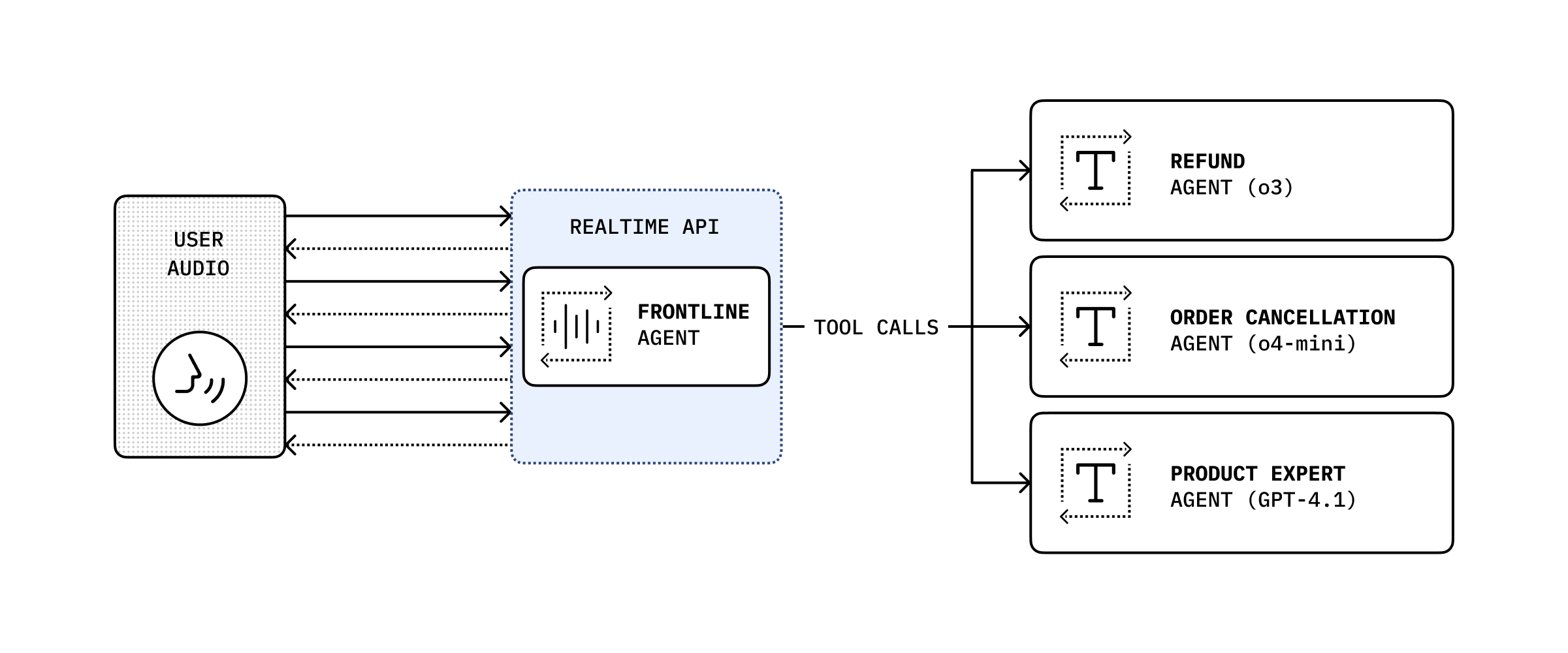
By combining the conversation history with a tool call, you can delegate the conversation to another backend agent to perform a more complex action and then pass it back as the result to the user.
import {
RealtimeAgent,
RealtimeContextData,
tool,
} from '@openai/agents/realtime';
import { handleRefundRequest } from './serverAgent';
import z from 'zod';
const refundSupervisorParameters = z.object({
request: z.string(),
});
const refundSupervisor = tool<
typeof refundSupervisorParameters,
RealtimeContextData
>({
name: 'escalateToRefundSupervisor',
description: 'Escalate a refund request to the refund supervisor',
parameters: refundSupervisorParameters,
execute: async ({ request }, details) => {
// This will execute on the server
return handleRefundRequest(request, details?.context?.history ?? []);
},
});
const agent = new RealtimeAgent({
name: 'Customer Support',
instructions:
'You are a customer support agent. If you receive any requests for refunds, you need to delegate to your supervisor.',
tools: [refundSupervisor],
});
The code below then runs on the server, in this example via a Next.js Server Action.
// This runs on the server
import 'server-only';
import { Agent, run } from '@openai/agents';
import type { RealtimeItem } from '@openai/agents/realtime';
import z from 'zod';
const agent = new Agent({
name: 'Refund Expert',
instructions:
'You are a refund expert. You are given a request to process a refund and you need to determine if the request is valid.',
model: 'gpt-5.4',
outputType: z.object({
reasong: z.string(),
refundApproved: z.boolean(),
}),
});
export async function handleRefundRequest(
request: string,
history: RealtimeItem[],
) {
const input = `
The user has requested a refund.
The request is: ${request}
Current conversation history:
${JSON.stringify(history, null, 2)}
`.trim();
const result = await run(agent, input);
return JSON.stringify(result.finalOutput, null, 2);
}
此内容由惯性聚合(RSS阅读器)自动聚合整理,仅供阅读参考。 原文来自 — 版权归原作者所有。