惯性聚合 高效追踪和阅读你感兴趣的博客、新闻、科技资讯
阅读原文 在惯性聚合中打开

推荐订阅源

WordPress大学
WordPress大学
Microsoft Security Blog
Security Archives - TechRepublic
V
Visual Studio Blog
宝玉的分享
宝玉的分享
IT之家
IT之家
人人都是产品经理
人人都是产品经理
T
The Blog of Author Tim Ferriss
I
InfoQ
B
Blog RSS Feed
T
Threatpost
博客园_首页
M
MIT News - Artificial intelligence
Spread Privacy
Spread Privacy
cs.CL updates on arXiv.org
Know Your Adversary
Know Your Adversary
U
Unit 42
Engineering at Meta
Engineering at Meta
C
Cyber Attacks, Cyber Crime and Cyber Security
月光博客
月光博客
Scott Helme
Scott Helme
T
Tor Project blog
有赞技术团队
有赞技术团队
AWS News Blog
AWS News Blog
让小产品的独立变现更简单 - ezindie.com
Last Week in AI
Last Week in AI
S
Schneier on Security
Vercel News
Vercel News
博客园 - Franky
C
Cybersecurity and Infrastructure Security Agency CISA
L
LINUX DO - 热门话题
NISL@THU
NISL@THU
L
LangChain Blog
爱范儿
爱范儿
Google DeepMind News
The GitHub Blog
The GitHub Blog
雷峰网
雷峰网
Latest news
Latest news
C
CXSECURITY Database RSS Feed - CXSecurity.com
Hugging Face - Blog
Hugging Face - Blog
Exploit-DB.com RSS Feed
www.infosecurity-magazine.com
G
GRAHAM CLULEY
S
Security Affairs
A
About on SuperTechFans
K
KPMG report finds enterprise disconnect between AI and its ROI | CIO
大猫的无限游戏
大猫的无限游戏
W
WeLiveSecurity
Cisco Talos Blog
Cisco Talos Blog
罗磊的独立博客

敢闯 - 折腾一下

打开小米钱包自动记账功能 - 敢闯 利用Python及宝塔面板每天自动提交微信支付宝步数 - 敢闯 给GitHub进行2FA/两因素认证 - 敢闯 给安卓版本的Obsidian安装插件 - 敢闯 StackEdit:浏览器内 Markdown笔记利器 - 敢闯 搭建微信查题小程序 - 敢闯 蚂蚁森林自动收取Auto.js脚本 - 敢闯 安卓强制软件分屏 - 敢闯 给CentOS7安装图形化界面 - 敢闯
Termux搭建Linux系统非杀后台解决方法(无root) - 敢闯
敢闯 · 2024-04-18 · via 敢闯 - 折腾一下

请注意,本文编写于 780 天前,最后修改于 776 天前,其中某些信息可能已经过时。

1
1

Termux 是一个在 Android 上模拟 Linux 环境的终端应用程序,它允许用户运行各种 Linux 命令和应用程序。
关于 Termux 杀后台的问题,好像是因为电池优化和节能机制,linux系统占用内存过高,当你安装完ubuntu或者debian等他们的图形化界面,跳转去vnc连接,无论锁后台,无视省电等方法,过不了多久就会卡住,那时候就是被杀后台了。
那我们直接开始吧

环境

安装好
termux
wifi环境
有无线调试功能(安卓10以上)

开始

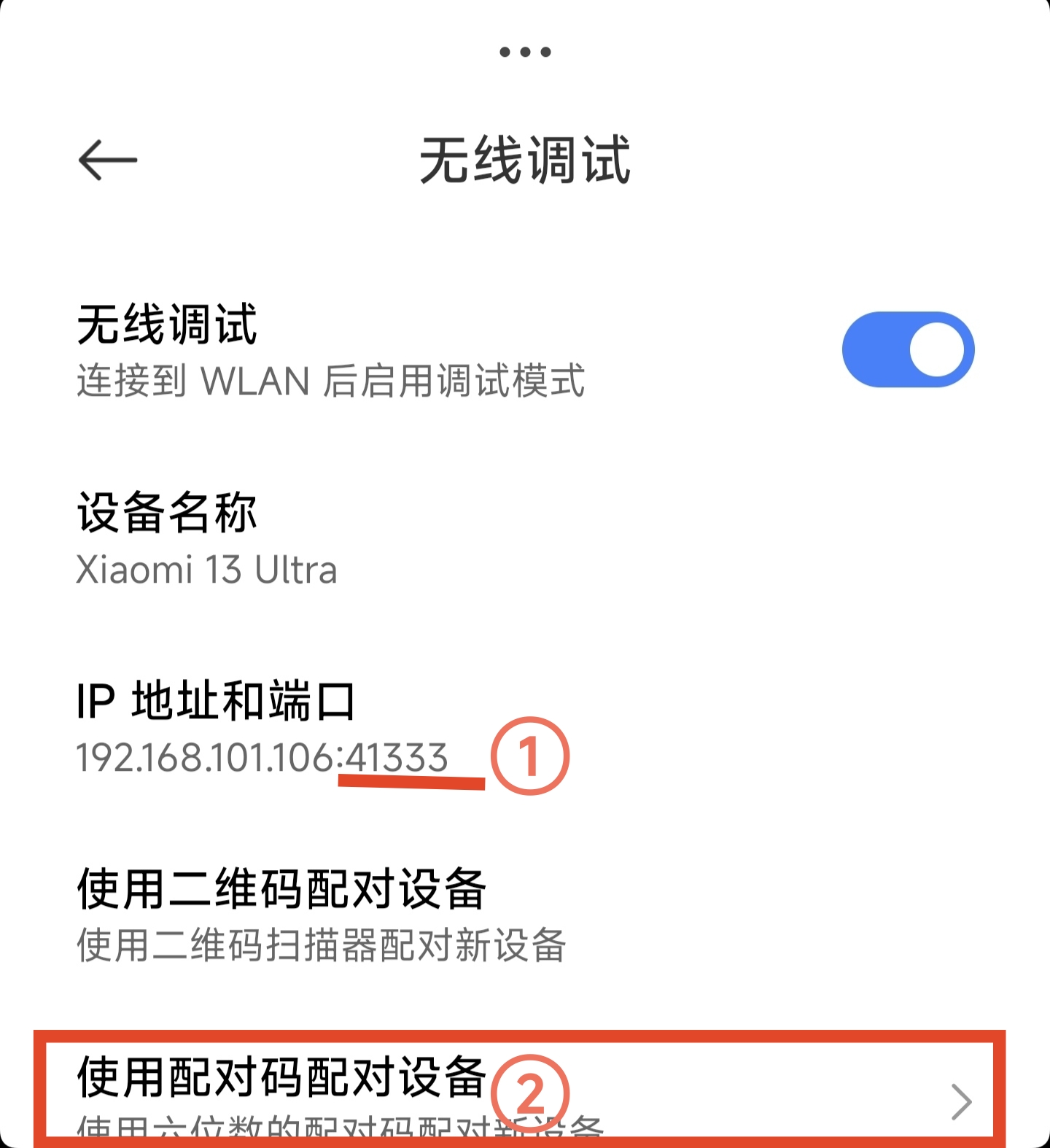
首先得用到分屏,一个开termux,另一个打开设置,打开设置后,打开开发者模式 ,找到无线调试 ,打开它,他就会给你弹窗

ed190d531e0ce81a.jpg

点确定就行
然后①记住那个端口,②点击使用配对码配对

第二步
第二步

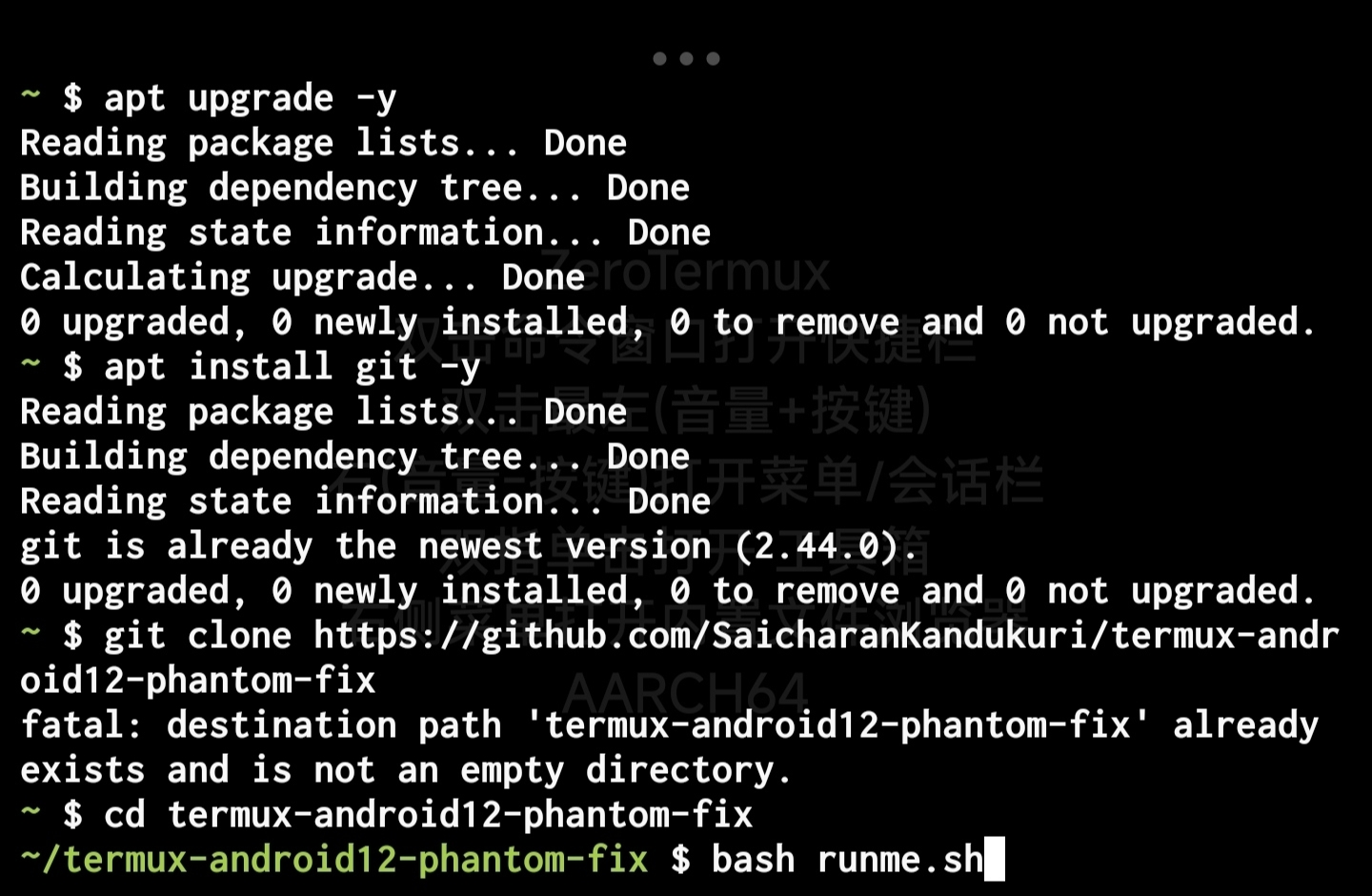
然后在你的Termux端输入以下内容:

apt update
apt upgrade -y
apt install git -y
git clone https://github.com/SaicharanKandukuri/termux-android12-phantom-fix
cd termux-android12-phantom-fix
bash runme.sh

他一般会自动运行,没有的话就回车,中途他会让你回车运行sh,回车即可
0fd80d5714b35161.jpg

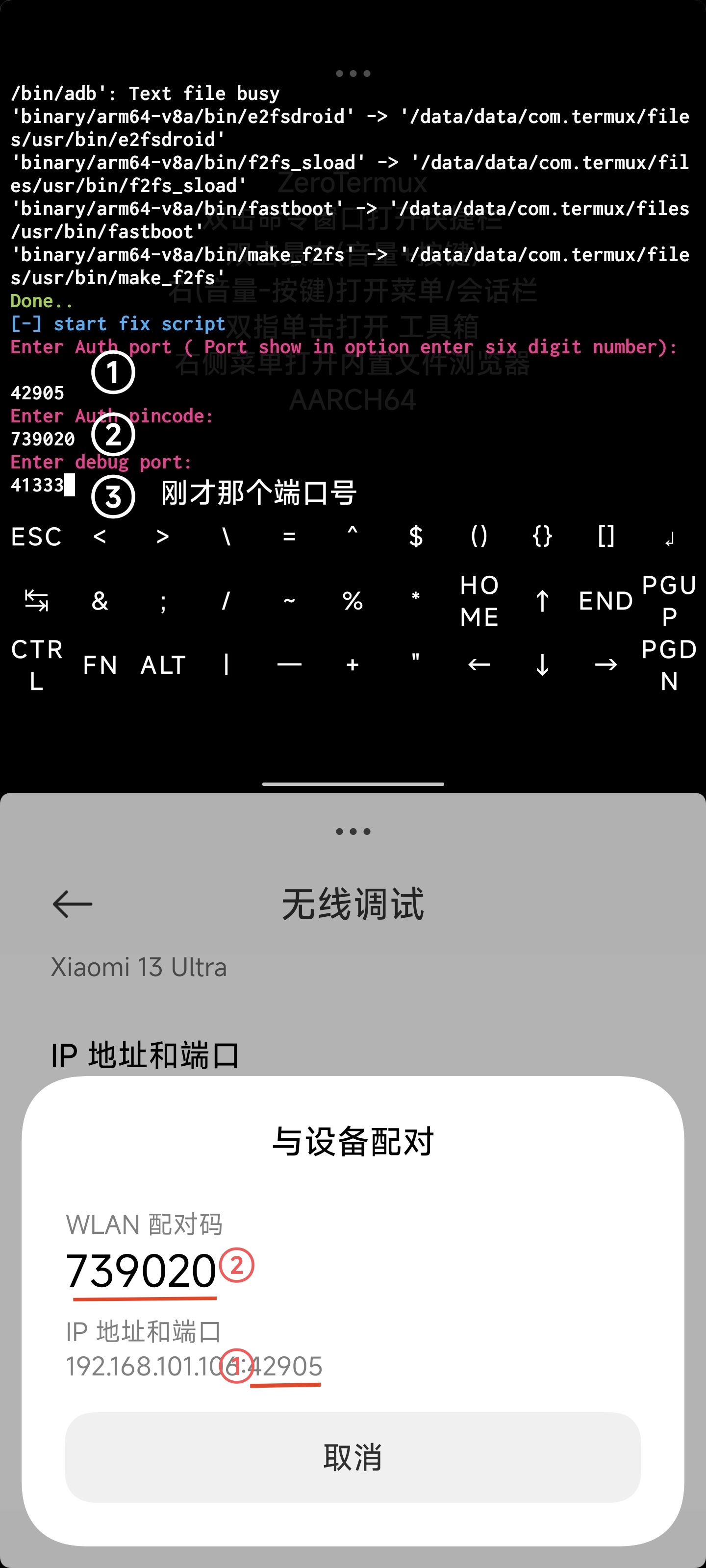
运行sh之后就会让你输入端口那些内容了
第一个输入下方与设备配对中的端口
第二个输入下方WLAN配对码
第三个输入刚才让你记住的那个端口
278b3e2620c8bcd8.jpg

最后回车,就会开启无线调试

de032eeb3ad9fd3a.jpg

这样,他开始无线调试后就不会乱杀后台了