







The OCI Registry As Storage (ORAS) project maintainers announced two releases of v0.15 for the ORAS CLI recently. ORAS v0.15.0 introduces four new top-level commands and new options to manage tags and repositories for advanced use cases. Three weeks later, ORAS 0.15.1 also released with a few known bug fixes. Since the release of v0.15, ORAS CLI has evolved into a fully functional OCI registry client.
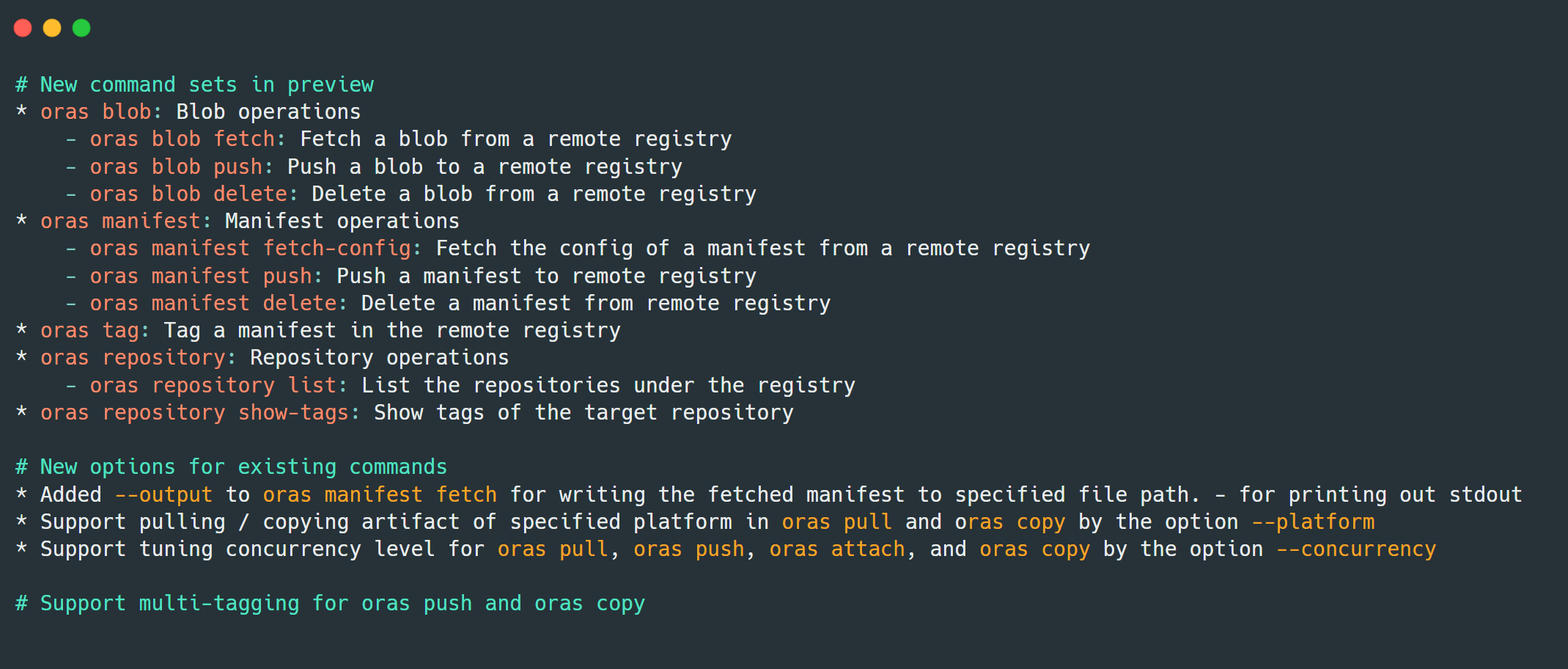
As ORAS has been adopted by more and more OCI implementors and registry vendors, we have seen increased community requirements in providing fine-grained capabilities to alter the content of OCI supply chain artifacts. ORAS 0.15 now supports granular blob and manifest operations for artifacts within the registry. Please see the Release Notes for details.
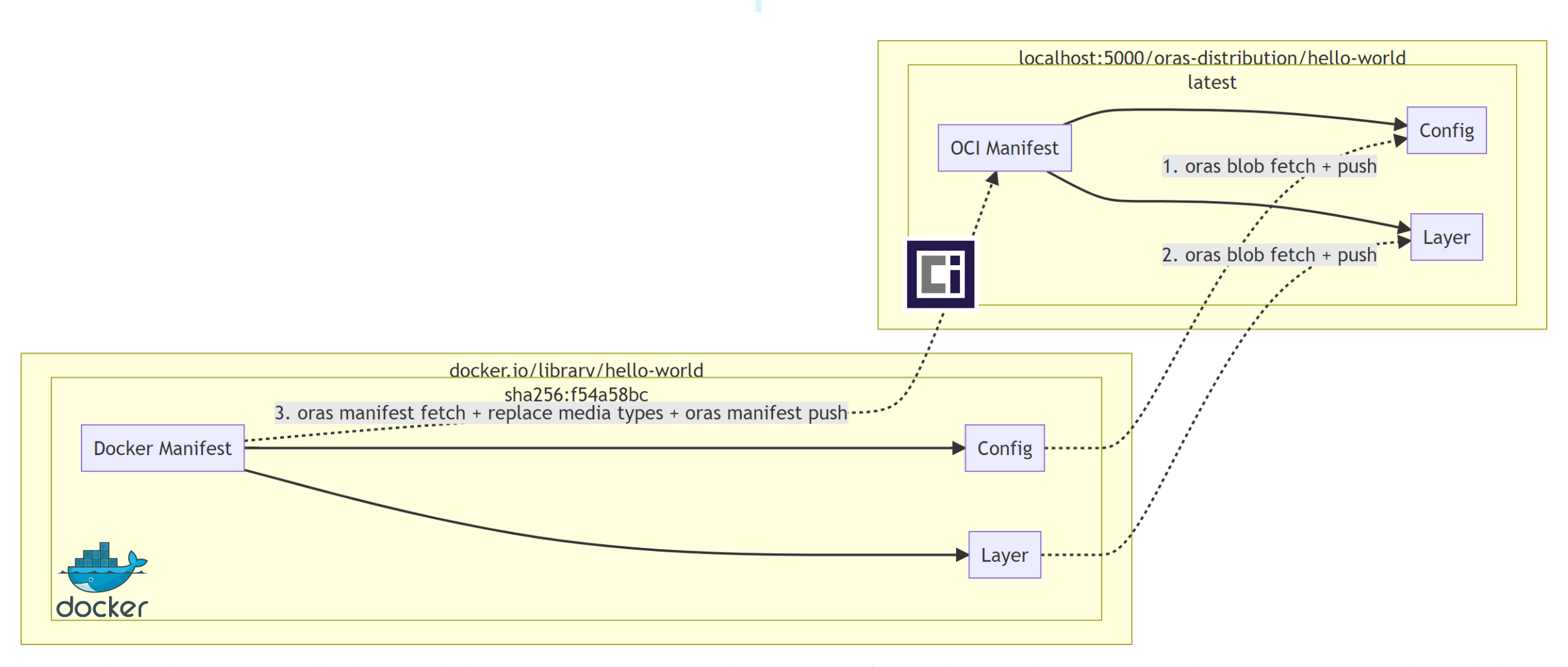
This blog post will demonstrate how to use ORAS CLI v0.15 to convert a Docker image stored in Docker Hub into an OCI image,then push it to the Distribution registry.
Run a local instance of the CNCF Distribution Registry, with ORAS Artifacts support (Note: OCI Artifact support is coming soon):
docker run -d -p 5000:5000 ghcr.io/oras-project/registry:v1.0.0-rc.4
Set the environment variable as below.
docker_digest="sha256:f54a58bc1aac5ea1a25d796ae155dc228b3f0e11d046ae276b39c4bf2f13d8c4"
Fetch the manifest and export it to a JSON file.
oras manifest fetch docker.io/library/hello-world@$docker_digest > docker.manifest.json
View the generated manifest file.
cat docker.manifest.json
{
  "schemaVersion": 2,
  "mediaType": "application/vnd.docker.distribution.manifest.v2+json",
  "config": {
    "mediaType": "application/vnd.docker.container.image.v1+json",
    "size": 1469,
    "digest": "sha256:feb5d9fea6a5e9606aa995e879d862b825965ba48de054caab5ef356dc6b3412"
  },
  "layers": [
    {
      "mediaType": "application/vnd.docker.image.rootfs.diff.tar.gzip",
      "size": 2479,
      "digest": "sha256:2db29710123e3e53a794f2694094b9b4338aa9ee5c40b930cb8063a1be392c54"
    }
  ]
}
Per distribution-spec ,the blobs making up the object are uploaded first, and the manifest last. So we should fetch a blob from Docker Hub and push it to local registry, then upload the manifest.
Set the environment variable as below.
config_digest=$(cat docker.manifest.json | jq -r .config.digest)
Fetch a config blob to a local file from a sample Docker image:
oras blob fetch docker.io/library/hello-world@$config_digest --output config-blob.json
Then push this blob file to a new repository in a CNCF Distribution registry:
oras blob push localhost:5000/oras-distribution/hello-world config-blob.json
Similarly, fetch the layer blob and push it to the Distribution registry:
layer_digest=$(cat docker.manifest.json | jq -r .layers[].digest)
oras blob fetch docker.io/library/hello-world@$layer_digest --output layer-blob.json
oras blob push localhost:5000/oras-distribution/hello-world layer-blob.json
Push it to the sample repository with the blob file.
oras blob push localhost:5000/oras-distribution/hello-world layer-blob.json
Similar to blob operations above, fetch a manifest from a Docker image stored in Docker Hub and export it to a JSON file:
oras manifest fetch docker.io/library/hello-world@sha256:f54a58bc1aac5ea1a25d796ae155dc228b3f0e11d046ae276b39c4bf2f13d8c4 --output hello-manifest.json
Modify the manifest file hello-manifest.json from Docker to OCI type in each mediatype field of config and layer:
{
   "schemaVersion": 2,
   "mediaType": "application/vnd.oci.image.manifest.v1+json",
   "config": {
      "mediaType": "application/vnd.oci.image.config.v1+json",
      "size": 1469,
      "digest": "sha256:feb5d9fea6a5e9606aa995e879d862b825965ba48de054caab5ef356dc6b3412"
   },
   "layers": [
      {
         "mediaType": "application/vnd.oci.image.layer.v1.tar+gzip",
         "size": 2479,
         "digest": "sha256:2db29710123e3e53a794f2694094b9b4338aa9ee5c40b930cb8063a1be392c54"
      }
   ]
}
Push the modified manifest file to the repository in the Distribution registry. It will also create a new repository automatically:
oras manifest push localhost:5000/oras-distribution/hello-world:latest hello-manifest.json
View the manifest of this Docker image from the Distribution registry, you will find all mediatype are changed to OCI type:
oras manifest fetch localhost:5000/oras-distribution/hello-world:latest
{
   "schemaVersion": 2,
   "mediaType": "application/vnd.oci.image.manifest.v1+json",
   "config": {
      "mediaType": "application/vnd.oci.image.config.v1+json",
      "size": 1469,
      "digest": "sha256:feb5d9fea6a5e9606aa995e879d862b825965ba48de054caab5ef356dc6b3412"
   },
   "layers": [
      {
         "mediaType": "application/vnd.oci.image.layer.v1.tar+gzip",
         "size": 2479,
         "digest": "sha256:2db29710123e3e53a794f2694094b9b4338aa9ee5c40b930cb8063a1be392c54"
      }
   ]
}
Run and validate the new OCI image:
docker run localhost:5000/oras-distribution/hello-world:latest
Hello from Docker!
This message shows that your installation appears to be working correctly.
To generate this message, Docker took the following steps:
 1. The Docker client contacted the Docker daemon.
 2. The Docker daemon pulled the "hello-world" image from the Docker Hub.
    (amd64)
 3. The Docker daemon created a new container from that image which runs the
    executable that produces the output you are currently reading.
 4. The Docker daemon streamed that output to the Docker client, which sent it
    to your terminal.
To try something more ambitious, you can run an Ubuntu container with:
 $ docker run -it ubuntu bash
Share images, automate workflows, and more with a free Docker ID:
 https://hub.docker.com/
For more examples and ideas, visit:
 https://docs.docker.com/get-started/
It turns out the conversion works.
Tag the manifest with 'latest' to 'v1.0.0', 'v2.0.0':
oras tag localhost:5000/oras-distribution/hello-world:latest v1.0.0 v2.0.0
View the newly created tags in the sample repository:
oras repo tags localhost:5000/oras-distribution/hello-world
latest
v1.0.0
v2.0.0
Congratulations! You have experienced all new top-level commands in ORAS CLI 0.15.
Recently the OCI and ORAS maintainers submitted a proposal to unify the ORAS Artifact manifest with an OCI Artifact manifest (pr-934) and pr-335, to consolidate the specs. These changes provide adds new capabilities to OCI registries while maintaining the ability to function on registries that don't yet support the new Artifact manifest. This proposal originates from the ORAS artifact and has been accepted by the OCI group. The OCI group also cut a new release in the distribution-spec and image-spec supporting Reference Types, enabling a breadth of supply chain evidence to benefit from existing registries.
In ORAS CLI 0.16 and ORAS-go v2.0.0-rc.4, we'll add support for the OCI artifact spec will be the most significant plan and is targeted to be released at the end of October. You can find the migration proposal from this doc. See also the ORAS Roadmap for more detailed future plans.
The ORAS Project was accepted in June 2021 as a Cloud Native Computing Foundation (CNCF) Sandbox project. It is important that we hear from the community as we advance the artifact-spec capability; if you maintain or are implementing a container registry, we are particularly interested in your feedback. Working together, we can improve supply chain artifact security in the cloud native ecosystem.
此内容由惯性聚合(RSS阅读器)自动聚合整理,仅供阅读参考。 原文来自 — 版权归原作者所有。