

惯性聚合 高效追踪和阅读你感兴趣的博客、新闻、科技资讯
阅读原文 在惯性聚合中打开

推荐订阅源

T
The Blog of Author Tim Ferriss
Cloudbric
Cloudbric
The Register - Security
人人都是产品经理
人人都是产品经理
MyScale Blog
MyScale Blog
NISL@THU
NISL@THU
N
News | PayPal Newsroom
P
Privacy International News Feed
cs.AI updates on arXiv.org
小众软件
小众软件
K
KPMG report finds enterprise disconnect between AI and its ROI | CIO
Jina AI
Jina AI
I
Intezer
N
News and Events Feed by Topic
H
Hackread – Cybersecurity News, Data Breaches, AI and More
I
InfoQ
奇客Solidot–传递最新科技情报
奇客Solidot–传递最新科技情报
A
Arctic Wolf
S
SegmentFault 最新的问题
P
Proofpoint News Feed
T
The Exploit Database - CXSecurity.com
云风的 BLOG
云风的 BLOG
CTFtime.org: upcoming CTF events
Blog — PlanetScale
Blog — PlanetScale
B
Blog RSS Feed
The Hacker News
The Hacker News
雷峰网
雷峰网
MongoDB | Blog
MongoDB | Blog
有赞技术团队
有赞技术团队
爱范儿
爱范儿
C
CXSECURITY Database RSS Feed - CXSecurity.com
P
Privacy & Cybersecurity Law Blog
Microsoft Security Blog
量子位
让小产品的独立变现更简单 - ezindie.com
The GitHub Blog
The GitHub Blog
Recent Commits to openclaw:main
Scott Helme
Scott Helme
博客园 - 叶小钗
Security Latest
Security Latest
博客园 - 【当耐特】
M
MIT News - Artificial intelligence
F
Fortinet All Blogs
S
Securelist
V
Visual Studio Blog
freeCodeCamp Programming Tutorials: Python, JavaScript, Git & More
罗磊的独立博客
L
LINUX DO - 最新话题
D
DataBreaches.Net
W
WeLiveSecurity

Inside Nutrient

A guide to the invisible work behind documents Introducing Nutrient Documents for Salesforce: Native document generation and signing Document AI vs. traditional OCR: Choosing between OCR, AI, and hybrid pipelines PDF SDK compliance and security evaluation checklist for enterprise teams (2026) Invariant Corp replaces paper processes with Nutrient Workflow and scales without limits What is process mapping? A complete guide Nutrient vs. Conga Composer for Salesforce document generation (2026) Document routing: How to automate document distribution The CTO’s AI playbook: Why accountability architecture beats orchestration Compliance workflow automation: Why built-in compliance is table stakes Workflow diagrams: Examples, symbols, and how to build one that actually runs Digital forms: Replace paper forms with automated workflows Approval workflow software: How to automate approvals Why document-centric automation is different The CEO’s AI playbook: Why decision architecture beats model selection Nutrient SDK product updates for Q1 2026 PDF redaction verification: How to prove sensitive data is permanently removed What is a VPAT? The complete guide to accessibility conformance reports What is PDF/UA? The accessible PDF standard explained Salesforce eSignatures: Generate, sign, and track documents in one flow Online document viewer: Options, tradeoffs, and how to embed one Document viewer for web apps: React, Vue, Angular (2026) Best document viewers in 2026: A buyer’s guide How to edit a PDF in Python: Add text, images, and annotations Nutrient advances Workflow platform with agentic AI for enterprise-grade speed and consistency in document-heavy operations How to create a Salesforce quote template from opportunity data The business case for accessibility: Five ways it drives enterprise value Python PDF library comparison (2026): 7 libraries for developers Why your AI agent hallucinates PDF table data PDF.js limitations: When to upgrade to a commercial PDF SDK How Subject scaled 5× with Nutrient’s PDF SDK without rebuilding its document layer I replaced our sales training with an AI coach that runs in Slack — here’s what broke Redirecting to: https://securitybuzz.com/cybersecurity-news/why-enterprise-permissions-are-ais-most-dangerous-inheritance/ Nutrient .NET SDK vs. iText Core: Complete comparison for .NET developers DocuVieware: Support’s most frequently asked setup questions Introducing Nutrient Workflow How to convert PDF to Word in C# (.NET) When email and spreadsheets stop working: Work order approval workflows for field teams on the move Compliance with confidence: Why document-centric automation is the foundation of your mission Nutrient expands AI Assistant, automating multistep document workflows inside any application What is document generation? A developer’s guide to PDF generation Document Converter data flow and how real-time watermarks skip the queue PDF/UA compliance guide: Requirements, standards, and best practices Computers still can’t understand you How Athena Intelligence built AI agents for regulated enterprises with Nutrient’s document infrastructure How to convert HTML to PDF (2026): 4 methods from browser print to SDK How to build a document extraction pipeline with Nutrient Vision API OCR vs. intelligent document processing: Choosing the right document extraction engine Beyond OCR: How document intelligence eliminates manual processing in regulated industries Nutrient vs. IronPDF: Complete comparison for .NET developers Nutrient vs. Aspose.PDF: Complete comparison for .NET developers Redirecting to: https://fortune.com/2026/02/19/openclaw-who-is-peter-steinberger-openai-sam-altman-anthropic-moltbook/ Lufthansa Systems uses Nutrient to deliver reliable, scalable PDF rendering for pilots worldwide Nutrient vs. Syncfusion: Complete comparison for .NET developers React’s useTransition: The hook you’re probably using wrong First City Monument Bank streamlines banking processes with Nutrient Workflow Redirecting to: https://www.sdcexec.com/warehousing/automation/article/22957364/nutrient-workflow-automation-the-missing-link-in-supply-chain-efficiency The complete guide to digital signatures: PAdES, CAdES, and XAdES explained Nutrient Python SDK: Production-grade document processing for Python Introducing agentic document editing for web applications with AI Assistant Nutrient vs. QuestPDF: Complete comparison for .NET developers How we fixed the GdPicture license expiration (and what to do if you’re affected) Red team security testing with agentic AI The future of healthcare document automation Best healthcare workflow software compared Nutrient SDK product updates for Q4 2025 How Harvey scaled legal document workflows 50 percent MoM without rebuilding infrastructure HIPAA-compliant document management in hospitals How we optimized rendering performance while handling thousands of annotations in React — Part 2 Automated PII removal with Nutrient API Redirecting to: https://www.devopsdigest.com/2026-low-code-no-code-predictions Redirecting to: https://www.kmworld.com/Articles/Editorial/ViewPoints/Leaders-predict-AI-to-continue-permeating-all-aspects-of-KM-in-2026-172594.aspx What are deep agents and how do they solve complex problems? Whipping up document magic: Your easy-bake recipe for Vue and Nutrient Web SDK 🧁 What I’ve learned about product iteration planning while building SDKs Passwordless document signing: Three-layer security guide New zip folder functionality streamlines file management in Document Automation Server The keyboard shortcuts playbook: Taking control of keyboard events in Nutrient Web SDK From experienced engineer to AI beginner: My unexpected journey AI-assisted manual testing: Handling Safari’s PDF rendering and UI quirks How to keep a 20-year-old SDK up to date How we optimized rendering performance while handling thousands of annotations in React — Part 1 Nutrient announces new executive hires to accelerate next phase of growth High performance UI using web workers Automate document conversion at scale with Python and Nutrient DCS From curiosity to PLG (and AI): My journey to understanding product-led growth Prost to progress: One year as Nutrient Pigeon usage at Nutrient: Bridging native SDKs to Flutter Modernizing CI build servers: How to migrate from Chef to Ansible Unix man pages: AI-friendly documentation since 1971 Consistent hashing for even load distribution Best AI redaction APIs: Complete comparison guide for 2025 Why AI document redaction matters for modern security From coding to coordinating: How AI transformed my workflow What is intelligent document processing (IDP)? A complete guide Enterprise PDF SDKs: Best PSPDFKit (now Nutrient) alternatives Nutrient SDK product updates for Q3 2025 GdPicture support best practices Redacting sensitive data with Nutrient AI redaction API How AI is transforming the customer experience at Nutrient: From instant answers to intelligent support
How to scale document workflows in compliance with regulations
Clavin Fernandes · 2025-05-19 · via Inside Nutrient

In regulated sectors such as finance, healthcare, legal services, and government, compliance with document-related regulations isn’t optional; it’s mission-critical. These organizations must adhere to strict standards around document retention, access control, security, and auditability. At the same time, they’re under growing pressure to scale operations and adopt modern digital workflows, creating an operational paradox: how to remain compliant while transforming the way they manage documents.

This ongoing tension gives rise to what we call the compliance conundrum, which is the challenge of staying aligned with ever-evolving regulatory frameworks while dealing with increasing volumes of documents scattered across formats and systems.

Understanding the compliance conundrum

At its core, this challenge is rooted in intersecting issues. Regulatory overload burdens organizations with the need to meet global mandates such as HIPAA, SOX, GDPR, and CCPA. Compliance becomes even more complicated for multinational businesses navigating contradictory rules between jurisdictions. On top of this, organizations manage a wide range of document types: PDFs, Word files, email records, scanned forms, and more, each requiring different strategies for classification, security, and retention.

Implementation gaps add another layer of complexity. Many teams operate without defined document policies or proper employee training. Legacy systems often lack crucial features like metadata tracking or version control, and documents are frequently stored in silos across departments. Regulatory updates may outpace a company’s ability to adapt, leading to non-compliance risks.

The consequences of falling short are significant: hefty fines, loss of contracts or certifications, and damage to organizational reputation. The stakes are too high to ignore.

Foundational principles: Security and privacy

Compliance requires clarity around two often conflated concepts: security and privacy. Security is about protecting documents from threats, maintaining their confidentiality, integrity, and availability. Privacy, on the other hand, governs lawful access to sensitive information. Ensuring both requires encryption, access control, redaction, and logging.

Document compliance in practice: Real-world examples

Consider a hospital managing patient records. It must comply with HIPAA, state-specific retention laws, and GDPR requirements. In such cases, converting documents to PDF/A, the ISO-standardized version of PDF designed specifically for long-term archiving, ensures records remain readable, self-contained, and compliant over time. PDF/A removes features that could impede preservation, such as encryption or external dependencies, making it an ideal format for healthcare organizations looking to maintain legal and regulatory integrity across decades.

Or take a financial institution: It must preserve key documents for SOX compliance, while also accommodating data access requests under GDPR. PDF/A provides a consistent format to store records in an audit-ready, immutable way, ensuring the integrity of financial statements is maintained.

A multinational enterprise, meanwhile, faces the challenge of aligning its document archiving practices across countries with vastly different privacy laws. Standardizing document storage in PDF/A across the organization helps enforce consistent retention policies, simplifies audits, and enhances accessibility, all while supporting long-term compliance.
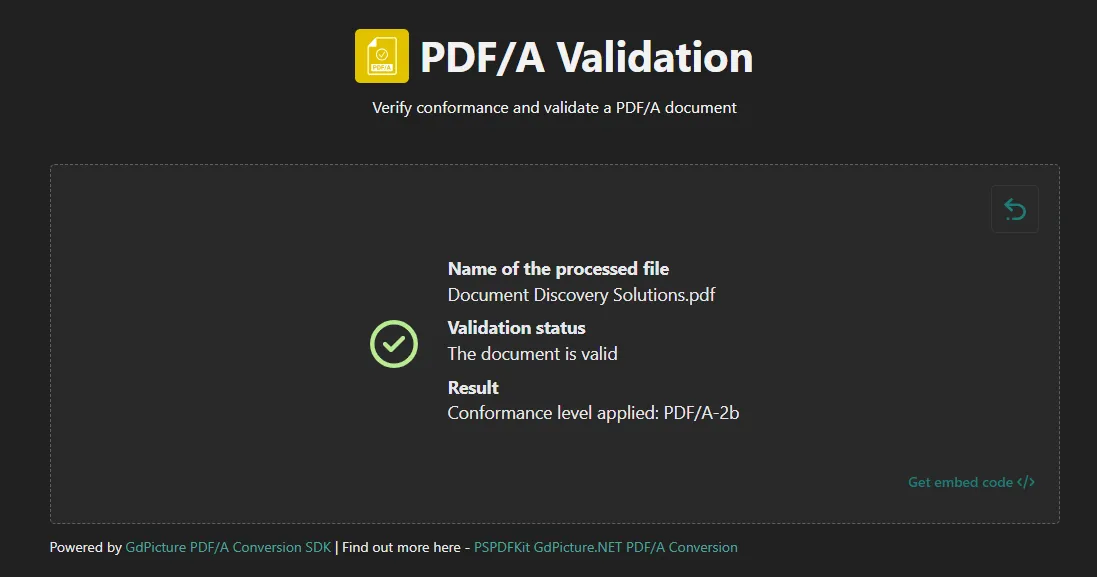
PDF/A validation

Efficiency and compliance: A necessary balance

For document-heavy industries, the only viable path forward is modernization. Automating processes like document creation, metadata capture, approvals, and storage is no longer a luxury; it’s a necessity. Manual and paper-based workflows introduce human error and bottlenecks. Legacy document management systems, lacking granular access control or audit capabilities, increase exposure to compliance failures.

Modern organizations need solutions that not only offer version history and enforce lifecycle policies, but also embed OCR into their document intake processes and minimize human handling of personally identifiable information (PII). Integration with broader compliance tools helps ensure traceability, reduces audit risk, and enhances both security and operational efficiency.

Low-code simplicity: Empowering compliance without code

Low-code platforms offer drag-and-drop simplicity, allowing teams to build complex workflows without writing a single line of code. This ease of use means business users and non-developers can take control of process automation and compliance, accelerating time to value without needing to rely heavily on IT resources.

Whether designing rules for document access, defining retention policies, or configuring destruction protocols, low-code tools provide a visual interface anyone can use. They also integrate seamlessly with modern PDF tools, eSignature apps, and archival services, making them ideal for cross-functional collaboration.

Because these platforms support rapid deployment and easy updates, organizations can adapt quickly to changing regulations and region-specific data residency requirements. In this context, low-code isn’t just a developer tool; it’s a democratized, business-friendly solution that empowers teams and drives agile compliance management.

Low-code tools

Enhancing document security with real-time watermarking

To overcome the compliance conundrum, organizations must embrace proactive technologies that embed trust, traceability, and scalability into every stage of document handling. A key starting point is real-time watermarking, which is a vital strategy for discouraging misuse of sensitive information. By applying dynamic, user-specific watermarks at the moment of viewing or downloading, organizations enhance visibility and accountability. This functionality, when built into low-code tools, becomes an invisible yet powerful part of everyday workflows, offering an efficient safeguard against unauthorized distribution.

Real-time watermarking

Scaling compliance through artificial intelligence

Artificial intelligence (AI) acts as a critical compliance accelerator. As the volume and complexity of document flows increase, manually tagging files, redacting sensitive information, or tracking access logs becomes infeasible. AI-powered systems step in to analyze content, apply classifications, redact PII, and log every document interaction, all automatically. These capabilities not only reduce human error, but also strengthen audit readiness and regulatory adherence in environments where time and scale are crucial.

Redaction

Accessibility: A compliance requirement often overlooked

Another critical pillar in solving the compliance conundrum is accessibility, not just as a feature, but as a legal and ethical requirement. Across major markets like the U.S., the EU, and Canada, regulations mandate that digital content meet WCAG 2.1 Level AA standards to ensure usability for individuals with disabilities. These standards span vision, hearing, motor, and cognitive considerations, ensuring content can be accessed by screen readers and other assistive technologies.

While the Americans with Disabilities Act (ADA) doesn’t define technical criteria, “PDF ADA compliance” typically implies conformance with the PDF/UA (Universal Accessibility) standard. This ensures PDF documents are not only machine-readable, but also accessible to assistive technologies, delivering an inclusive user experience.

Organizations committed to digital transformation must embed accessibility into the document lifecycle from the start and not as an afterthought. That means using technologies that support tagging, reading order, alt text, and other PDF/UA-specific features. This shift is about more than compliance: It boosts SEO, improves usability for all users, and minimizes the risk of litigation.

Embedding accessibility into your document workflows, especially for PDFs, supports legal obligations and broadens reach. Technologies that offer automatic tagging and remediation tools make it easier for teams to meet these standards efficiently and consistently. Accessibility isn’t a side feature; it’s a compliance foundation.

The path forward

Compliance doesn’t have to come at the cost of efficiency. Today’s organizations can and must pursue both. By combining document automation, AI-driven compliance tools, accessibility-conscious design, and the agility of low-code platforms, regulated industries can transform how they manage documents while minimizing risk.

To lead the way:

  • Automate the entire document lifecycle.
  • Build security and privacy into every interaction.
  • Use AI for tagging, redaction, and logging.
  • Make accessibility a standard, not an afterthought.

By adopting this proactive, integrated approach, organizations will not only stay ahead of regulations, but they’ll become more resilient, scalable, and inclusive in the process. If you’re looking to transform compliance into a competitive advantage, Nutrient helps regulated industries modernize document workflows without compromising on security, privacy, or accessibility. If you have any questions, feel free to reach out.