
惯性聚合 高效追踪和阅读你感兴趣的博客、新闻、科技资讯
阅读原文 在惯性聚合中打开

推荐订阅源

IT之家
IT之家
GbyAI
GbyAI
cs.AI updates on arXiv.org
Know Your Adversary
Know Your Adversary
D
Darknet – Hacking Tools, Hacker News & Cyber Security
Latest news
Latest news
Scott Helme
Scott Helme
Recent Commits to openclaw:main
L
LINUX DO - 最新话题
O
OpenAI News
W
WeLiveSecurity
TaoSecurity Blog
TaoSecurity Blog
Threat Intelligence Blog | Flashpoint
P
Proofpoint News Feed
T
Tor Project blog
AWS News Blog
AWS News Blog
H
Hacker News: Front Page
Forbes - Security
Forbes - Security
S
Security @ Cisco Blogs
cs.CL updates on arXiv.org
T
Threat Research - Cisco Blogs
L
LINUX DO - 热门话题
G
GRAHAM CLULEY
I
Intezer
Webroot Blog
Webroot Blog
Cloudbric
Cloudbric
S
Security Affairs
K
KPMG report finds enterprise disconnect between AI and its ROI | CIO
Cisco Talos Blog
Cisco Talos Blog
H
Heimdal Security Blog
C
CERT Recently Published Vulnerability Notes
N
News and Events Feed by Topic
Exploit-DB.com RSS Feed
N
News and Events Feed by Topic
S
Secure Thoughts
Google DeepMind News
Cyberwarzone
Cyberwarzone
Help Net Security
Help Net Security
N
News | PayPal Newsroom
P
Privacy International News Feed
Google Online Security Blog
Hacker News - Newest:
Hacker News - Newest: "LLM"
The Last Watchdog
The Last Watchdog
A
Arctic Wolf
The Hacker News
The Hacker News
Apple Machine Learning Research
Project Zero
Project Zero
宝玉的分享
宝玉的分享
B
Blog
C
Cybersecurity and Infrastructure Security Agency CISA

SerpApi

The State of the SERP in the Age of AI How to find the Google Knowledge Graph ID (kgmid) for anything What is an API? Part 2: Feeding the Machine (JSON) Building an Accessibility Search Experience with Google Flights, Hotels, and Maps APIs SerpApi Weekly Changelog: July 06-12, 2026 How to Scrape Google Flights Deals with a simple API Monitoring FIFA World Cup scores with a simple API How to scrape Google sports results Build Smarter Pydantic AI Agents with Real-Time Search A complete guide to web scraping with Ruby (2026) SerpApi Weekly Changelog: June 29- July 05, 2026 Make no mistakes: agent usability testing Semantic Image Search with Elasticsearch MCP Apps with FastMCP: Turning Tool Output Into Interactive UI How to Scrape Naver AI Briefings with SerpApi Connect Sakana AI (Fugu) with Web Search API SerpApi Weekly Changelog: June 22-28, 2026 Trending Travel Destinations using Python & SerpApi How to scrape Bing reverse image search results Measuring Brand Presence Across AI Answer Engines SerpApi Weekly Changelog: June 15-21, 2026 How I Built a Star Wars Grogu Product Research Agent with Codex, Lark, and SerpApi How to scrape Bing web search results Categorizing hotels using Google Hotels images How to scrape Bing Images search results How to scrape Bing Copilot answers Build A No Code AI-Powered Local Lead Outreach System SerpApi Weekly Changelog: June 08-14, 2026 How to Do SEO Research with Claude Desktop and SerpApi MCP Track and Compare Product Prices Across Stores and Locations (SerpApi & Python) How to Extract Full Opinion Text from Google Scholar Case Law with SerpApi How to scrape Bing Maps search results SerpApi Weekly Changelog: June 01-07, 2026 Amazon ASIN Lookup API: Find and Fetch Product Details The State of MCP: Everything That Changed in H1 2026 How to scrape Bing News search results How to Connect Your Local LLM with Web Search Data SerpApi on Postman: One Unified Collection for Faster API Exploration SerpApi Weekly Changelog: May 25-31, 2026 Building an AI Agent in Python How to scrape Google Case Law API for Legal Research, Analytics, AI, and more SerpApi Achieves SOC 2 Type 2 and ISO 27001 Certification How to find your next product idea with Google Trends and SerpApi Scrape Competitors' Google Ads Data (Tutorial 2026) Using SerpApi and DeepSeek to Break Down Dan Koe’s Content Strategy SerpApi Weekly Changelog: May 18-24, 2026 How to scrape Bing Videos search results How to Scrape Instagram Profile Data with SerpApi How to scrape Bing Shopping search results How to Scrape Google Hotels Reviews SerpApi Weekly Changelog: May 11-17, 2026 5 Things You Can Build with Claude Code and Live Search Data Real Estate Data API for PropTech Developers How to Scrape Apple Maps with SerpApi How to scrape Google Trends
What is an API? Part 1: The Secret Life of a Web Browser
Roi Driscoll · 2026-07-03 · via SerpApi
Blog  /  getting-started

To understand what an API is and why it's useful to you, we first need to look at something you do dozens of times a day: loading a website in your web browser.

Welcome to the first part of our guide to understanding APIs!

If you’ve ever felt like the tech world speaks a completely different language, you are not alone. Terms like "API," "HTTP," and "JSON" get thrown around constantly, but at their core, they represent incredibly simple concepts.

To understand what an API is and why it's useful to you, we first need to look at something you do dozens of times a day: loading a website in your web browser.

The Digital Handshake: Requests and Responses

Every time you type a website address (like google.com) into your browser and hit Enter, you are kicking off a high-speed digital conversation.

This conversation is built on a framework called HTTP (Hypertext Transfer Protocol), which is really just a fancy term for "the rules of the internet's postal service."

This conversation always happens in two distinct steps:

1. The Request

Your web browser (the Client) sends a digital letter across the internet to a massive computer where the website lives (the Server). This letter says: "Hey, someone just asked to look at your homepage. Can you send it over?"

2. The Response

The server receives the letter, processes it, and sends a package back across the internet to your laptop or phone (and therefore your browser). This package is the Response, and it contains all the raw ingredients needed to build that website on your screen.

What’s Inside the Response Package?

When the server sends its response, it doesn't send a fully formed, beautiful webpage. It sends a package of raw materials.

If you could peak inside that digital package, you would find three main types of files:

  • HTML (The Skeleton): This is the raw text and structure. It tells the browser where the headings are, where the paragraphs go, and where a button should exist.
  • CSS (The Makeup): This is the "design code". It tells your browser what colour the background should be, where each part of text should live, what fonts to use, how big the images should look.
  • Assets (The Media): These are the logos, image files, and videos that need to be dropped into the page.

Your web browser is essentially a highly advanced translator. It takes this package of raw ingredients, reads the instructions, and instantly builds the visual page you see on your screen.

How Humans Navigate the Web: Visual Cues

As humans, we rely entirely on the browser's translation to make sense of information. We don't read the raw code; we read the design.

When you look at a Google search result page, your brain instantly decodes the information based on visual cues:
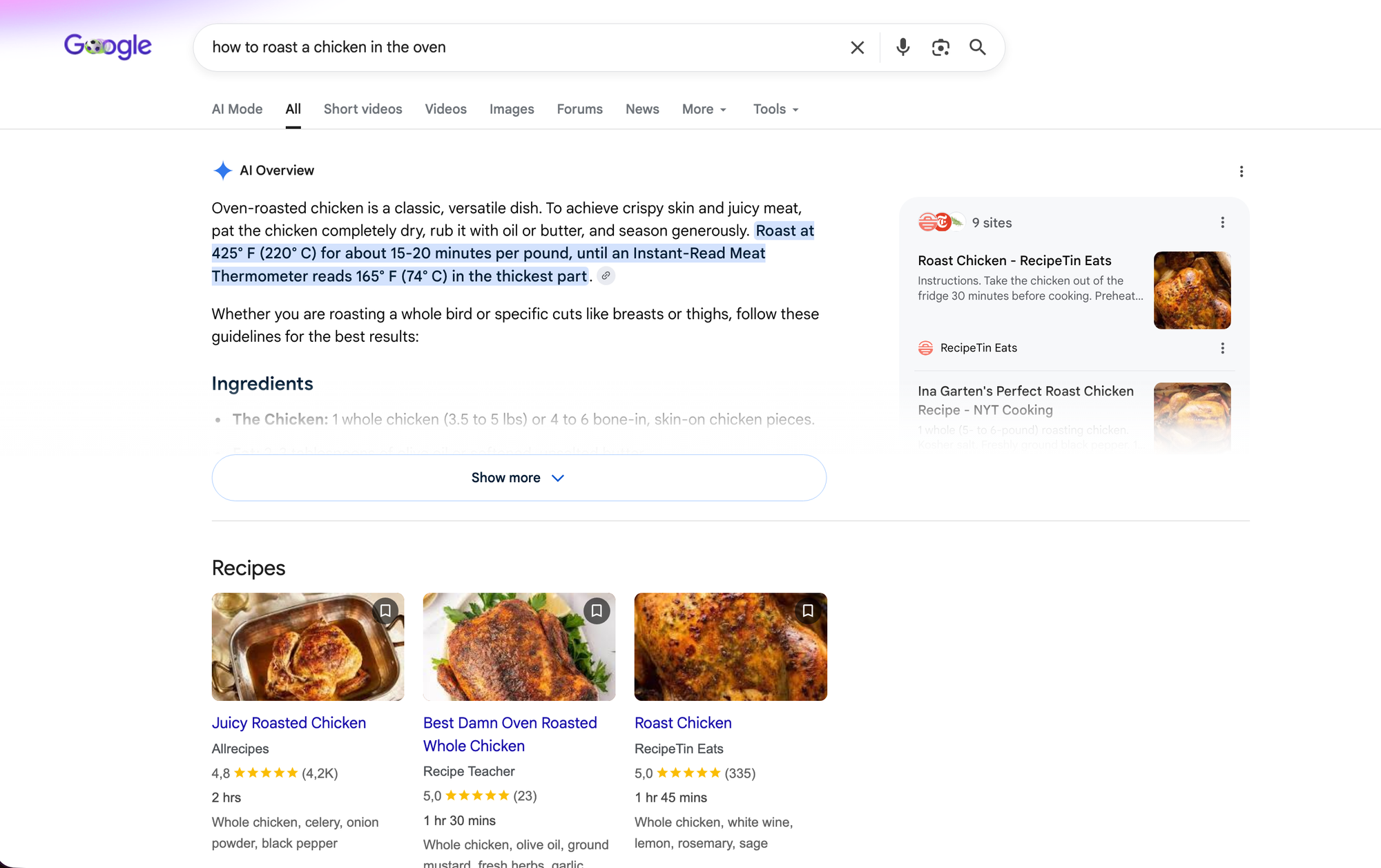
  • Big, Blue Text: Your brain says, "Ah, that's a clickable link to a website."
  • Small, Grey Text below it: Your brain says, "That’s a summary of what the website is about."
  • Positioning: Because a specific link is at the very top of the page, your brain knows, "This is the number one result - this is the most important."
Web page with CSS & Images:
A regular search engine results page, displayed in your browser.

We need layouts, spacing, fonts & colours to help us sort through data and find what we are looking for.

If you took away the design and just looked at the raw code, it would take you ages to find a single phone number or headline.
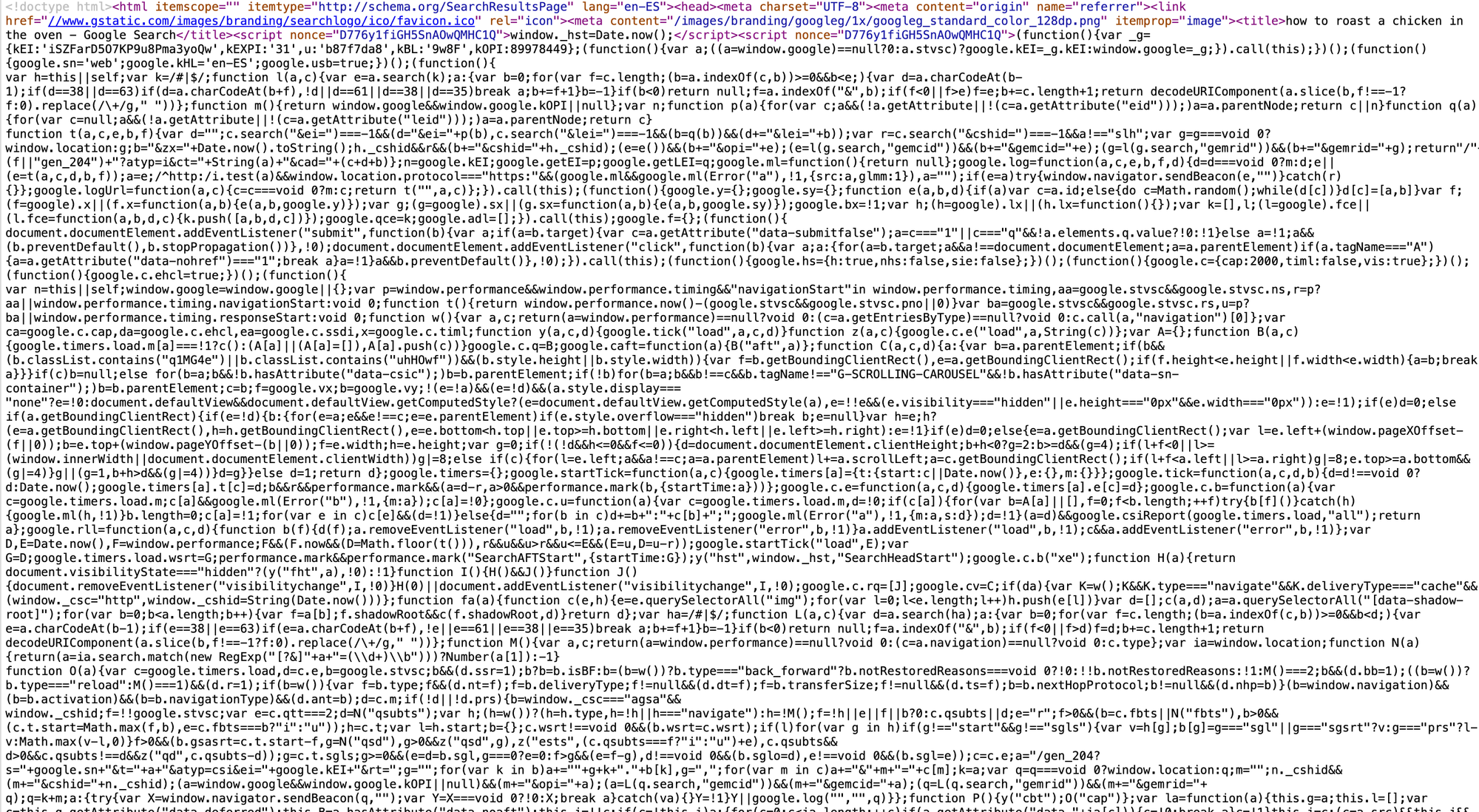
Web page without presentation elements:
The same page search - this is what the page looks like before your browser interprets the code.

Machines Don't Have Eyes

Now, let's look at this from a different perspective. What if you want a computer program (like a spreadsheet, a tracking tool, or an automation app) to read a Google search result for you?

A computer won't pay attention to a sleek logo. Using the Helvetica font won't help it read more clearly. Furthermore, it won't intuitively understand which piece of text is more important than another simply by the colour used, or the fact that it has a red border around it.

In fact, all of that layout and design code just gets in the machine's way, when it comes to understanding information. For a computer, trying to extract information from a standard webpage is like trying to read a book where someone has pasted random magazine cutouts and glitter all over the words.

Machines don't need a User Interface or UI (a design built for human eyes). They need an Application Programming Interface. An API.

💡 REMEMBER: you can think of an API is simply a version of a website that strips away all the visual fluff (the CSS, the logos, the layout instructions) and delivers only the raw, organised data.

What's Next?

Now that you know how a browser requests & receives information, and why humans need visual designs to understand it, we can look at how machines do the exact same thing using a text format called JSON.

In Part 2, we will pull back the curtain on JSON, show you how it organises data into digital filing cabinets, and teach you how to read it without breaking a sweat!