Whether you're building a travel booking platform, an AI travel assistant, a corporate travel tool, or an accessibility-focused application, providing accurate accessibility information can make a meaningful difference for your users. The challenge is that this information is often spread across multiple Google services in different ways.
With SerpApi, you can integrate data from Google Flights, Google Hotels, Google Maps, and other APIs to create a unified accessibility search experience. You can retrieve details such as wheelchair-accessible entrances, accessible parking, elevators, accessible hotel amenities, airport accessibility information, and nearby businesses that meet a traveler's accessibility needs.
If you are new to SerpApi get started with this blog post:
Getting started with SerpApi: The Web Search API
Learn what SerpApi is, how to use it, and why you need it.
 SerpApiHilman Ramadhan
Now that you are setup with SerpApi and have located your API key, let's take a look at SerpApi's libraries.
Libraries
In this example we will be using SerpApi's Python library.
To install the serpapi package, simply run the following command:
$ pip install serpapiYou can also make a simple GET request or for other programming languages, view our supported libraries here: https://serpapi.com/integrations.
Let's say you want to search for flights and you need certain accessibility features, first we'll start with the flight itself.
New to Google Flights? This post walks through the basics:
How to Scrape Google Flights
There are many flights and many services that allow you to search for flights. Google offers a free flight booking search service as part of the Google Travel platform. It allows users to search for flights from various airlines, compare prices, and book tickets. You can search for flights by
 SerpApiAndy L
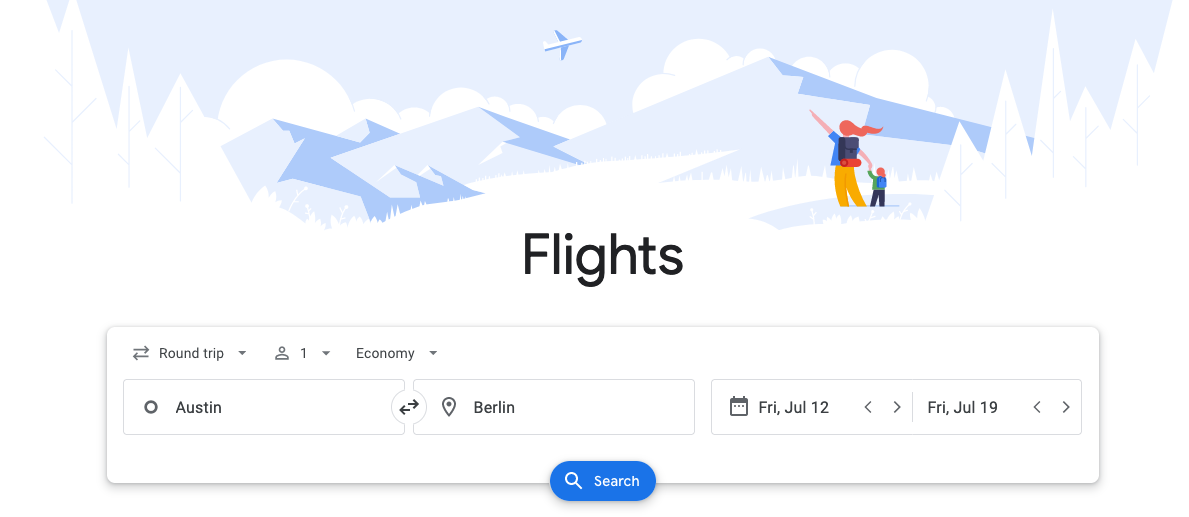
Below is a simple example using SerpApi's Google Flights API. We'll be looking for a flight with these details:
type 1departure_token from the outbound flight outputbooking_token from the return flight outputExample Query:
import serpapi

# Query SerpApi with already set parameters and additional input parameter (departure_token or booking_token)
def query_serpapi(parameter, token):
    client = serpapi.Client(api_key="YOUR_SECRET_API_KEY")
    results = client.search({
        "engine": "google_flights",
        "departure_id": "AUS",
        "arrival_id": "JFK",
        "type": "1",
        "outbound_date": "2026-10-10",
        "return_date": "2026-10-19",
        parameter: token
    })

    return results
token = ""

# Query the API initially for set dates and airports
# Collect the departure_token for the first outbound best flight (if available, otherwise the other flights)
results = query_serpapi("", "")
if "best_flights" in results:
    token = results["best_flights"][0]["departure_token"]
else:
    token = results["other_flights"][0]["departure_token"]

# Query the API with the departure_token for the selected flight
# Collect the booking_token for the first return best flight (if available, otherwise the other flights)
results = query_serpapi("departure_token", token)
if "best_flights" in results:
    token = results["best_flights"][0]["booking_token"]
else:
    token = results["other_flights"][0]["booking_token"]

# Query the API with the booking_token for both selected flights
flights_results = query_serpapi("booking_token", token)

# Access the airline from the results and print
airline = flights_results["selected_flights"][0]["flights"][0]["airline"]
print(airline)
Results
In this example we're just looking at the airline so we can confirm the accessibility details for this airline, however there is so much other relevant data such as:
Looking at our printed result:
DeltaThis means Delta is the airline for this flight. Now let's take this data and use additional APIs / search engines to collect additional accessibility data.
The Google Flights search engine doesn't have any accessibility filters built in so we must gather this data manually. SerpApi offers many APIs that are helpful to search for additional details like "Airline accessibility".
In this example we're just going to look at the airline which is "Delta".
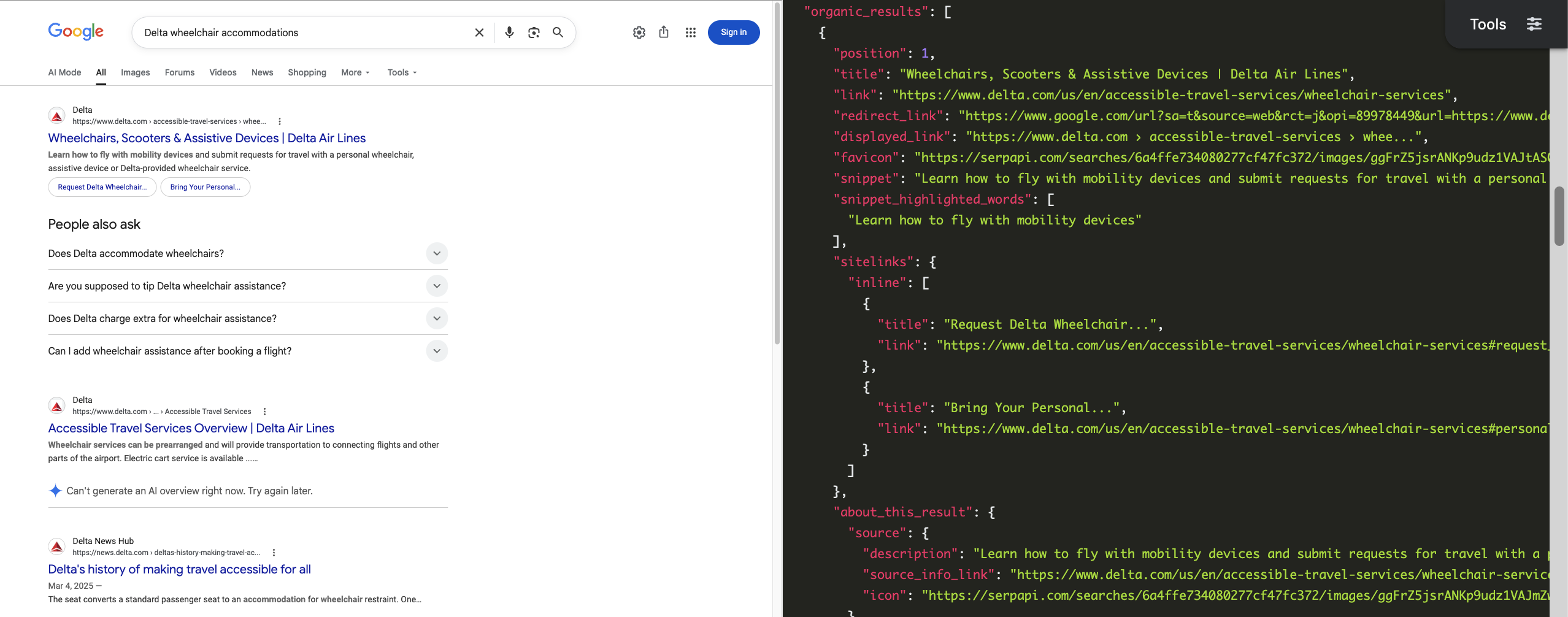
For example, using the Google Search API with the query "Delta wheelchair accommodations".
Example Query:
import serpapi

client = serpapi.Client(api_key="YOUR_SECRET_API_KEY")
results = client.search({
  "engine": "google",
  "google_domain": "google.com",
  "q": "Delta wheelchair accommodations"
})
The first result includes details and links to a Delta site for "Wheelchairs, Scooters & Assistive Devices".
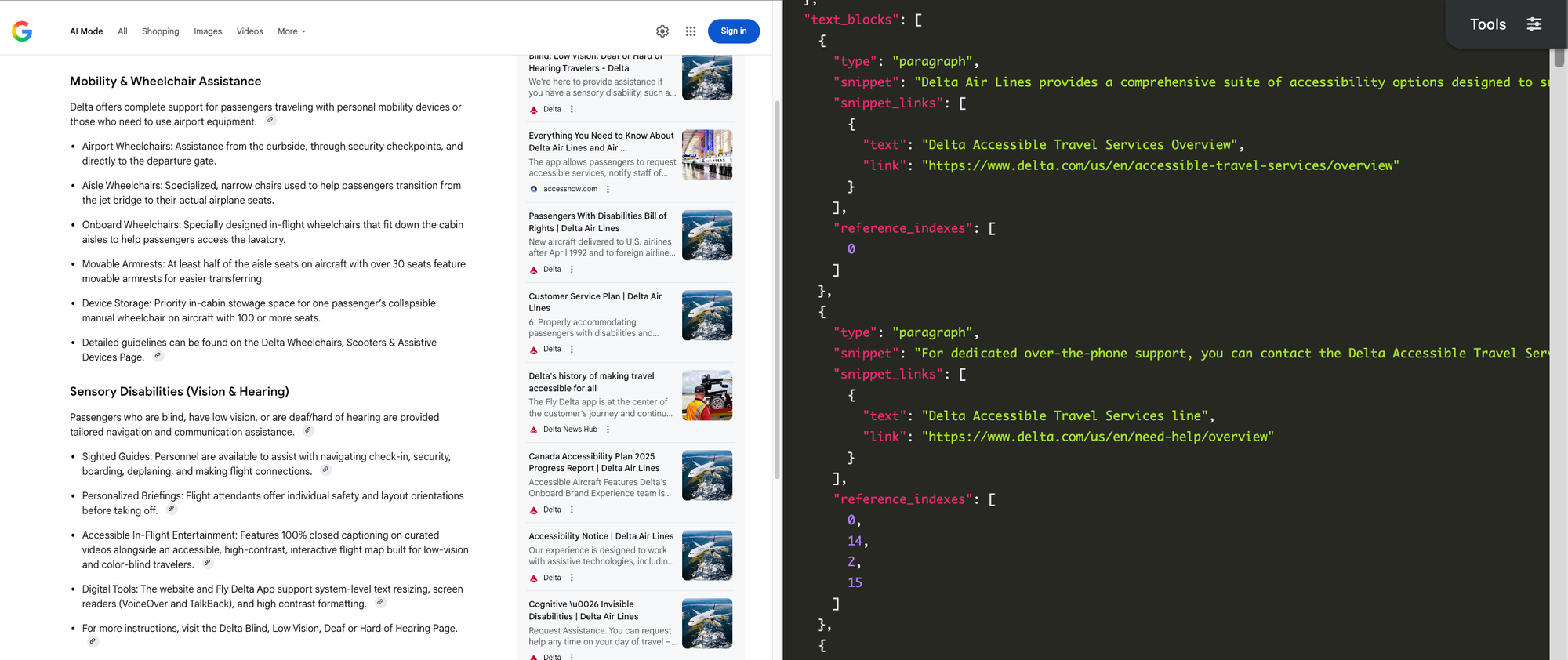
Next we'll look at sending a more a prompt to Google AI Mode. This prompt will be more open ended '"Provide all accessibility options Delta airline provides including links".
Example Query:
import serpapi

client = serpapi.Client(api_key="YOUR_SECRET_API_KEY")
results = client.search({
  "engine": "google_ai_mode",
  "q": "Provide all accessibility options Delta airline provides including links",
  "hl": "en",
  "gl": "us"
})
The results include a breakdown of each accessibility option Delta offers including links to relevant Delta resources.
These are just 2 options for looking up additional accessibility information, however we offer many other APIs. You can also search for other specific details like the airplane or airport.
If you require booking hotels or accommodations, we offer a Google Hotels API. There are a few places we can see accessibility options within Google Hotels.
New to Google Hotels? This post walks through the basics:
How to scrape Google Hotels Data (Tutorial 2026)
Learn how to scrape Google Hotels information to get property listing, property details, prices, and more using a simple API
 SerpApiTerry Tan
Continuing with the destination and dates we used in our Google Flights example, we'll search for:
amenities Parameter Google Hotels also offers an amenities parameter. You can see the full list of available amenities here.
Currently the only accessibility amenity filter is #53 "Wheelchair accessible". That means if you're looking for a wheelchair accessible hotel, we will set the amenities parameter to "53":
Example Query:
import serpapi

client = serpapi.Client(api_key="YOUR_SECRET_API_KEY")
results = client.search({
    "engine": "google_hotels",
    "q": "New York",
    "check_in_date": "2026-10-10",
    "check_out_date": "2026-10-19",
    "amenities": "53"
})
You'll receive all results that have wheelchair accessible set as an amenity:
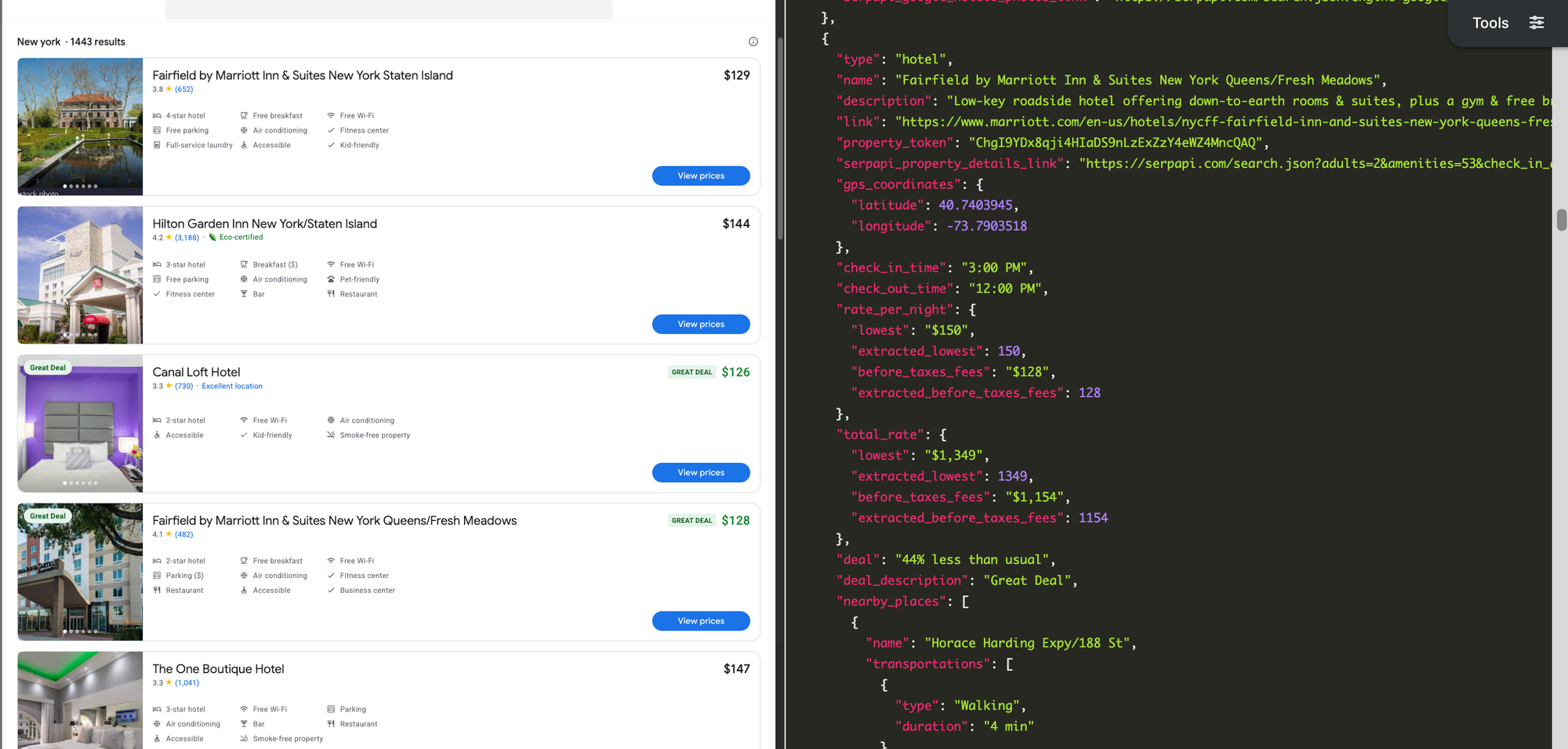
The unfortunate limitation to this is that there is only a filter for Wheelchair accessibility but not any other accessibility options. However, Google Hotels doesn't stop there.
There are a lot more details you can get for a specific property by opening the property details. To do this you need to extract the property_token from the properties results for the location you want to view further.
For the example above, the first property had the property_token "ChgI9YDx8qji4HIaDS9nLzExZzY4eWZ4MncQAQ".
Let's use this property token and query the Google Hotels API again with the amenities filter removed as well.
Example Query:
import serpapi

client = serpapi.Client(api_key="YOUR_SECRET_API_KEY")
results = client.search({
  "engine": "google_hotels",
  "q": "New York",
  "check_in_date": "2026-10-10",
  "check_out_date": "2026-10-19",
  "property_token": "ChgI9YDx8qji4HIaDS9nLzExZzY4eWZ4MncQAQ"
})
Now you can see the full details for that specific hotel:
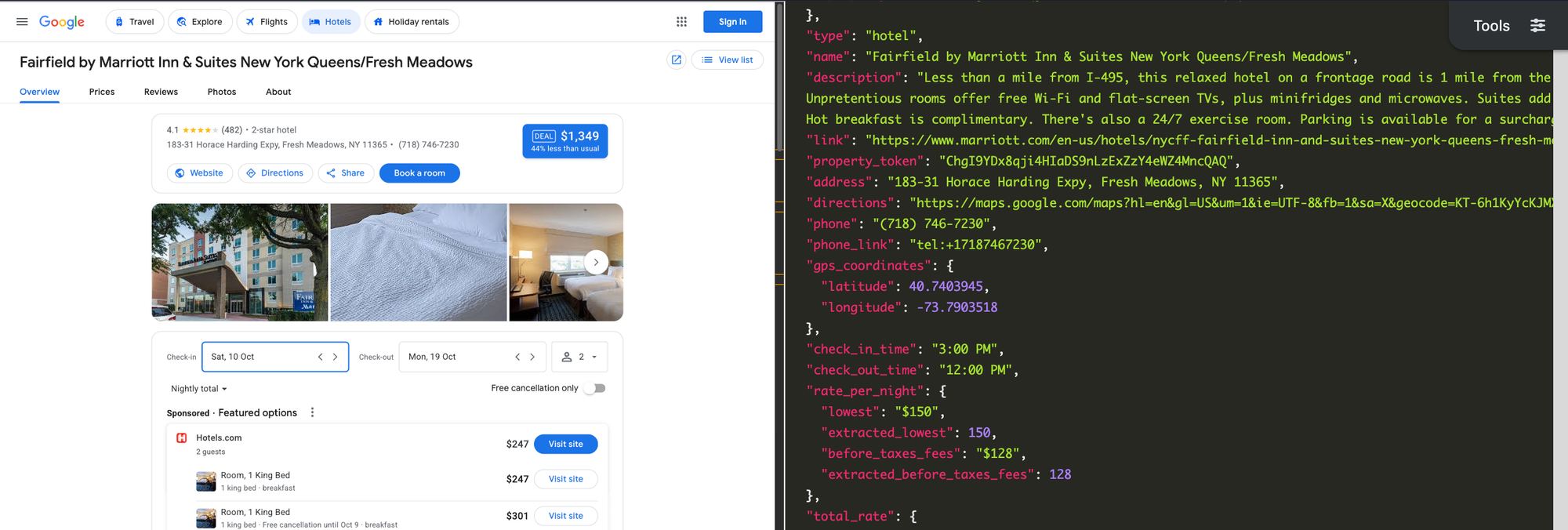
Now that we have the property details pulled up, there are a few places you can see accessibility details such as the rates, amenities, or amenities_detailed sections.
Results: rates
Some hotels have accessible specific booking options.
For example: Hearing Accessible (Roll-in) Shower

Using the results from above, if we want to compile the rooms that say "Accessible", we could do something like this:
accessible_rooms = []
for booking in results["featured_prices"]:
    for room in booking["rooms"]:
        name = room["name"]
        if ("Accessible" in name):
            accessible_rooms.append(booking)
This will create a list of all the accessible rooms including the booking details.
Results: amenities
Within the place details you can also see the full list of amenities, these can differ between what the location lists.
For example this location lists "Accessible" and "Accessible elevator".
"amenities":
[
..........
"Accessible",
"Accessible elevator",
"Private bathroom",
"Bathtub in some rooms",
...........
],
Using the results from the example above again, you can collect all of the Accessible amenities for this location:
accessible_amenities = []
for amenity in results["amenities"]:
    if "accessible" in amenity.lower():
        accessible_amenities.append(amenity)
This will create a list of all the accessible amenities.
Results: amenities_detailed
Similarly to the amenities field, this lists accessible amenities with some additional details.
"amenities_detailed":
{
"groups":[
...........
  {
    "title":
    "Accessibility",
    "list":[
      {
        "title": "Accessible",
        "available": true
      },
      {
        "title": "Accessible elevator",
        "available": true
      }
    ]
  },
...........
Using our results from above once again, you can collect all of the Accessible amenities for this location:
accessible_amenities = []
amenities_detailed = results["amenities_detailed"]
for group in amenities_detailed["groups"]:
    for item in group["list"]:
        title = item["title"].lower()
        if "accessible" in title:
            accessible_amenities.append(title)
This will create a list of all the accessible amenities.
Last but definitely not least are the APIs supporting locations and places. We're primarily going to discuss the Google Maps API, however there are more APIs that may be helpful. Each has a unique set of input parameters, output fields, and reviews you can gather accessibility details from.
Whether you are confirming the Hotel accessibility, looking for food or activity accessible places, or reading reviews to ensure the location's accessibility is accurate.
Let's query the Google Maps API using a simple query of "Coffee"
import serpapi

client = serpapi.Client(api_key="YOUR_SECRET_API_KEY")
results = client.search({
  "engine": "google_maps",
  "q": "Coffee"
})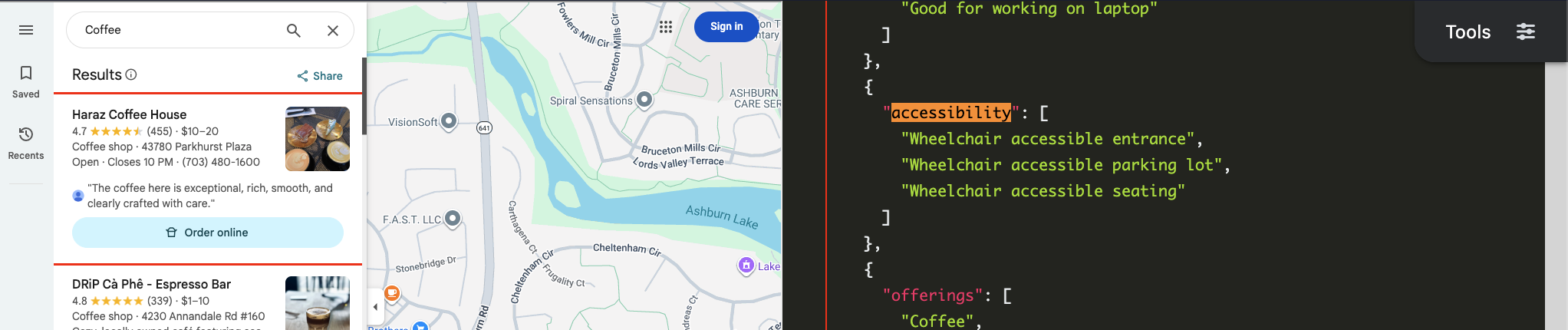
When locations have accessibility listed you can access it in the local_results within the extensions array for each location.
Using the results from above, collecting the accessibility information for each one would look like:
locations = {}
for result in results["local_results"]:
    title = result["title"]
    for item in result["extensions"]:
        if "accessibility" in item:
locations[title] = item["accessibility"]You can also read the full reviews for a specific location and identify if there were any negatives regarding the locations accessibility.
The Google Maps Reviews API requires the data_id which you can collect from the Google Maps API results within the data_id field. For this example we'll be using the data_id 0x89b7adf9f755c29d:0xed4e7f8d582eca3.
You can also use the query parameter to filter the queries to relevant keywords. We'll set this to "Accessible" for this example.
The code will look like this:
import serpapi

client = serpapi.Client(api_key="YOUR_SECRET_API_KEY")
results = client.search({
  "engine": "google_maps_reviews",
  "data_id": "0x89b7adf9f755c29d:0xed4e7f8d582eca3",
  "query": "Accessible"
})
print(results)
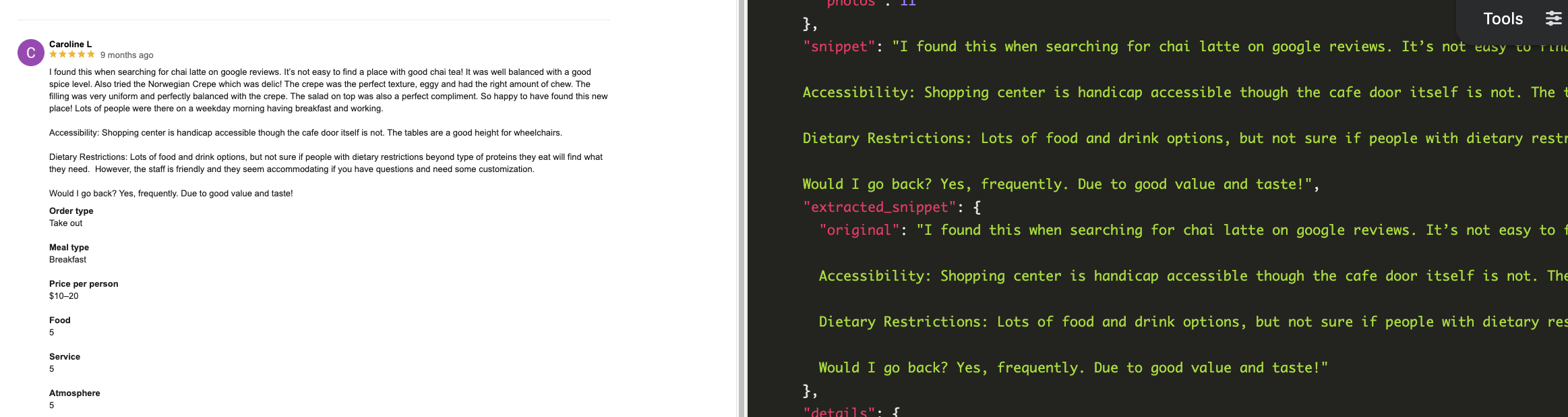
You can see any comments within the review itself. In this case it states the shopping center is accessible however the cafe door is not. Also the table height is good for wheelchairs.
You can also see the answers to questions, in this case the question asks "Wheelchair accessible":
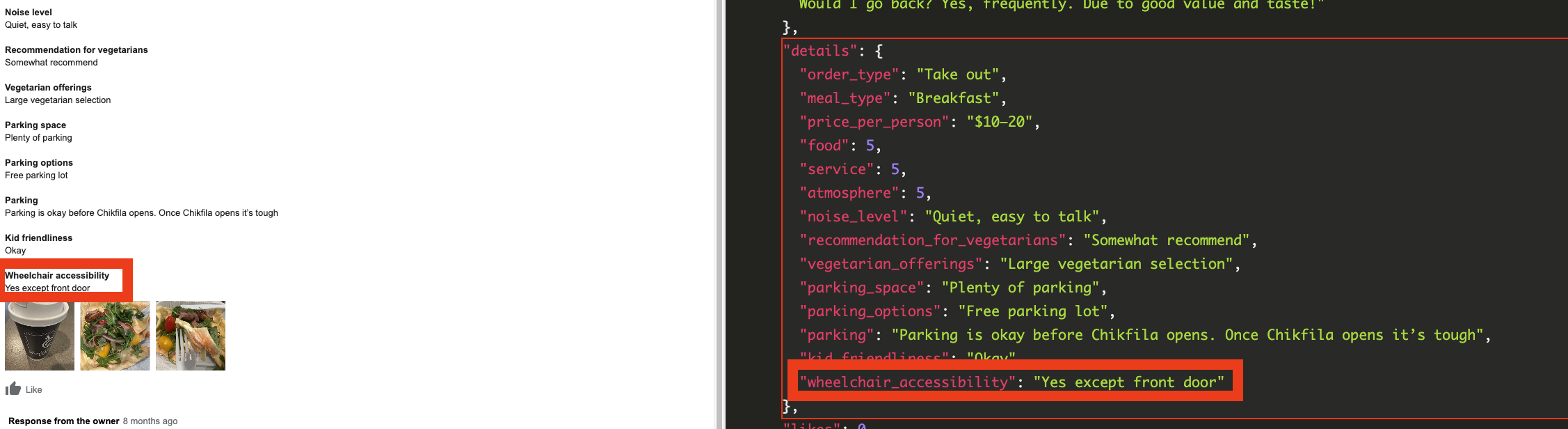
While we won't be doing full examples with the remaining APIs, these also have accessibility details. You can view the documentation page via the link on each title.
The Apple Maps API offer accessibility details within the ["amenities"] array.
Example amenities result:
"amenities":[
...........
{
  "name": "Wheelchair Accessible",
  "id": "crossbusiness.accessibility_features.wheelchair_accessible"
},
...........The Tripadvisor Search API and Yelp Search API don't provide any accessibility details on the search engines themselves.
However, you can use the Tripadvisor or Yelp search results to find relevant locations.
Then utilize the the place_id to search for reviews for a specific location.
place_id, iterate through each page of reviews and search manually for specific keywords. Example Review:
"position": 1587,
"title": "Food good, bathroom a disaster",
"snippet":
..............
Ladies Bathroom: not very clean, small with only 2 stalls...what's up with that? They serve endless coffee, but only 2 stalls? Disabled (larger of the 2) not ADA compliant and since I am disabled, I had challenges. Bathroom being redone, but apparently quite slowly. They should make it a priority!",
..............place_id to search for reviews for a specific location. q parameter as well to include relevant keywords.Example Review:
"comment": {
  "text": "Drink was 10/10 parking was easily accessible
  .....
},All of these APIs are available for SerpApi users, sign up for a free account including 250 successful searches now!
You can use this for a travel app, company planning, or other travel accessibility needs. SerpApi makes finding accessible activities, accommodations, and flights easy. And we're happy to do it! ❤️
If you need any help on your journey, send us a chat or an email to contact@serpapi.com, we are happy to help.
此内容由惯性聚合(RSS阅读器)自动聚合整理,仅供阅读参考。 原文来自 — 版权归原作者所有。