






People do not experience your website one page at a time. They arrive with a goal, move between pages and events, get answers, get stuck, compare options, drop off, or convert. User journey data helps you see those paths instead of looking at each page in isolation.
Someone may first find a blog post from Google, visit your homepage, check the pricing page, read the docs, and then sign up. Someone else may land directly on a product page, click through to a comparison page, and contact sales in the same visit.
It is a practical subset of customer journey analytics (that often joins CRM, support, email, ads and offline touchpoints) for website teams.
Website journey analytics is the process of analyzing the sequence of pages and events visitors go through on your website.
It helps you answer questions like:
and so on. Even if you don’t have any questions beforehand, you can do open-ended exploration to discover new paths and behaviors.
In other words, it gives you the context around your website traffic.
There are a few similar-sounding concepts in this area. The difference is mostly about scope and intent.
Customer journey analytics usually looks across many touchpoints: ads, email, CRM, sales, support, product usage and website visits. Plausible User Journeys focuses only on the paths visitors take on your website.
For example, it can show what visitors did after landing on your pricing page, but it will not combine that with sales calls or support tickets.
A user journey map is a visual artifact a team creates to understand an experience. User Journeys is based on live website behavior: the pages and events visitors actually move through.
For example, a journey map may show the expected path from homepage to signup, while User Journeys may reveal that many visitors go through a blog post, docs or comparison page first.
Funnels are for measuring a path you already know and seeing drop-off between steps. User Journeys is for discovering paths you did not know to measure, or working backwards from a conversion.
For example, use a funnel to measure Homepage -> Pricing -> Signup. Use User Journeys when you want to see which pages people visited before signing up.
Here are some useful ways:
Your homepage, pricing page, comparison pages, docs, feature pages and top blog posts are not just individual pages but starting points.
Journey data helps you see what visitors do after those pages.
For example:
This is helpful for improving page structure and internal linking. If visitors are not taking the next step you expected, the page may need clearer calls-to-action, better navigation, or more relevant links.
Conversion path analysis is the other side of the same question.
Instead of starting from a page and asking “what happened next?”, you start from a goal and ask “what happened before?”
For example:
This is especially useful for content marketing and SEO. A blog post may not directly convert many visitors on the first pageview, but it may still appear in journeys that eventually lead to signup or purchase.
Without journey data, that content can look less valuable than it is.
Not every visitor will continue to another page or trigger an event. That is normal.
But when many visitors stop after a key page, it is worth investigating.
For example:
In Plausible User Journeys, for instance, this is shown as “No further action” at each step. It helps you see where visitors stopped moving through the tracked journey.
No further action is not always bad. Someone may leave after getting exactly what they needed. But if the page is supposed to lead to a conversion, a large drop-off can be a useful signal.
The same page can perform differently for different audiences.
Visitors from Google search may read more content before converting. Visitors from paid campaigns may go straight to pricing. Mobile visitors may drop off earlier than desktop visitors. Visitors from a certain country may prefer different pages or product information.
This is why journey analysis becomes more useful when combined with filters and segments.
For example, you can compare:
This helps you avoid treating all traffic as one big average.
Different teams can use the same journey data in different ways:
If you want a simple and privacy-friendly way to track user journeys on your website, Plausible User Journeys is built for this.
It lets you explore the actual paths visitors take through your site without extra setup, cookies or personal profiles. You just pick a page or goal and see what visitors did next. Or you can start from a conversion goal and work backwards to see what led visitors there.
You can see it in action right now, on our own public analytics dashboard, by scrolling down to the “Explore” tab.
User Journeys is available in the Explore tab alongside Goals, Properties and Funnels. It works with the pages and events already in your dashboard and you don’t need to work with code or even turn on any settings. It’s always there in your single-page dashboard.
You can explore journeys in two directions:
For example, you can select a signup goal as the end point and see which pages and events visitors went through before reaching it.
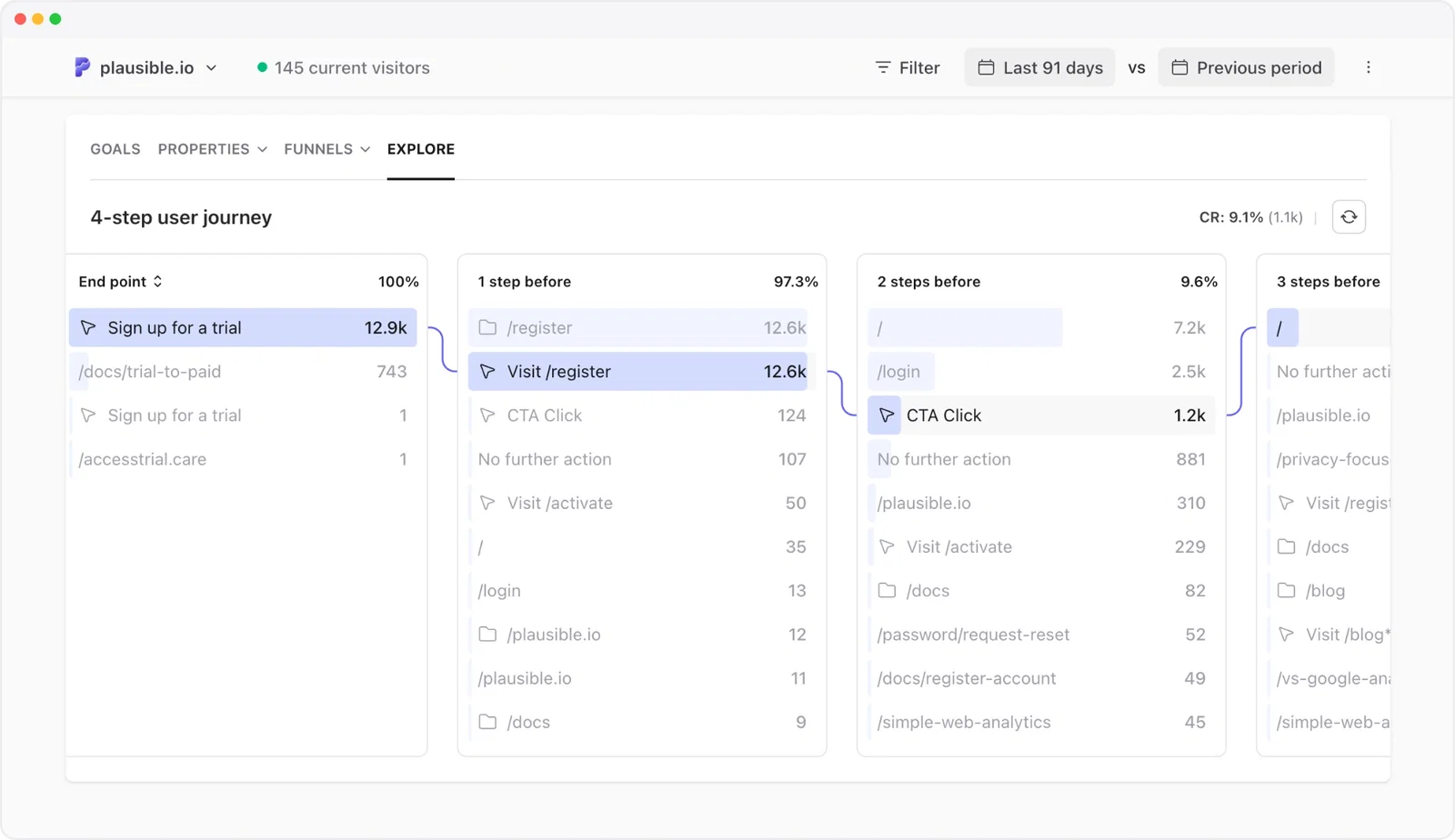
In Plausible, goals can be pageviews such as a thank-you page (codeless setup), custom events such as a signup button click, or optional measurements (plug-and-play) such as form submissions, outbound link clicks, file downloads.
Each column shows one step in the path. Click any entry to keep exploring, and Plausible will load the next step. You can go up to 20 steps, and the conversion rate updates as you build the selected journey.
You’ll also find grouped pages from the same directory to reduce noise. For example, individual blog posts might be grouped under /blog, and documentation pages under /docs. This makes it easier to see section-level patterns instead of getting lost in hundreds of individual URLs, while you can still do individual URL analysis if needed.
Dashboard filters also apply to User Journeys. So you can narrow paths by:
This helps you compare how different audiences move through your site. For example, you can check whether visitors from a paid campaign go from the landing page to signup, whether mobile visitors drop off earlier than desktop visitors, or whether visitors from a specific country take a different path through your docs or pricing pages.
Google Analytics 4 has a Path Exploration report. It is powerful, but it lives inside GA4’s Explorations area (custom reporting), which means you need to configure dimensions, node types, segments and events before getting to the answer.
That may be fine for data scientists. But for many website teams, it’s overly complicated and time-consuming.
You’d usually even be missing about half your data with Google Analytics, because its script is commonly blocked by ad blockers and majority of visitors decline consent banners.
If you just want simple and effective answers to questions like:
then Plausible User Journeys is built into the same dashboard where you already analyze pages, sources, goals, funnels, devices and locations.
Journey analysis helps you move from isolated metrics to real behavior.
You can still look at pageviews, sources, bounce rate, visit duration and goals. But when you add journeys, you see how those pieces connect.
You can understand where visitors start, what they do next, what happens before conversions, and where they take no further action.
If you want to explore the paths visitors take on your site, open the Explore tab in Plausible and try User Journeys.
此内容由惯性聚合(RSS阅读器)自动聚合整理,仅供阅读参考。 原文来自 — 版权归原作者所有。