





Git is the source code version control system that is rapidly becoming the standard for open source projects. It has a powerful distributed model which allows advanced users to do tricky things with branches, and rewriting history. What a pity that it’s so hard to learn, has such an unpleasant command line interface, and treats its users with such utter contempt.
The information model is complicated – and you need to know all of it. As a point of reference, consider Subversion: you have files, a working directory, a repository, versions, branches, and tags. That’s pretty much everything you need to know. In fact, branches are tags, and files you already know about, so you really need to learn three new things. Versions are linear, with the odd merge. Now Git: you have files, a working tree, an index, a local repository, a remote repository, remotes (pointers to remote repositories), commits, treeishes (pointers to commits), branches, a stash… and you need to know all of it.
The command line syntax is completely arbitrary and inconsistent. Some “shortcuts” are graced with top level commands: “git pull” is exactly equivalent to “git fetch” followed by “git merge”. But the shortcut for “git branch” combined with “git checkout”? “git checkout -b”. Specifying filenames completely changes the semantics of some commands (“git commit” ignores local, unstaged changes in foo.txt; “git commit foo.txt” doesn’t). The various options of “git reset” do completely different things.
The most spectacular example of this is the command “git am”, which as far as I can tell, is something Linus hacked up and forced into the main codebase to solve a problem he was having one night. It combines email reading with patch applying, and thus uses a different patch syntax (specifically, one with email headers at the top).
The man pages are one almighty “fuck you”. They describe the commands from the perspective of a computer scientist, not a user. Case in point:
git-push – Update remote refs along with associated objects
Here’s a description for humans: git-push – Upload changes from your local repository into a remote repository
Update, another example: (thanks cgd)
git-rebase – Forward-port local commits to the updated upstream head
Translation: git-rebase – Sequentially regenerate a series of commits so they can be applied directly to the head node
Remember the complicated information model in step 1? It keeps growing, like a cancer. Keep using Git, and more concepts will occasionally drop out of the sky: refs, tags, the reflog, fast-forward commits, detached head state (!), remote branches, tracking, namespaces
Git doesn’t so much have a leaky abstraction as no abstraction. There is essentially no distinction between implementation detail and user interface. It’s understandable that an advanced user might need to know a little about how features are implemented, to grasp subtleties about various commands. But even beginners are quickly confronted with hideous internal details. In theory, there is the “plumbing” and “the porcelain” – but you’d better be a plumber to know how to work the porcelain.
A common response I get to complaints about Git’s command line complexity is that “you don’t need to use all those commands, you can use it like Subversion if that’s what you really want”. Rubbish. That’s like telling an old granny that the freeway isn’t scary, she can drive at 20kph in the left lane if she wants. Git doesn’t provide any useful subsets – every command soon requires another; even simple actions often require complex actions to undo or refine.
Here was the (well-intentioned!) advice from a GitHub maintainer of a project I’m working on (with apologies!):
Translation: “It’s easy, Granny. Just rev to 6000, dump the clutch, and use wheel spin to get round the first corner. Up to third, then trail brake onto the freeway, late apexing but watch the marbles on the inside. Hard up to fifth, then handbrake turn to make the exit.”
Most of the power of Git is aimed squarely at maintainers of codebases: people who have to merge contributions from a wide number of different sources, or who have to ensure a number of parallel development efforts result in a single, coherent, stable release. This is good. But the majority of Git users are not in this situation: they simply write code, often on a single branch for months at a time. Git is a 4 handle, dual boiler espresso machine – when all they need is instant.
Interestingly, I don’t think this trade-off is inherent in Git’s design. It’s simply the result of ignoring the needs of normal users, and confusing architecture with interface. “Git is good” is true if speaking of architecture – but false of user interface. Someone could quite conceivably write an improved interface (easygit is a start) that hides unhelpful complexity such as the index and the local repository.
The fundamental promise of any version control system is this: “Once you put your precious source code in here, it’s safe. You can make any changes you like, and you can always get it back”. Git breaks this promise. Several ways a committer can irrevocably destroy the contents of a repository:
In the traditional open source project, only one person had to deal with the complexities of branches and merges: the maintainer. Everyone else only had to update, commit, update, commit, update, commit… Git dumps the burden of understanding complex version control on everyone – while making the maintainer’s job easier. Why would you do this to new contributors – those with nothing invested in the project, and every incentive to throw their hands up and leave?
The primary output of development work should be source code. Is a well-maintained history really such an important by-product? Most of the arguments for rebase, in particular, rely on aesthetic judgments about “messy merges” in the history, or “unreadable logs”. So rebase encourages you to lie in order to provide other developers with a “clean”, “uncluttered” history. Surely the correct solution is a better log output that can filter out these unwanted merges.
The point of working on an open source project is to make some changes, then share them with the world. In Subversion, this looks like:
If your changes involve creating new files, there’s a tricky extra step:
For a Github-hosted project, the following is basically the bare minimum:
In reality though, the maintainer of that Github-hosted project will probably prefer your changes to be on feature branches. They’ll ask you to work like this:
So, to move your changes from your local directory to the actual project repository will be: add, commit, push, “click pull request”, pull, merge, push. (I think)
As an added bonus, here’s a diagram illustrating the commands a typical developer on a traditional Subversion project needed to know about to get their work done. This is the bread and butter of VCS: checking out a repository, committing changes, and getting updates.
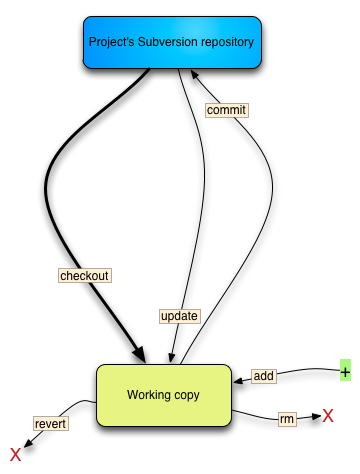
“Bread and butter” commands and concepts needed to work with a remote Subversion repository.
And now here’s what you need to deal with for a typical Github-hosted project:
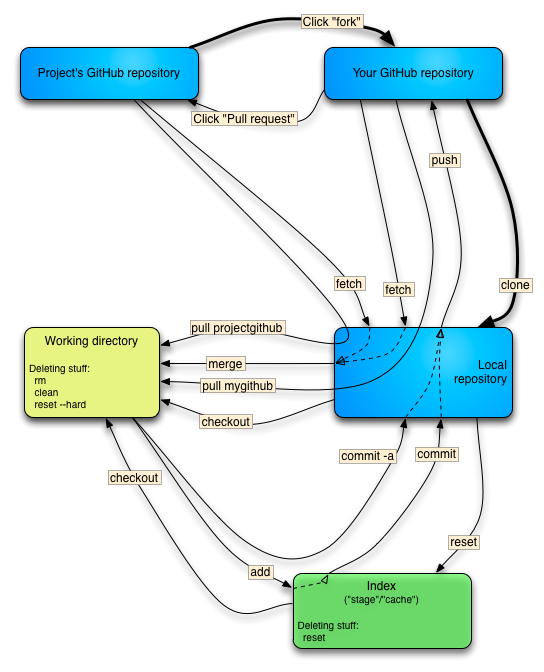
The “bread and butter” commands and concepts needed to work with a Github-hosted project.
If the power of Git is sophisticated branching and merging, then its weakness is the complexity of simple tasks.
This post has obviously struck a nerve, and gets a lot of traffic. Thought I’d address some of the most frequent comments.
A few bonus command inconsistencies:
Reset/checkout
To reset one file in your working directory to its committed state:
git checkout file.txt
To reset every file in your working directory to its committed state:
git reset --hard
Remotes and branches
git checkout remotename/branchname
git pull remotename branchname
There’s another command where the separator is remotename:branchname, but I don’t recall right now.
Command options that are practically mandatory
And finally, a list of commands I’ve noticed which are almost useless without additional options.
| Base command | Useless functionality | Useful command | Useful functionality |
| git branch foo | Creates a branch but does nothing with it | git checkout -b foo | Creates branch and switches to it |
| git remote | Shows names of remotes | git remote -v | Shows names and URLs of remotes |
| git stash | Stores modifications to tracked files, then rolls them back | git stash -u | Also does the same to untracked files |
| git branch | Lists names of local branches | git branch -rv | Lists local and remote tracking branches; shows latest commit message |
| git rebase | Destroy history blindfolded | git rebase -i | Lets you rewrite the upstream history of a branch, choosing which commits to keep, squash, or ditch. |
| git reset foo | Unstages files | git reset –hard git reset –soft |
Discards local modifications Returns to another commit, but doesn’t touch working directory. |
| git add | Nothing – prints warning | git add . git add -A |
Stages all local modifications/additions Stages all local modifications/additions/deletions |
A few interesting links:
此内容由惯性聚合(RSS阅读器)自动聚合整理,仅供阅读参考。 原文来自 — 版权归原作者所有。