






趁着春节假期,作业一点没做,倒是抽空写了一个新的个人页。
到现在 axton.cc 这个域名的根域总算是启用了,之前一直在用二级域根域扔着没管。
个人页算是个假 shell,支持少数常用命令及历史命令和 Tab 补全。几乎所有操作都在前端完成,只有在获取博客最新文章时会和后台交互。用的是 WordPress 的 RESTful API,真的是一个超好玩的 API。CORS 靠反代解决,反代加了一层缓存减轻源站压力。
至于为啥不直接连后端而是去写1k+行的 js...

说到 WordPress,WordPress 最近被发现一个 Dos 漏洞,开发团队拒绝修复,于是自己补了一下。
然后突然 Nginx 1.13.9 就释出了,添加了 Server Push。在发现 Server Push 相关的提交之后就一直眼馋地盯着 1.13.9,在释出之后一些认识的大佬陆续升级了 Nginx,我盯着自己万年没升级 Stable 版本,最后还是下定决心升个级,顺便添加了 Brotli 支持和 TLS 1.3 的支持。
以下是正文
首先添加 Brotli 支持。
$ git clone https://github.com/google/ngx_brotli.git
$ cd ngx_brotli
$ git submodule update --init
由于系统自带的 OpenSSL 版本普遍偏低,需要自行下载一份 OpenSSL 给 Nginx 用。目前浏览器支持的大多是 Draft 18,所以 clone 的也是 Draft 18 版本。
$ git clone -b tls1.3-draft-18 --single-branch https://github.com/openssl/openssl.git openssl
接下来安装 Nginx。先下载最新版本。
$ wget http://nginx.org/download/nginx-1.13.9.tar.gz
$ tar zxvf nginx-1.13.9.tar.gz
$ cd nginx-1.13.9
然后执行 nginx -V 获取旧版本 Nginx 的编译参数,再输入:
$ ./configure --add-module=../ngx_brotli --with-openssl=../openssl --with-openssl-opt='enable-tls1_3 enable-weak-ssl-ciphers'
引用屈哥的说法:
enable-tls1_3是让 OpenSSL 支持 TLS 1.3 的关键选项;而enable-weak-ssl-ciphers的作用是让 OpenSSL 继续支持 3DES 等不安全的 Cipher Suite,如果你打算继续支持 IE8,才需要加上这个选项。
再加上之前的编译参数,然后 make。
由于之前我启用了旧版本 lua-nginx-module,编译会出错,换用新版本编译即可,不再赘述。
为了平滑升级,先备份旧版 Nginx。
$ mv /path/to/nginx/sbin/nginx /path/to/nginx/sbin/nginx.old
再把编译好的版本拷过去。
$ cp objs/nginx /path/to/nginx/sbin/
接着测试一下有没有问题。
$ /path/to/nginx/sbin/nginx -t
没问题的话会输出:
nginx: the configuration file /path/to/nginx.conf syntax is ok
nginx: configuration file /path/to/nginx.conf test is successful
那么接下来要平滑重启 Nginx。首先找一下 nginx.pid 在哪(如果你忘了的话)。
$ find / -name "nginx.pid" -print
then
$ kill -USR2 `cat /path/to/nginx.pid`
$ kill -WINCH `cat /path/to/nginx.pid`
$ kill -QUIT `cat /path/to/nginx.pid`
没问题的话就可以用 nginx -V 测试一下了。

Done!
然后编辑 Nginx 配置文件。在 nginx.conf 里加上:
brotli on;
brotli_comp_level 6;
brotli_types text/plain text/css application/json application/x-javascript text/xml application/xml application/xml+rss text/javascript application/javascript image/svg+xml;
这样就启用了 Brotli 支持。接着修改站点配置文件来支持 TLS 1.3。
ssl_protocols TLSv1 TLSv1.1 TLSv1.2 TLSv1.3;
ssl_ciphers TLS13-AES-256-GCM-SHA384:TLS13-CHACHA20-POLY1305-SHA256:TLS13-AES-128-GCM-SHA256:TLS13-AES-128-CCM-8-SHA256:TLS13-AES-128-CCM-SHA256:ECDHE-RSA-AES128-GCM-SHA256:ECDHE:ECDH:AES:HIGH:!NULL:!aNULL:!MD5:!ADH:!RC4:!DH:!DHE;
TLS13 开头的为 TLS 1.3 新增的 Cipher Suite。
到此为止 Nginx 已经支持了 Brotli 和 TLS 1.3。至于 Server Push 的用法,最简单的用法是在站点配置文件中加入:
http2_push /path/to/file1;
http2_push /path/to/file2;
进阶用法可以参考 Nginx 官方的 这篇博文。
那么来检查一下吧
要检查 Brotli 支持,只要使用 Chrome,然后在开发者面板检查响应头。如果成功地启用了 Brotli,就可以看到:

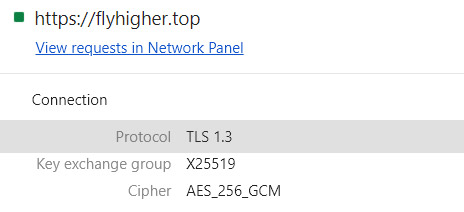
这说明 Brotli 已经启用。再检查 TLS 1.3。Chrome 需将 chrome://flags/ 中的 TLS 1.3 改为 Enabled (Draft);Firefox 需将 about:config 中的 security.tls.version.max 改为 4。Firefox Developer Edition 已经默认启用。然后检查连接的安全信息即可看到:
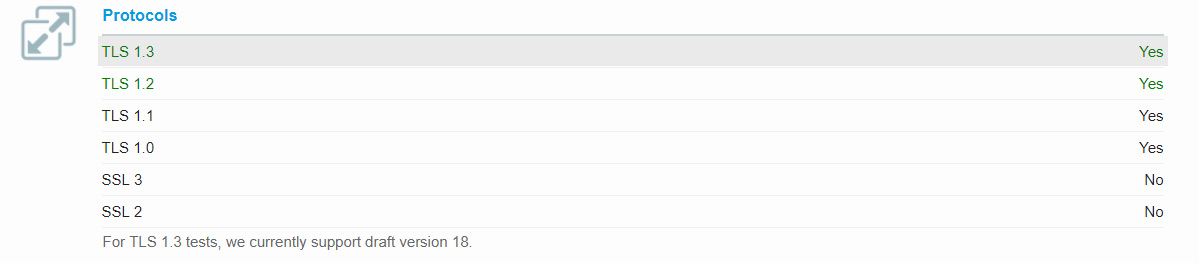
或者使用 SSLLabs 也可以检查:
对于 Server Push,可以在浏览器的开发者面板中检查。
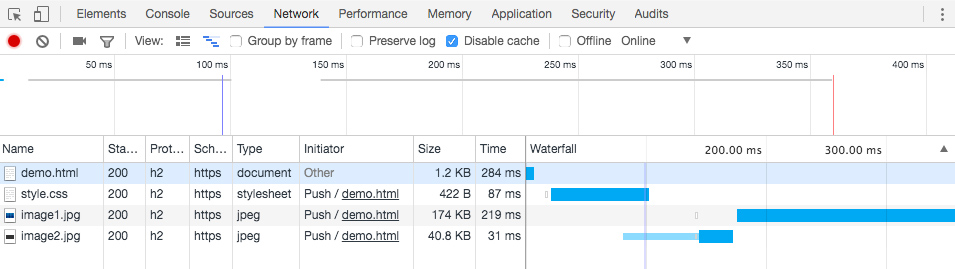
(本图来自 nginx.com,版权属于 NGINX Inc. 因为不知道为啥我没有在自己的博客页面上找到标记为来自 Server Push 的资源,尽管我已经正确(但愿)配置了 Nginx)
(逃