


Whether you want to test your theme for compatibility with the latest Ghost CMS version or you are looking to buy a Ghost Theme and want to see the performance, there are tools for both situations.
Ghost GScan
GScan is the official tool to test your Ghost theme for compatibility. GScan returns detailed report of issues where themes need to be modified in order to be compatible with a specific Ghost version.
The returned list can contain different error levels:
- recommendation = things you might want to know about
- warning = mostly used for deprecations, things that will be errors in the next version
- error = anything that makes the theme invalid or incompatible with the current version of Ghost.
GScan can be used in several ways:
GScan site
The GScan site is the easiest way to test your Ghost Theme. You can upload a zip file of your theme and you will get a full validation report.
Ghost Admin
When a theme is uploaded in Ghost admin, it will automatically be checked with gscan and any fatal errors will prevent the theme from being activated and used.
Command line
GScan can be used from the command line as well.
First install gscan using npm:
npm install -g gscan
Then move to the theme directory you want to check
gscan /path/to/ghost/content/themes/theme_name
You can also run gscan on a zip file:
gscan /path/to/ghost/content/themes/theme_name/dist/theme.zip -z
By default, GScan scans themes for the latest Ghost version compatibility. You can also specify a Ghost version by using the parameters:
--v1--v2--v3
Ghost Audit
Besides compatibility with Ghost, there are other important aspects to consider when choosing or building a Ghost Theme. This is where Lighthouse comes in.
Lighthouse is an open-source tool for testing and improving the quality of web pages. It has audits for performance, accessibility, progressive web apps, SEO and more.
You can run Lighthouse in Chrome DevTools, which will return values for each category:
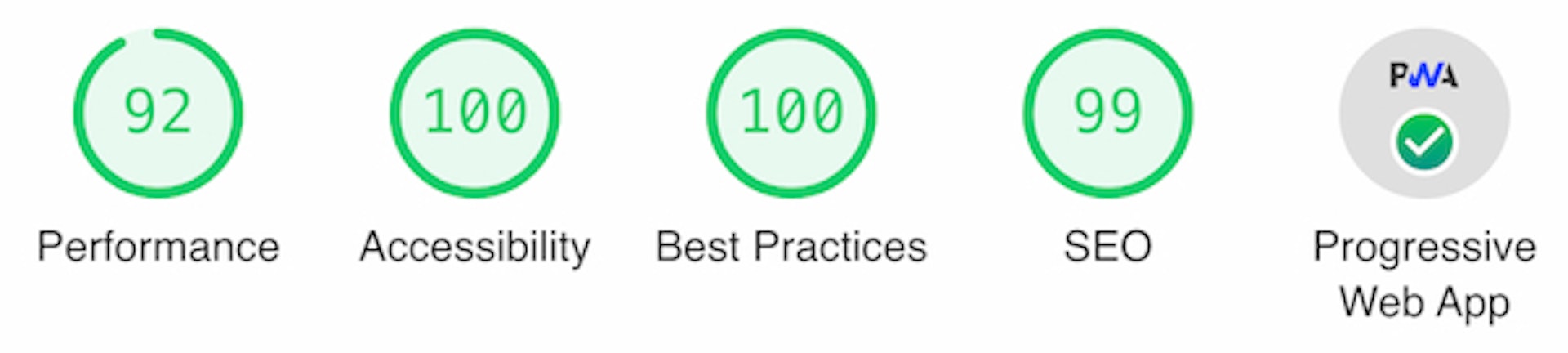
Besides the Chrome Devtools you can also use online tools to test your Ghost Site Performance ( these are using Lighthouse ):
With Lighthouse v6 these are the most important metrics:
| Audit | Weight |
|---|---|
| First Contentful Paint | 15%. |
| Speed Index | 15%. |
| Largest Contentful Paint | 25%. |
| Time to Interactive | 15%. |
| Total Blocking Time | 25%. |
| Cumulative Layout Shift | 5%. |
You can read more about it in the performance score section.
Based on the report you can take specific actions to improve the overall performance of your Ghost site, as well as accessibility and SEO.
The report will check if your site is a progressive web app, we have a guide how to transform your Ghost Theme into a progressive web app.
This was a general overview of steps you can take to improve your Ghost blog, but you can dive deeper in these topics. I hope you find this useful.