








Plugin and extension development for JetBrains products.
Stop Pasting Tokens: OAuth2 Login for JetBrains IDE Plugins
The moment a plugin needs account data, a simple API call turns into an authentication problem. The bad shortcut is familiar: ask the user to create a personal access token (PAT), make them paste it into settings, and hope it never leaks.
For a JetBrains IDE plugin, use this flow instead: the user clicks the Login button, the browser opens, the provider handles sign-in, the IDE receives a callback, and the plugin stores the token.
At a high level, the plugin will:
- Open the provider’s authorization page in the browser.
- Receive the OAuth2 callback inside the IDE.
- Validate the returned
state. - Exchange the authorization code with PKCE.
- Store the access token in
PasswordSafe.
This post uses GitHub as the OAuth2 provider, but the same shape works elsewhere. Scopes, URLs, token responses, and refresh rules will change.
Sample code: https://github.com/JetBrains/intellij-sdk-docs/tree/main/code_samples/oauth2
The Mental Model

OAuth2 is easier to reason about as hotel key cards.
At check-in, you do not get a master key. You get a card for your room, maybe the elevator or gym. When your stay ends, the card stops working.
That is the useful bit: allowed access, but limited and temporary. An OAuth2 access token works the same way. The user signs in with the provider, and the plugin gets a token for the API access the user approved. The plugin never needs the user’s password.
That approach is better than asking people to paste a long-lived secret into settings. Users stay in the browser login flow they already trust, while the provider keeps control of scopes, expiration, and revocation.
So the goal is simple: get the plugin a limited token without making the user paste one manually. The catch is that a desktop plugin cannot protect a traditional client secret.
Why PKCE Is Part of the Story
In a web app, the server can keep a client secret on the backend. A desktop plugin cannot do that. Anything bundled into the plugin can be inspected.
That is where PKCE comes in. PKCE stands for Proof Key for Code Exchange, and it ties the returned authorization code to the login request that created it.
Before opening the browser, the plugin creates a random code_verifier and sends GitHub a derived code_challenge. Later, when GitHub redirects back with a temporary code, the plugin sends the original verifier to the token endpoint.
GitHub compares the verifier with the earlier challenge. If they do not match, no token. That means the returned code is not enough on its own, which is exactly what we want for a desktop plugin.
The Flow
Here is the full flow:
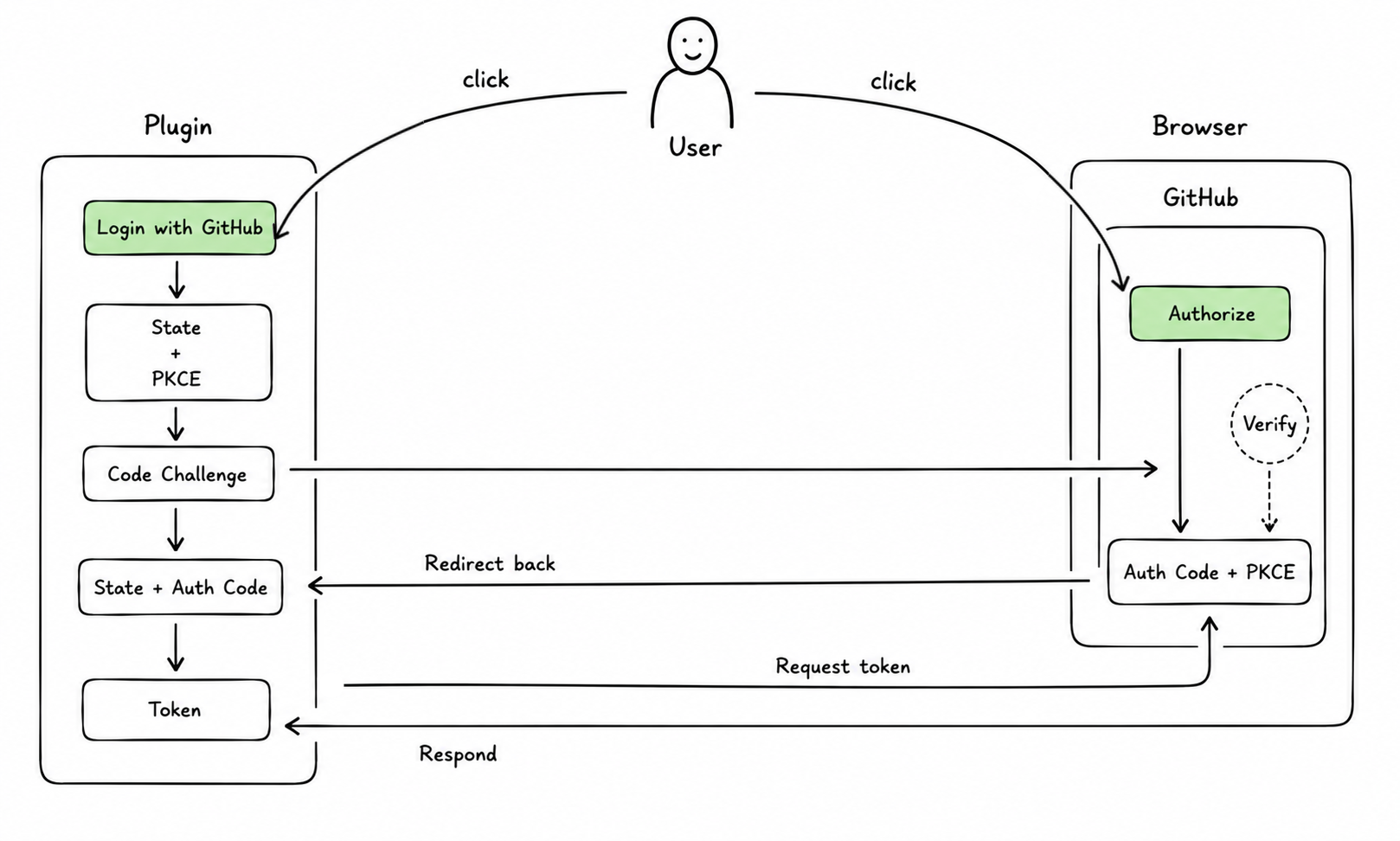
- The user clicks Login with GitHub.
- The plugin creates
state,code_verifier, andcode_challenge. - The plugin opens GitHub’s authorization URL in the browser.
- GitHub redirects back to the IDE with
stateand a temporarycode. - The plugin validates
state. - The plugin exchanges the code and verifier for an access token.
- The plugin stores the token in
PasswordSafeand calls the GitHub API.
Where the Flow Lives in Code
The sample code lives in code_samples/oauth2. The flow above is split across four small pieces:
plugin.xmlregisters the settings UI and the local callback handler.AuthConfigurablegives the user the login and logout buttons.AuthRestServicehandles the request that GitHub sends back to the IDE’s built-in HTTP server.AuthServicecreates the OAuth2 request, exchanges the code, stores the token, and calls the API.
That split is the main thing to notice. OAuth2 feels messy when everything is described as one big mechanism. In code, it is much easier to follow when each class owns one part of the trip.
Register the UI and Callback
The plugin descriptor registers two things:
- the settings page
- the local HTTP callback handler
<extensions defaultExtensionNs="com.intellij">
  <applicationConfigurable
      instance="org.intellij.sdk.oauth2.AuthConfigurable"
      id="org.intellij.sdk.oauth2.AuthConfigurable"
      displayName="My Plugin Auth"/>

  <httpRequestHandler implementation="org.intellij.sdk.oauth2.AuthRestService"/>
</extensions>
applicationConfigurable adds the settings page. httpRequestHandler registers a handler with the IDE’s built-in HTTP server, so a request to /api/myplugin can be routed to AuthRestService. That gives GitHub a local redirect target after browser authorization.
Keep the Settings UI Boring
AuthConfigurable is the settings UI. In the sample, it extends BoundConfigurable, uses the Kotlin UI DSL, and its job is small:
- if disconnected, show Login with GitHub
- if connected, show the username and Logout
The panel observes AuthService.state, and the view is a small state switch:
private fun createView(state: AuthState) = panel {
  when (state) {
    is AuthState.Connected -> row("Username") {
      label(state.username ?: "Unknown")
      button("Logout") { authService.logout() }
    }

    is AuthState.Disconnected -> row {
      button("Login with GitHub") { authService.login() }
    }
  }
}
Receive the Browser Redirect
After approval, GitHub redirects back to the IDE’s built-in HTTP server. The callback is handled with the IntelliJ Platform RestService:
http://localhost:<built-in-server-port>/api/myplugin
AuthRestService reads state and code, finds the pending login request, completes it, and returns a small HTML response:
val parameters = urlDecoder.parameters()
val state = parameters["state"]?.firstOrNull()
    ?: return "No authorization state found"
val code = parameters["code"]?.firstOrNull()
    ?: return "No authorization code found"
val callback = service<AuthService>().callbacks.remove(state)
    ?: return "No active OAuth request found"

callback.complete(code)
sendResponse(
  request,
  context,
  response("text/html", Unpooled.wrappedBuffer(HTML_RESPONSE.toByteArray()))
)
return null
After that, AuthService continues the flow by exchanging the code for a token.
Run the Flow
AuthService creates the login request, waits for the callback, and exchanges the returned code:
private suspend fun requestToken(): String {
  val state = UUID.randomUUID().toString()
  val codeVerifier = UUID.randomUUID().toString().padStart(43, '0')
  val callback = CompletableDeferred<String>().also { callbacks[state] = it }

  try {
    BrowserUtil.browse(authorizationUrl(state, codeVerifier))
    return exchangeCodeForToken(callback.await(), codeVerifier)
  } finally {
    callbacks.remove(state)?.cancel()
  }
}
CompletableDeferred is the bridge between the HTTP callback and the coroutine waiting in requestToken(). requestToken() waits on callback.await(), and AuthRestService completes that same object when GitHub redirects back with the code.
The padStart(43, '0') is there because GitHub expects the PKCE verifier to meet the minimum verifier length. Some providers are less strict and may accept a UUID as-is, but GitHub needs the verifier to be at least 43 characters long.
The authorization URL carries both safety checks: state and the PKCE challenge.
private fun authorizationUrl(state: String, codeVerifier: String) = url(
  AUTHORIZATION_URL,
  "client_id" to CLIENT_ID,
  "scope" to SCOPES,
  "state" to state,
  "redirect_uri" to redirectUri,
  "code_challenge" to codeChallenge(codeVerifier),
  "code_challenge_method" to "S256",
)
The challenge is derived from the code verifier:
private fun codeChallenge(codeVerifier: String) =
  DigestUtil.sha256().digest(codeVerifier.toByteArray())
    .let { Base64.getUrlEncoder().withoutPadding().encodeToString(it) }
The actual token exchange is a POST to GitHub’s token endpoint:
private suspend fun exchangeCodeForToken(code: String, codeVerifier: String) =
  withContext(Dispatchers.IO) {
    parseAccessToken(post(tokenUrl(code, codeVerifier), null).readString())
  }
The token request sends back the temporary code and the original verifier:
private fun tokenUrl(code: String, codeVerifier: String) = url(
  ACCESS_TOKEN_URL,
  "client_id" to CLIENT_ID,
  "client_secret" to CLIENT_SECRET,
  "code" to code,
  "redirect_uri" to redirectUri,
  "code_verifier" to codeVerifier,
)
The sample includes a GitHub client secret because GitHub’s OAuth app flow expects one. For a desktop plugin, do not treat that value as secret. PKCE is the useful check here: the returned code is useless without the original verifier.
Store the Token in PasswordSafe
Once the provider returns an access token, store it in PasswordSafe. Regular persistent settings are fine for preferences, but not for access tokens.
The sample uses one credential key:
private val credentials =
  CredentialAttributes(generateServiceName("MyPluginAuth", "OAuthToken"))
On startup, the service restores an existing token if one was saved earlier:
init {
  coroutineScope.launch {
    val token = PasswordSafe.instance.getPassword(credentials) ?: return@launch
    _state.value = AuthState.Connected(fetchUserProfile(token))
  }
}
Storing and clearing go through the same helper:
private fun storeToken(token: String?) =
  PasswordSafe.instance.setPassword(credentials, token)
For a real plugin, use a stable service name. If you support multiple accounts, store one credential per provider account.
Platform sources: PasswordSafe, CredentialStore, and CredentialAttributes.
Calling the API
After login, the rest of the plugin should not care how OAuth2 worked. The sample uses the external org.kohsuke:github-api library and passes the token into GitHubBuilder to fetch the current GitHub username:
private suspend fun fetchUserProfile(token: String): String? =
  withContext(Dispatchers.IO) {
    runCatching { GitHubBuilder().withOAuthToken(token).build().myself.login }
      .onFailure { thisLogger().warn("Failed to fetch user profile", it) }
      .getOrNull()
  }
Keep that boundary in larger plugins too. API code should not know how browser login works.
Wrapping Up
OAuth2 in a plugin is mostly about putting the responsibilities in the right place.
Let the provider handle sign-in. Let the browser handle the user-facing login. Let the IDE receive the callback. Let AuthService deal with the token. And once the token is stored in PasswordSafe, the rest of your plugin can stop caring how the user authenticated.
If you are building something similar, or if you hit an edge case with a provider, bring it to the JetBrains Platform forum.
Good luck!
Subscribe to JetBrains Platform updates