


When we talk about GitHub Actions security, we cannot skip mentioning third-party GitHub Actions. GitHub Actions, with its vast repository of over 20,000 third-party actions, presents both opportunities and challenges for organizations. While these actions offer convenience, they also introduce potential security vulnerabilities. As third-party GitHub Actions run in the context of enterprises’ GitHub Actions environment, they have access to highly sensitive assets such as deployment cloud credentials, source code, and production builds. A breach in a GitHub Actions workflow can have far-reaching consequences, leading to the compromise of enterprise data and production environment. As organizations increasingly rely on third-party actions to enhance their GitHub workflows, ensuring the security of these actions is a pressing concern for the security team.
In this blog, we will talk about best practices for securely managing third-party GitHub Actions. Check out our other blogs from the GitHub Action security series:
GitHub Actions Security Best Practices (With Checklist)
8 GitHub Actions Secrets Management Best Practices to Follow
GITHUB_TOKEN: How It Works and How to Secure Automatic GitHub Action Tokens
Pinning GitHub Actions for Enhanced Security: Everything You Should Know
But first, let’s understand the basics of third-party GitHub Actions.
Third-party GitHub Actions are actions created and maintained by an individual or organization that can be reused by other users on GitHub in their CI/CD pipelines. These actions may involve a bad actor that may pose a risk to your projects. Even though it may be very convenient to use a third-party GitHub Action in your workflow, you must ensure that it goes through a screening process and is deemed safe by the security team.
Using an unchecked or unreviewed third-party GitHub Action comes with various risks:
Now, let’s understand how you can securely leverage third-party GitHub Actions in your workflows and ensure the highest level of GitHub Actions security.

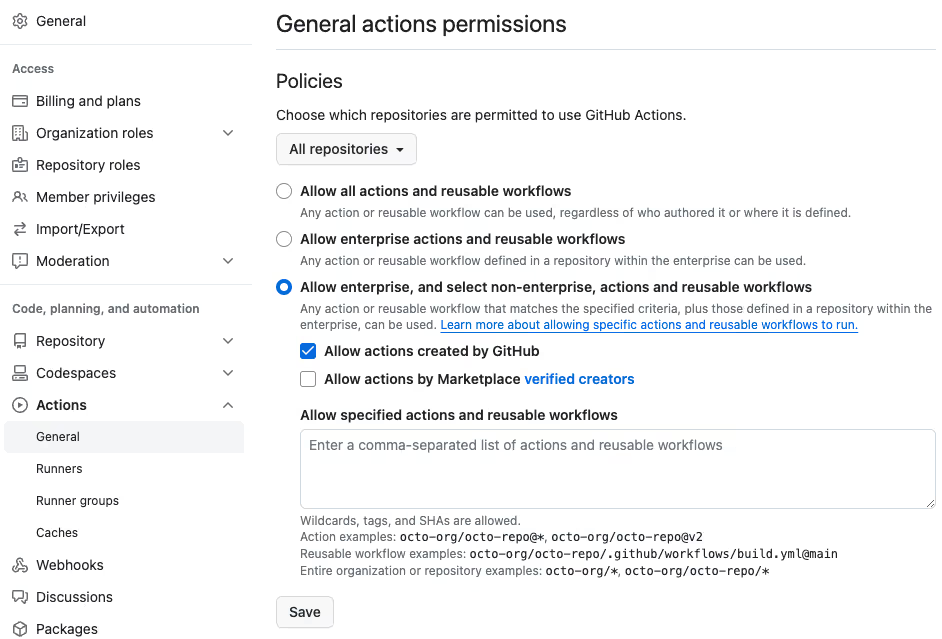
The default setting on GitHub allows enterprises to use all third-party GitHub Actions. To ensure you do not use unmaintained and unsafe third-party actions (or abandonware) that may pose a risk to your workflows, make sure to change this setting to “allow enterprise, and select non-enterprise, actions and reusable workflows”. This setting will enable you to limit the third-party actions being used in your organizations and explicitly choose the safe ones. Typically, after the setting has been changed, DevOps or Security teams of an organization will perform due diligence and approve or decline the use of a third-party GitHub Action.
Here’s a screenshot of the setting showing how to choose the “allow enterprise, and select non-enterprise, actions and reusable workflows” option.
Before using a third-party Action in your workflow, make sure you’re auditing the source code. This must be done to ensure that there are no malicious agents or questionable actions in your workflow.
Here are a few things you should be checking when auditing the source code of the Action. There are several guides on the internet on how to perform security code assessment depending upon the resources you have. At a high level, you should look for code or patterns that:
Make sure you understand what the Action is doing and that it is handling the GitHub secrets as it should. Any malicious code found should be properly audited and the action be rejected to keep your GitHub Actions security intact.
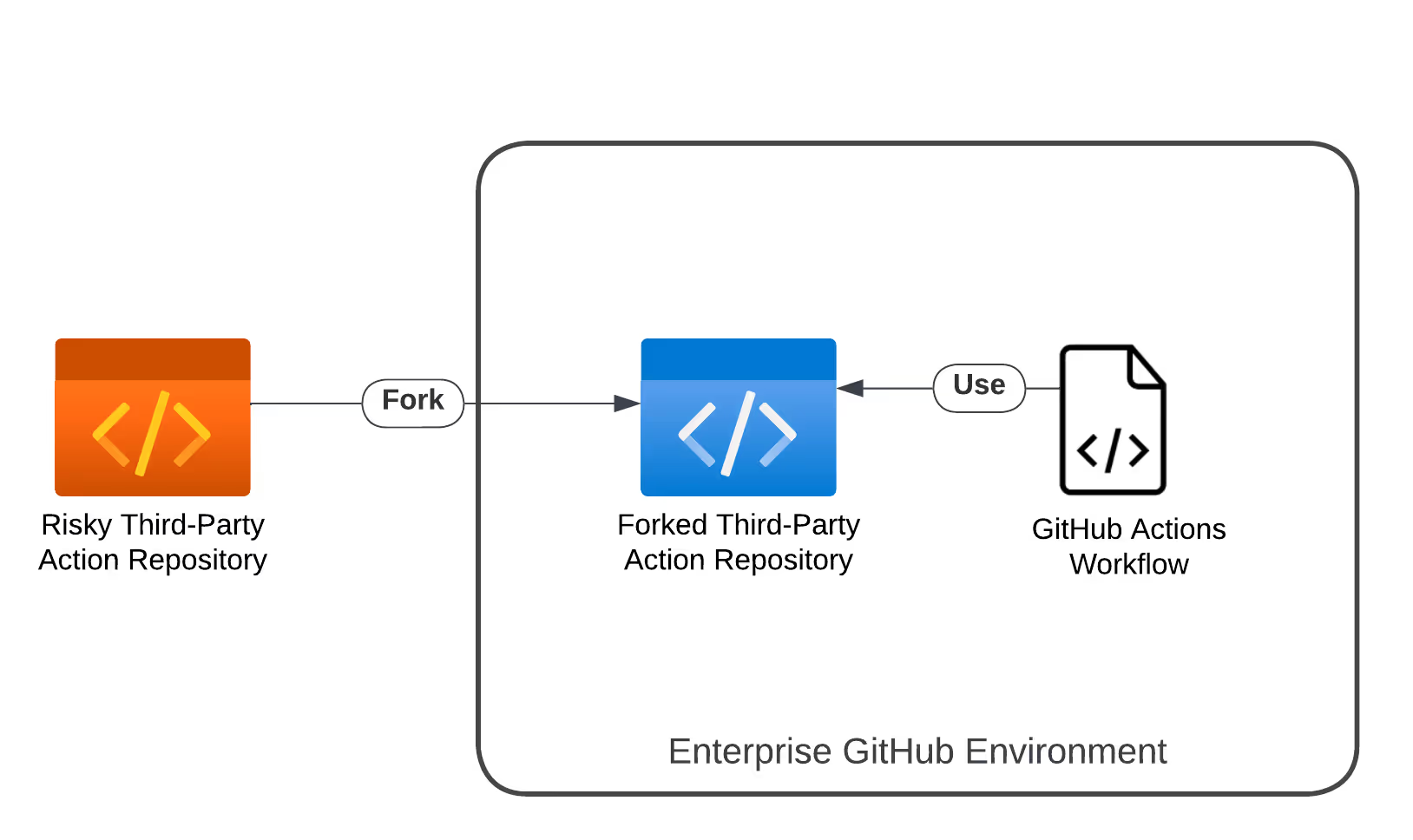
One fundamental best practice you can follow to secure your GitHub Actions workflows from threats is to fork risky third-party actions.
Here’s why forking can be very beneficial for securing your workflows:
Post forking, you should apply missing security controls such as branch protection, code updates, etc. In addition, you need to make sure that the forked GitHub Action is being maintained regularly. This includes upgrading vulnerabilities and dependencies for security hardening of the actions. Maintaining forked actions can be quite a time-consuming task and may require dedicated personnel to specifically do it. As a good citizen, we also encourage enterprises following this practice to merge their code improvements upstream so that the entire community can benefit.
One of the first things you should do to enhance your GitHub Actions security after checking a third-party Action and choosing them is to pin them. This means you must pin the action’s major and minor versions to ensure you’re always using the same version in your workflows.
In the following screenshot, you’ll see tags getting translated into pinned Hashes in one of the workflows in Azure’s project “bridge to kubernetes”.
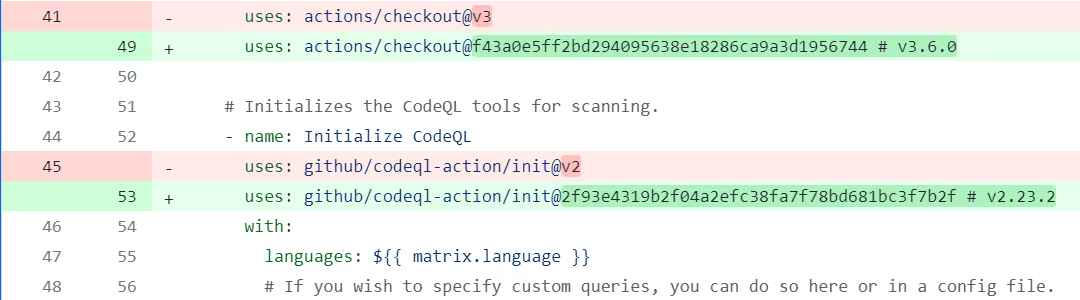
To ensure that the source code of the version you’re using hasn’t been altered you must pin the action to the full-length commit SHA. The value of commit SHA is unique for each commit and is immutable. This ensures that your GitHub Actions workflows will always use the same release of the Action and forces developers to manually deploy every single update to the Action.
If you’re using an Action by a reputed organization like GitHub, you can skip using the full-length commit SHA as they’re usually well maintained and updated.
If you’re using a third-party Action owned by an individual developer(s), it is important to verify the author. Doing this will help you understand if the action is secure for usage or not. Check the author’s profile. You can also check the links they’ve added in their profiles (like LinkedIn and X) to verify. If they’re from an organization, chances are, the author is a professional developer and may maintain the action regularly too. Although, if you find anything fishy, it is best to avoid using the action.
Analyzing the number of contributors and seeing who they are can also help you decide if a third-party Action is safe to use or not. If the action has a lot of contributors, it is more likely to be secured. Moreover, if the contributors are from the same organization, the action is more likely to be maintained properly over time and be secure for usage.
StepSecurity’s January 2024 webinar on managing risks of third-party GitHub Actions talks about how you effectively maintain and securely use third-party Actions. Watch the full recording of the webinar in the summary blog post:
As organizations navigate the complexities of GitHub Actions security, a proactive approach to managing third-party actions is important. By integrating the third-party Actions best practices mentioned in this blog, you can actively fortify your GitHub Actions workflows against potential threats.
And if you’re looking to further discuss your concerns and challenges about the GitHub Actions security of your organization, our team is here to help you out. Try the StepSecurity app for free and enhance your GitHub Actions security now!
Third-party GitHub actions can have bad actors or malicious code that could compromise your workflows. Since third-party Actions are created by individual contributors, it is important to ensure you follow the best practices of third-party GitHub Actions management.
GitHub provides options to control access to Actions within your organization. You can restrict actions to local ones or disable them entirely for enhanced security. Additionally, managing the use of self-hosted runners can further reduce security risks if compromised.
When auditing source code, focus on identifying any access to sensitive information, dynamic code execution, or outbound network calls to unknown sources. Ensure the action handles GitHub secrets securely and be vigilant for any signs of malicious code.
此内容由惯性聚合(RSS阅读器)自动聚合整理,仅供阅读参考。 原文来自 — 版权归原作者所有。