


Effective mobile application testing that meets all the requirements of modern quality assurance can be challenging. Not only do teams need to create tests that cover a range of different device types, operating system versions, and user interactions—including swipes, gestures, touches, and more—they also have to maintain the infrastructure and device fleets necessary to run these tests. Addressing these challenges requires a comprehensive testing strategy that can be implemented by all members of the mobile app team, regardless of technical proficiency.
Datadog Mobile Application Testing—now GA—delivers fast, no-code, and reliable mobile app testing on real devices in the cloud. Any member of your team–whether they’re technical or non-technical–can create and maintain automated tests that seamlessly integrate into your CI/CD pipelines, so you can ship mobile apps with confidence and increase your release velocity.
With Datadog Mobile Application Testing, you can create and run end-to-end tests for your applications on both iOS and Android. Datadog runs these tests on real phones and tablets (as opposed to emulators) to provide a realistic, step-by-step representation of key application workflows with screenshots of each step and detailed pass/fail results, so that your team can quickly visualize what went wrong and fix it. Additionally, these tests automatically adapt to minor changes in your app, simplifying the task of test maintenance as your app evolves.
In this post, we’ll show you how to use Datadog Mobile Application Testing to:
Create mobile app tests
Record your test with our no-code test recorder
View test results and debug
Datadog Mobile Application Testing makes it easy to create, update, and maintain tests, easing the load on your developers, and helping them release features without bugs that could impact your customer experience and the success of your business.
Say you’re a mobile app developer looking to run a test on the latest version of your e-commerce application, which fixes a bug in the checkout process. To create a new test in Mobile Application Testing, you can select New Test under UX Monitoring in the left-hand sidebar, as in the example below.
Next, select the app you’d like to run your test with. You can choose an existing app from Mobile Applications list, which contains all the applications you’ve already uploaded to the platform, or create a new one.
Then, choose the version of your app you want to test. If your app contains multiple versions, you can select a specific version to test or select Always run the latest to ensure your tests are always running on the latest version of your app.
From there, you can set the name of your test, the environment you want to run it in, and any additional tags to help share the results of your tests and make them easily visible to other teams. Then, choose which devices you want to run your test on.
Datadog Mobile Application Testing allows you to record a test just one time and replay the test across different devices on that same operating system, including both phones and tablets. This allows you to get a more holistic picture of user experience across devices while saving time and developer effort. Tests can be run manually, on a schedule, or via CI pipelines.
Datadog Mobile Application Testing allows anyone on your team, including non-technical users, to create and run tests without code by simply clicking and navigating through the most important flows in your app, just like your users do.
Once you launch your device, you can then start clicking through the flow that you want to capture, and Datadog will automatically record these actions as steps.
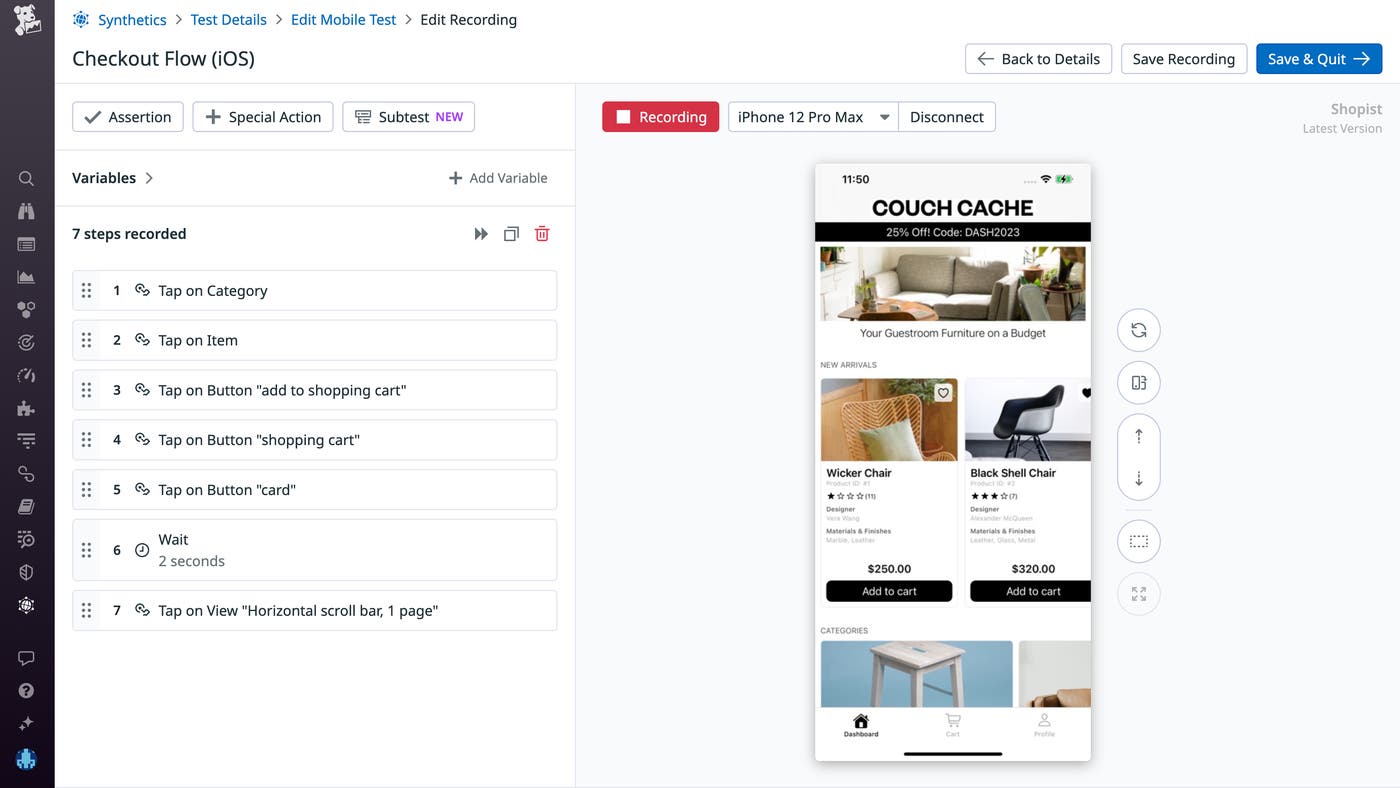
For instance, say you want to capture a checkout flow and make sure it works from end to end. You’ll click on the Wicker Chair product, add it to your cart, go to your cart, and check out.
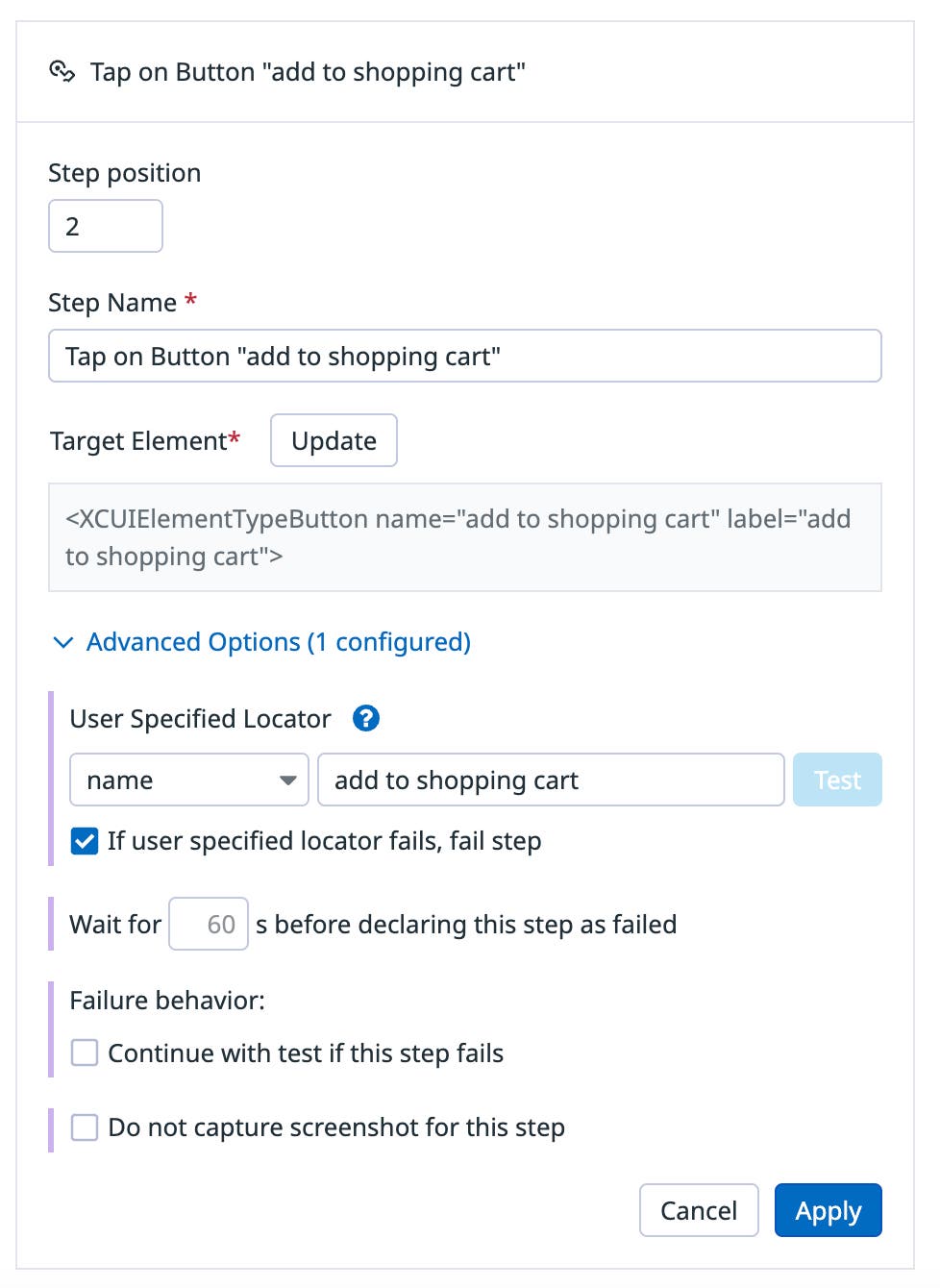
Datadog automatically records and names each step you carry out in the user flow you are testing. Each step supports advanced options, such as timeout length, failure behavior, disabling screenshots, and the ability to target elements based on their user locator.
For example, let’s say you want edit the “add to shopping cart” step so that the step fails if the target element cannot be found. To do this, you would set up your step like so:
Mobile app tests also support Assertions, which test the content presented to the user in your app—for example, whether or not text is present on the screen at a certain step, such as a confirmation screen that says, “Thank you! Your order has been placed.”
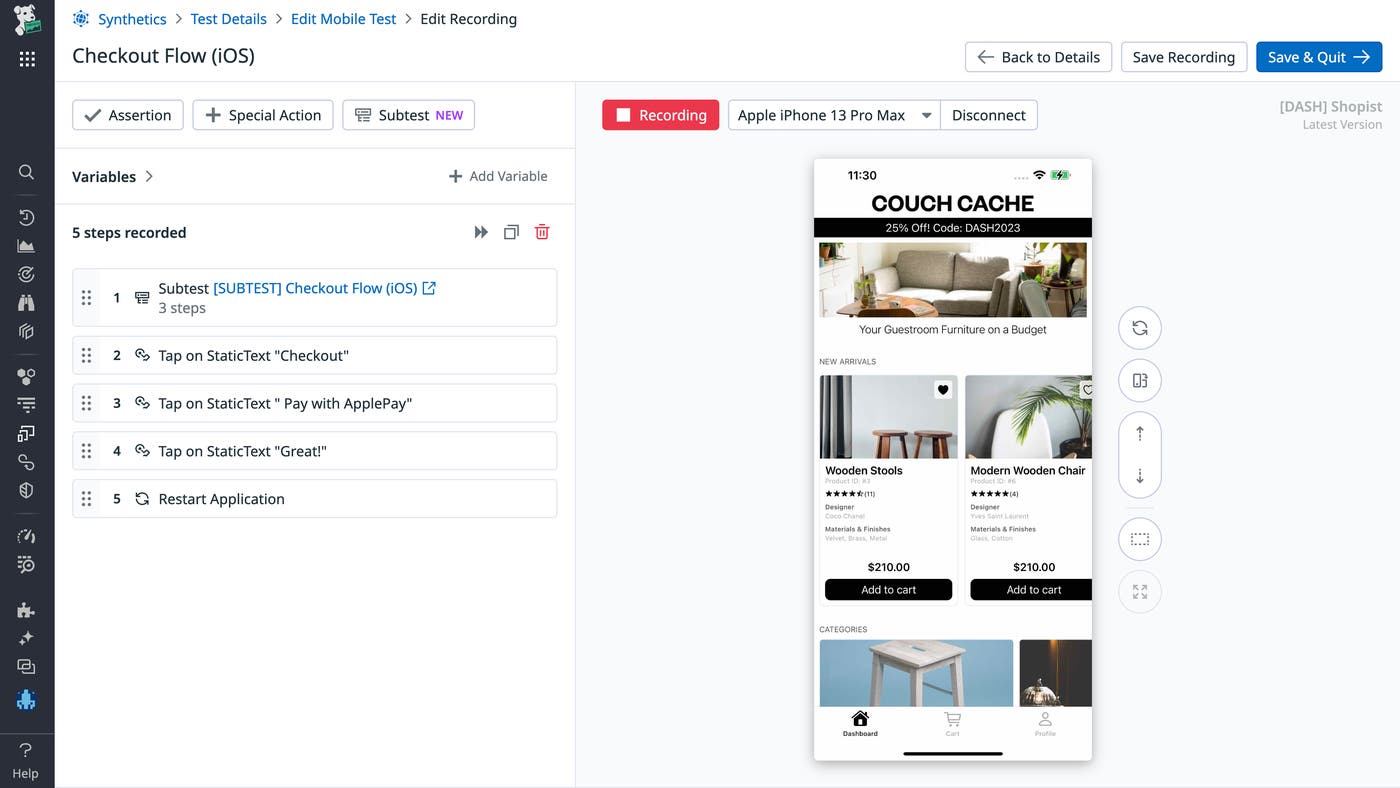
In addition, Mobile app tests also support Subtests, which allow you to share steps across multiple tests to make building and updating your tests even easier. Just record a certain flow once—for example, adding something to your cart—and then reuse those same steps for other tests that require the same flow.
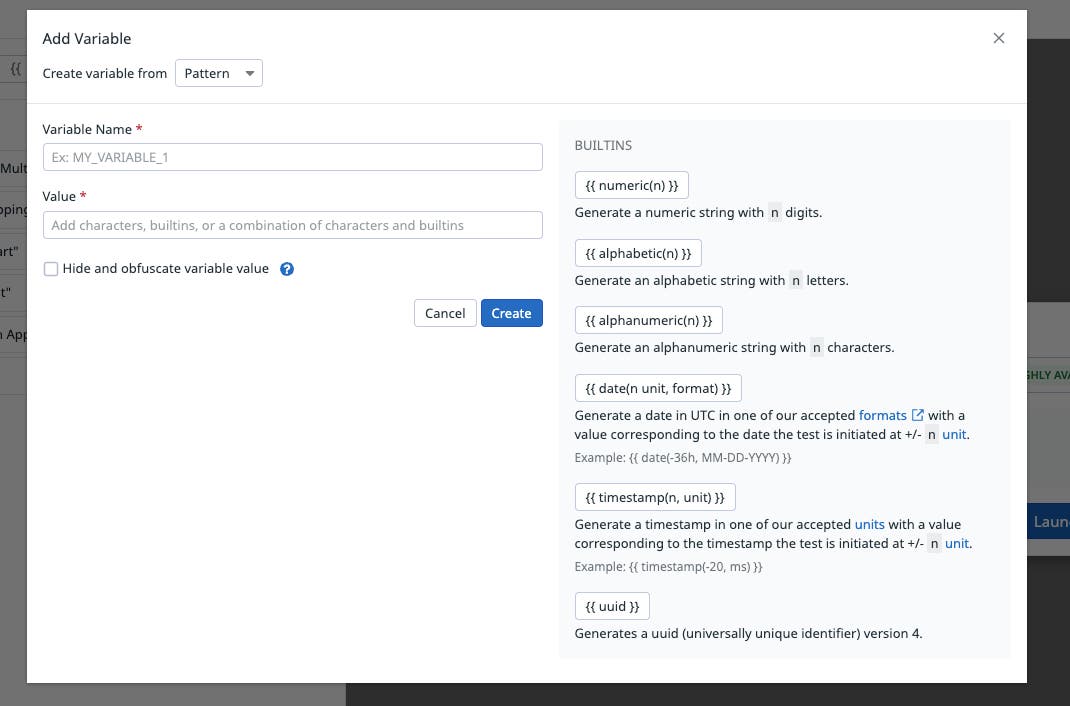
Mobile Application Testing also supports local and global variables, which allow you to reuse commonly used values within (or across) tests to make test creation even easier. For example, let’s say a common workflow that occurs in many of your tests is user login. You can save your credentials (email and password) as variables so they can be easily reused across tests and updated from one central place should they ever change.
In addition to automatically recording your interactions with a device, you can manually record steps using the actions available under the Special Actions button, including tap, type text, scroll, wait, deep link, and more.
Finally, the Step Replayer allows you to replay each step in the test one by one if there are specific steps you want to double-check, or to run through them all sequentially.
After you’ve created a test, it will appear in the Synthetic test page alongside all the rest of your mobile app, browser, and API tests.
The test details page provides metadata about the test itself, including the name of the test, the app being tested, associated monitors, and more.
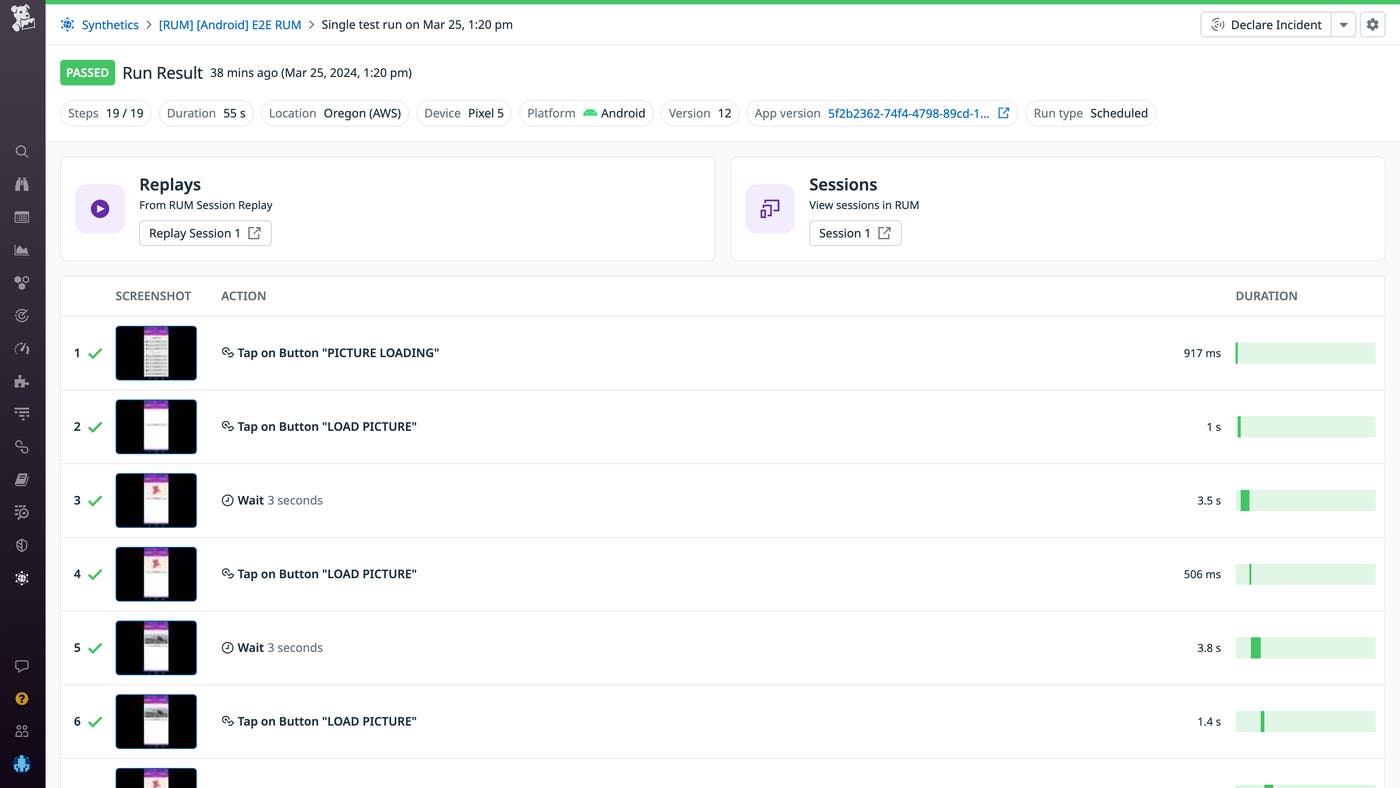
In addition, if you’ve enabled RUM and Session Replay in your application, then you’ll also see a link to the associated replay, which shows you more information about your test.
Clicking on a step will show you a highlighted area of the app that’s been interacted with, which is helpful when you’re debugging and want to figure out what interaction led to a failure.
With the ability to customize your tests, run them across many devices and operating systems, and drill down to more granular information about each test, you can better understand how users interact with your mobile applications and quickly identify issues with end-user experience.
Datadog’s Mobile Application Testing provides no-code tooling for creating, maintaining, and running mobile app tests across the most popular devices at any time, enabling technical and non-technical team members alike to test mobile applications and ship features with confidence. With self-healing tests, maintaining your test suite is easier than ever, and our robust scheduling and monitoring makes running these tests simple and cost-effective.
Mobile Application Testing complements Datadog Mobile Session Replay, RUM, APM, and browser testing, offering a unified testing platform for all your application’s needs. Additionally, Datadog offers built-in integrations with the most popular CI providers like GitHub Action, Jenkins, and CircleCI.
Mobile App Testing is available to Datadog customers—you can use our documentation to get started. Or, if you’re not yet a Datadog user, you can sign up for a free trial.
此内容由惯性聚合(RSS阅读器)自动聚合整理,仅供阅读参考。 原文来自 — 版权归原作者所有。