








Modern Kubernetes environments are becoming increasingly complex. In 2021, Datadog analyzed real-world usage data from more than 1.5 billion containers and found that the average number of pods per organization had doubled over the course of two years. Organizations running containers also tend to deploy more monitors than companies that don’t leverage containers, pointing to the increased need for monitoring in these environments.
When platform and application engineers need to investigate incidents within dynamic, containerized environments, finding the most meaningful signals can involve many trial-and-error steps. Now, you can streamline this process with Datadog’s Kubernetes Anomalies, which automatically surfaces anomalies in your Kubernetes clusters. In the Live Containers view, you can filter anomalies based on your current search context, allowing you to accelerate incident investigations, relieve strain on engineers, reduce MTTR, and improve end-user experience.
Kubernetes helps users automatically schedule and scale containerized applications, but it also introduces ephemerality that presents challenges for monitoring (i.e., pods are frequently launched and restarted across nodes). To help cut through the noise, Watchdog’s Kubernetes Anomalies scans your entire Kubernetes Infrastructure to immediately detect and surface meaningful anomalies, such as:
High percentage of unavailable Kubernetes Deployment replicas
High percentage of unhealthy nodes
High percentage of Pending pods
High percentage of OOM-terminated containers
High percentage of restarted containers
Watchdog continuously analyzes your infrastructure so it can understand when activity in your containers deviates enough from its historical baseline to be considered anomalous. These anomalies provide immediate insights that can save you valuable time when an issue arises.
Say you are an SRE who recently joined an e-commerce company that runs a number of services on Kubernetes, and you receive a page alerting you to a high number of errors on your site. After verifying that the application team hasn’t recently deployed a new version, you suspect that the issue may be at the infrastructure level. As a new member of the team, you are not yet familiar with the site’s underlying infrastructure, but you navigate to the Live Container view to investigate further. Here, you can see real-time performance data from your Kubernetes workloads and get visibility into every layer of your clusters. You can also see a carousel of anomalies from Watchdog Insights at the top of the page.
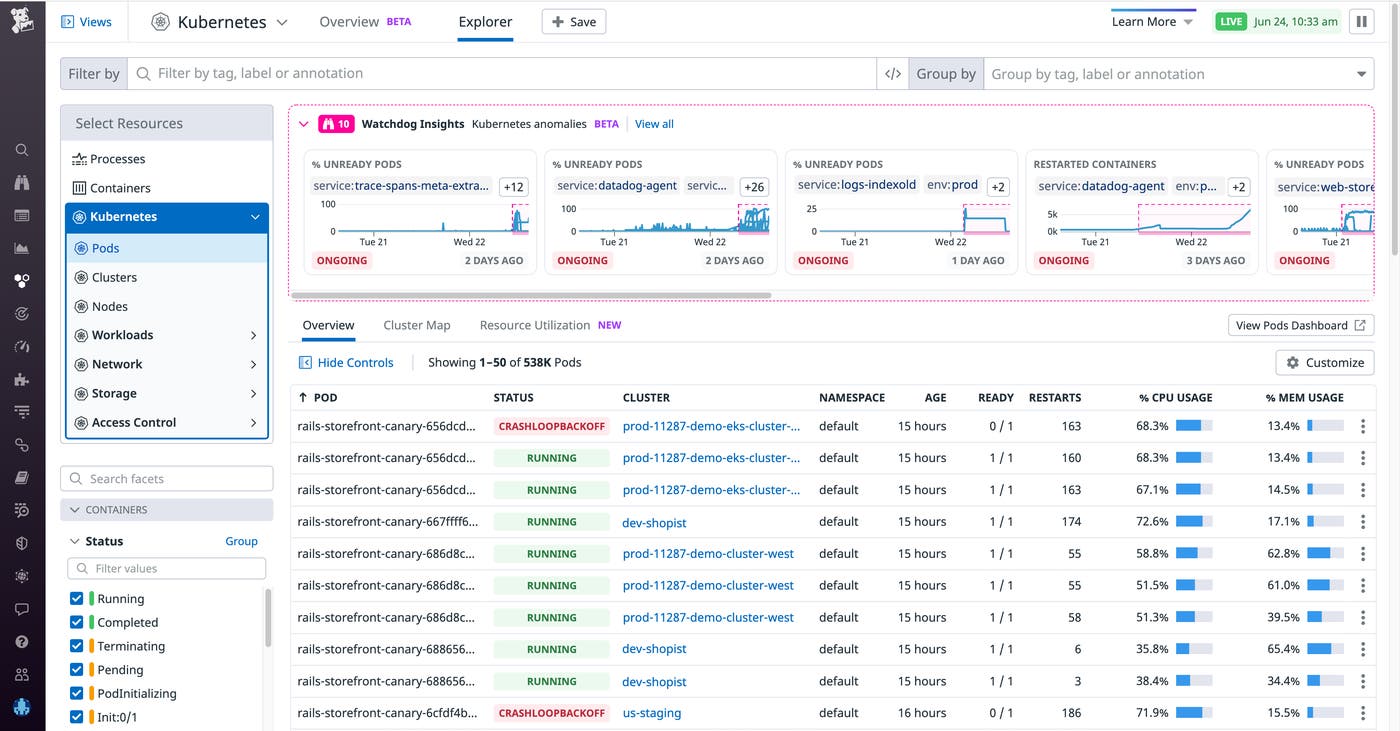
You see an anomalous increase in the number of unready pods and restarted containers. Watchdog Insights prioritizes anomalies based on a number of factors—such as the current state of the anomaly (ongoing or resolved) and its history (i.e., whether it is a new error or an increase in an existing error)—to further guide you in what you should look at first (highest priority on the left side of the carousel). These anomalies are analyzed based on your current search context (e.g., service, env, kube_cluster_name, or kube_namespace). You can narrow down your search context to the service that triggered the alert (e.g., service:web-store) and filter out any anomalies that aren’t relevant to your investigation (e.g., anything detected outside of env:prod) to drill down to the anomaly causing the performance issue.
Let’s suppose that, after successfully filtering out unrelated anomalies, you now see just one anomaly in your search context: an elevated number of restarted containers. At a glance, you can gauge the extent of the anomaly: the number of containers affected, when the anomaly started, how it evolved over time, and whether it is still ongoing or not. Tags show you the scope of the anomaly’s impact, including which clusters, services, and namespaces are affected. And the Select Resources call-to-action allows you to scope down your search to show only the underlying resources (pod/cluster/nodes, etc.) relevant to the anomaly you are investigating.
You click on the anomaly to see an in-depth explanation and suggested next steps, which recommend specific tags (in the image below, kube_cluster_name:us-prod-east and service:web-store) to observe logs, traces, and metrics from the relevant pods, nodes, and containers.
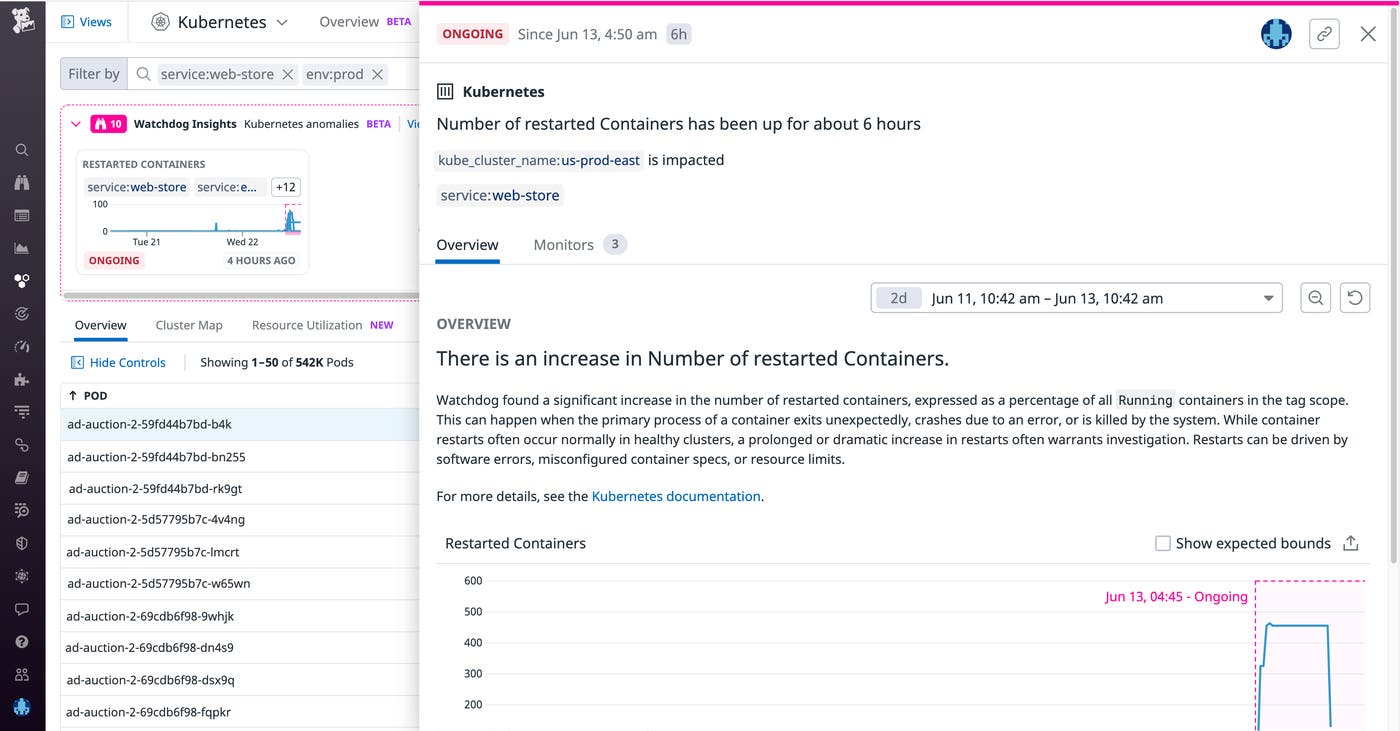
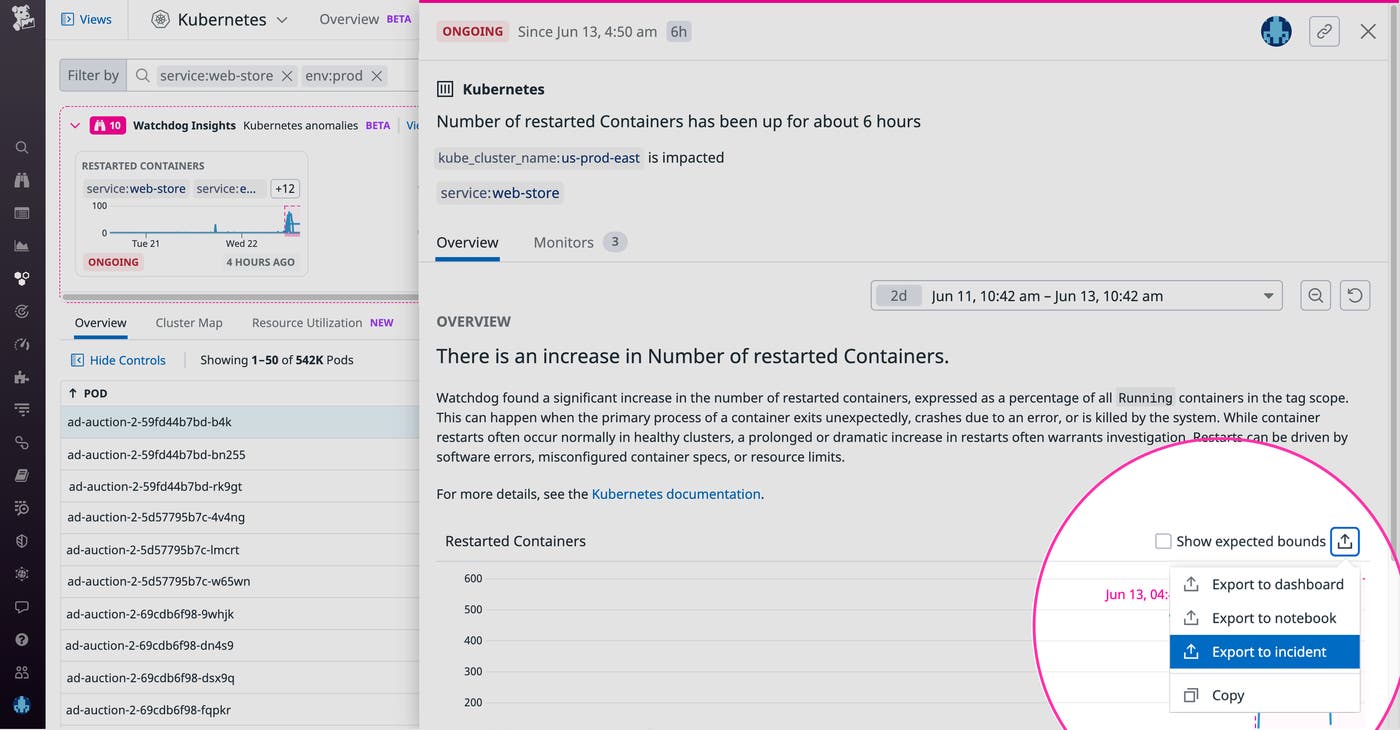
To continue our hypothetical scenario, let’s assume that you then alert a platform engineer to the issue with the us-prod-east cluster. Upon further investigation, the platform engineer finds that the containers are restarting because their memory limit was set too low. Knowing this, the engineer is able to increase the memory limit so that the pods can get rescheduled, eliminating the errors from your customer experience. As in the screenshot below, you can easily export the timeseries to your incident management workflow so that other team members can track this issue’s resolution. Once the issue is resolved, you can add the anomaly to a Notebook to create a postmortem, facilitating cross-team collaboration and the prevention of future incidents.
Watchdog Insights automates the process of detecting and troubleshooting issues in your Kubernetes clusters. Now, engineers can effectively resolve incidents in far less time, regardless of their prior knowledge of the infrastructure involved. Kubernetes Anomalies complements Datadog’s host of Kubernetes monitoring tools, as well as other Watchdog features such as Root Cause Analysis, Watchdog for Infra, Log Anomaly Detection, and Watchdog Insights. If you’re new to Datadog, sign up for a 14-day free trial to start detecting anomalies across all your services automatically.
此内容由惯性聚合(RSS阅读器)自动聚合整理,仅供阅读参考。 原文来自 — 版权归原作者所有。