


惯性聚合 高效追踪和阅读你感兴趣的博客、新闻、科技资讯
阅读原文 在惯性聚合中打开

推荐订阅源

C
Cisco Blogs
Cyberwarzone
Cyberwarzone
Exploit-DB.com RSS Feed
SecWiki News
SecWiki News
Martin Fowler
Martin Fowler
T
Tor Project blog
N
Netflix TechBlog - Medium
C
Cybersecurity and Infrastructure Security Agency CISA
V
Vulnerabilities – Threatpost
V
Visual Studio Blog
GbyAI
GbyAI
PCI Perspectives
PCI Perspectives
D
DataBreaches.Net
Jina AI
Jina AI
H
Heimdal Security Blog
云风的 BLOG
云风的 BLOG
P
Privacy International News Feed
A
About on SuperTechFans
J
Java Code Geeks
美团技术团队
H
Hackread – Cybersecurity News, Data Breaches, AI and More
N
News | PayPal Newsroom
有赞技术团队
有赞技术团队
MyScale Blog
MyScale Blog
博客园 - 司徒正美
C
Check Point Blog
T
Threat Research - Cisco Blogs
Attack and Defense Labs
宝玉的分享
宝玉的分享
AI
AI
Simon Willison's Weblog
C
Cyber Attacks, Cyber Crime and Cyber Security
I
Intezer
P
Proofpoint News Feed
Blog — PlanetScale
Blog — PlanetScale
Apple Machine Learning Research
Hugging Face - Blog
Hugging Face - Blog
The Last Watchdog
The Last Watchdog
freeCodeCamp Programming Tutorials: Python, JavaScript, Git & More
Vercel News
Vercel News
I
InfoQ
阮一峰的网络日志
阮一峰的网络日志
Cisco Talos Blog
Cisco Talos Blog
W
WeLiveSecurity
Hacker News: Ask HN
Hacker News: Ask HN
Recent Commits to openclaw:main
奇客Solidot–传递最新科技情报
奇客Solidot–传递最新科技情报
D
Docker
博客园 - Franky
Security Archives - TechRepublic

Analytics Vidhya

Handling Imbalanced Classification: What Works Better Than SMOTE GPT-5.6 Is Here: Sol, Terra, and Luna Loop Engineering for AI Agents: How /loop is Changing AI Workflows DeepSeek DSpark: The Speculative Decoding Trick Behind 400% Faster LLM OKF: Redefining Knowledge Bases for AI Agents Modern VLMs Explained: How GPT-4o, Gemini, Claude Vision, and Qwen-VL Work YOLO26 Tutorial: Object Detection, Pose Estimation & More Large Action Models (LAMs) vs Agentic LLMs: What's the Real Difference? Claude Sonnet 5: The Fable 5 at Home The Best $20 AI Plan: ChatGPT Plus vs Claude Pro vs Gemini Pro GraphRAG vs Vector RAG: Which Retrieval Method is Best? Using AI When You Don’t Trust AI The Self-Improving Loop in AI Agents: Architecture, Benefits, and How it Outperforms Traditional Agent Workflows Harness-1: The 20B Retrieval Subagent That Beats GPT-5.4 at Search Sakana Fugu: Multi-Agent System as a Model Claude's Hidden Art Skill: Making Illustrations With Code System Design for ML Interviews: 10 Real Problems Walked Through Most People Use ChatGPT Wrong: 10 Features and Tips That Changed How I Work OpenAI Just Launched 3 Free AI Courses with Certificates Autoregressive Models: Predicting the Future Using the Past Gemini Omni: AI Video Generation Inside Gemini DiffusionGemma: Google’s Diffusion-Based Open Model for Faster Text Generation Top 10 AI Engineering Tools Everyone is Using in 2026 I Tested Claude Fable 5: Can Anthropic’s Newest AI Deliver on the Hype? Prophet vs NeuralProphet vs TimeGPT vs Chronos: A Practical Comparison Build an Emergency Helpline Voice Agent with LangChain Choosing the Right Vector Database for RAG and AI Applications Google Gemma 4 12B: Architecture, Benchmarks, Access, and Hands-on Guide for Developers How to Choose the Right AI Model for Your Needs Agent Observability with LangSmith, Langfuse, and Arize: A Hands-On Comparison How to Use Claude Managed Agents? Google AI Studio vs Gemini App: What’s the Difference? AI Workflows for Sales Teams: Prospect Research, Lead Qualification, and CRM Updates on Autopilot Using LangGraph 25 Most Influential AI Pioneers to Meet at DataHack Summit 2026 Claude Opus 4.8: A Smarter Model in the Right Direction PySpark Optimization: 12 Proven Techniques to Speed Up Your Spark Jobs 10 Everyday Tasks You Can Automate with AI Today (With n8n Templates) Google Antigravity 2.0: The Full Developer Guide (I/O 2026) Build a Claude Cowork-Like Browser Agent Using Playwright MCP and Claude Desktop Pandas vs Polars vs DuckDB: Which Library Should You Choose? Qwen3.7-Max: Alibaba’s New Agent-First LLM for Coding, Reasoning, and Long-Horizon AI Workflows The Biggest Announcements from Google I/O 2026 Top 9 AI Events and Conferences in 2026 that you Must Attend Gemini 3.5 Flash: Frontier Intelligence with Speed Kimi WebBridge: Hands-on Guide to Kimi’s Browser Extension for AI Agents 40 Advanced SQL Window Functions Every Data Scientist Must Know(with examples) Top 10 AI Research Papers of 2025 6 Steps to Crack GenAI Case Study Interviews (With Real Examples) OpenAI Omni Moderation: How to Filter Text & Images for Free DataHack Summit 2026: You Just Cannot Skip This AI Event of the Year OpenAI’s New API Voice Models Will Change the Way You Use AI Hermes Agent Guide: What is it and How to Use it? Top 10 LLM Research Papers of 2026 Agent Memory Patterns in Cognitive Science and AI Systems 10 AI Agents Every AI Engineer Must Build (with GitHub Samples) 23 Tips for Smart Claude Code Token Saving and Workflow Optimization Feature Engineering with LLMs: Techniques & Python Examples ChatGPT is Now Inside Excel and Google Sheets: Here is How to Use it Gemini API File Search: The Easy Way to Build RAG Top 10 Open-Source Libraries to Fine-Tune LLMs Locally ML Intern in Practice: From Prompt to a Shipped Hugging Face Model 15+ Solved Agentic AI Projects with Github Links How People are Figuring Out Life With Claude MemPalace Explained: Building Long-Term Memory for AI Agents Beyond RAG Grok Voice Think Fast 1.0: Build Voice AI Agents That Actually Think Compressing LSTM Models for Retail Edge Deployment: A Practical Comparison MCP vs Agent Skills: Different Altogether GPT 5.5 vs Opus 4.7: Which is the Best AI Model Today? What is Agentic AI? Claude Code vs Codex: A Detailed Terminal Agent Comparison Google Deep Research Max: Build Autonomous AI Research Agents in Minutes Meta Muse Spark Review: Is It Worth the Hype? ChatGPT Images 2.0 vs Nano Banana 2: Which is Better? Cursor V3 Explained: The AI Coding Agent That’s Replacing Traditional IDEs in 2026 DeepSeek-V4: The Most Powerful Open-Source Model Ever Is GPT Image 2 the Best Image Generation Model? Token Economics: Why AI is Getting “Cheaper” From Idea to Output: Claude Does the Design Work Opus 4.7 vs Opus 4.6: Should You Switch? Build Human-Like AI Voice App with Gemini 3.1 Flash TTS How to Structure a Claude Code Project that Thinks Like an Engineer Anthropic Launches Claude Opus 4.7 For “Most Difficult Tasks” Top 28 Claude Shortcuts that will 10X your Speed GPT-5.4-Cyber: Why OpenAI is Keeping its Most Powerful Model Under Lock and Key Google AI Studio Guide: Every Feature Explained Mastering Deep Agents: Context Engineering that Actually Works 21 Computer Vision Projects from Beginner to Advanced (2026 Guide) Excel 101: Excel Agent Mode Explained MiniMax M2.7 Goes Open-Weight to Let You Run Agents Locally Top 10 Gemma 4 Projects That Will Blow Your Mind GLM-5.1: Architecture, Benchmarks, Capabilities & How to Use It Understanding BERTopic: From Raw Text to Interpretable Topics From Karpathy’s LLM Wiki to Graphify: AI Memory Layers are Here 10 Most Important AI Concepts Explained Simply Project Glasswing is World’s Most Powerful AI in Action How to Run Gemma 4 on Your Phone Without Internet: A Hands-On Guide Running Claude Code for Free with Gemma 4 and Ollama LLM Wiki Revolution: How Andrej Karpathy’s Idea is Changing AI Rethinking Enterprise Search: How Cortex Search Turns Data into Business Impact Google’s Gemma 4: Is it the Best Open-Source Model of 2026?
Gemma 4 Tool Calling Explained: Build AI Agents with Function Calling (Step-by-Step Guide)
Sarthak Dogr · 2026-04-19 · via Analytics Vidhya

Imagine asking your AI model, “What’s the weather in Tokyo right now?” and instead of hallucinating an answer, it calls your actual Python function, fetches live data, and responds correctly. That’s how empowering the tool call functions in the Gemma 4 from Google are. A truly exciting addition to open-weight AI: this function calling is structured, reliable, and built directly into the AI model!

Coupled with Ollama for local referencing, it allows you to develop non-cloud-dependent AI agents. The best part – these agents have access to real-world APIs and services locally, without any subscription. In this guide, we will cover the concept and implementation architecture as well as three tasks that you can experiment with immediately.

Also read: Running Claude Code for Free with Gemma 4 and Ollama

What is Tool Calling in LLMs?

Conversational language models have a limited knowledge based on when they were developed. Hence, they can offer only an approximate answer when you ask for current market prices or current weather conditions. This lack was addressed by providing an API wrapper around common models (functions). The aim – to solve these types of questions via (tool-calling) service(s).

By enabling tool-calling, the model can recognize:

  • When it is necessary to retrieve outside information
  • Identify the correct function based on the provided API
  • Compile correctly formatted method calls (with arguments)

It then waits until the execution of that code block returns the output. It then composes an assessed answer based on the received output.

To clarify: the model never executes the method calls that have been created by the user. It only determines which methods to call and how to structure the method call argument list. The user’s code will execute the methods that they called via the API function. In this scenario, the model represents the brain of a human, while the functions being called represent the hands.

Gemma 4 Tool Calling Architecture

Before you begin writing code, it is beneficial to understand how everything works. Here is the loop that each tool in Gemma 4 will follow, as it makes tool calls:

  1. Define functions in Python to perform actual tasks (i.e., retrieve weather data from an external source, query a database, convert money from one currency to another).
  2. Create a JSON schema for each of the functions you have created. The schema should contain the name of the function and what its parameters are (including their types).
  3. When the system sends a message to you, you send both the tool-schemas you have created and the system’s message to the Ollama API.
  4. The Ollama API returns data in a tool_calls block rather than plain text.
  5. You execute the function using the parameters sent to you by the Ollama API.
  6. You return the result back to the Ollama API as a ‘role’:’tool’ response.
  7. The Ollama API receives the result and returns the answer to you in natural language.

This two-pass pattern is the foundation for every function-calling AI agent, including the examples shown below.

Gemma 4 Tool Calling Environment Setup

To execute these tasks, you will need two components: Ollama must be installed locally on your machine, and you will need to download the Gemma 4 Edge 2B model. There are no dependencies beyond what is provided with the standard installation of Python, so you don’t need to worry about installing Pip packages at all.

1. To install Ollama with Homebrew or MacOS:

# Install Ollama (macOS/Linux) 
curl --fail -fsSL https://ollama.com/install.sh | sh 

2. To download the model (which is approximately 2.5 GB):

# Download the Gemma 4 Edge Model – E2B 
ollama pull gemma4:e2b

After downloading the model, use the Ollama list to confirm it exists in the list of models. You can now connect to the running API at the URL http://localhost:11434 and run requests against it using the helper function we will create:

import json, urllib.request, urllib.parse
def call_ollama(payload: dict) -> dict:
    data = json.dumps(payload).encode("utf-8")
    req = urllib.request.Request(
        "http://localhost:11434/api/chat",
        data=data,
        headers={"Content-Type": "application/json"},
    )
    with urllib.request.urlopen(req) as resp:
        return json.loads(resp.read().decode("utf-8"))

No third-party libraries are needed; therefore, the agent can run independently and provides complete transparency.

Also read: How to Run Gemma 4 on Your Phone: A Hands-On Guide

Hands-on Task 01: Live Weather Lookup

The first of our methods uses open-meteo that pulls live data for any location through a free weather API that does not need a key in order to pull the information down to the local area based on longitude/latitude coordinates. If you’re going to use this API, you will have to perform a series of steps :

1. Write your function in Python

def get_current_weather(city: str, unit: str = "celsius") -> str:
    geo_url = f"https://geocoding-api.open-meteo.com/v1/search?name={urllib.parse.quote(city)}&count=1"
    with urllib.request.urlopen(geo_url) as r:
        geo = json.loads(r.read())
    loc = geo["results"][0]
    lat, lon = loc["latitude"], loc["longitude"] 
    url = (f"https://api.open-meteo.com/v1/forecast"
           f"?latitude={lat}&longitude={lon}"
           f"&current=temperature_2m,wind_speed_10m"
           f"&temperature_unit={unit}")
    with urllib.request.urlopen(url) as r:
        data = json.loads(r.read())
    c = data["current"]
    return f"{city}: {c['temperature_2m']}°, wind {c['wind_speed_10m']} km/h" 

2. Define your JSON schema

This provides the information to the model so that Gemma 4 knows exactly what the function will be doing/expecting when it is called.

 weather_tool = { 

    "type": "function",
    "function": {
        "name": "get_current_weather",
        "description": "Get live temperature and wind speed for a city.",
        "parameters": {
            "type": "object",
            "properties": {
                "city": {"type": "string", "description": "City name, e.g. Mumbai"},
                "unit": {"type": "string", "enum": ["celsius", "fahrenheit"]}
            },
            "required": ["city"]
        }
    }

3. Create a query for your tool call (as well as handle and process the response back) 

messages = [{"role": "user", "content": "What's the weather in Mumbai right now?"}] response = call_ollama({"model": "gemma4:e2b", "messages": messages, "tools": [weather_tool], "stream": False}) msg = response["message"]
if "tool_calls" in msg: tc = msg["tool_calls"][0] fn = tc["function"]["name"] args = tc["function"]["arguments"] result = get_current_weather(**args) # executed locally
messages.append(msg) 
messages.append({"role": "tool", "content": result, "name": fn})
final = call_ollama({"model": "gemma4:e2b", "messages": messages, "tools": [weather_tool], "stream": False}) 
print(final["message"]["content"])
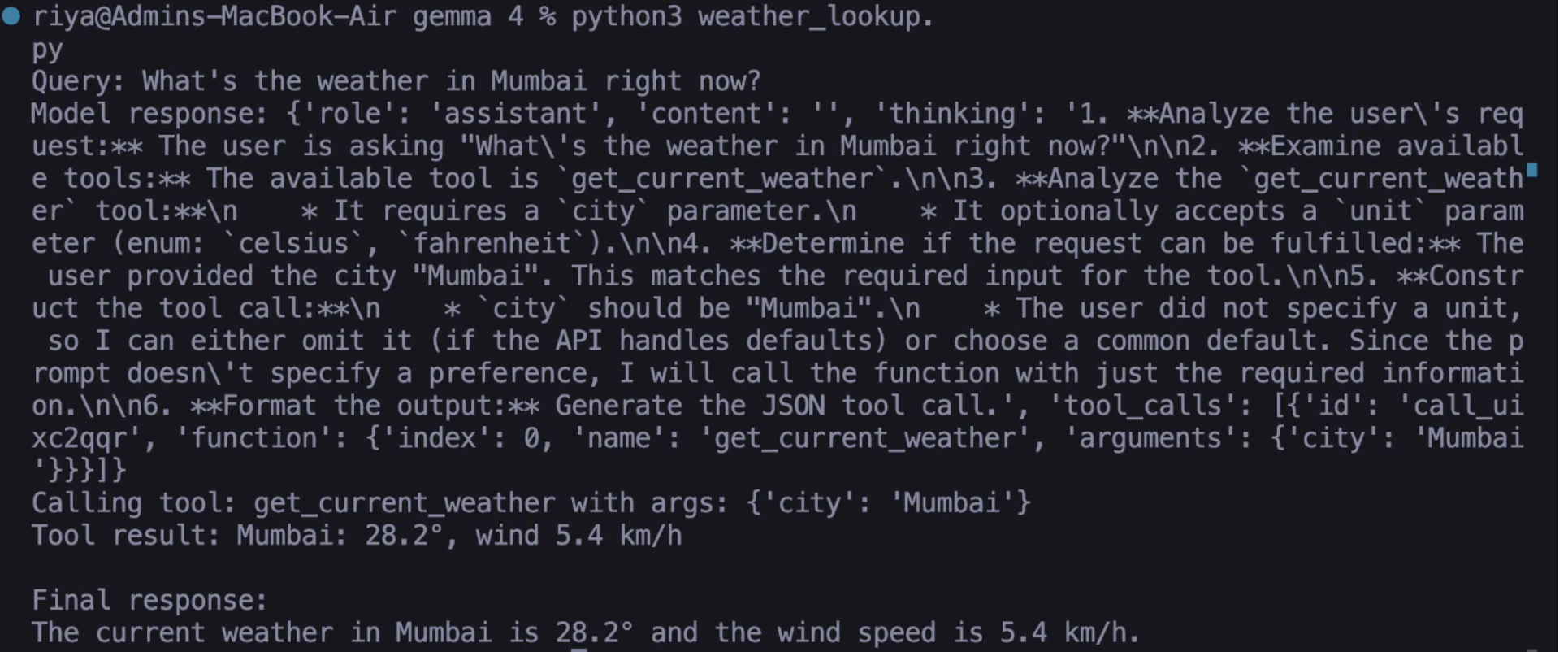
Output

Hands-on Task 02: Live Currency Converter

The classic LLM fails by hallucinating currency values and not being able to provide accurate, up-to-date currency conversion. With the help of ExchangeRate-API, the converter can get the latest foreign exchange rates and convert accurately between two currencies.

Once you complete Steps 1-3 below, you will have a fully functioning converter in Gemma 4:

1. Write your Python function

def convert_currency(amount: float, from_curr: str, to_curr: str) -> str:
    url = f"https://open.er-api.com/v6/latest/{from_curr.upper()}"
    with urllib.request.urlopen(url) as r:
        data = json.loads(r.read())
    rate = data["rates"].get(to_curr.upper())
    if not rate:
        return f"Currency {to_curr} not found."
    converted = round(amount * rate, 2)
    return f"{amount} {from_curr.upper()} = {converted} {to_curr.upper()} (rate: {rate})"

2. Define your JSON schema 

currency_tool = { 

    "type": "function",
    "function": {
        "name": "convert_currency",
        "description": "Convert an amount between two currencies at live rates.",
        "parameters": {
            "type": "object",
            "properties": {
                "amount":    {"type": "number", "description": "Amount to convert"},
                "from_curr": {"type": "string", "description": "Source currency, e.g. USD"}, 
                "to_curr":   {"type": "string", "description": "Target currency, e.g. EUR"}
            },
            "required": ["amount", "from_curr", "to_curr"]
        } 
    }
} 

3. Test your solution using a natural language query

response = call_ollama({
    "model": "gemma4:e2b",
    "messages": [{"role": "user", "content": "How much is 5000 INR in USD today?"}],
    "tools": [currency_tool],
    "stream": False
}) 

Gemma 4 will process the natural language query and format a proper API call based on amount = 5000, from = ‘INR’, to = ‘USD’. The resulting API call will then be processed by the same ‘Feedback’ method described in Task 01.
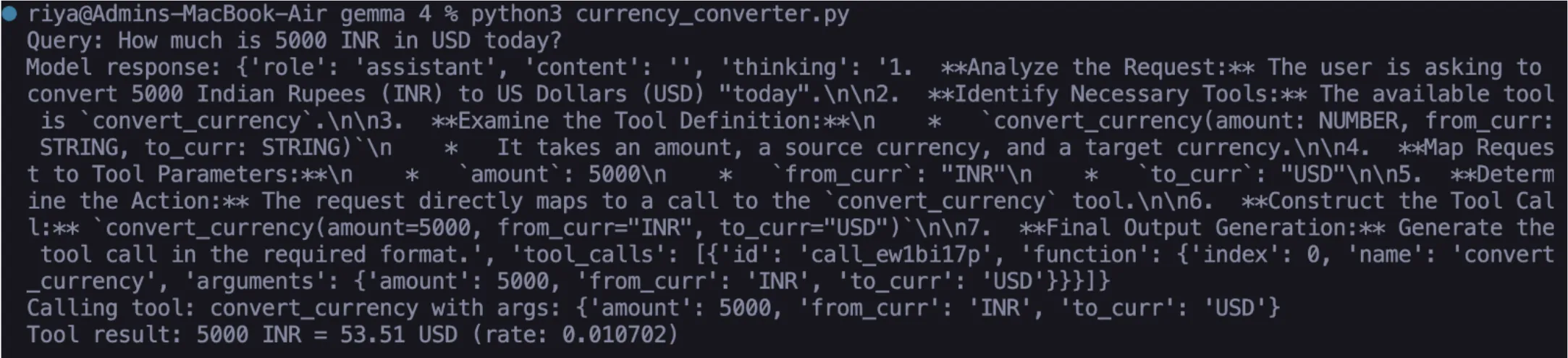
Output

Hands-on Task 03: Multi-Tool Agent (Stacked Calls)

Gemma 4 excels at this task. You can supply the model multiple tools simultaneously and submit a compound query. The model coordinates all the required calls in one go; manual chaining is unnecessary.

1. Add the timezone tool

def get_current_time(city: str) -> str: 

    url = f"https://timeapi.io/api/Time/current/zone?timeZone=Asia/{city}"
    with urllib.request.urlopen(url) as r:
        data = json.loads(r.read())
    return f"Current time in {city}: {data['time']}, {data['dayOfWeek']} {data['date']}"
time_tool = {
    "type": "function",
    "function": {
        "name": "get_current_time",
        "description": "Get the current local time in a city.",
        "parameters": {
            "type": "object",
            "properties": {
                "city": {"type": "string", "description": "City name for timezone, e.g. Tokyo"}
            },
            "required": ["city"]
        }
    } 

2. Build the multi-tool agent loop

TOOL_FUNCTIONS = { "get_current_weather": get_current_weather, "convert_currency": convert_currency, "get_current_time": get_current_time, } 

def run_agent(user_query: str): all_tools = [weather_tool, currency_tool, time_tool] messages = [{"role": "user", "content": user_query}] 

response = call_ollama({"model": "gemma4:e2b", "messages": messages, "tools": all_tools, "stream": False}) 
msg = response["message"] 
messages.append(msg) 
 
if "tool_calls" in msg: 
    for tc in msg["tool_calls"]: 
        fn     = tc["function"]["name"] 
        args   = tc["function"]["arguments"] 
        result = TOOL_FUNCTIONS[fn](**args) 
        messages.append({"role": "tool]]]", "content": result, "name": fn}) 
 
    final = call_ollama({"model": "gemma4:e2b", "messages": messages, "tools": all_tools, "stream": False}) 
    return final["message"]["content"]
return msg.get("content", "")

3. Execute a compound/multi-intent query

print(run_agent(
    "I'm flying to Tokyo tomorrow. What's the current time there, "
    "the weather, and how much is 10000 INR in JPY?"
))e
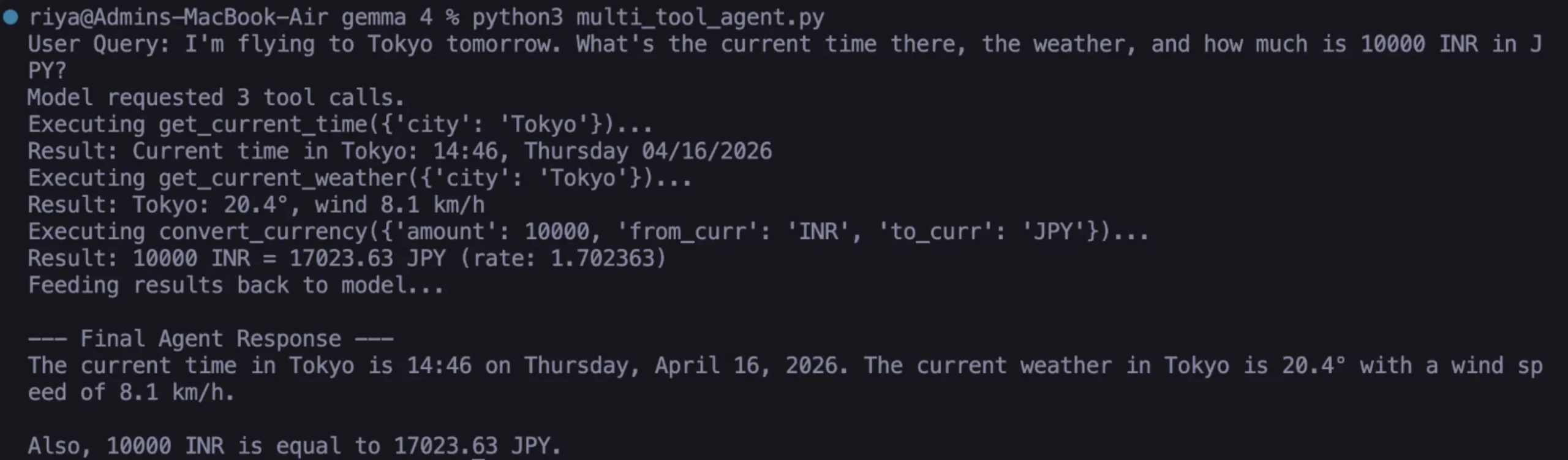
Output

Here, we described three distinct functions with three separate APIs in real-time through natural language processing using one common concept. It includes all local execution without cloud solutions from the Gemma 4 instance; none of these components utilize any remote resources or cloud.

What Makes Gemma 4 Different for Agentic AI?

Other open weight models can call tools, yet they do not perform reliably, and this is what differentiates them from Gemma 4. The model consistently provides valid JSON arguments, processes optional parameters correctly, and determines when to return knowledge and not call a tool. As you keep using it, keep in mind the following:

  • Schema quality is critically important. If your description field is vague, you will have a difficult time identifying arguments for your tool. Be specific with units, formats, and examples.
  • The required array is validated by Gemma 4. Gemma 4 respects the needed/optional distinction.
  • Once the tool returns a result, that result becomes a context for any of the “role”: “tool” messages you send during your final pass. The richer the result from the tool, the richer the response will be.
  • A common mistake is to return the tool result as “role”: “user” instead of “role”: “tool”, as the model will not attribute it correctly and will attempt to re-request the call.

Also read: Top 10 Gemma 4 Projects That Will Blow Your Mind

Conclusion

You have created a real AI agent that uses the Gemma 4 function-calling feature, and it is working entirely locally. The agent-based system uses all the components of the architecture in production. Potential next steps can include:

  • adding a file system tool that will allow for reading and writing local files on demand;
  • using a SQL database as a means for making natural language data queries;
  • creating a memory tool that will create session summaries and write them to disk, thus providing the agent with the ability to recall past conversations

The open-weight AI agent ecosystem is evolving quickly. The ability for Gemma 4 to natively support structured function calling affords substantial autonomous functionality to you without any reliance on the cloud. Start small, create a working system, and the building blocks for your next projects will be ready for you to chain together.

Technical content strategist and communicator with a decade of experience in content creation and distribution across national media, Government of India, and private platforms