
惯性聚合 高效追踪和阅读你感兴趣的博客、新闻、科技资讯
阅读原文 在惯性聚合中打开

推荐订阅源

B
Blog
Microsoft Security Blog
Jina AI
Jina AI
博客园 - 叶小钗
J
Java Code Geeks
博客园 - 聂微东
博客园 - 司徒正美
大猫的无限游戏
大猫的无限游戏
阮一峰的网络日志
阮一峰的网络日志
V
V2EX
美团技术团队
WordPress大学
WordPress大学
M
MIT News - Artificial intelligence
雷峰网
雷峰网
酷 壳 – CoolShell
酷 壳 – CoolShell
GbyAI
GbyAI
罗磊的独立博客
T
The Blog of Author Tim Ferriss
aimingoo的专栏
aimingoo的专栏
T
Tailwind CSS Blog
The Cloudflare Blog
Stack Overflow Blog
Stack Overflow Blog
N
Netflix TechBlog - Medium
小众软件
小众软件

Google Chrome

Switching password managers is easy and safe on Android Tap into the power of Gemini in Chrome on Android. We’re expanding Gemini in Chrome to users in the U.K. Chrome is bringing advanced autofill capabilities to your phone with Google Wallet We’re expanding Gemini in Chrome to users in Latin America, Africa, the Middle East and more. Bringing the best of Gemini in Chrome to Android Approximate location sharing gives you more control over your location data in Chrome. We’re expanding Gemini in Chrome to users in Asia Pacific. A new way to explore the web with AI Mode in Chrome Turn your best AI prompts into one-click tools in Chrome Expanding Chrome’s AI experiences to India, New Zealand and Canada New features in Chrome for work, life and everything in between The latest AI news we announced in January The new era of browsing: Putting Gemini to work in Chrome 60 of our biggest AI announcements in 2025 Take the web for a fresh spin with GenTabs, built with Gemini 3 4 new ways Chrome autofill will simplify your holidays Our favorite Chrome extensions in 2025 AI Mode in Chrome is easier to use on iOS and Android. Chrome now helps you fill in passport, driver’s license, vehicle information and more. The latest AI news we announced in September Go behind the browser with Chrome’s new AI features Chrome: The browser you love, reimagined with AI 5 Chrome features I use all the time as a college student Chrome is helping you shop smarter and safer with store reviews. New Chromebooks and tools for even better teaching and learning You can now move your Chrome address bar to the bottom of your Android screen. Introducing Google AI Ultra: The best of Google AI in one subscription New AI and accessibility updates across Android, Chrome and more
Get more done with new vertical tabs and immersive readin...
Alex Tsu · 2026-04-08 · via Google Chrome

Jess Carpenter

Product Manager, Chrome

General summary

Chrome has two new features to help you focus and be more productive. You can now move your tabs to the side of your browser window by right-clicking and selecting “Show Tabs Vertically.” Also, you can remove distractions from any webpage by right-clicking and selecting “Open in reading mode.”

Summaries were generated by Google AI. Generative AI is experimental.

Basic explainer

Chrome has new features to help you focus. Vertical tabs let you see all your tabs on the side. Reading mode makes web pages simpler so it's easier to read.

Summaries were generated by Google AI. Generative AI is experimental.

Explore other styles:
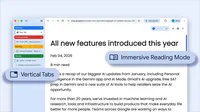
Image of browser window using vertical tabs and immersive reading mode

Your browser does not support the audio element.

Listen to article

This content is generated by Google AI. Generative AI is experimental

[[duration]] minutes

Today we are beginning to roll out two new features designed to streamline your browser and help you maximize productivity in Chrome.

You now have the option to use vertical tabs in Chrome, depending on your preferences. Just right click on any Chrome window and select “Show Tabs Vertically.” By moving your tabs to the side of your browser window, you can read full page titles and manage tab groups with ease — even when your tab count hits double digits. This layout is perfect for multitasking, saving you time by making sure you never lose a tab.

And reading mode, a favorite Chrome feature for deep focus, is even better with a new full-page interface. Right-click on any page and select “Open in reading mode” to remove visual distractions and transform a busy webpage into an immersive, text-focused reading experience.

Try both features to see how a little extra focus can make a big difference.

Related stories