
惯性聚合 高效追踪和阅读你感兴趣的博客、新闻、科技资讯
阅读原文 在惯性聚合中打开

推荐订阅源

博客园 - 叶小钗
爱范儿
爱范儿
WordPress大学
WordPress大学
Last Week in AI
Last Week in AI
博客园 - 聂微东
雷峰网
雷峰网
奇客Solidot–传递最新科技情报
奇客Solidot–传递最新科技情报
博客园 - 三生石上(FineUI控件)
T
Tailwind CSS Blog
博客园 - Franky
酷 壳 – CoolShell
酷 壳 – CoolShell
博客园_首页
OSCHINA 社区最新新闻
OSCHINA 社区最新新闻
博客园 - 司徒正美
月光博客
月光博客
大猫的无限游戏
大猫的无限游戏
钛媒体:引领未来商业与生活新知
钛媒体:引领未来商业与生活新知
freeCodeCamp Programming Tutorials: Python, JavaScript, Git & More
The Cloudflare Blog
让小产品的独立变现更简单 - ezindie.com
人人都是产品经理
人人都是产品经理
宝玉的分享
宝玉的分享
罗磊的独立博客
Jina AI
Jina AI

The Official Google Blog

5 helpful tools from Google to keep your accounts safe This Teacher Appreciation Week, we’re celebrating educators who made a difference in our lives. Find out how AlphaEvolve has gone from research to solving real-life problems. New AI-powered bidding and budgeting innovations in Search and Shopping Here’s how we're celebrating Asian American, Native Hawaiian and Pacific Islander Heritage Month 5 gardening tips you can try right in Search Google Flow Music and Believe bring next-gen tools to artists 5 new ways to explore the web with generative AI in Search AI is reshaping ad creative. Here’s how brands can get it right. Gemini API File Search is now multimodal: build efficient, verifiable RAG Approximate location sharing gives you more control over your location data in Chrome. Accelerating Gemma 4: faster inference with multi-token prediction drafters Here’s what’s new with Google Home. Celebrating educators’ creativity this Teacher Appreciation Week Turn your data into decisions: 3 things your business needs for growth in the AI era Here’s how we’re helping Belgium's farmers save water with AI. Putting educators at the center of AI learning The latest AI news we announced in April 2026 Here's how Google AI is powering small business growth Reduce friction and latency for long-running jobs with Webhooks in Gemini API Celebrating America’s 250th on Google Arts & Culture Supporting startups that are shaping the future of energy Your car with Google built-in is about to get smarter, thanks to Gemini Preferred Sources is now available in all languages. Adapt your Shopping campaigns to modern Search with AI Max. Meet travelers in the moments that matter with Search Campaigns for Travel. AI Max Turns 1 with new ways to steer performance and expansion to more advertisers How we’re protecting energy affordability in Oklahoma Alphabet is one of TIME’s 100 most influential companies of 2026. Q1 2026 earnings call: Remarks from our CEO
Get more done with new vertical tabs and immersive readin...
Alex Tsu · 2026-04-08 · via The Official Google Blog

Jess Carpenter

Product Manager, Chrome

General summary

Chrome has two new features to help you focus and be more productive. You can now move your tabs to the side of your browser window by right-clicking and selecting “Show Tabs Vertically.” Also, you can remove distractions from any webpage by right-clicking and selecting “Open in reading mode.”

Summaries were generated by Google AI. Generative AI is experimental.

Basic explainer

Chrome has new features to help you focus. Vertical tabs let you see all your tabs on the side. Reading mode makes web pages simpler so it's easier to read.

Summaries were generated by Google AI. Generative AI is experimental.

Explore other styles:
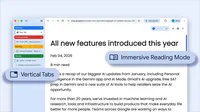
Image of browser window using vertical tabs and immersive reading mode

Your browser does not support the audio element.

Listen to article

This content is generated by Google AI. Generative AI is experimental

[[duration]] minutes

Today we are beginning to roll out two new features designed to streamline your browser and help you maximize productivity in Chrome.

You now have the option to use vertical tabs in Chrome, depending on your preferences. Just right click on any Chrome window and select “Show Tabs Vertically.” By moving your tabs to the side of your browser window, you can read full page titles and manage tab groups with ease — even when your tab count hits double digits. This layout is perfect for multitasking, saving you time by making sure you never lose a tab.

And reading mode, a favorite Chrome feature for deep focus, is even better with a new full-page interface. Right-click on any page and select “Open in reading mode” to remove visual distractions and transform a busy webpage into an immersive, text-focused reading experience.

Try both features to see how a little extra focus can make a big difference.

Related stories