








Well, I don't see any practical applications of the approach I'm going to describe... However, I do think that messing about with things like this is the only way to gain extra knowledge of any system internals. We are going to speak Docker and Linux here. What if we want to take a base Docker image, I mean really base, just an image made with a single line Dockerfile like FROM debian:latest, and convert it to something launchable on a real or virtual machine? In other words, can we create a disk image having exactly the same Linux userland a running container has and then boot from it? For this we would start with dumping container's root file system, luckily it's as simple as just running docker export, however, to finally accomplish the task a bunch of additional steps is needed...
UPD: Seems like there is some practicality in the approach after all! 👉 github.com/linka-cloud/d2vm.
First, let's bring a tiny bit of boring theory in there. What does the Linux operating system look like after its installation has been done? Basically, it's an on-disk combination of Linux kernel binary, initial ramdisk binary, and userland programs and libraries, usually in form of GNU Core Utilities. And the last but not least - the bootloader.
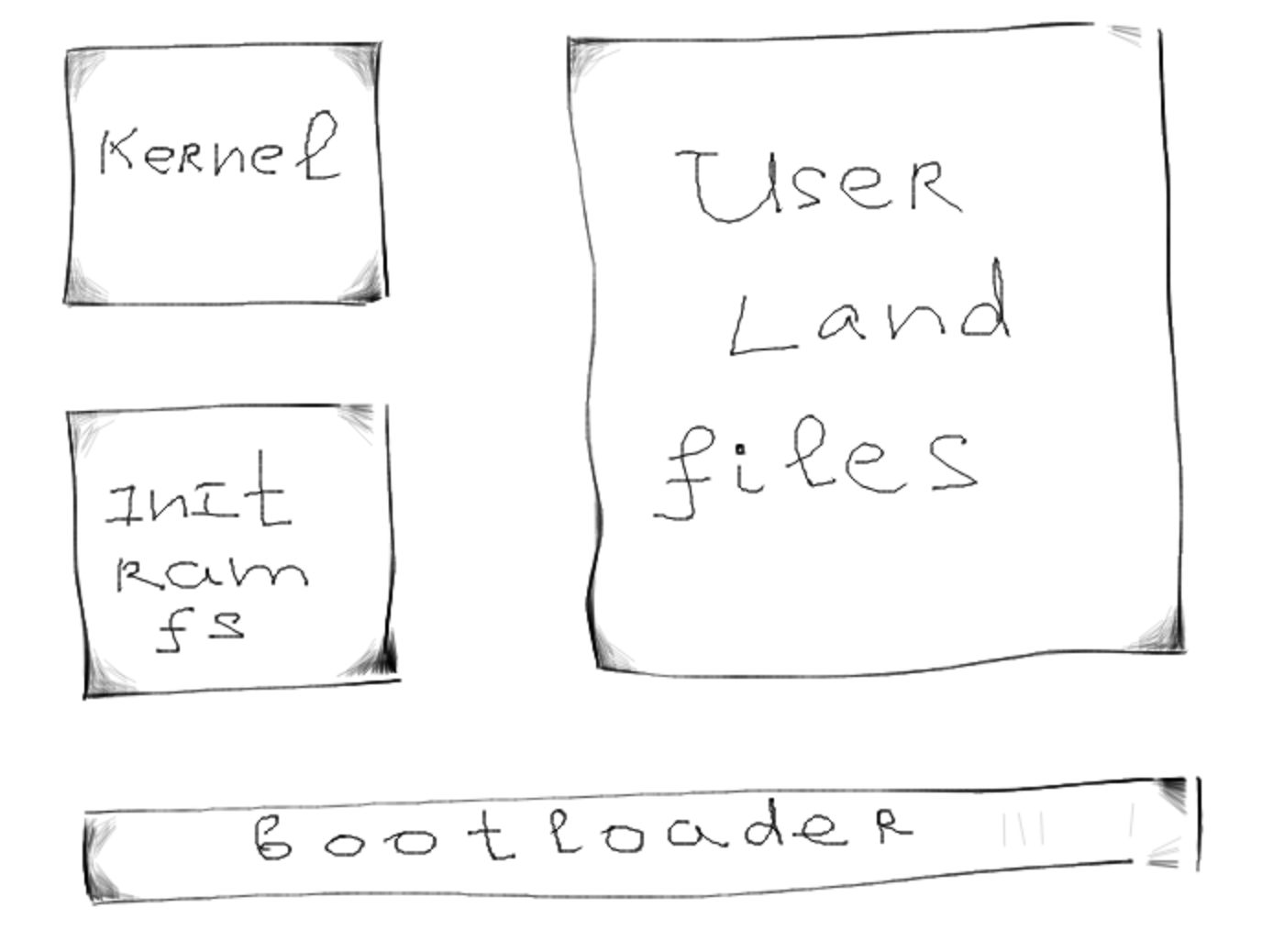
Let's run tree -L 1 / and check the root directory structure:
$ cat /etc/os-release | grep NAME
PRETTY_NAME="Debian GNU/Linux 9 (stretch)"
NAME="Debian GNU/Linux"

$ tree -L 1 /
/
├── bin
├── boot
├── data
├── dev
├── etc
├── home
├── initrd.img -> boot/initrd.img-4.9.0-9-amd64  # initial ramdisk
├── lib
├── lib64
├── media
├── mnt
├── opt
├── proc
├── root
├── run
├── sbin
├── srv
├── sys
├── tmp
├── usr
├── var
└── vmlinuz -> boot/vmlinuz-4.9.0-9-amd64        # kernel binary
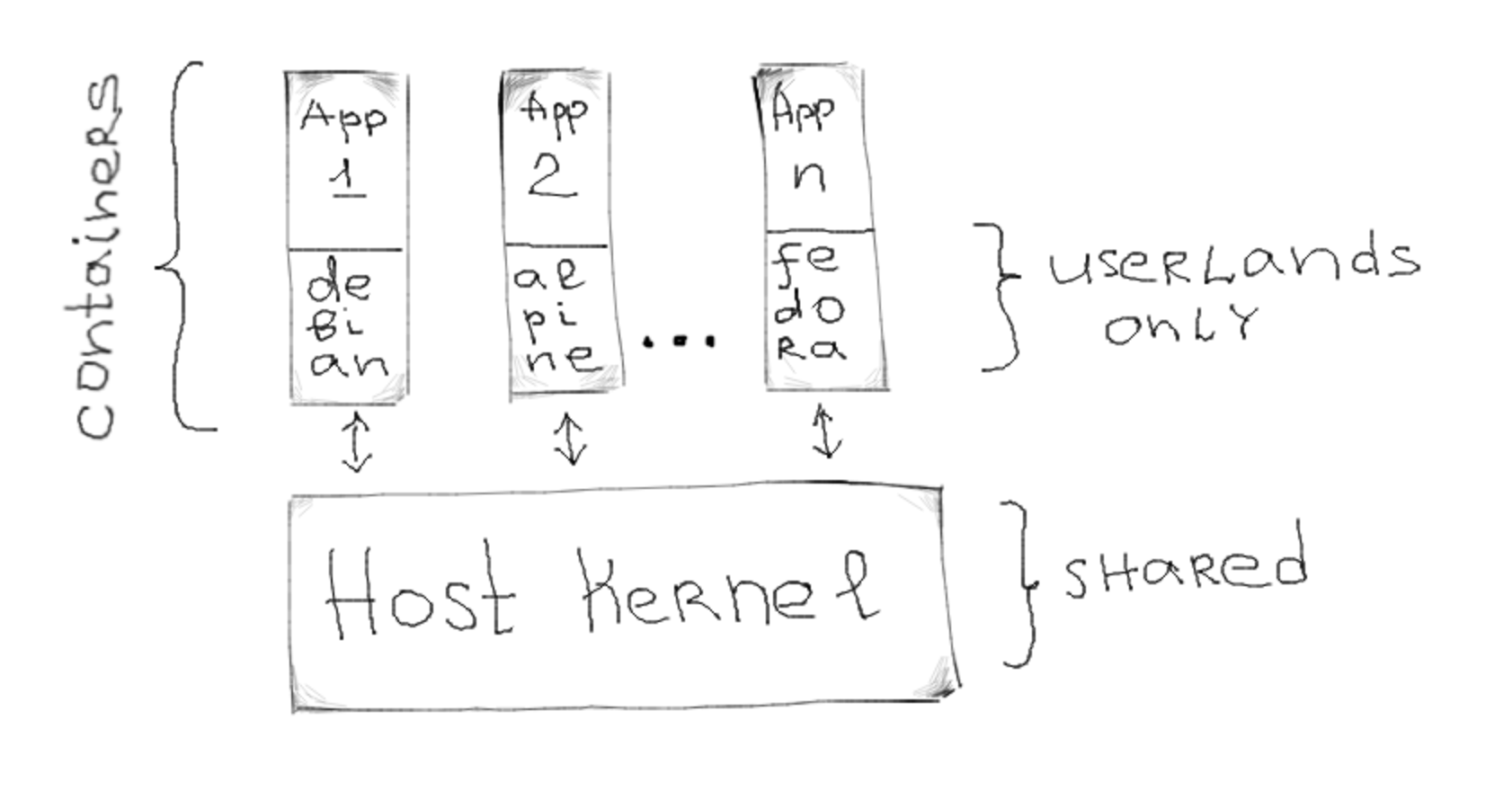
Now let's have a brief look at Docker. Docker follows the OS-level virtualization way to encapsulate its containers. It basically means that running containers reuse the host's kernel while their userlands are completely separated and come from the appointed Linux distributions:
Let's launch a container and also inspect the root directory:
$ docker run -it debian:latest bash

root@62376e4c451b:/# cat /etc/os-release | grep NAME
PRETTY_NAME="Debian GNU/Linux 9 (stretch)"
NAME="Debian GNU/Linux"

root@62376e4c451b:/# apt-get update && apt-get install -y tree
root@62376e4c451b:/# tree -L 1
.
|-- bin
|-- boot
|-- dev
|-- etc
|-- home
|-- lib
|-- lib64
|-- media
|-- mnt
|-- opt
|-- proc
|-- root
|-- run
|-- sbin
|-- srv
|-- sys
|-- tmp
|-- usr
`--  var

19 directories, 0 files

root@62376e4c451b:/# tree -L 1 /boot
boot/

0 directories, 0 files
We can see Debian's userland in there, but at the same time, there is nothing about kernel & Co. However, this is not the only difference. While a Linux operating system runs its init daemon as a process with PID 1, Docker containers usually have either shell or directly user-defined executable as a PID 1 processes. Hence, we also need to address this discrepancy to bring container's state as close as possible to the full-fledged Debian installation.
Ok, finally, the practical part begins. Let's create a Dockerfile with the following content to have the reproducible process:
FROM debian:stretch
Now let's build it with docker build --platform=linux/amd64 -t mydebian . and inspect the image with glorious wagoodman/dive: dive mydebian.
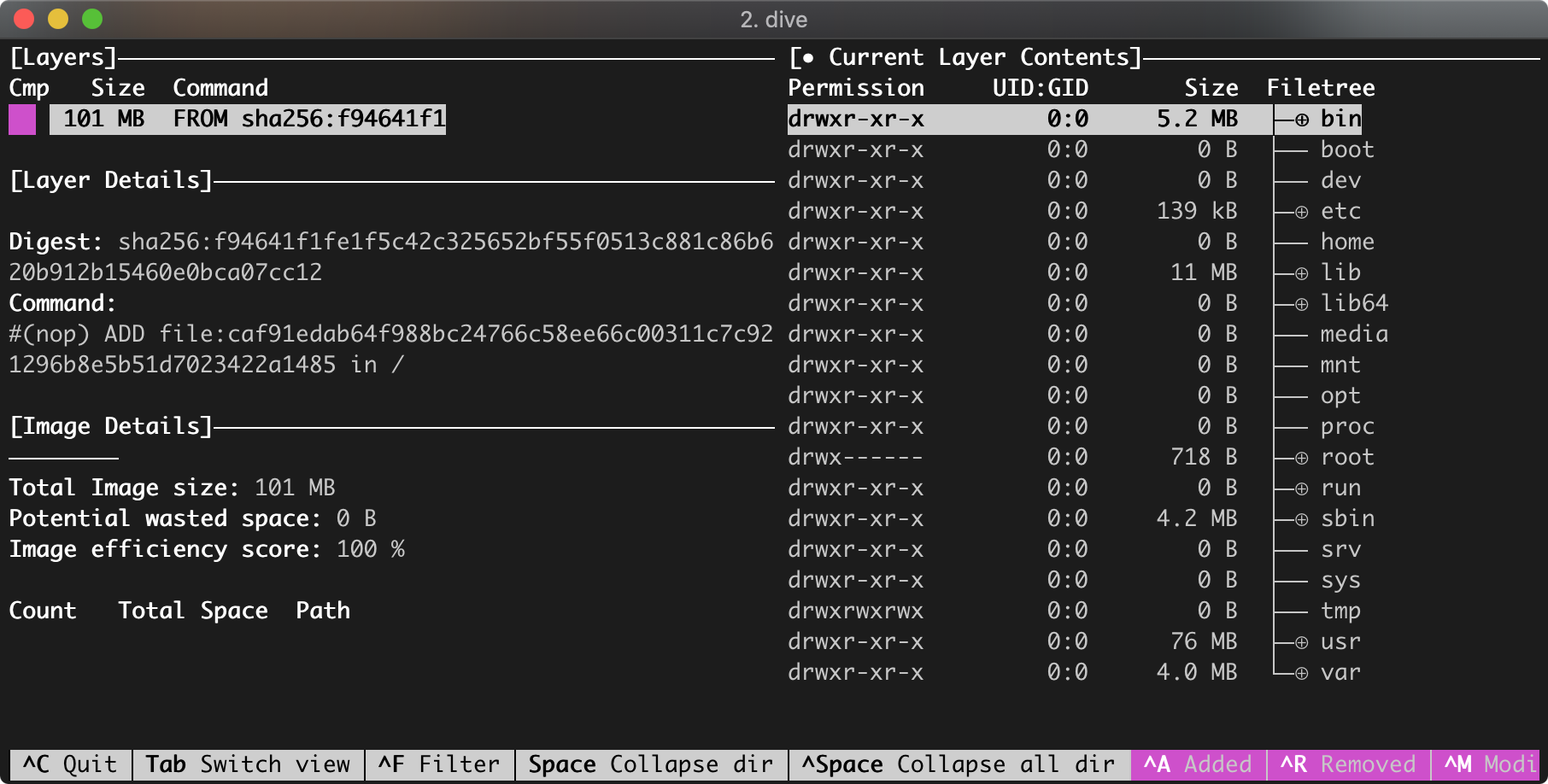
debian userland only image
We can see, that the total image size is only 101 MB, even though the image contains fully-functional Debian userland. Since we are still missing the kernel, we need to download and install kernel binaries. Easy doable with the following modification of the Dockerfile:
FROM debian:stretch
RUN apt-get -y update
RUN apt-get -y install --no-install-recommends \
  linux-image-amd64
Let's rebuild and inspect the new image:
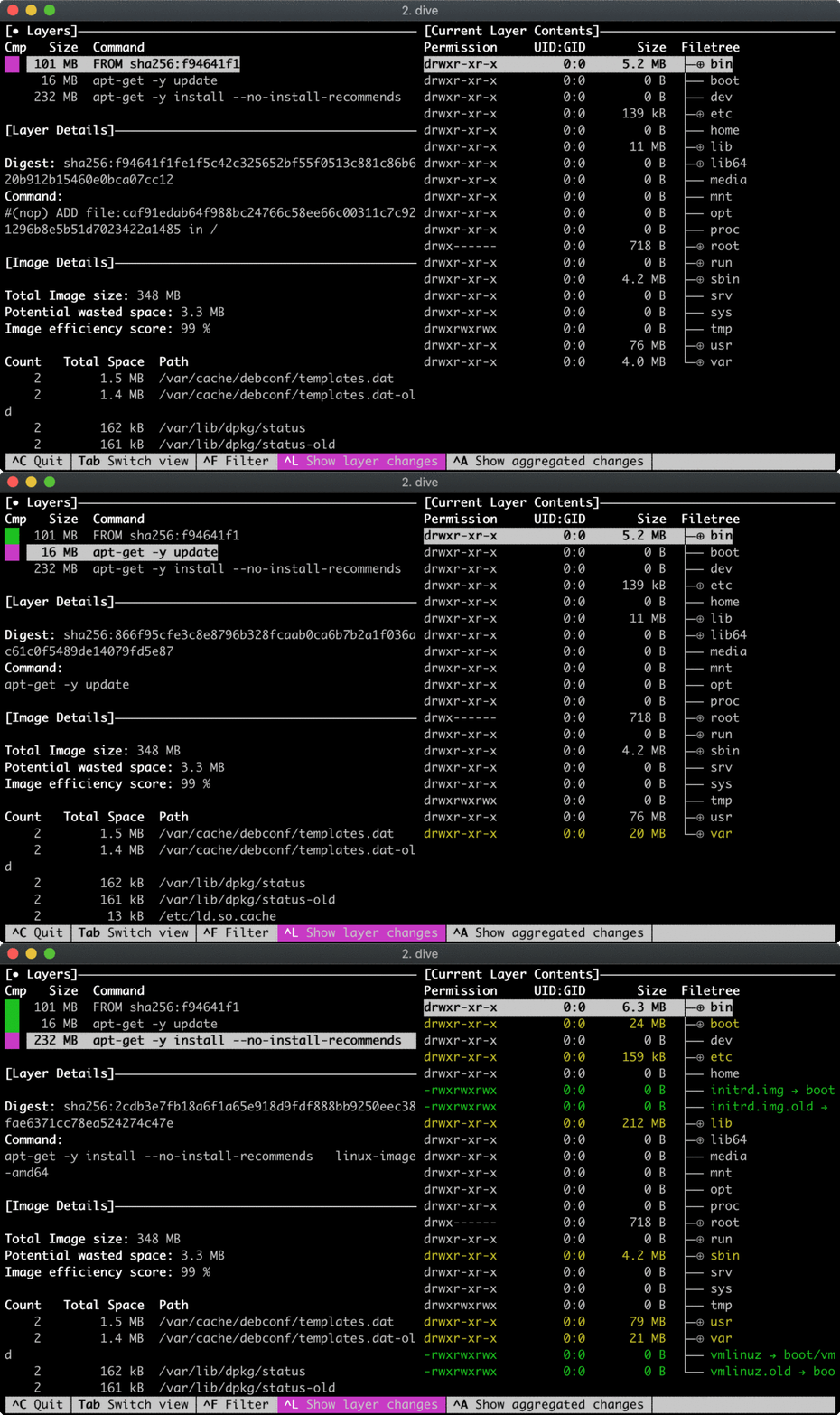
debian userland + kernel image
Looks like linux-image-amd64 package brought extra 232 MB, where 24 MB came from /boot folder and around 200 MB from /lib. Let's dive deeper...
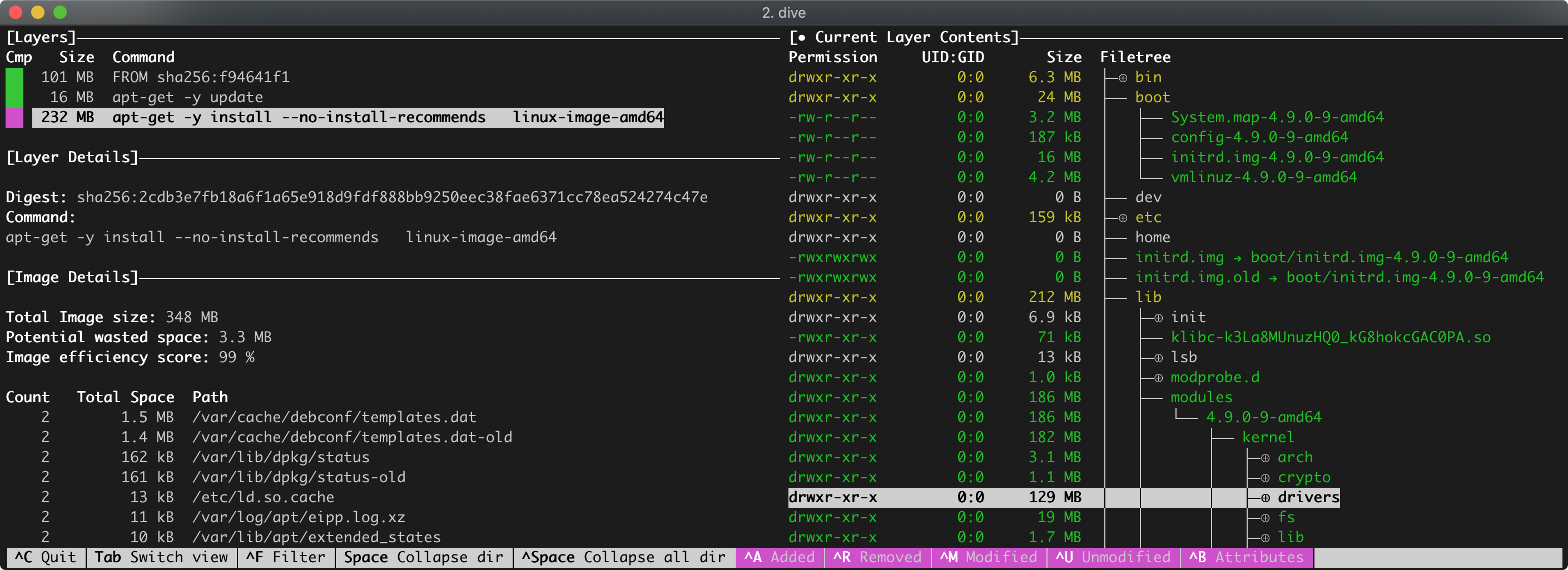
debian userland + kernel image (detailed)
Notice that the kernel itself /boot/vmlinuz-4.9.0-9-amd64 is only 4.2 MB, initial ramdisk /boot/initrd.img-4.9.0-9-amd64 is 16 more megabytes and the remaining ~200 MB is a shit load of kernel modules in /lib/modules, with the prevalent drivers folder.
It's time to bring in the init daemon - systemd:
FROM debian:stretch
RUN apt-get -y update
RUN apt-get -y install --no-install-recommends \
  linux-image-amd64
RUN apt-get -y install --no-install-recommends \
  systemd-sysv
Rebuild and inspect again:
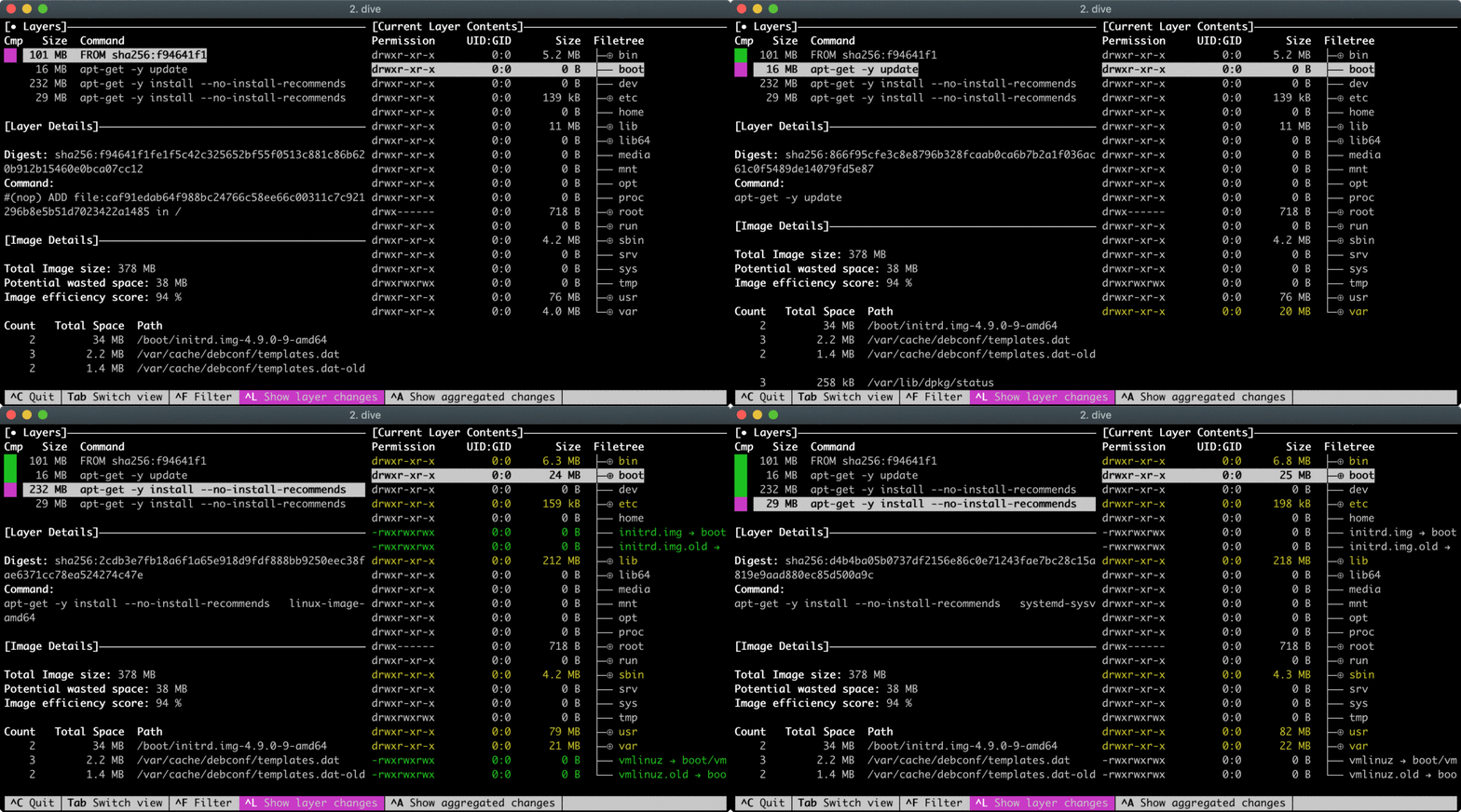
debian userland + systemd + kernel image
Some ca. 30 more megabytes and we are almost there! Let's export container's filesystem:
$ CID=$(docker run -d mydebian /bin/true)
$ docker export -o linux.tar ${CID}

# List files in the archive:
$ tar -tf linux.tar | grep -E '^[^/]*/?$'
.dockerenv
bin/
boot/
dev/
etc/
home/
initrd.img
initrd.img.old
lib/
lib64/
media/
mnt/
opt/
proc/
root/
run/
sbin/
srv/
sys/
tmp/
usr/
var/
vmlinuz
vmlinuz.old
And make a bootable disk image out of the tar archive. The following steps could be done directly on a Linux host machine, but since I use macOS at the moment, I'll start another Debian container as a builder machine:
$ docker run -it -v `pwd`:/os:rw            \
    --cap-add SYS_ADMIN --device /dev/loop0 \
    debian:stretch bash
We need to create a sufficiently-sized image file first:
$ IMG_SIZE=$(expr 1024 \* 1024 \* 1024)
$ dd if=/dev/zero of=/os/linux.img bs=${IMG_SIZE} count=1
Then create a partition on the newly created disk image:
$ sfdisk /os/linux.img <<EOF
label: dos
label-id: 0x5d8b75fc
device: new.img
unit: sectors

linux.img1 : start=2048, size=2095104, type=83, bootable
EOF

Checking that no-one is using this disk right now ... OK

Disk /os/linux.img: 1 GiB, 1073741824 bytes, 2097152 sectors
Units: sectors of 1 * 512 = 512 bytes
Sector size (logical/physical): 512 bytes / 512 bytes
I/O size (minimum/optimal): 512 bytes / 512 bytes

>>> Script header accepted.
>>> Script header accepted.
>>> Script header accepted.
>>> Script header accepted.
>>> Created a new DOS disklabel with disk identifier 0x5d8b75fc.
/os/linux.img1: Created a new partition 1 of type 'Linux' and of size 1023 MiB.
/os/linux.img2: Done.

New situation:

Device         Boot Start     End Sectors  Size Id Type
/os/linux.img1 *     2048 2097151 2095104 1023M 83 Linux

The partition table has been altered.
Syncing disks.
Mount this image, format it using ext3 filesystem and copy content of the tar archive to it:
$ OFFSET=$(expr 512 \* 2048)
$ losetup -o ${OFFSET} /dev/loop0 /os/linux.img
$ mkfs.ext3 /dev/loop0
$ mkdir /os/mnt
$ mount -t auto /dev/loop0 /os/mnt/
$ tar -xvf /os/linux.tar -C /os/mnt/
Finally, we need to install the bootloader and unmount the image:
$ apt-get update -y
$ apt-get install -y extlinux

$ extlinux --install /os/mnt/boot/
$ cat > /os/mnt/boot/syslinux.cfg <<EOF
DEFAULT linux
  SAY Now booting the kernel from SYSLINUX...
 LABEL linux
  KERNEL /vmlinuz
  APPEND ro root=/dev/sda1 initrd=/initrd.img
EOF

$ dd if=/usr/lib/syslinux/mbr/mbr.bin of=/os/linux.img bs=440 count=1 conv=notrunc

$ umount /os/mnt
$ losetup -D
As a result of the steps from above, we will have a disk image linux.img in the working directory.
We just created a bootable Linux disk image which can be dumped to a real or virtual drive. For example, one can easily boot a QEMU virtual machine using the image:
$ qemu-system-x86_64 -drive file=linux.img,index=0,media=disk,format=raw
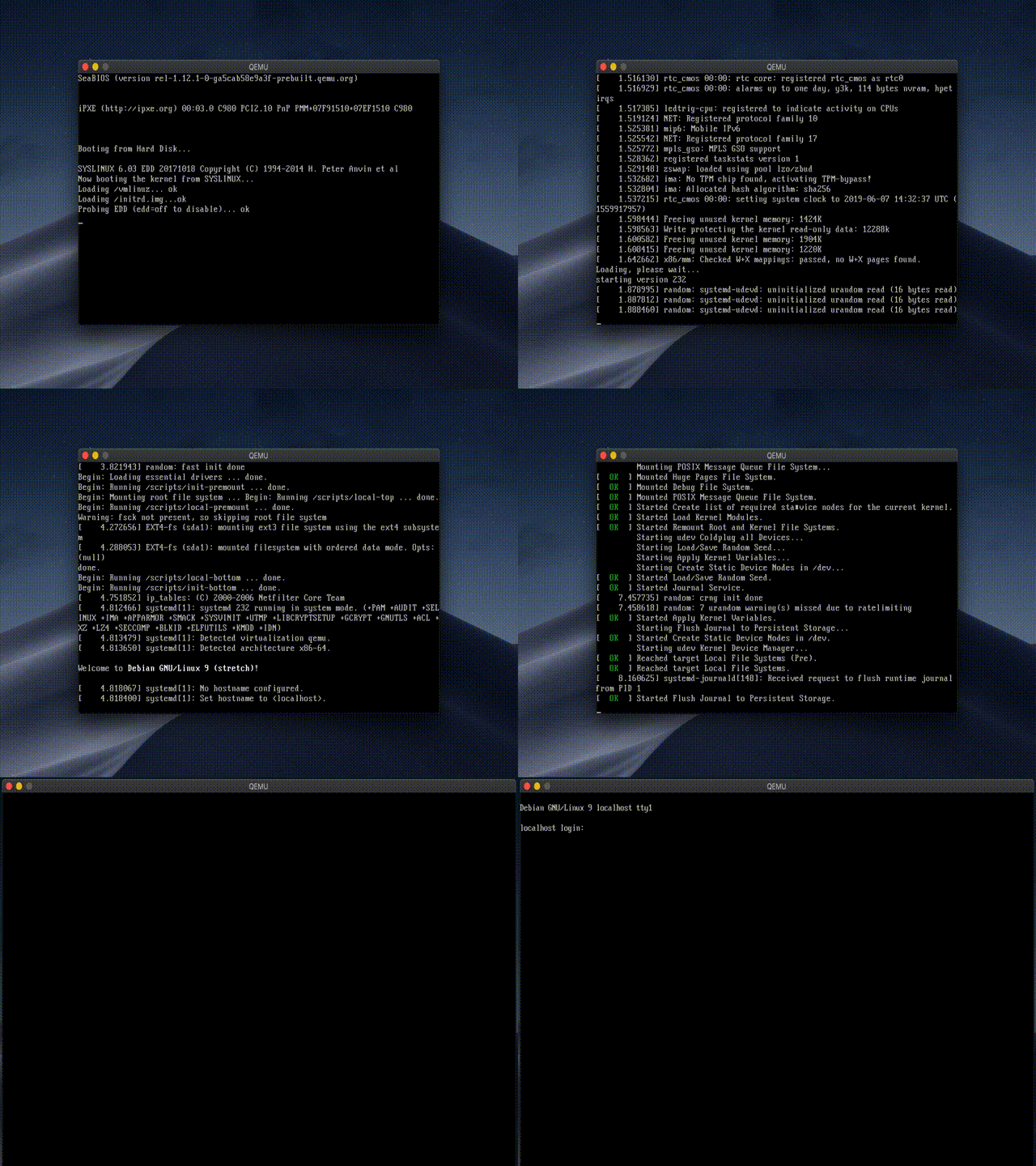
qemu virtual machine running linux.img
Or VirtualBox machine by converting the raw image to VDI disk:
$ VBoxManage convertfromraw --format vdi linux.img linux.vdi
If Debian's ~400 MB is too much for you, Alpine Linux offers comparable functionality under a total of 100 MB:
FROM alpine:3.9.4
RUN apk update
RUN apk add linux-virt
RUN apk add openrc
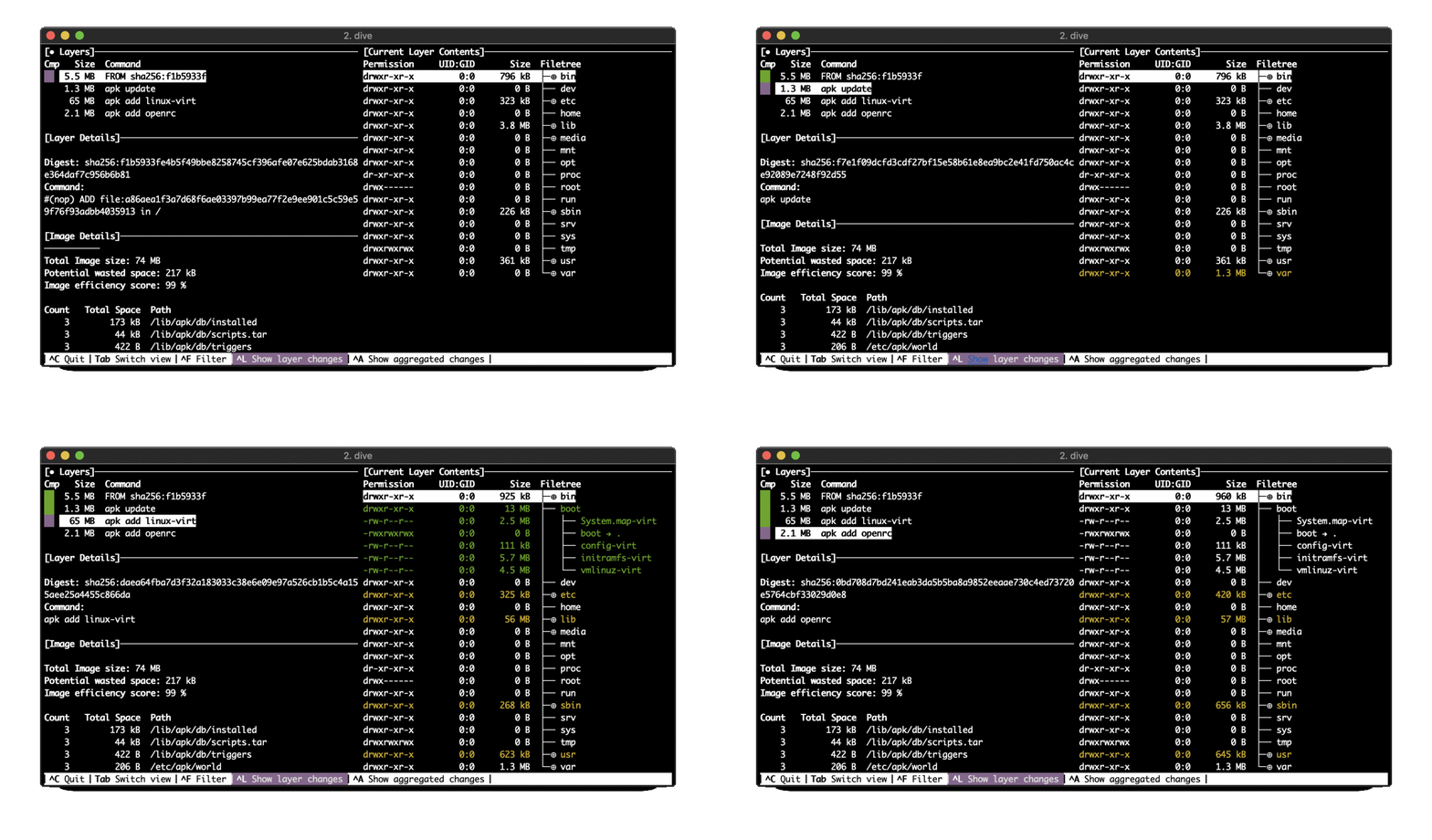
I created a project to automate the creation of disk images using Docker. For now, I already automated Debian and Alpine distros, check it out on GitHub iximiuz/docker-to-linux.
此内容由惯性聚合(RSS阅读器)自动聚合整理,仅供阅读参考。 原文来自 — 版权归原作者所有。