惯性聚合 高效追踪和阅读你感兴趣的博客、新闻、科技资讯
阅读原文 在惯性聚合中打开

推荐订阅源

S
Schneier on Security
The Register - Security
月光博客
月光博客
freeCodeCamp Programming Tutorials: Python, JavaScript, Git & More
OSCHINA 社区最新新闻
OSCHINA 社区最新新闻
The GitHub Blog
The GitHub Blog
博客园 - 司徒正美
罗磊的独立博客
U
Unit 42
S
SegmentFault 最新的问题
Y
Y Combinator Blog
博客园_首页
Hugging Face - Blog
Hugging Face - Blog
J
Java Code Geeks
Schneier on Security
Know Your Adversary
Know Your Adversary
C
Check Point Blog
Cyber Security Advisories - MS-ISAC
Simon Willison's Weblog
V
Vulnerabilities – Threatpost
让小产品的独立变现更简单 - ezindie.com
阮一峰的网络日志
阮一峰的网络日志
The Hacker News
The Hacker News
博客园 - 叶小钗
C
Cybersecurity and Infrastructure Security Agency CISA
Spread Privacy
Spread Privacy
L
LINUX DO - 热门话题
T
The Exploit Database - CXSecurity.com
P
Palo Alto Networks Blog
cs.CL updates on arXiv.org
Latest news
Latest news
L
Lohrmann on Cybersecurity
A
About on SuperTechFans
L
LangChain Blog
Stack Overflow Blog
Stack Overflow Blog
S
Securelist
A
Arctic Wolf
D
Darknet – Hacking Tools, Hacker News & Cyber Security
T
Threatpost
Scott Helme
Scott Helme
博客园 - 聂微东
博客园 - 【当耐特】
T
Tenable Blog
I
Intezer
D
DataBreaches.Net
B
Blog RSS Feed
Security Latest
Security Latest
C
Cisco Blogs
T
Tor Project blog
N
Netflix TechBlog - Medium

无名博客

如何利用 3D 打印机热床来烘干耗材 - 无名博客 解决 CyberChef 解码 ROT13 后出现乱码的问题 - 无名博客 如何在树莓派 4B 上驱动一块 2.4 寸 SPI 屏幕 - 无名博客 如何从 ClawCloud Run 爪云迁移 n8n 到自托管 Docker - 无名博客 DIY 维修数控电子防潮柜 更换制冷片记录 - 无名博客 只需不到十元 用 RP2040 DIY 一条 YubiKey FIDO2 物理密钥 - 无名博客 为解决晚上睡觉途中突然亮灯 再次购入小米人体感应器一枚 - 无名博客 Home Assistant 配合小米人体传感器 2s 实现人走关灯 - 无名博客 如何解决 Matomo 统计的历史数据突然变成 0 访客 - 无名博客 利用 n8n 工作流实现定时检测友链状态 - 无名博客 WordPress 优化 – 把博客的图片挂载到免费的 Cloudflare R2 储存桶 - 无名博客 如何使用 Rclone 下载 Google Drive 分享链接内的文件 - 无名博客 WordPress 优化 – 后台禁用 Ctrl+K 快捷键控制面板 - 无名博客 通过 Portainer 更新 Docker 容器镜像/重新拉取镜像 - 无名博客 Remotely – 群晖 NAS 自建免费远程控制软件 - 无名博客
Home Assistant 绑定米家账号后怎么刷新设备列表 - 无名博客
wmbk · 2026-04-04 · via 无名博客

问题

在 Home Assistant 使用小米官方插件并绑定账号(初始化)后,再在米家 APP 内添加设备,HA 内没有自动添加上设备,需要手动刷新设备列表

这里有一个之前写的绑定米家设备的教程,不知不觉过了两年啦


解决方法

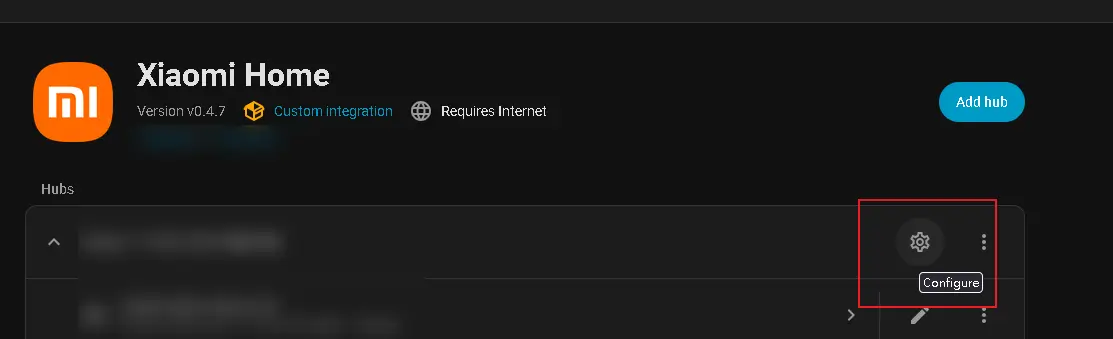
在 HA 左下角设置>设备与服务>XiaoMi Home 里点击齿轮图标

然后在弹出的窗口滑到上方,勾选更新设备列表
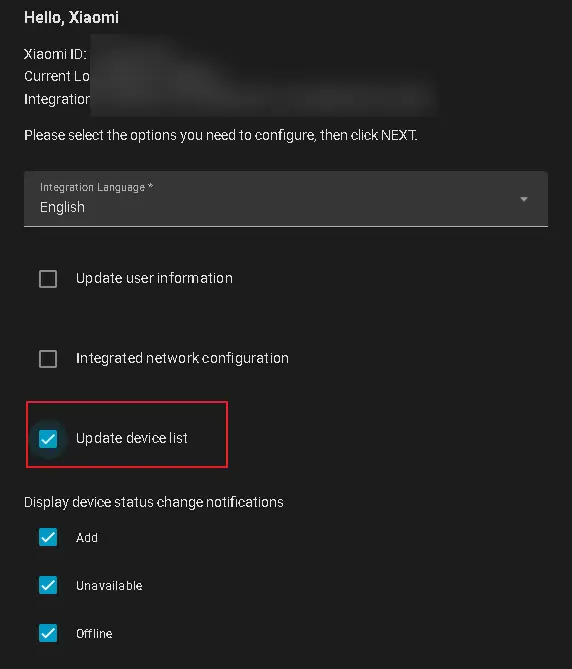
在页面下方点击下一步,再勾选确认后等待几秒就能看到新添加的设备了


后记:这个 GitHub 文档里是有写的,但是明显我没有看到,在设置里找了很久才找到 🙁


Web hosting by ServerSpan