


Topolog turns any goal into a dependency graph and schedules your days around it. You get a structured plan, a completion spectrum, and a task list that adapts as you mark them done. Every plan is a real program, so the dates and odds are computed, not guessed.
7-day free trial · 250 credits · No card required
Completion spectrum
Every outcome, ranked
Self-tuning
Scheduler learns your pace
Public language. You can bring your own AI.
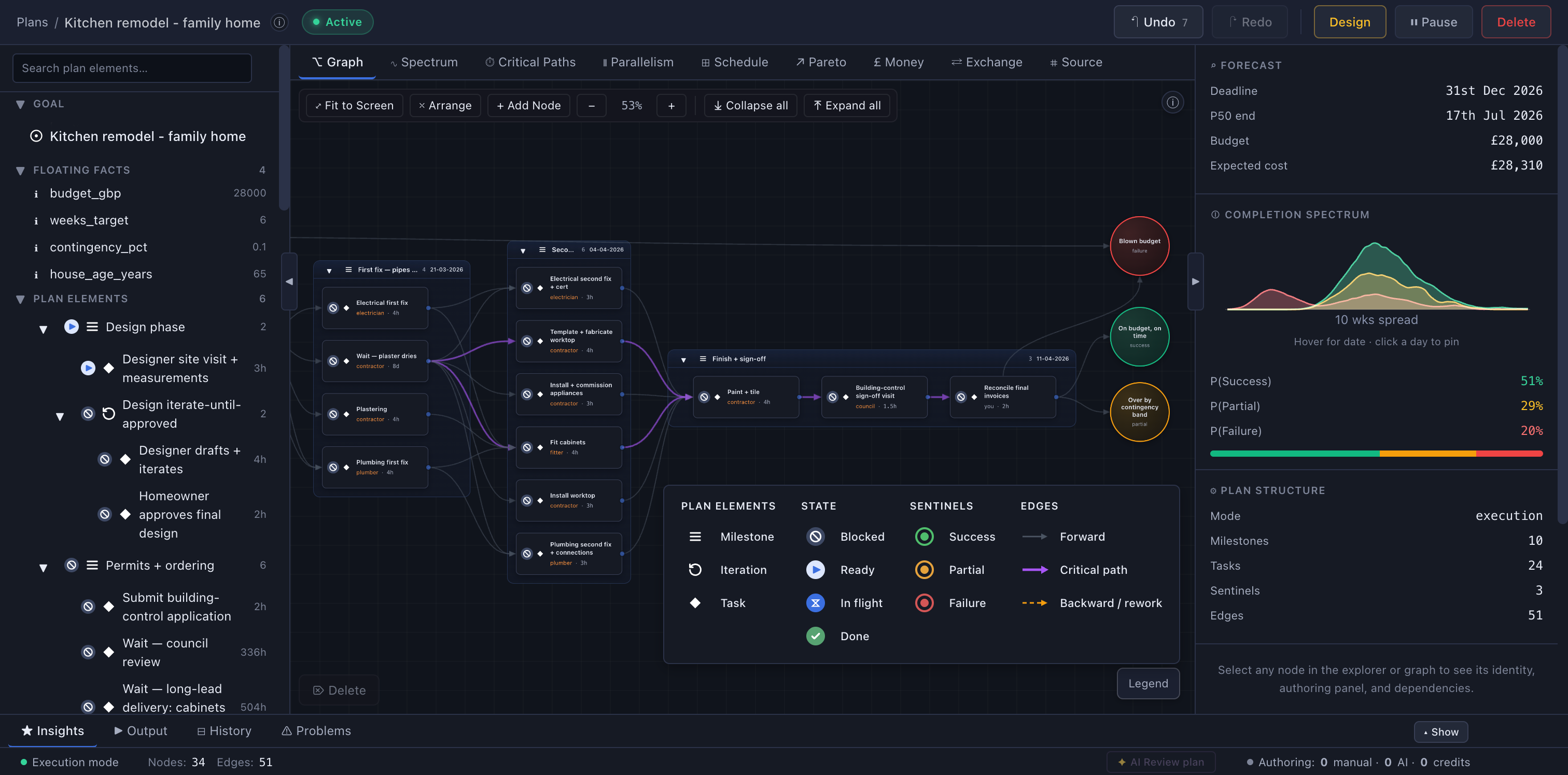
Topolog shows every plan as a Directed Graph and as a List: the same plan, topologically sorted into the familiar outline you already think in. Same data, two shapes.
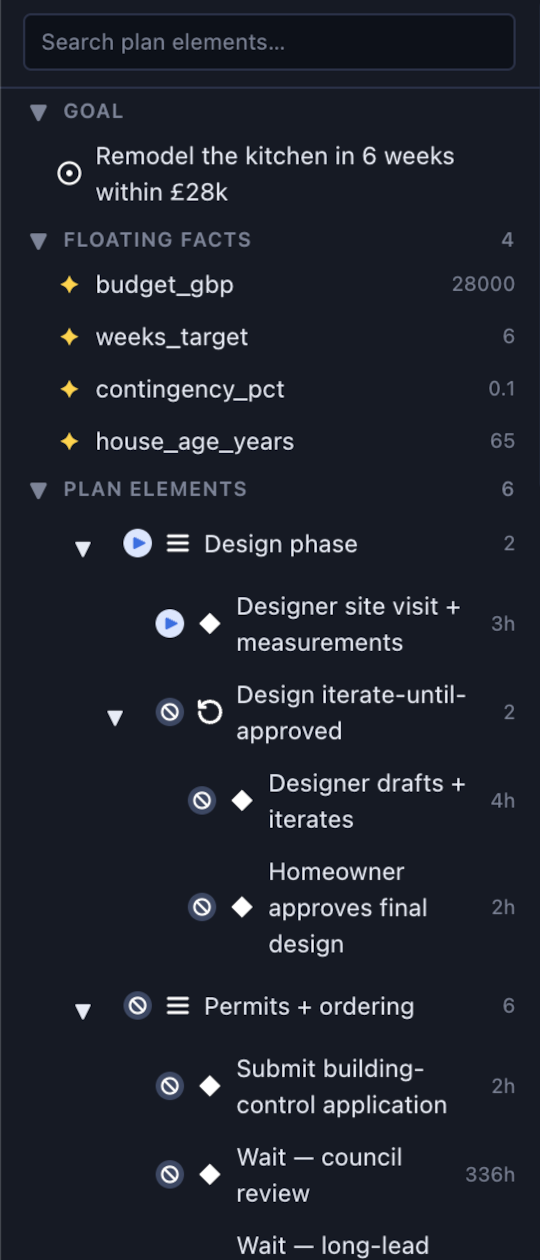
Graph for shape
See the dependency structure, parallel branches, and where work bunches up, all in one canvas.
List for doing
Work top to bottom. Milestones expand into tasks and iterations, each with its hour estimate, always in dependency order.
One model, both synced
Graph and list are two shapes of the same data, side by side. Edit either and the other updates live.
Graph
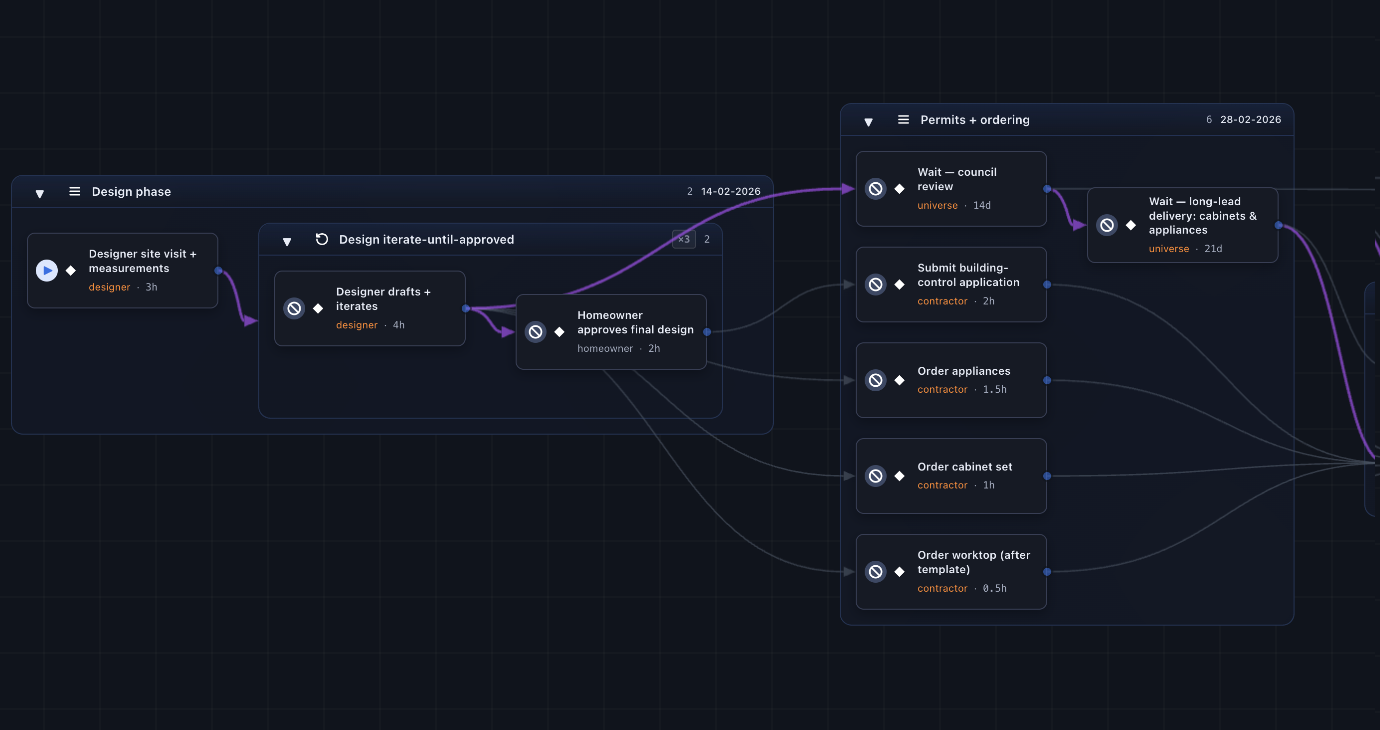
Same plan, two shapes. Edit on the graph and the list stays in lockstep.
Express mode runs hierarchically: milestones first, then the cross-dependencies between them, then the atomic tasks fan out in parallel. You watch the plan think itself into existence.
t = 0s
Type your goal
“Buy a house with my partner”
t = ~30s
Milestones appear
Property · Finance · Legal · Move
t = ~1m
Cross-edges wire up
Critical path surfaced on its own tab; near-critical flagged in the Spectrum panel
t = ~3m
Tasks fan out in parallel
2-4 atomic tasks under each milestone, with intra-edges
t = ~5m
Schedule populates
Today’s tasks slot into your availability calendar
A planner that takes structure as seriously as you do, without the project-management overhead.
Every task knows what blocks it. Mark one done and the rest of the plan re-arranges itself instantly. The critical path always stays marked.
Your weekly availability + your dependency graph = a calendar that fills itself. Slips are absorbed silently.
Topolog tells you when the goal will land, with a 'no earlier than' floor and a 'latest realistic' ceiling, not a single number you'll miss.
Set a budget and Topolog allocates it across the plan, then plots the Pareto trade-off: how much spend buys how much probability of success.
Topolog quietly learns how long you actually take per area and adjusts future scheduling. Your plan gets sharper as you execute.
Share goals, pool credits, assign tasks. The team scheduler maximises parallelism on your shared critical path.
Under the hood
The graph isn't a drawing; it's source code. Every plan is written in TOL, our Total Orchestration Language: a typed, executable description of the work, its uncertainty, and its dependencies.
Because it's a real program, one that is guaranteed to terminate by construction, your schedule and completion odds are computed, never guessed.
See how TOL workskitchen.tol
plan "Remodel the kitchen in 6 weeks" {
  agent contractor { type: internal }
  outcome on_budget: boolean

  milestone m_finish "Second fix + sign-off" {
    task t_tile "Paint + tile" {
      agent: contractor
      estimate: 4h cv 0.3
      produces: [on_budget]
      script: "let waste = 0.1; 18.0 * (1 + waste)"
    }
  }

  sentinel s_done { end_state: success }
  edge e_done m_finish -> s_done { carries: null }
}
The AI is the draftsman; you're the architect. But it never hands you prose to clean up: it drafts structured edits against a continuously validated graph. Goals decompose into milestones, then the dependencies between them, then the tasks, with every step checked against the language's invariants before it reaches you. Edit any node, rewire any dependency, override any proposal; the graph is always yours.
AI is completely optional. The canvas and scheduler work just fine without it.
37
structural errors when the biggest model writes the whole plan one-shot
0
errors when our authoring algorithm writes it instead
Same goal, the era's biggest model. The fix was a better algorithm, not a bigger model.
Click empty canvas to add a node. Click any node or edge to inspect and edit it in the side pane, or press Delete to remove the selection. Cycles at the task level are rejected automatically, so the structure stays a valid Directed Acyclic Graph (DAG) by construction.
Every plan is a document written in a purpose-built language called Total Orchestration Language (TOL) under the hood. The Source tab opens that document with syntax highlighting; the Problems drawer surfaces validator errors, structural-invariant violations, and deprecation warnings inline as you type.
The AI only ever drafts structured edits to the graph, and each is validated before it lands. Your schedule and completion spectrum are then computed by deterministic code, never AI, so the dates and odds never hallucinate. This is only possible because every plan is real, executable source code (TOL), not a prompt an AI re-interprets each time.
Done-by date31 Dec 2026
Odds on time51%
Computed deterministically · no AI
No lock-in
The planning language is public, so you can write in it with your own AI.
Express and Structured mode use our AI, but you are not locked to it. TOL is a real language with a full, public handbook, so any frontier model can write it. Describe your goal to Claude, GPT, or Gemini, point it at the handbook, and paste the result into Expert Mode. The engine validates instantly; copy any errors back to your AI and iterate.
Your AI authors. Our engine runs the math.
Plan as a team
Share a plan and it folds straight into one team timeline. See who is overloaded, what is shared, and when every thread really lands. It is all computed from the same graph, never typed into a status update.
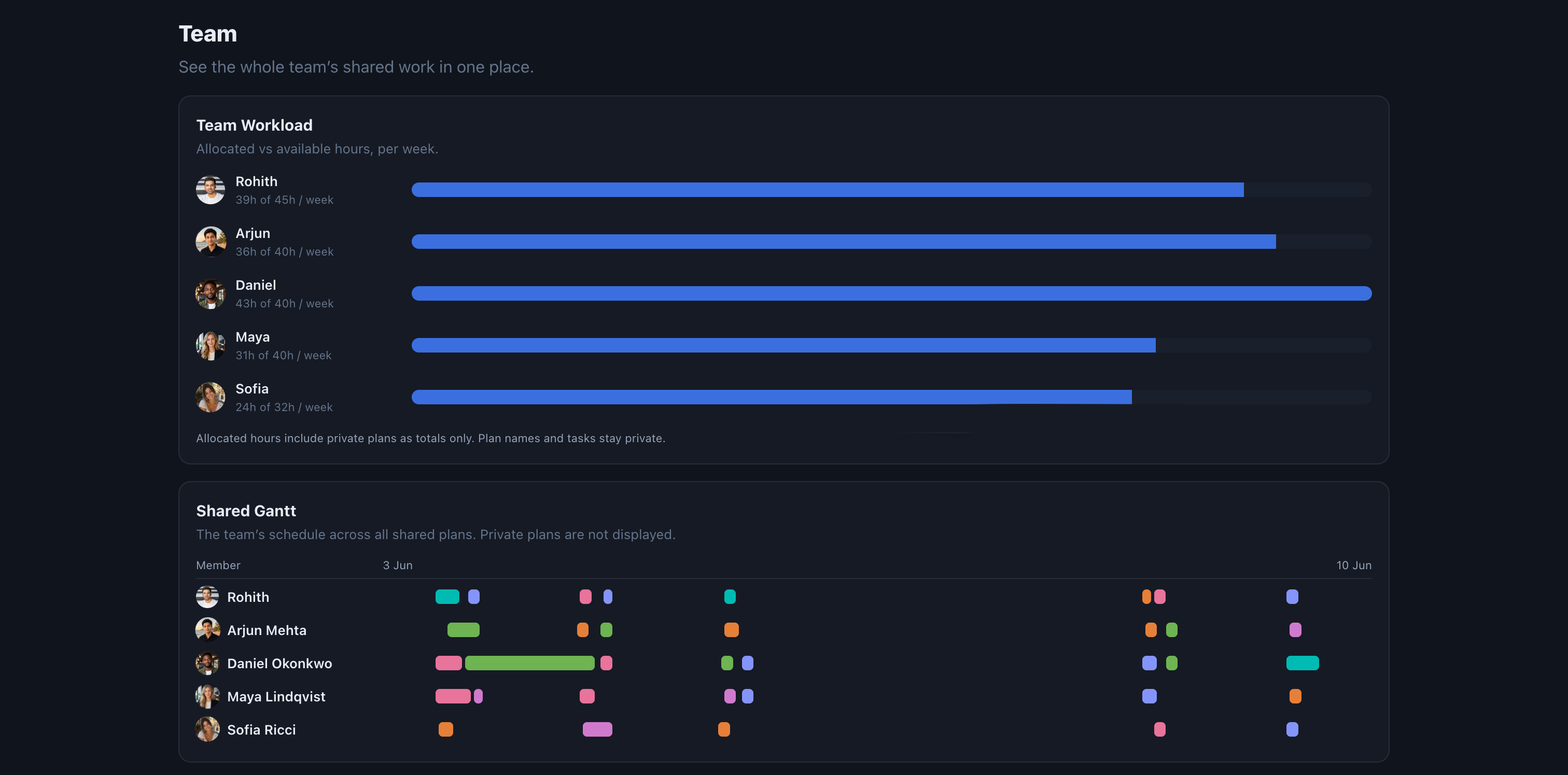
Every teammate gets one honest bar: the hours they have committed across their active plans against the hours they actually have that week. Overload shows up before the deadline does.
Flip a plan to shared and the whole team sees it: coloured, owned, and assignment-aware. Everything you keep private stays private, right down to the individual task.
Each shared plan lands on a single team Gantt, a lane per person. Overlaps, hand-offs, and idle gaps are all computed, so the schedule is the truth, not a guess.
One object, many views
Gantt, Kanban, a todo list: each one is just a projection of the same underlying thing. Most tools hand you a single shadow and lock you in. Topolog gives you the object itself, a rigorous Directed Acyclic Graph, and every view is computed straight from it, so they always agree.
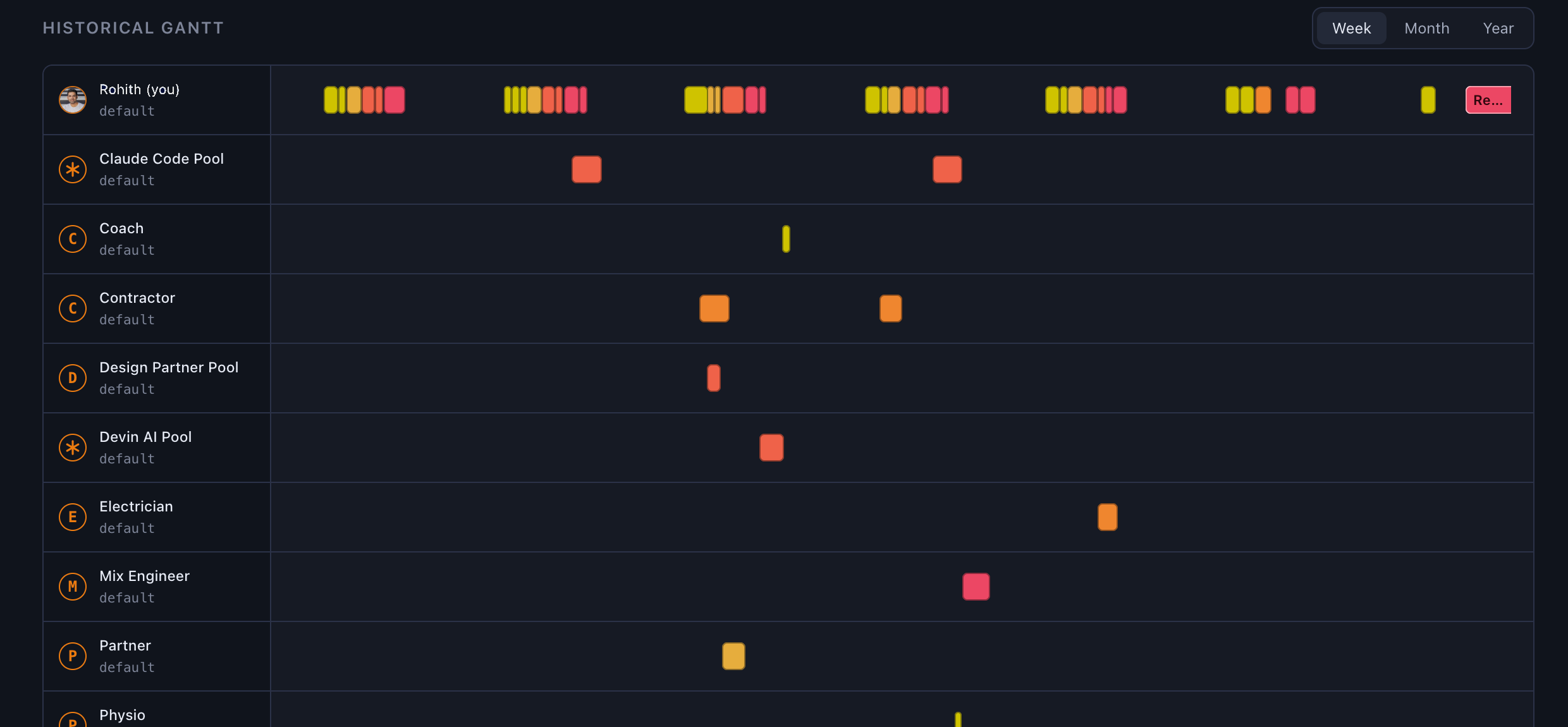
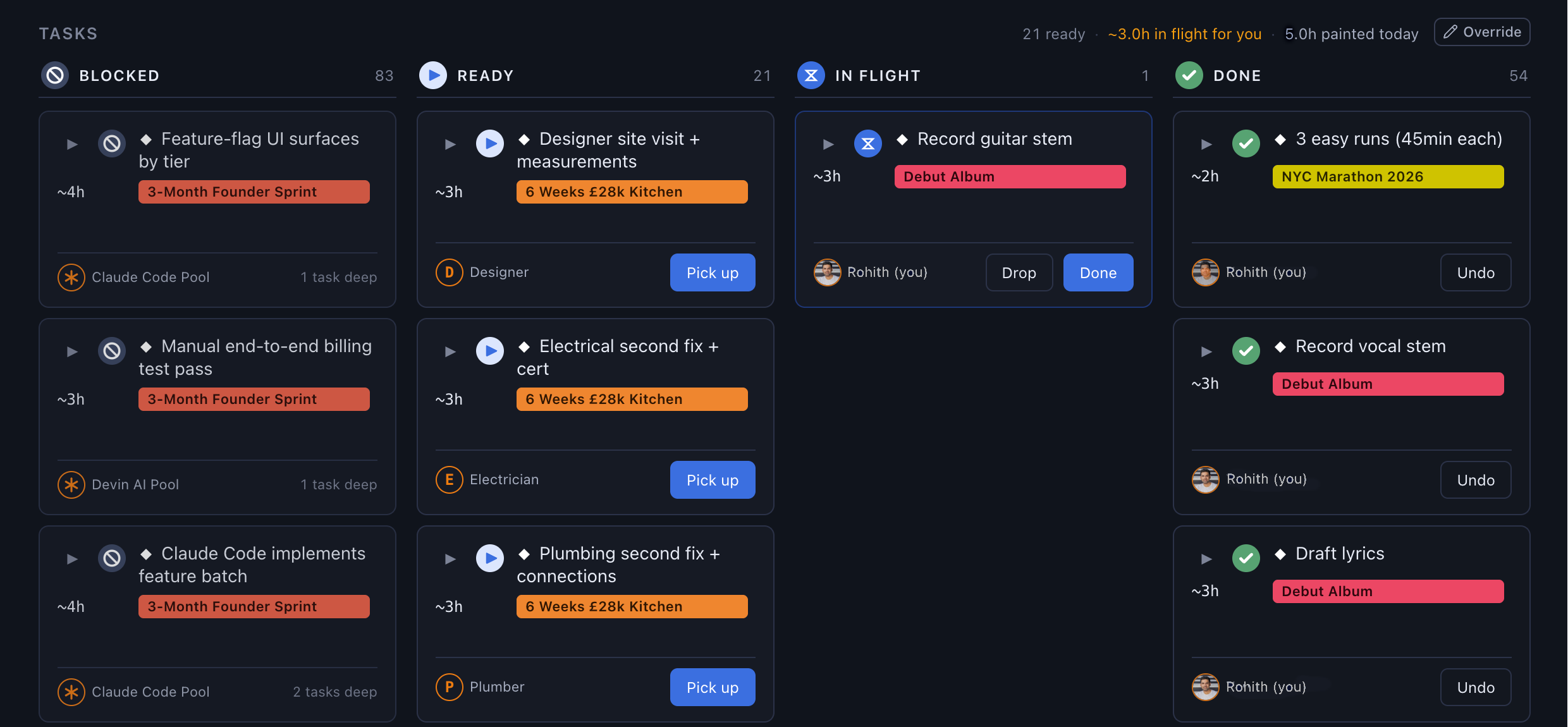
A Gantt's timeline, a Kanban's blocked and ready columns, a list's dependency order: none of it is bolted on per view. It all just falls out of the graph.
Topolog reads your weekly availability and fits your tasks into your real days, in dependency order. No drag-and-drop, no nudges.
Mark a task done and what remains re-plans instantly. Slips are silently absorbed into the rest of the plan, and a deadline only warns you when it is genuinely at risk.
The only data you ever log is when you pick up, drop, or finish a task. From those timestamps, Topolog learns your true pace and folds it into every future estimate, date, and probability.
Per seat, per month. Credits pool across the team.
~5 min Express plans
Type a goal, and get a structured plan with milestones and a completion spectrum.
Multiple plans in sync
Have up to 16 active plans at any one time and trust the scheduler to tell you what's next.
Graph ↔ Source, in sync
Graph for shape, Source for precision. Both views read and write the same code.
Day · Week · Month schedules
Your plan fitted into your real availability: three views, one source of truth.
Critical path & near-critical
See the chain that determines your deadline, and the tasks one slip away from joining it.
Self-tuning scheduler
Learns how long you actually take per area; future plans get sharper as you execute.
Honest deadline ranges
A floor (“no earlier than”) and a ceiling (“latest realistic”), not a single number you'll miss.
External dependencies
Broker, bank, solicitor: tracked in the graph, never scheduled into your hours.
Team-aware, pooled credits
Same per-seat rate solo or full team. Credits pool across members and roll over forever.
Monthly
£29.99/seat/mo
1,000 pooled credits/seat at signup
3 months free
Annual
£22.49/seat/mo
£269.91/seat billed yearly · 1,000 pooled credits/seat at signup
Need more AI? Top-up packs from £9.99. Credits pool with subscription credits and never expire.
Most planners give you a list and let you tag dependencies. Topolog is graph-first: every task knows what blocks it, and the scheduler fits tasks into your real availability in dependency order. You can't accidentally schedule 'exchange contracts' before 'searches return' because the graph won't allow it.
Anything you didn't mark done is carried forward and re-prioritised tomorrow. No streak shaming, no spinners. The schedule silently rebalances. The only alert is if a milestone deadline has become genuinely at risk.
The subscription buys the product. Credits buy AI calls, and the AI isn't free. Most users never run out: every seat ships with 1,000 credits at signup (a one-time grant, not a monthly refill) and typical use is ~50/month. Credits pool across the team and never expire. Top-up packs are there when you push harder.
No. The scheduler is plain code: it sorts your tasks in dependency order and fits them into your real availability. AI only writes the one-line plan summary at the end. That means the schedule is fast, free of hallucination, and reproducible.
Yes. Same per-seat price solo or team. Members share the workspace and pool credits across the seat count, so if one teammate is a heavy planner this month and another is light, the heavy planner just uses the pooled budget. Per-member task assignment and team-aware scheduling are built in too.
此内容由惯性聚合(RSS阅读器)自动聚合整理,仅供阅读参考。 原文来自 — 版权归原作者所有。