



新家新路由器。
为了玩 teeworlds,需要 root 权限操作 iptables。我上网找了一堆方案,无果。最后想着,先把自动更新 DNS 的脚本写了吧。
于是研究 API。通讯协议是 JSONRPC 2.0,授权是一个 token。先用从网页取得的 token 调 API,成功~然后我还在想,怎么拿 root shell 呢。结果去看了一下登录后返回的数据:
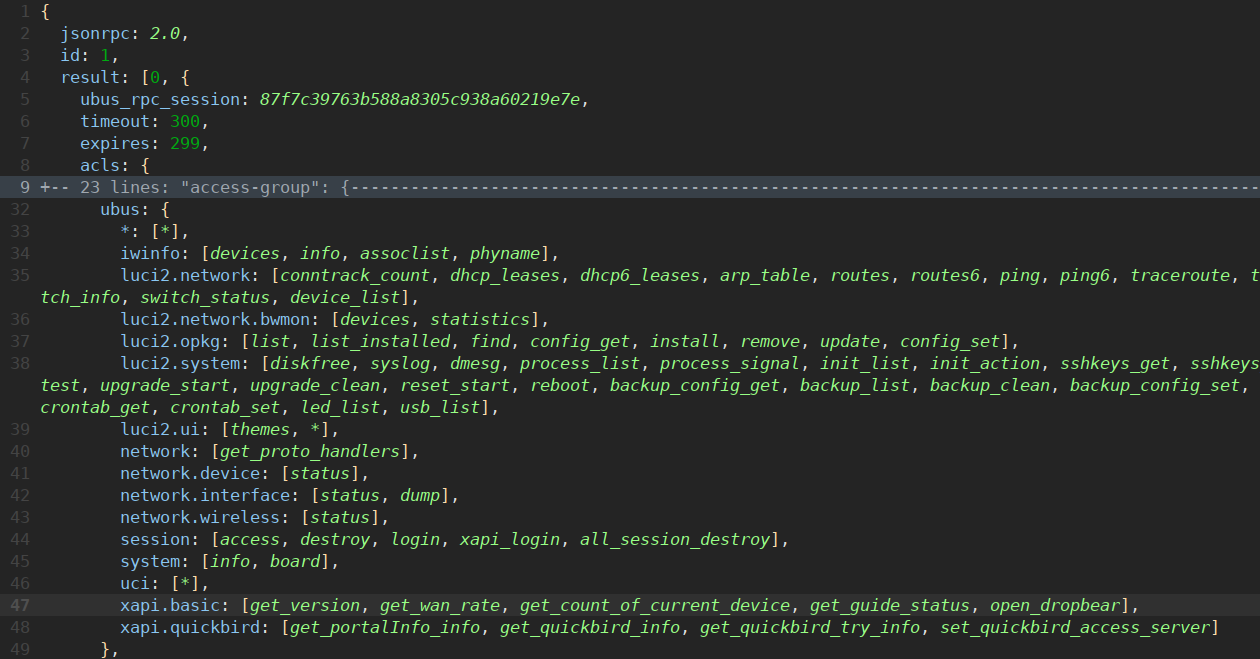
注意看右下角!「open_dropbear」!
于是:
>>> c.api_request('xapi.basic', 'open_dropbear')
[D 08-05 19:28:36.145 connectionpool:243] Resetting dropped connection: localhost
[D 08-05 19:28:36.640 connectionpool:396] http://localhost:8080 "POST http://192.168.99.1/ubus/ HTTP/1.1" 200 None
{'status': 0}
然后就:
>>> ssh root@192.168.99.1
The authenticity of host '192.168.99.1 (192.168.99.1)' can't be established.
RSA key fingerprint is SHA256:............................................
Are you sure you want to continue connecting (yes/no)? yes
Warning: Permanently added '192.168.99.1' (RSA) to the list of known hosts.
root@192.168.99.1's password:


BusyBox v1.22.1 (2017-03-10 15:06:06 CST) built-in shell (ash)
Enter 'help' for a list of built-in commands.

        ____      _____
       |  _ \    |_   _|__  __ _ _ __ ___
       | | | |_____| |/ _ \/ _` | '_ ` _ \
       | |_| |_____| |  __/ (_| | | | | | |
       |____/      |_|\___|\__,_|_| |_| |_|

 -----------------------------------------------------
 From BARRIER BREAKER (3.2.1.5900, r39558)
 -----------------------------------------------------
  * By D-Team 2015 present
 -----------------------------------------------------
root@newifi:~#
WTF,就这么简单!
顺便附上我写的简单客户端:
from requestsutils import RequestsBase

class NeWifi(RequestsBase):
  baseurl = 'http://192.168.99.1/'
  token = '00000000000000000000000000000000'

  def api_request(self, cat, name, args={}):
    req = {"jsonrpc":"2.0","id":1,"method":"call","params":[self.token,cat,name,args]}
    ans = self.request('/ubus/', json=req).json()
    return ans['result'][1]

  def login(self, password):
    password = base64.b64encode(password.encode('utf-8')).decode('ascii')
    ans = self.api_request("session","xapi_login",{"username":"root","password":password})
    self.token = ans['ubus_rpc_session']

  def get_wan_info(self):
    return self.api_request('xapi.net', 'get_wan_info')
此内容由惯性聚合(RSS阅读器)自动聚合整理,仅供阅读参考。 原文来自 — 版权归原作者所有。