


Typically, when you’re sitting on a plane on the tarmac, you switch your phone to flight mode while you’re sitting through yet another “quirky” (boring) safety video. You’ll watch some inflight entertainment, read the airline magazine if you get really desperate, and wonder if anyone ever buys those random watches for sale in the “duty free” section. Then, finally, upon landing, you’ll be connected back to the Internet and you’ll finally feel like you can breathe again.
Only, this time, you forgot to set your plane on flight mode. You’re sitting at 30,000 feet, and… your phone has signal? You’re online, and you’re getting notifications and emails just like you’re on the ground. You’ve accidentally discovered that your flight has an on-board cell tower.
Connection
When you’re cruising on a passenger airliner, you would typically expect to see little to no cellular signal by sheer virtue of altitude and speed. For one thing, you’re blasting past at immense speed and not staying in any one coverage zone for very long at all. Meanwhile, while you’re probably within 10 kilometers or so, vertically speaking, cell towers generally have their antennas aimed at the ground, not the sky. There simply isn’t much signal available, and you’re zooming around a bit too fast to hang on to any cell tower before it’s disappeared out of range.
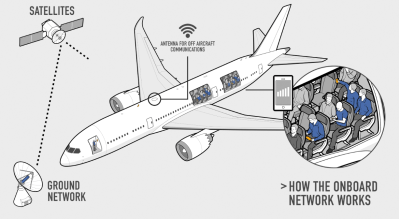
Some airlines have gotten around this problem by providing on-board Internet connectivity over WiFi. The aircraft features an uplink to one of various satellite networks that provide Internet access, and that is provisioned to customers in the cabin over a WiFi router with a captive portal. Typically, for some painful charge in double digit US dollars, you can purchase a few hours of access to your emails and the Web, often with quite shaky connectivity.
However, there is sometimes a way to dodge the painful fees for onboard WiFI, while still getting online. A handful of airlines have equipped some of their fleets with cellular connectivity via a system called AeroMobile. They still rely on a satellite uplink for Internet access, and these planes generally still have onboard WiFi as well. However, if you happen to switch your phone out of flight mode, you might notice it connecting to a cell tower onboard—the AeroMobile picocell, in fact. Your phone connects to this tiny cell tower over cellular data links—originally 3G, later 4G or 5G depending on the hardware onboard—instead of WiFi. You escape the airline’s captive portal and data charges, instead paying your home carrier for data and whatever fee you normally get billed for international roaming. The ability to do this depends on your home mobile carrier, too, and whether they have an agreement with AeroMobile.
AeroMobile’s service depends on customers actually switching out of “Flight Mode” in order to allow the phone to use its cellular radios to connect to the picocell onboard the aircraft. Credit: AeroMobile
AeroMobile has been around for a long time now, first demonstrating its hardware with GSM and GPRS data links on aircraft as far back as 2005. The company’s voice and data offerings have stepped up over the years as mobile technology has moved on, albeit often some years behind the state-of-the-art in the cellular world. The first planes with 3G didn’t fly until 2015, well over a decade after the technology was becoming established on the ground. As a subsidiary of Panasonic Avionics, AeroMobile-equipped aircraft communicate with a range of satellites that Panasonic has access to over Ku-band and L-band links. In recent years, the company has been developing the capacity for its aircraft to seamlessly switch between links to geostationary and low-earth orbit satellites, with the former offering the best coverage, and the latter Eutelsat OneWeb satellites offering much reduced latency and higher link speeds. Ultimately, user experience depends on flight route, local conditions, and other factors; speeds and reliability can vary from good to spotty on any given day. There’s also the fact that, on any given flight, tens or hundreds of other users may be trying to get online over the same link, which can quickly dry up what little bandwidth may be available in some black spots on the world map with poor satellite coverage.
If you’re flying soon, it’s still unwise to rely on in-flight internet connectivity. Whether you’re hooking up over WiFi or cellular, there are still often issues with coverage, or with systems being inoperative on certain flights and at lower altitudes, even on airlines with the best-equipped fleets. You’re also unlikely to regularly get high enough speeds for comfortable streaming, so you’re better off downloading The Thick Of It prior to take-off rather than trying to watch it live off a server while you’re scooting over downtown Astana. However, now and then, when you’re lonely and high above this marbled sphere, you might be just able to hang out on Discord and flirt with a few friends back home thanks to Panasonic and a steady link to the satellites above. Have fun up there.


